AKAI MPK249 Support

We don’t tend to commit IDE configuration files so each developer may use the tools that best suit them. The wiki page was written to offer an example of how to do things, mostly recording the author’s experience. I mostly use vsc now, running on a Chromebook (or other laptop) and connected via ssh. The code runs on the real zynthian with editing, debugging, etc. all presented on the local laptop. It works well must of the time. I do to text editor sometimes, mostly vim because I was taught basic vi in the 1990’s and have the muscle memory for it. (Damn the default enabled plugins on later versions! I am looking at you, “visual mode”.)

There is no official way to code but there is the standard git pull request method of submitting code to the project.

Be careful to store your code before and normal update, else you will lose it. (It is rather disheartening when this happens.) The best way is to use git how it’s supposed to be used… good luck learning that!

Regarding CC assignment, use the most likely default setting of the device. We prefer to avoid the need to configure a device to work with zynthian, preferring zynthian to work with the out-of-the-box device. For the LaunchKey driver I send commands to set it to DAW mode and set the knobs to a known state then support the user changing the knobs to fader, pan, device, etc.

2 Likes

To avoid this kind of tragedy, i rarely edit the files in the zynthian device directly.
Editing the code files locally in your workstation and copying to the zynthian device to test is the way i do. This adds an extra step to my workflow (copying the modified files) but this also have some advantages:

  • SD cards are less stable/reliable than my workstation RAID.
  • Zynthian’s update scripts are quite destructive with modifications.
  • git pushes from the zynthian device needs extra config. You can’t do It from a fresh burned image.
  • you are more conscious about changes because you are copying the modified files all the time.
  • it’s easier to test the code changes in several zynthian devices before commit.
  • Etc.

all the best!

2 Likes

Yeah. I get the general idea. I am just somewhat conflicted between leaving it on Preset 1, which is named LiveLite, versus one of the ones that is just MIDI Out or Generic. The former is, de facto, the “default”, but in reality, most people would think of the latter two being baseline. As it stands, the Ableton / LiveLite assignments feel much neater. So, I guess that I will lean that way if there’s no input to the contrary.

Just a quick update. I did get the driver “working” in a very basic form some time ago. However, I have been distracted by many things, including the newly released Ardour 9 release candidates, which sort of pulled my mind in a different direction in terms of looping/ideal setup, etc.

Regardless, one thing that I figure someone will likely know the answer to…as it stands, when I load the drivers…the newly mapped functions of the knobs (encoders?) and faders work as intended. However, until I uncheck the driver, it no longer allows the keyboard to be selected as a standard MIDI source for notes. I am guessing that there is a certain parameter or class inclusion that I don’t know, which would make all right in the world again. If I could get past that hiccup, I would probably be a lot more motivated to make more progress. Thank you all for the help to get this far. I really hope to get something more proper available in the first couple of months of 2026.

2 Likes

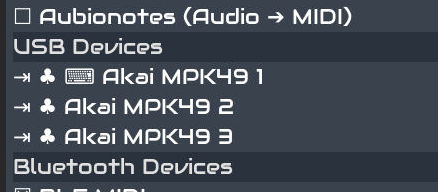
Hi @jigglydad - I’m guessing also, and I could be way off here, leading you down a path that is not really related to the issue you’re experiencing, but I’ll pass along some bits of Akai driver support info that I learned when I was initially trying to get my Akai MPK225 and Akai APC Key 25 mk2 working with Zynthian Oram. I think the MPK225 and MPK249 are conceptually the same for purposes of this post, the 249 has more keys, and thus more panel space so they gave it more controls as well. The APC Key 25 is different, as shown in the ‘device list’ below:

The difference to note is that the APC Key 25 shows up as 2 devices, K for the Keybed, and C for Controls, where the MPK225 shows up as a single USB-MIDI device. So the APC can use a Control Driver for the controls, and the Keybed still works with Zynthian, unlike the MPK225.

I think that for the MPK249 to supply MIDI notes once the driver takes over you will have to process them in the Control Driver and pass them along to Zynthian. I know that’s awfully vague, and it’s also guessing on my part, but I hope it helps.

And may the Force be with you.

If there is but one device showing up, my guess is it works akin to the akai apc key 25 first generation. This uses a different MIDI channel for the keybed. The class variabele `unroute_from_chains` can then be used as a bitmask for the channels to unroute. See the driver for apc key 25 first gen (not mk2) for an example.

1 Like

I’m currently thinking about some kind of assisted vibe coding to get some functions for the MPK225 driver. We’ll see how that goes… The result should be at least adaptable the 249.

But what I found useful was to fire up a

aseqdump -p MPK225>> midictrl.out

and then operate each and every control of the MPK225, from min to max values, over all banks, including wheels and keys. That gives you at least a good overview how your Controllerdevice is configured and which features are usable.

If I had enough time, I’d try to take the syx file of my current configuration, change a setting, download a new syx file and compare to learn which part of the hex syx file has changed. Document and repeat with all other settings. Finally we would get a full documentation about where in the syx files which setting is configured, and we could generate a syx file with a working configuration… alas I don’t have the time…

2 Likes

Hi @jigglydad - did you get past the “hiccup” with @niels ‘s suggestion: “The class variabele `unroute_from_chains` can then be used as a bitmask for the channels to unroute.” above?

Which preset did you decide to write for?

Any notes or thoughts on the Ardour 9 release candidates that were among your distractions?

Hey. Sorry…. I ran into some serious snags trying to upgrade the GPU in my main PC, which has unexpectedly required ended up requiring me doing a ton of data moving, partitioning, etc. So, my usual project time has been eaten up trying to keep things moving….not to mention the crazy snowfall and taking in a dog that turned out to have fleas and be in heat. :joy: So, as of now, I am no further than I was last time I posted.

As for the Ardour stuff, I am excited that version 9 is near, but the lack of documentation as to how most of it is supposed to work prior to the actual release, it is hard to say much. They’ve been doing a great job squashing the most-obvious bugs, but hard to say whether it is up to the task of truly doing Ableton-style looping yet.

1 Like

OK, @jigglydad - Thanks for the info and no problem, I just wanted to make sure you got an answer, so you can try at your pace.

Ok all. As I mentioned in another post, I FINALLY got a driver that does a lot of the things I want it to for my MPK249. When I saw that the vangelis drivers were going to be somewhat different, I quickly decided that that was what I wanted to target. While it initially slowed me down, I finally got there. I am actively still trying to decide what else I should make it do, but I have only tried to use it a couple of times live for looping. The first time was a nightmare, because I realized that I hadn’t setup any way to quickly clear a loop when I want to redo it. The next time, I realized that the clear loop function that I was using was resetting everything, not just removing the content of the loops. That is also something that I don’t advise anyone learn live while performing. :laughing:

This is literally the first code that I’ve ever put on github (aside from my aborted attempt to do the same for oram). So, I am unclear the best way to move forward now. Here is a link to where to find the driver on github: zynthian-ui/zyngine/ctrldev at local-nightly · ncfoster219/zynthian-ui · GitHub

I believe it will show up in your options for software versions under zynthian-ui. Somebody is going to have to set me straight on how to proceed with this. I hope someone else finds this useful, and I would love feedback. Thanks.

2 Likes

The first thing to do is to rebase your code so that it is up to date with vangelis. I see that it is 62 commits behind. Then you should check your code still works. After that, you may submit a pull request. All of this can be done from GitHub.

Quick follow-up and initial notes regarding the driver:

This driver is designed to be used with the Generic preset (#25). I believe that #24 may be identical, but I am not 100% sure. . I believe that they are largely identical. I initially started out using preset 1, which is named LiveLite. It seemed a little cleaner for certain purposes, such as the knob and fader mapping. However, when I started working on the pads, it became clear quickly that the way that the LiveLite preset handled the pads was going to be way harder to work with than the way that the generic preset did.

I did my best to make sure that the driver would work with a preset in the default state. However, I got stuck on the Loop button. The Generic preset defaults to MMC/MIDI for the transport buttons (which is how it classifies the Loop button) and it seems not to emit any signal that I could pick up. For that reason, I changed the preset to use MIDI CC for transport buttons. The driver itself will handle the signals either way. So, someone using the driver without adjusting their preset will have full use of all buttons EXCEPT the loop button. It felt like the best compromise to me.

I did what I assume are standard things, mapping the faders and knobs on Control Bank A to the first 7 chains and master channel volumes and balance (though I honestly don’t think I’ll ever use balance IRL in this context). I used Control Bank B knobs to control the Sends and Return on a Reverb chain (which the user has to create, of course). I set the toggle buttons on Control Bank A to mutes, solos on B, On B, I mapped the 8th button to a fade out, since I don’t need a solo for the master chain (and I’ve always wanted a button for that to use live). :smiley:

The loop button will initially take you to the ZynPad screen. If you are already on the ZynPad screen, it will take you into the selected loop.

Stop, Play and Record should behave as you would expect them to (though how do I know what you expect).

I decided that I would map the rewind button to clear the current loop, and the fast-forward button to duplicate the loop pattern to the next channel.

The drum pads are addressed in an 8x8 grid, so that I can address up to 8 loop slots on 8 chains. I think it probably makes sense to have buttons mapped to the Main loop button for each row, since I would think it would be used heavily. However, I was having a very hard time coming up with a logical way to do that with only a 4x4 grid to work from. I could do the first 3 chains and the main buttons on Banks A and B, leaving chains 4-7 for Banks C & D. That would make them the most accessible, and it aught to work great for a simple loop with no more than 3 chains. But, as soon as you get to a 4th chain in the loop, it would start being a negative. Thoughts are welcome on how this aught to behave.

I’m still trying to think of ideas for how to logically use the faders on Banks B and C, and the knobs and buttons on C. So, I’d love some input from MPK249 users, other driver developers and anyone who’s done enough looping to have had way more thoughts than I’ve had.

I hope that this driver enables others to have as much fun as I am having with it, but it is still a work in progress.

Ok. Everything seems to still be working upon a quick test. Hopefully, I’ve done it right. :smiley:

3 Likes

I’ve been comparing the MPK249 and the APC40, and they have a lot of similarities.
The vangelis APC40 driver could be a good starting point for a second MPK249 driver.

Regards

1 Like

Reading these developments I am curious what would happen if I plug in my mpk49 (original version). There are some differences between them, some extra buttons here and there and an extra row of pads on the mpk249. If I rename the driver, let’s see if something will happen…

1 Like

I am not an expert at these things at all, but looking at the manual, After looking at a picture of the MPK49 and a little of the manual, I would expect that you could use a lot of the functionality of the driver with only small modifications. That decision to have a 3x4 pad bank definitely is interesting….but, once you remap those, I would expect you’d be good to go.

One embarrassing thing that kept me from making any progress at all in the early days was that I didn’t understand that the main driver class needs to have the same name as the driver file itself. After that, you need to figure out how the MPK49 identifies itself.

So, if you find this chunk of code (presently starting at line 304 of the most recent version), just get the correct values for your device, and you should be well on your way to getting it right:

class zynthian_ctrldev_akai_mpk249(zynthian_ctrldev_zynpad, zynthian_ctrldev_zynmixer):

    dev_ids = [
"MPK249 IN 1",
"MPK249 IN 2",
"MPK249 IN 3",
"MPK249 IN 4",
"MPK249 IN3",
    ]

If you need any help, lmk. While I am extremely new to this, I have learned a few things along the way that I wish I’d known at the start. :smiley: Good luck.

For anyone following this, I have just updated the driver. I moved some things around, cleaned up the formatting and tried to lay the groundwork for the MPK225 and MPK261 to also be supported. Since I don’t have either of these devices, someone else will probably have to do the testing, but minimal changes/additions should be required at this point to support those devices.

Please let me know what your experience is if you try this driver.

1 Like