Some engines create both audio and MIDI chains, e.g. setBfree and Aeolus create an audio chain for their stereo output and MIDI only chains for each manual or division. It makes sense to keep these together and not put the MIDI only chains at the end, beyond all the audio chains. I don’t think we would necessarily want separate hardware gadgets for each of these MIDI only chains although you may argue that, if their MIDI volume can be adjusted, it may make some sense.
I’ve now changed the code around to have the order of the chains and now I see everything in the correct order as seen in the UI. Moving chains around also works and in sync with UI, with now apparent delay. (This time all chain the types have been added to my snapshot)
I have respected the main chain as an extra master fader if the device has it set to true but also if there is no master fader then possitiined after the last chain.
Back to the point on different chain types and how to view. The standard Mackie Controller has buttons to allow, in our case, to filter in and out the chain types, e.g. Audio, Midi and Inst so the user could filter in and out combinations of different types, placement would remain in the same order. In the code you already have these filters  as keyword arguments. At the moment midi channels have no volume so setting it is not allowed, this would have to be adjusted if the feature is added.
I’ll try and get this done in the next couple of days and push to my fork, so that you can see what I mean.
2 Likes
Hi Maartmaart,
Are you testing or waiting until I’ve got something more final.
Sadly the filters are not working as I hoped, so I need more time to look deeper.
My latest push can be found here
1 Like
I pushed a PoC dev branch to GitHub as described in ticket 1279.
If you are intereseted on what I am doing, you can check it out but it is not yet complete. In particular I haven’t yet written the backwards compatibility transforms so this is only good for greenfield testing.
I am considering removing the ability to route chains to chains and just rely on the effects send/return chains which are effectively the same (or very similar). I am very pleased with my previous implementation of chain-to-chain routing concept and implementation with its check for potential howl-round loops so it feels a shame to say goodbye so soon after its stable release but I worry it is an additional complexity that may confuse, have support overhead and is probably no longer required. I think that users will feel more comfortable with the familiar effects send/return concept which has some advantages, like individual send level control.
Thoughts and opinions are gratefully received.
1 Like
Hi @chrismat
I am waiting so far… but probably this weekend going to try your inplementation. 
Cheers,
Maarten
Latest Update, (I’ve not stopped, I’m just extremely slow) everytime I add a feature I break something else (usually several), which I suppose has a positive effect of me improving the code structure. Life beyond Zynthian is also busy
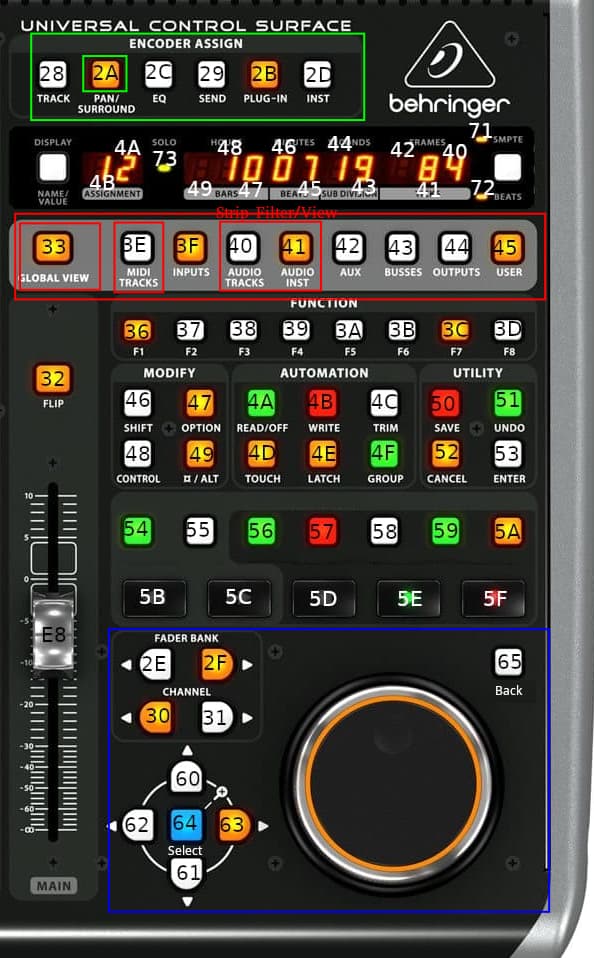
Using the Strip View (red box) we can view less chains e.g. midi chains only, audio chains only and instrument chains only, the buttons are predefined and it makes sense to reuse them. “GLOBAL VIEW” show all chains. In all cases the chain order is kept to how the user has ordered them (e.d. moved chains are respected). In the case of the chain type “MIDI + Audio Chain” they are viewed in both midi and audio views.
The Blue Box - The arrow keys, select, back and scroll work correctly, but the Faderbank and Channel buttons need to be optimized (not enough time today to fix them)
The Green Box - Encoder assign, only the PAN button has a function so far.
My CALL FOR HELP for the 7 buttons 54 to 5A I would like to use for zynthian “OPT/ADMIN”, “MIX/LEVEL”, “CTRL/PRESET”, etc Short and Long Press Buttons. I’ve looked everywhere and I fail to see how I can integrate the multi use for these buttons.
2 Likes
No sweat. Is it the spiraling , slowly, outwards amongst several related projects?
Use CUIA ZYNSWITCH with a single parameter indicating which switch. It will implement the short, bold and long press functionality.
I thought there might be a simple answer
And what is the parameter for the e.g.OPT/ADMIN button, or where are they listed?
Hi @chrismat ,
The OPT/ADMIN button etc refer to the hardware buttons used to control the screens/fubctionality on the display. in the case of OPT/ADMIN it activates the ‘Main’ window and its functionality and pressed again ) the Admin windows (its a toggle button)…
These buttos have three possibilities… press short or bold (longer) or held (press more than eh… 2? seconds)
Cheers,
Maarten
PS Pavel made it possible to have these buttons on the display iso having hardware buttons. wanthalf (Pavel Vondřička) · GitHub
1 Like
Thanks @maartmaart, you understood what I’m looking for
I’ve found this from Pavel, looks similar to what previously seen, is “n” an interger above 4 for the switches I’m looking for or are these the custom ones f1,f2,f3,….?
def cb_button_push(self, n, event):
  Call ZYNSWITCH Push CUIA on button push

  zynthian_gui_config.zyngui.cuia_queue.put_nowait(f"zynswitch {n},P")
def cb_button_release(self, n, event):
  Call ZYNSWITCH Release CUIA on button release

  zynthian_gui_config.zyngui.cuia_queue.put_nowait(f"zynswitch {n},R")
I’ll take a closer look once I get home, difficult on a smart phone
I should have done updates to my testing system more often, I’ve just noticed that something in staging has broken my driver, please don’t try it out. I’ll let you know once it’s fixed.
The problem was in my setup, the code base is not broken, don’t know why, it might be possible that is was ./zynthian-my-data/snapshots/last_state.zss or pycache
1 Like
@maartmaart Thanks for the tip, reading through all of Pavel’s posts I now understand how to use the Custom Switches shown in the WebUI Wiring to get it to work.
Adjust the Switches Pins instead of default dummy for 4 switches “-1,-1,-1,-1” n = 0 to 3. To then with “-1,-1,-1,-1,-1,-1,-1,-1,-1,-1,-1,-1,-1,-1,-1,-1,-1,-1,-1” for n=4 to 11 (Mackie Buttons 54 to 5A and WebUI Custom 1 to 7) and n=12 to 20 (Mackie Buttons 36 to 3D and WebUI Custom 8 to 15). I will deplay commiting the changes until I’ve added checks that enough buttons are activated, perhaps also add an info in the logs.
I hope everyone understands.
1 Like
Hi @chrismat
Glad my message helped, altough it was not totally clear to me what you were looking for… 
Happy it lead to something.
Thanks for your devoted effort!
Cheers,
Maarten
PS Perhaps a snapshot to explain where and how to fill in the custom pin definitions is more clear?