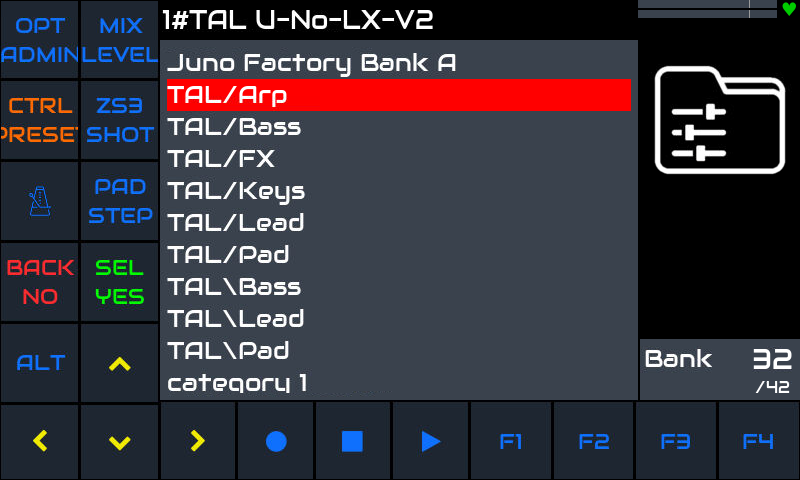
TAL-U-NO-LX-V2: The best Juno 60 emulator comes to zynthianland!

Sorry to dig this up again.
There is also again the question of Presets!
I am not able to select any presets of the TAL-U-NO-LX-V2 via the Zynthian UI, except for the factory installed ones. For everything else, I need to activate the laptop or at least the phone and use VNC to load or save the preset, that does not show up in Zynthian UI, but is loadable via VNC gui. While it all was new, I got so much used to this procedure (see Osirus), but now it starts to become unnerving!
Also, a VNC loaded preset does not save in Snapshots, which takes away even more of the fun.
Is there something I’ve done wrong (except for complaining here)?
Is there anything I can do to make this work?

PS: It would be nice to have the Engine GUI screen on the local display. This could be activated by long-alt, for example, or by bold-alt, if shifting the help screen to long-alt.
How to do that? There is a hidden display for VNC already. Could that be used on the local display? Unfortunately, I am not good enough in understanding Zynthian code to make this work.

PPS: Yes, I’ve tried uploading via Webconf, but then it shows "
Can’t install file: Unknown preset format: None" Error. It is also not possible to see the new banks, not is it possible to create another bank, nor does Search for Presets change anything with these issues.

1 Like

I don’t know how to follow that pointer, what aspect of Osirus are you talking about?

I’d need to know more detail of what you’ve done and how what’s happening differs from your expectation to answer that and how to actually get the presets doing what you want. @riban 's recent post Rtpmidi not working properly [Solved] - #32 by riban may shed light, have you seen it?

Yes. There is a script to regenerate the presets, but It needs to know where did you installed your presets.

Please, explain to me how and where did you install these presets. if you can, send me a capture of the directory structure.

Thanks

1 Like

Thanks for your reply. Now, Ive tried that script and it threw errors of this kind on many presets transferred from the laptop with the Windows version of TAL-U-NO-LV-V2, on which they worked well:

TypeError: cannot unpack non-iterable NoneType object
(venv) root@zynthian:~/.toguaudioline/TAL-U-No-LX/presets# generate_lv2_presets_TAL-U-NO-LX.py
Bad XML preset format '/root/.toguaudioline/TAL-U-No-LX/presets/Bjoerns Preset Bank/AR 8th pattern BB.pjunoxl' => 'category'
Traceback (most recent call last):
  File "//zynthian/zynthian-sys/sbin/generate_lv2_presets_TAL-U-NO-LX.py", line 77, in <module>
    preset_name, bank_name = parse_xml_preset(fpath)

and then the script stopped, until I deleted the offending preset and retried. This went on until most, not all (!), of the PC presets had been deleted. On the remaining presets it then shows something like:

<https://tal-software.com/TAL-U-NO-LX-V2:preset_502>
  a pset:Preset ;
  pset:bank <https://tal-software.com/TAL-U-NO-LX-V2:bank_36> ;
  lv2:appliesTo <https://tal-software.com/TAL-U-NO-LX-V2> ;
  rdfs:label "Test 01" ;
  state:state [ <https://tal-software.com/TAL-U-NO-LX-V2:Program> "502"^^xsd:int ; ] .

but this preset never shows up in any bank, nor does a bank show on Zynthian UI or in Webconf, only in VNC.
The same is with presets saved via VNC GUI.
The preset directory shown via right-click on the preset browser is:
/root/.toguaudioline/TAL-U-No-LX/presets
that is where I put my presets, too. Putting them in /zynthian/zynthian-my-data/ gives no benefit and does not change anything, presets are processed but never show anywhere.

What I see now is that I’ve just spent a fair amount on yet another Juno emulator for the Laptop and a bunch of presets usable only on two Zynthians, due to licensing. My hope was to be able to make Juno sounds on the Laptop and transfer them to Zynthian, or to use the Juno sounds tweaked on the Zynthian version on the CLAP plugin in the DAW, but this only works via VNC and then it becomes tedious, dropping all advantage of using a Zynthian instead of a Laptop.

Version is recent vangelis:

zyncoder: vangelis (f4fed76)
zynthian-ui: vangelis (11f6a9e)
zynthian-sys: vangelis (9d8630b)
zynthian-data: vangelis (ca1c0d3)
zynthian-webconf: vangelis (fc5c12b)
1 Like

After regenerating the presets for the TAL plugin, you have to rescan the presets to get the cache updated. Something like:

regenerate_lv2_presets.sh https://tal-software.com/TAL-U-NO-LX-V2

Yes, this workflow is not very comfortable and it should be improved. Please, open a ticket in the issue tracker and i will try to address this subject ASAP.

Regards,

2 Likes

Hi @fussl !

The script failed with presets without a category set. I fixed it and now it should gracefully use the “none” category for these presets.

Please, give me feedback so i can integrate all this and make it easier for other users trying to install presets for TAL-U-NO-LX-V2.

Thanks!

Unfortunately, I am sorry to tell you that the updated script does not work. It is now up this date:

4 -rwxr-xr-x 1 root root 3970 Aug 11 21:21 generate_lv2_presets_TAL-U-NO-LX.py

The presets still show in the VNC-Engines UI in the plugin’s own preset selector, but not in Zynthian UI, like they do when simply copying them to Zynthian without calling any script.

Running the generate script processes 727 presets, but the new ones do not shw in Zynthian UI, even after searching for presets, be it via Webconf, via command line (regenerate_lv2_presets.sh https://tal-software.com/TAL-U-NO-LX-V2) or via Zynthian UI (bold SEL, Scan for new presets).

The none category shows only Default.

Nothing changed even after reboot.

The presets do not show up in the directories like /zynthian/zynthian-data/presets/lv2 or any my-data .

Please, send me by PM the preset packages and i will test with It to fix the generation script.

thanks

1 Like

Hi @fussl !

Update and test, please.

I’ve fixed the script and now it should work OK. I also included the cache regeneration, so you don’t need to do it. You don’t need to restart the UI, just reload the plugin (or “Scan for new presets” from the preset options menu).

Ahh! I’ve shorted factory bank names to avoid so much “Presets Bank” repetition. This could break existing snapshots that use the plugin.

Regards,

2 Likes

updated and tested. Result:

(venv) root@zyn-pocket:~/.toguaudioline/TAL-U-No-LX/presets# /zynthian/zynthian-sys/sbin/generate_lv2_presets_TAL-U-NO-LX.py
error: /zynthian/zynthian-plugins/lv2/TAL-U-NO-LX-V2.lv2/presets.ttl:4351:18: expected string escape sequence
lilv_world_load_file(): error: Error loading file `file:///zynthian/zynthian-plugins/lv2/TAL-U-NO-LX-V2.lv2/presets.ttl'
lilv_plugin_get_name(): warning: Plugin <https://tal-software.com/TAL-U-NO-LX-V2> has no (mandatory) doap:name
INFO:root:Workaround took 11s
lilv_plugin_get_name(): warning: Plugin <https://tal-software.com/TAL-U-NO-LX-V2> has no (mandatory) doap:name
INFO:root:Command took 11s
(venv) root@zyn-pocket:~/.toguaudioline/TAL-U-No-LX/presets#

The TAL-U-NO-LX-V2 does not load any more.
Zynthian UI shows Adding Processor, the moving logo and adding JV/TAL U-NO-LX-V2 to chain 1 (sic! with space behind TAL) and that stays forever. UI locks up, SSH still functional to sync reboot.
I had to progressively delete all files in the presets directory and with an empty directorym the script takes 11 s, but obviously gives no presets in any side of TAL-U-NO-LX-V2. Update restores default presets in the dirtectory, but not in the plugin, so had to run the script again, 11 sec no error, but now is an empty row in the preset catalog, opening this shows two presets efault and efault stereo.
How can this situation now be recovered? Any files to delete?
Reflash entire image?
PS: I’ve tried a bit more. So the script shows the above error if a preset is in a subdir of a subdir (two levels of dirs instead of only one) like this happens when adding a downloaded preset collection.

I would need all the presets you are installing to test.

[EDIT] I just pushed a new version with some extra “escape” code. Perhaps it works :wink:

Thanks

3 Likes

I don’t think this is the problem. I think the problem is related to invalid characters in the name of some preset.

Of course you don’t need to reflash the entire image. If the script still fails:

  • Remove all extra preset collections and leave just the factory presets.
  • Run the generate_lv2_presets_TAL-U-NO-LX.py script
  • Rescan for presets ot reload plugin => Test

Then install the preset packages one by one until you find the one that causes the error:

  • Copy one preset collection
  • Run the generate_lv2_presets_TAL-U-NO-LX.py script
  • Rescan for presets or reload plugin => Test

Regards,

3 Likes

Now it works without showing an error, but there is this strange result, even though I’ve never tried to upload a TAL preset pack. There seems to be a problem with path separators or escape characters. Could be due to some presets are made on mac or linux and others on windows.

A friendly note about current Black Friday discounts of this software:

The desktop version, which you can enable in Zynthian, is currently 15% off

The iPad version of ‘TAL-U-NO-LX’ is 50% off.

1 Like

The TAL-U-NO-LX-V2 on the Zynthian (v5.0.0) is long behind the PC version (v5.1.2).
The changelog:

Version 5.1.2 / 03.11.2025

    MPE pitch not stay in note release fixed.

Version 5.1.1 / 17.09.2025

    More MPE options to improve compatibility for different MPE hardware devices (Osmose).
    Framework update.
    Small UI changes.

I do not find a download for the update. @jofemodo do you have a good connection to them and could you ask for the update?

2 Likes

Recent Oram Staging (which I have to set up new now if Vangelis gets shredded), it is no longer possible to import presets from PC. The script to generate LV2 presets throws only errors and locks up:

Regenerating LV2 presets DB: https://tal-software.com/TAL-U-NO-LX-V2 ...
^CTraceback (most recent call last):
  File "//zynthian/zynthian-sys/sbin/generate_lv2_presets_TAL-U-NO-LX.py", line 92, in <module>
    preset_name, bank_name = parse_xml_preset(fpath)
                             ^^^^^^^^^^^^^^^^^^^^^^^
  File "//zynthian/zynthian-sys/sbin/generate_lv2_presets_TAL-U-NO-LX.py", line 43, in parse_xml_preset
    root = ElementTree.parse(fpath)
           ^^^^^^^^^^^^^^^^^^^^^^^^
  File "/usr/lib/python3.11/xml/etree/ElementTree.py", line 1218, in parse
Traceback (most recent call last):
  File "//zynthian/zynthian-sys/sbin/generate_lv2_presets_TAL-U-NO-LX.py", line 115, in <module>
Traceback (most recent call last):
  File "//zynthian/zynthian-sys/sbin/generate_lv2_presets_TAL-U-NO-LX.py", line 115, in <module>
    check_output(["regenerate_lv2_presets.sh", "https://tal-software.com/TAL-U-NO-LX-V2"])
  File "/usr/lib/python3.11/subprocess.py", line 466, in check_output
    tree.parse(source, parser)
    check_output(["regenerate_lv2_presets.sh", "https://tal-software.com/TAL-U-NO-LX-V2"])
  File "/usr/lib/python3.11/xml/etree/ElementTree.py", line 580, in parse
  File "/usr/lib/python3.11/subprocess.py", line 466, in check_output
Traceback (most recent call last):
  File "//zynthian/zynthian-sys/sbin/generate_lv2_presets_TAL-U-NO-LX.py", line 115, in <module>
    return run(*popenargs, stdout=PIPE, timeout=timeout, check=True,
           ^^^^^^^^^^^^^^^^^^^^^^^^^^^^^^^^^^^^^^^^^^^^^^^^^^^^^^^^^
  File "/usr/lib/python3.11/subprocess.py", line 550, in run
Traceback (most recent call last):
  File "//zynthian/zynthian-sys/sbin/generate_lv2_presets_TAL-U-NO-LX.py", line 115, in <module>
    return run(*popenargs, stdout=PIPE, timeout=timeout, check=True,
    stdout, stderr = process.communicate(input, timeout=timeout)
Traceback (most recent call last):
    check_output(["regenerate_lv2_presets.sh", "https://tal-software.com/TAL-U-NO-LX-V2"])
Traceback (most recent call last):
  File "//zynthian/zynthian-sys/sbin/generate_lv2_presets_TAL-U-NO-LX.py", line 115, in <module>
Traceback (most recent call last):
  File "//zynthian/zynthian-sys/sbin/generate_lv2_presets_TAL-U-NO-LX.py", line 115, in <module>
  File "//zynthian/zynthian-sys/sbin/generate_lv2_presets_TAL-U-NO-LX.py", line 115, in <module>
Traceback (most recent call last):
  File "//zynthian/zynthian-sys/sbin/generate_lv2_presets_TAL-U-NO-LX.py", line 115, in <module>
    self._root = parser._parse_whole(source)
Traceback (most recent call last):
  File "//zynthian/zynthian-sys/sbin/generate_lv2_presets_TAL-U-NO-LX.py", line 115, in <module>
Traceback (most recent call last):
  File "//zynthian/zynthian-sys/sbin/generate_lv2_presets_TAL-U-NO-LX.py", line 115, in <module>
    check_output(["regenerate_lv2_presets.sh", "https://tal-software.com/TAL-U-NO-LX-V2"])
    check_output(["regenerate_lv2_presets.sh", "https://tal-software.com/TAL-U-NO-LX-V2"])
  File "/usr/lib/python3.11/subprocess.py", line 466, in check_output
  File "/usr/lib/python3.11/subprocess.py", line 466, in check_output
Traceback (most recent call last):
           ^^^^^^^^^^^^^^^^^^^^^^^^^^^^^^^^^^^^^^^^^^^^^^^^^^^^^^^^^
Traceback (most recent call last):
  File "/usr/lib/python3.11/subprocess.py", line 550, in run
                     ^^^^^^^^^^^^^^^^^^^^^^^^^^^^^^^^^^^^^^^^^^^
    return run(*popenargs, stdout=PIPE, timeout=timeout, check=True,
    check_output(["regenerate_lv2_presets.sh", "https://tal-software.com/TAL-U-NO-LX-V2"])
  File "//zynthian/zynthian-sys/sbin/generate_lv2_presets_TAL-U-NO-LX.py", line 115, in <module>
    check_output(["regenerate_lv2_presets.sh", "https://tal-software.com/TAL-U-NO-LX-V2"])
Traceback (most recent call last):
  File "//zynthian/zynthian-sys/sbin/generate_lv2_presets_TAL-U-NO-LX.py", line 115, in <module>
    return run(*popenargs, stdout=PIPE, timeout=timeout, check=True,
           ^^^^^^^^^^^^^^^^^^^^^^^^^^^^^^^^^^^^^^^^^^^^^^^^^^^^^^^^^
  File "/usr/lib/python3.11/subprocess.py", line 550, in run
    check_output(["regenerate_lv2_presets.sh", "https://tal-software.com/TAL-U-NO-LX-V2"])
  File "/usr/lib/python3.11/subprocess.py", line 466, in check_output
  File "//zynthian/zynthian-sys/sbin/generate_lv2_presets_TAL-U-NO-LX.py", line 115, in <module>
  File "//zynthian/zynthian-sys/sbin/generate_lv2_presets_TAL-U-NO-LX.py", line 115, in <module>
    check_output(["regenerate_lv2_presets.sh", "https://tal-software.com/TAL-U-NO-LX-V2"])
    check_output(["regenerate_lv2_presets.sh", "https://tal-software.com/TAL-U-NO-LX-V2"])
  File "/usr/lib/python3.11/subprocess.py", line 466, in check_output
  File "/usr/lib/python3.11/subprocess.py", line 466, in check_output
  File "//zynthian/zynthian-sys/sbin/generate_lv2_presets_TAL-U-NO-LX.py", line 115, in <module>
                 ^^^^^^^^^^^^^^^^^^^^^^^^^^^

omg… what a …

I just pushed a fix on vangelis & oram. I tested and it works fine for me now.
Please, update and test.

Regards,

1 Like

Thank you. This seems to work now.
zyncoder: oram (840c6fa)
zynthian-ui: oram (22e7db5)
zynthian-sys: oram (79e64dc)
zynthian-data: oram (e4e24b8)
zynthian-webconf: oram (1c1b855)

1 Like

Sorry to call this up again, but the generated presets for Zynthian UI do not match exactly the presets that can be loaded from GUI. Some parameters are not transferred correctly and the sorting is also a bit wild at times, where for example an arp gets sorted into bass and vice versa, happening many times throughout the presets lists.
Issue #1536

Please, try to be more verbose. We would need detailed examples of each issue. At least, we would need the preset files (in native format) that cause trouble.

If possible, check the plugin version used to generate the presets match the installed version in zynthian. This is the most probable cause of trouble with parameter values. FYI, we don’t translate the native presets. We simply recall them, using the LV2 interface and their index number, so there is no possibility of changing any parameter value. You should get the same result loading a preset from the native GUI and from the Zynthian UI.

Ahhh please, post links for the issues you open. It’s more comfortable to click the link that having to look for the ticket number :wink:

The best

1 Like