I may not have an equally strong opinion or feeling about that matter, but I think leaving zynthian-my-data untouched by any action the user did not perform would be beneficial for the backup and restore mechanism.
3 Likes
Can you tell what exactly is set_first_boot.sh is touching and what it’s not? I guess it will revert the Zynthian config (envars) but not the user folder and/or root directories, including stored licenses (pianoteq, tal, …)?
EDIT: Sorry, I just read the script itself. It does delete the user data. It seems to me like it actually performs actions some might want to avoid (why should it clean the user folder) but wouldn’t fix any breaking changes in the root file hierarchy or missing packages. I sometimes thought it would be maybe great if the image came with a 7GB extra partition to store the (or a newer) image for self-factory-reset from the device itself, if this is possible.
2 Likes
OK. Did that with a fresh SD.
After first boot: Only flickering disco lights on keypad. No SSH, no network, hang-up.
At this point it would not be possible to do anything. Maybe a serial console exist, but I have no debug cable with me.
So, like usually, when trying to boot with anything attached to GPIO plus connected HDMI+USB, took out the card and configured the display in config.txt. This step would not be necessary, if I disconnect the GPIO completely from Pi5 before first boot.
New boot showed login prompt on screen, SSH possible. Like it has been since Beta.
Login locally, update_zynthian.sh
Zynthian UI shows up and takes over with wrong screen resolution, small display in upper left corner, touch works.
Via SSH set_first_boot.sh
Asks for confirmation, y, and havoc happens, Pi5 powers down.
Power up.
Boot messages, on the keypad the Admin LED white, Mix LED green, blank screen with a sigle underscore at top left.
Hang up, no SSH, no net, no USB-tethering, etc.
Took out SD, configured display via config.txt
Power up,
Again, small display on top left corner, Webconf and SSH possible.
Webconf Hardware Kit shows V4
Display shows Zynscreen 3.5
etc… => Autoconfig/Autodetect did not work. This is the same like it has been, if anything is connected to GPIO, it will make nonsense.
Configured Kit to Custom, Display to Generic HDMI, Audio was correctly set to HifiBerry DAC+ADC Pro, manually set Wiring to V5 and Layout V5.
Reboot.
Looks OK, but sluggish reaction.
DSP56300 Engines can not be enabled → Zynthian thinks it is V4 or running on Pi3 or Pi4 !
uname --all
Linux zynthian 6.18.39+rpt-rpi-2712 #1 SMP PREEMPT Debian 1:6.18.39-1+rpt1 (2026-07-29) aarch64 GNU/Linux
This script resets the zynthian ready to create a base image. It isn’t something a user worked normally run. It can be used during diagnosis of issues to help debug.
1 Like
Telling what is touching and what not is best explained by reading the code:
# Clean unneeded packages & apt cache
echo "Cleaning unused packages and cache..."
apt -y autoremove
apt clean

# Delete configured wifi networks
clean_wifi_networks.sh

# Delete logs
echo "Deleting first boot logs..."
rm -f /root/first_boot.log
echo "Deleting system logs..."
for f in /var/log/* /var/log/**/* ; do
	if [ -f "$f" ]; then
		cat /dev/null > "$f"
	fi
done

# Removing user data files
echo "Removing user data files..."
rm -rf "$ZYNTHIAN_MY_DATA_DIR/snapshots"/*
rm -rf "$ZYNTHIAN_MY_DATA_DIR/preset_favorites"/*
rm -rf "$ZYNTHIAN_MY_DATA_DIR/capture"/*
rm -rf "$ZYNTHIAN_MY_DATA_DIR/collections"/*
rm -rf "$ZYNTHIAN_MY_DATA_DIR/files/Audio/Tracks"/*
rm -rf "$ZYNTHIAN_MY_DATA_DIR/files/Samples/Loops"/*
rm -rf "$ZYNTHIAN_MY_DATA_DIR/files/One-Shot"/*
rm -rf "$ZYNTHIAN_MY_DATA_DIR/files/Percussion"/*
rm -rf "$ZYNTHIAN_MY_DATA_DIR/files/Midi/patterns"/*
rm -rf "$ZYNTHIAN_MY_DATA_DIR/files/Patterns"/*
rm -rf "$ZYNTHIAN_MY_DATA_DIR/files/IRs"/*
rm -rf "$ZYNTHIAN_MY_DATA_DIR/files/Tuning"/*
rm -rf "$ZYNTHIAN_MY_DATA_DIR/files/Neural Models"/*
rm -rf "$ZYNTHIAN_MY_DATA_DIR/files/IRs"/*
mkdir "$ZYNTHIAN_MY_DATA_DIR/files/IRs/deconvolved"

# Copy default snapshots
echo "Copying initial user data files..."
mkdir $ZYNTHIAN_MY_DATA_DIR/snapshots/000-Factory
cp -a $ZYNTHIAN_DATA_DIR/snapshots/* $ZYNTHIAN_MY_DATA_DIR/snapshots/000-Factory
#cp -a $ZYNTHIAN_DATA_DIR/snapshots/015-Sprammagamma.zss $ZYNTHIAN_MY_DATA_DIR/snapshots/last_state.zss

# Restore factory config
echo "Restoring factory config..."
rm -rf $ZYNTHIAN_CONFIG_DIR/img
#rm -rf $ZYNTHIAN_CONFIG_DIR/jalv/presets_*
cp -a "$ZYNTHIAN_SYS_DIR/scripts/zynthian_envars.sh" $ZYNTHIAN_CONFIG_DIR
cp -a "$ZYNTHIAN_SYS_DIR/config/default_midi_profile.sh" "$ZYNTHIAN_CONFIG_DIR/midi-profiles/default.sh"
update_zynthian_sys.sh --first-boot
rm -rf $ZYNTHIAN_DIR/zyncoder/build
$ZYNTHIAN_DIR/zyncoder/build.sh

# Clean history
echo "Cleaning shell history..."
rm -f /home/zyn/.bash_history*
rm -f /home/zyn/.history*
rm -f /root/.bash_history*
rm -f /root/.python_history
rm -f /root/.history
history -c && history -w
Hi @fussl !
Please, could you send the content of the “first_boot.log” file?
What is your exact hardware configuration?
It looks like your zynthian is detected as a V4 kit, so you have a HifiBerry card + MCP23017 connected in address 0x20, right?
We have no way to detect the V4 SPI display, so the system assume it’s a V4 if the HifiBerry and the MCP23017 are in place.
If this is the case, you have to live with this and configure your display by hand. It seems that configuration from webconf now works OK, so , this would be the expected behaviour.
Only official kits are correctly detected and configured. All the rest would need some extra configuration. The worst case is, probably, V3 or V4 false positive, like your case, because then display is wrongly configured and the zynthian UI can’t be started.
I would try to avoid this false positives, OK? But i can’t promise … 
Regards
Finally getting around to loading this image - on the first go, the OS seems to have started up fine, other than, the screen never came on. I’m doing a new burn.
edit: actually I’m booting the fresh dd right now, it’s not quite true the screen never came on - it came on during the initial bootup and showed the “building vangelis” and such screens, just never came to the home screen at the end of it all, but the system was online and on the network.
…and it was just a glitch or something, the fresh install just came up absolutely fine. Thank you for your services!
2 Likes
Hi @fussl !
Please, could you repeat the procedure? I have improved the hardware autodetection and hopefully your hardware combination shouldn’t be detected as V4. For your curiosity, now it tries to detect any KMS display (HDMI or DSI), failing V2/V4 detection if any KMS display is connected.
If this works, you still would have to configure your soundcard device from the webconf, but you would get the vangelis splash and the UI running with a fake sound device, what is a better UX than a blinking terminal screen.
Regards,
Hardware is Pi5, a V5-style keypad with LEDs and the four controllers like in V5, a Waveshare HDMI touchscreen with USB and HiFiBerry DAC+ADC2Pro.
Perhaps you could distinguish this setup from V4 with the HDMI screen or the USB touch device? I don’t think my setup is so unique.
BTW: Is there a way to tell Zynthian it is running on a Pi5? This is not official V4, isn’t it?
PS: Sorry, wrote this one while you wrote your answer.. Will try in the next days due to time.
V5.1 kit here, no problems first booting (as expected). Due to time constraints I was only able to install a few Packages from webconf and produce a digestive noise in vaporizer.
In a week I’ll be on vacation and taking the zynth with me (as well as 2 small desktop synths) so expect more testing from my side then.
I wanted to thank you for your hard work, it really shows (you know who you are  )
)
1 Like
Aren’t there ways to determine the PI Model? Internet says:
Yes, we already do that. What we don’t do is creat a graph of every possible combination of hardware and deduce the appropriate configuration. There may be some improvement possible for supported hardware configurations but not for the (almost infinite) variations of DIY builds. If you have a specific (preferably supported) hardware build that is not working, and there is a simple, scalable fix, let us know via a GitHub ticket.
1 Like
Hello Zynthian community,
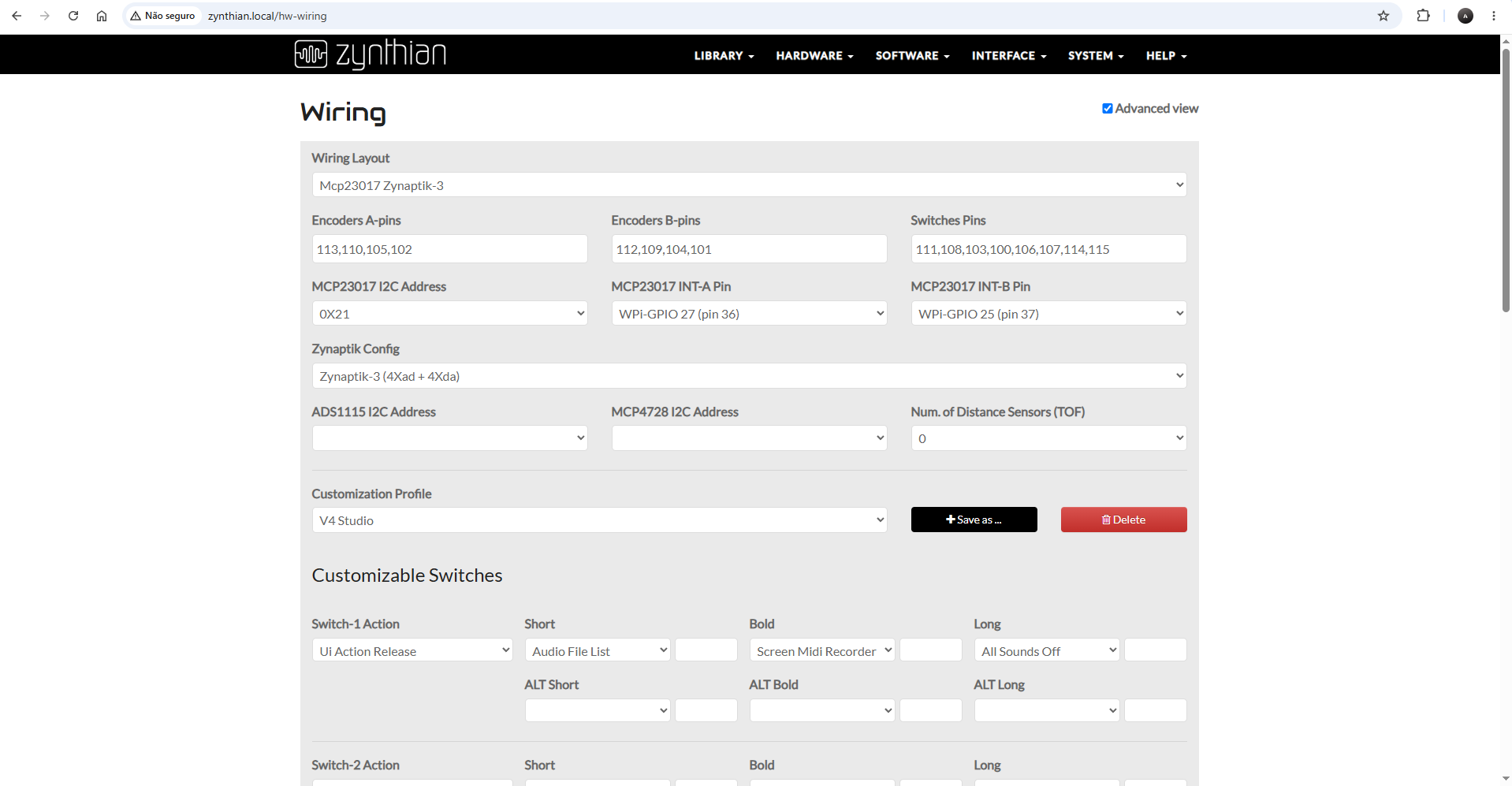
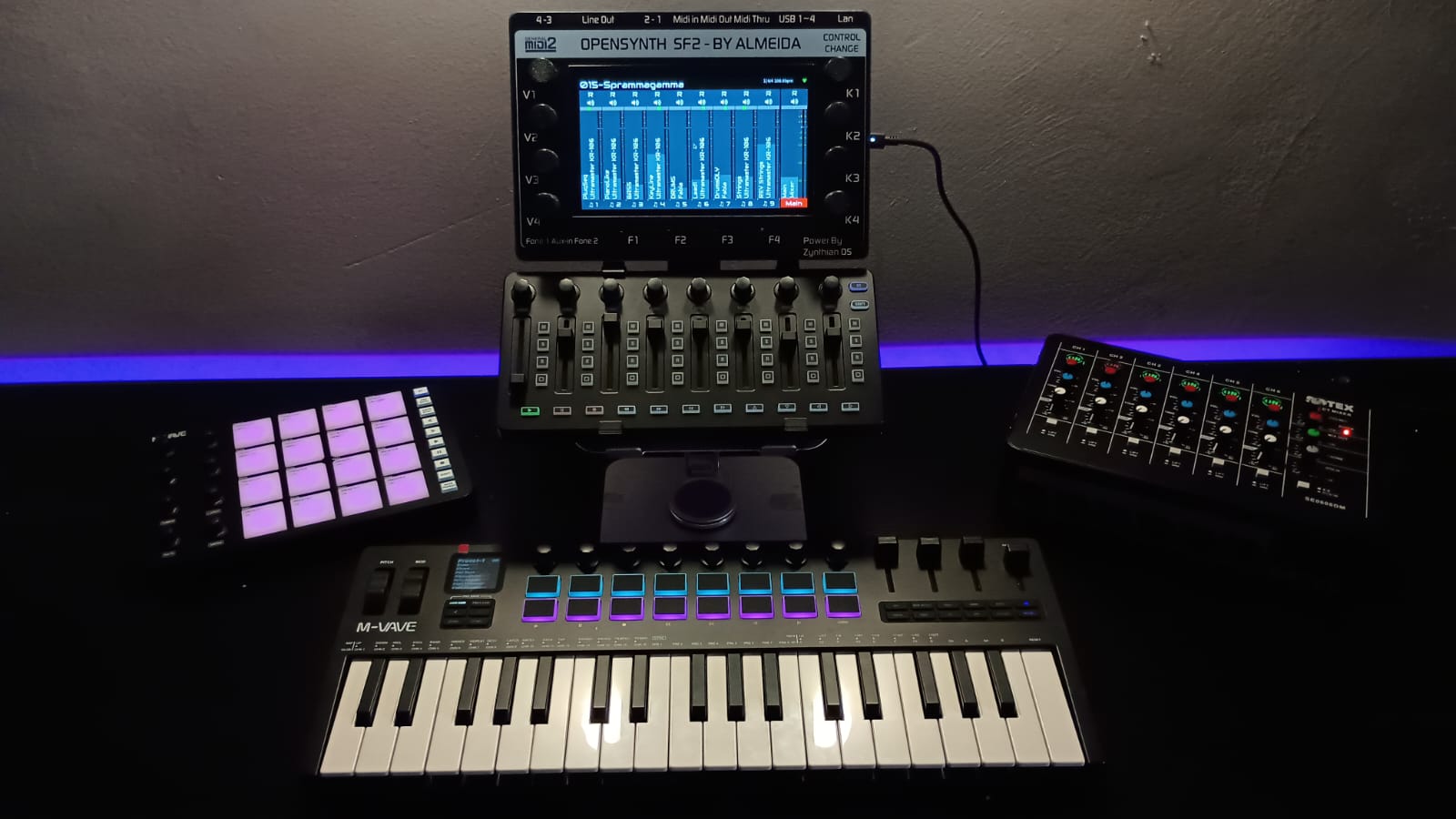
My setup is based on the V4 Studio wiring layout (Mcp23017 Zynaptik-3, I²C address 0x21, with encoders and switches connected to GPA/GPB). The hardware platform is a Raspberry Pi 5.
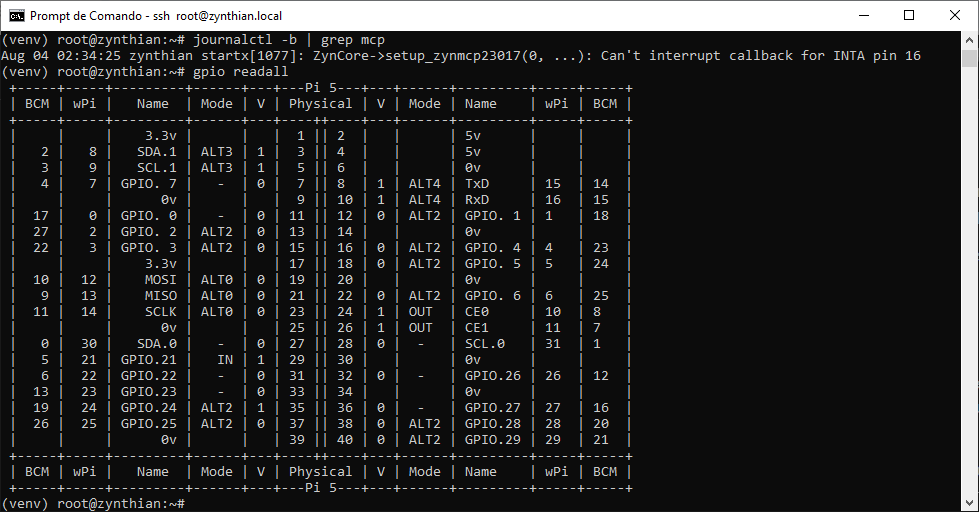
After the latest system update, the knobs and switches stopped working. Previously everything worked fine with this diagram and profile, but now the logs show errors related to the MCP23017 interrupt callback.
Here is the profile I am currently using:
To complement this information: I reinstalled the Vangelis image, and with that fresh installation the knobs and switches worked correctly. However, as soon as I ran the system update, they stopped working again.
Could you please confirm if there have been changes in how Zynthian interprets GPIO pins (WiringPi vs BCM) on the Raspberry Pi 5? Is there a recommended fix or adjustment so that the encoders and switches work again after updating?
Thank you for your help!
(venv) root@zynthian:~# (venv) root@zynthian:~# journalctl -b | grep mcp
Aug 04 02:25:13 zynthian startx[1034]: ZynCore->setup_zynmcp23017(0, …): Can’t interrupt callback for INTA pin 16
1 Like
Hi, I have exactly the same setup (V4 with Raspberry Pi 5) and same happened for me. Now I’m with a fresh install - evertyhing works again, but I certainly won’t do a system update now knowing it’s likely to break again. So also looking for a solution!
3 Likes
I did exactly what you mentioned: a clean installation on the new image with Raspberry Pi 5 and Zynthian V4. After that, everything started working again — the GPIOs were recognized and ZynCore initialized without errors. So yes, this solution worked for me as well, and the system is stable again.
Thank you so much for sharing your experience, because that’s exactly what helped me fix the issue too! 
1 Like
Someone with a RPi5 V4 should raise a github ticket so that this gets looked at. The hardware platform is not a standard supported by zynthian labs so needs community engagement. It won’t be detected by any of our normal regression tests.
1 Like
I installed the new image on my RPI4 based custom Zynthian and at first the software thought that it was on a V4. After selecting custom and the 7 inch RPI screen all was well again.
What a change it is. Congrats and thanks.
I tried to upload my previously saved ORAM backup, but I could not get that working.
Furthermore I tried the Vaporizer2. Sounds great, but I get a lot of XRun warnings. Is this the moment to start using a RPI5?
2 Likes
Hi vangelis lovers!
While testing some RT-safe improvements in the deeps of sequencer low level code, i’ve played the sprammagamma snapshot at 420BPM. I must say there was not a single XRUN while playing it in my V5 Pi5. It behaved Rock Solid!!
You can listen the result by yourself:
I suppose it’s really far from the author’s intention … but whoaooo! What a bizarrous japannese-girl-thrash-metal-jam-or-whatever-the-hell it sounds like!! 
With all respect!
9 Likes
What an exciting release! Congratulations!
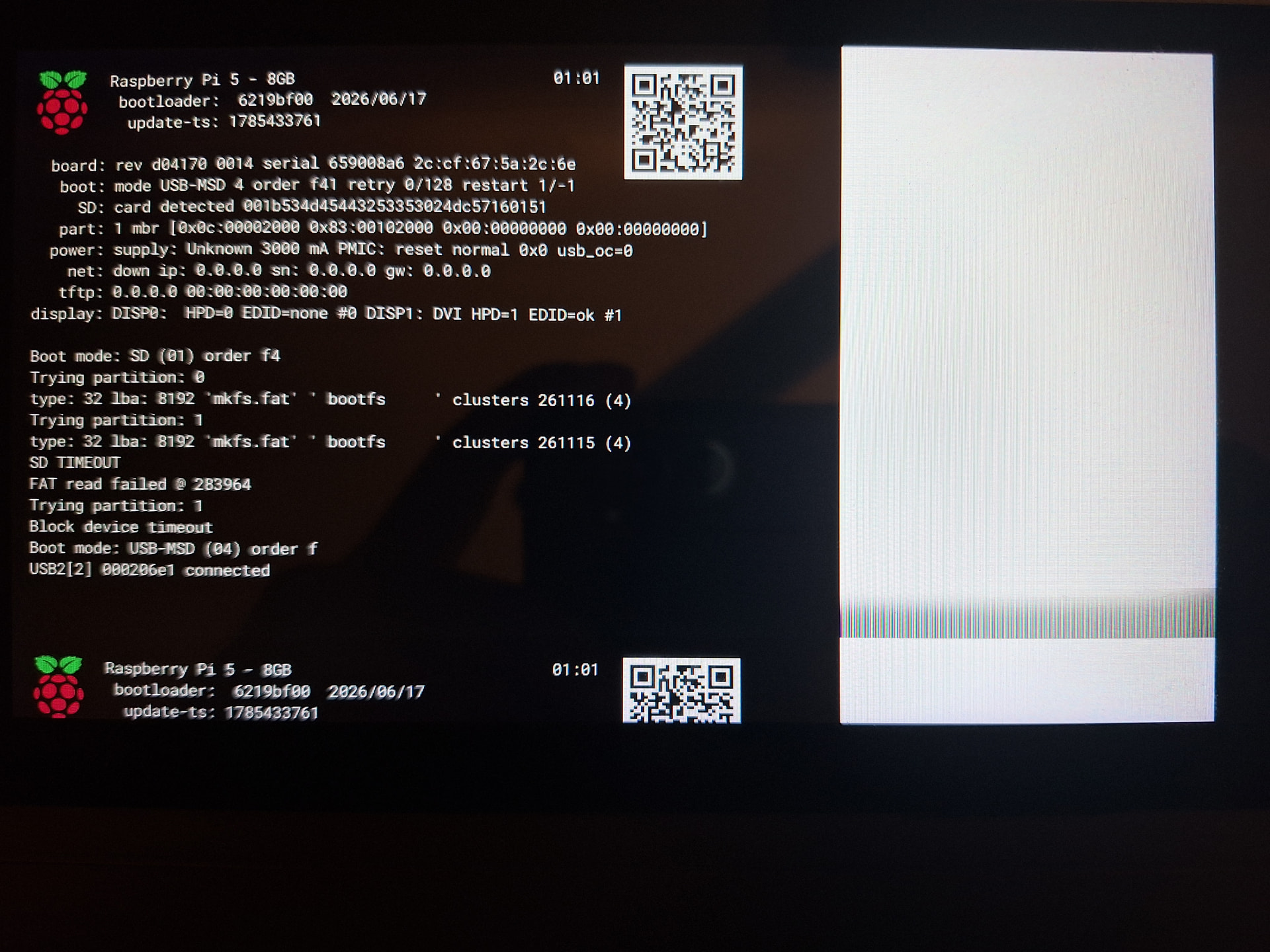
After update of the original image, things started working for me well, except of one minor low-level issue - while there is no problem with booting after a power-on, each sw reboot fails with the following error:
I like it! 
1 Like