If I understand correctly the system used to be based on Debian bookworm, and it is now based on Debian Trixie, which comes with updated libraries that zynthian relies on. Therefore more and more functionality will stop working with the old libraries and finally the system may get (or already does get) stuck at any time. So it is not sufficient to install updates from zynthian anymore. You need provide a correct base underneath. And that requires making a new image.
As to “setup everything again” I can only witness from my perspective which was starting from an “old” Vangelis: I did
a full backup using zynthian webconf
installed the new image on SD card
Started zynthian on the new SD
checked that all engines I used were enabled in webconf and actually there
restored the backup file from the computer via zynthian webconf.
It went smoothly without anything lost including presets and snapshots, with sometimes more complex configurations.
You may use a new sd card of course in case you want absolutely no risk.
@ledan and @emuse, I can personally report that, beyond a certain point, the Vangelis Bookworm-based testing OS stops working in many crucial areas of the Zynthian UX and GUI, due to missing components and libraries with failed compilations/installations.
As overtly and repeatedly stated by @jofemodo and @riban, the by now deprecated Vangelis Testing version is neither supported nor maintained anymore.
Am i right to assume that backing up via the UI will also tuck away any (custom) ROM-files, etc along with everything else that is required to revive the engines post-mortem, on the new OS?
I seem to be able to repeatedly trigger a segfault related to tr808-fischer and zynsampler (newest image and latest update). I discovered it by doing a wrong workflow (because I didn’t know better). Since it’s not how you’re supposed to do things it’s probably low priority. Steps I do to reproduce:
I detected a regression in Vangelis with this issue :
I put a comment with a proposed fix, I tested it on a fresh Vangelis beta (not updated) and it correct the issue (not sure it doesn’t introduce another problem though as I don’t fully understand the routing process)
Literally flashed the SD, put it in, plugged in LAN cable, plugged in power and waited 15-20 mins then tried to get the webconf. Wasn’t working, but SSH was so I started to investigate.
Also just throwing this out in case it helps anyone – out-of-the-box I couldn’t get the VNC working on a headless Pi 5 (i.e. I don’t have an HDMI plugged in but I still want to use the VNC).
The fix was:
Force a virtual HDMI output. To the end of the line in /boot/firmware/cmdline.txt append something like: video=HDMI-A-1:1024x600@60D
Point X at the display GPU instead of the V3D accelerator. Create a new file /etc/X11/xorg.conf.d/99-modesetting.confand put into it: Section “Device” Identifier “default” Driver “modesetting” Option “kmsdev” “/dev/dri/card1” EndSection
Then enable the VNC service:systemctl enable --now vncserver0.service
Hello Zynthianers, it’s been a while since I last turned on my Zynthian. I’ve just loaded the “Vangelis” build (dated today) onto a 64GB microSD card and am impressed by the new possibilities.
However, I didn’t get very far. Since I enjoy playing the piano and care about good sound quality, I tried out “Salamander Accurate Piano”—testing both the built-in Zynthian version and the more extensive version installed separately. Neither version works; there is no sound output. After a few reboots and selecting other Linux sampler sounds, “Accurate Salamander” did work briefly at one point, but it stopped working again after another reboot.
I’ve switched back to Oram for now, as “Vangelis” still seems a bit unstable.
Could someone check if “Accurate Salamander” runs stably in its various versions? Is this just an issue on my end? My setup is the V5.1 kit with a Raspberry Pi 5 8GB (which I was lucky enough to buy much cheaper two years ago).
Are you using LinuxSampler? Please, try with Sfizz.
We are considering to disabling Linuxsampler by default because most recent SFZ doesn’t work OK with it.
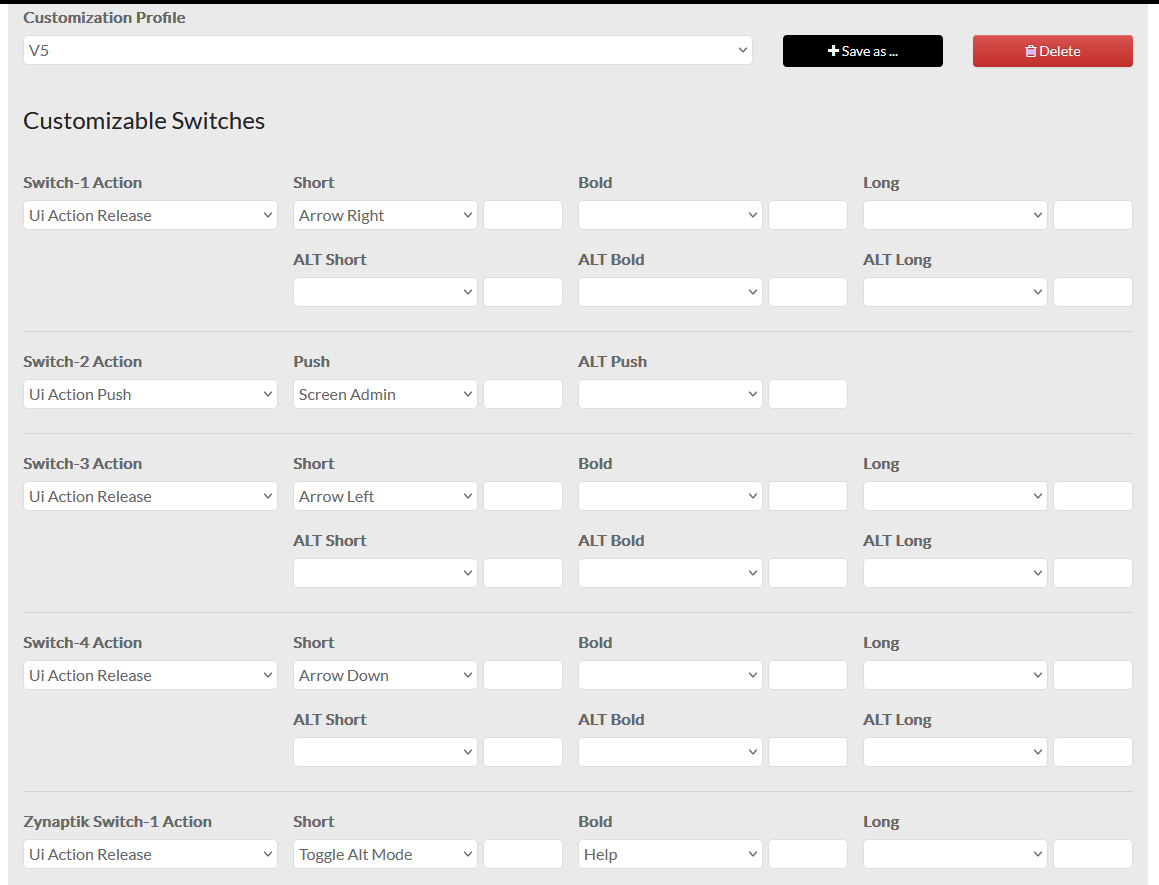
@jofemodo I was trying to fix the launchpad driver with UI device control and found what appears to be zynswitch actions not matching the label on the button. Tested in the UI touchscreen buttons (touch navigation) so assuming it’s not driver code related.
It seems related with your wiring layout & profile config.
How did you configure the wiring layout & profile? Could you send screenshots of your wiring layout config?
You are right. I have some physical buttons connected to the MCP (switch 1-4) and located on the physical bottom row so I assigned them similar to V5 bottom row. When I look through the zynaptik switch list, it seems these are already in the list by default i.e. left, right, down etc so I had a double up.
Updating wiring of those physical buttons is a separate problem for me to deal with. When I toggled out and back into the V5 profile the buttons config reset and are now working correctly in touchscreen and launchpad.
Another thing I just realised, are all the customisation profiles ‘read only’ until you do a save as? As in, there’s a current state which saves whatever adjustments made (on any profile whether v5 or ‘my custom profile’ or whatever) but the profiles will only update when you save as and overwrite with the same name?
Customization profiles are “partial config files” containing the “switch action assignation” for each customizable switch (all except the 4 x V1-V4 knob-switches). When selected, customization profiles are loaded on top of the active/current configuration.
You can also save a profile from the current active configuration. You can overwrite any of the pre-defined profiles or save new ones. Overwriting existing ones is not recommended because modifications to pre-defined profiles could be overwritten by updates.
When you “save” the current/active configuration, you don’t overwrite the customization profile that is selected. You can see this “selected customization profile” as the “last customization profile you loaded”.
This image include all the latest bugfixes/improvements and hopefully, also fixes the first boot issues with bare-bones zynthians.
You don’t need to download if already have a working vangelis image based in the last Beta, but do it if you want to test the “first boot procedure” with your zynthian.
Currently, first boot procedure tries to detect the next hardware configurations:
V5.1 (Pi5)
V5 (Pi4)
MINI V2 (Pi4)
Z2 (Pi4)
V4 (Pi4)
V2/V3 (Pi3 / Pi4)
If none of these hardware configuration is detected, it defaults to bare-bones config:
Pi3/Pi4 => HDMI + onboard analog audio
Pi5 => HDMI + fake audio device => Should we configure HDMI audio instead?

 as I don’t fully understand the routing process)