But I’m curious about you asking for a zss snapshot. Snapshot of what? The default/empty one that you and 100% of users of Vangelis already have when booting the first time on a brand new Zynthian ?
Update: If I connect the MPK249 after booting Zynthian, the midi signal is correctly recognized EDIT: In fact it seems completely random
Update 2: At least everything seems to work if I disconnect then reconnect the MPK249 USB cable
I wonder if the issue is powering the MPK249 during Zynthian startup and competing for power over USB. Is the MPK249 getting its power over USB? If so, could you try powering it externally?
Yes, the MPK249 is MIDI+Powered with the USB through Zynthian
it worked flawlessly with ORAM
I don’t have the original power supply of MPK249 (or I lost it) so I cannot try powering it externally
Does it should change anything if I use USB3 or USB2 Port of the RPi? I through it would not but it seems I got more luck when using USB3 (but the mpk is not something that would need super speed)
Anything 32GB or above will work. I think 64GB may be the current sweetspot for value but if you want lots of massive sample sets and/or do a lot of audio recording you could go bigger. Remember that to can always expand storage with USB.
I don’t think that it changes anything, power supply-wise, switching USB-A 2nd or 3rd gen ports, and the data transfer speeds involved are rather limited.
The MPK249 requires 500 mA, that is 1/2 A, which shouldn’t take out that much of the available current fed to the Zynth.
This said, the best way to hook your controller to the Zynth, without drawing from its precious current, is probably to power it through the USB-B connector with a power bank, thus sending/receiving Midi data through 5 din connectors.
I’m using an Akai MPK225 directly connected via USB to the Zynthian v5.1 on Vangelis(stable), it should need presumably around 100mA less than the 249. But both would according to the manual need a power supply of 6V/1A, center positive. Try to lower the lighting intensity on the Akai MPK249, that should lower the power need and would at least be a possibility to test if it works with lower intensity/power need. (It works with my 225 with max light, which should roundabout draw the same electricity as 249 on min light.)
Second Vangelis Stable 2610 installation here, this time from a burnt image on uSD.
All nominal and without a single issue, even the subsequent and seamless transfer to SSD (courtesy of @riban) after the first zyncore build, system tuning/config and OS update.
I couldn’t commend more the nice touch of having a dummy audio device selected by default on non-official hw, which turns out to be very handy with Zynthian custom builds.
I noticed that my Zynthians with Vangelis Stable coming from recent fresh installations are all set on the Staging OS version, and indeed offered various times to download updates, which I did, albeit perplexed for them being brand-new stable systems.
I think it is fair to think that installs from image should be set by default on Vangelis Stable 2610. At least, I would prefer Zynths employed in composition or production to be sound and reliable OS-wise.
Can I safely revert the system in webconf to Vangelis Stable as of now?
Vangelis is the current stable version. It can be installed from the image that was created on 15th October 2026. Since the image was created there have been some hot-fixes for bugs. These will continue to be applied throughout the life of Vangelis. We aspire to only apply stable and tested updates to Vangelis so that it benefits from feature enanhancements and fixes to reported and developer found bugs whilst keeping it stable. We generally only apply hot-fixes for urgent bugs.
We also make periodic point releases. These are tagged versions of the stable release that has all the previous hot-fixes plus less urgent bug fixes and some feature enahancements. There is no fixed schedule for point releases.
Tomita is the new development branch that will get bleeding edge development applied to it.
So, users should use Vangelis and update when prompted but… do not update just before you need to use it. (This is good advise for anything.) There is always a risk that an update may introduce a regression (undesirable change of behaviour) or a feature change that may not match your current workflow.
If you have the perfect zynthian, don’t touch it. Don’t update something that already works perfectly. The only updates that may be frutiful would be security patches (which we do not treat different to normal updates so can’t be done separately). In this case, avoid conneting to the Internet to reduce the risk of hacks.
If you hear about some feature or bug fix that you want or need, you will have to update to get it. I recommend doing so when you have some good time to run through your workflows to validate they all work afterwards.
For a period just after a release (like now) there are more hot-fixes because a lot more users start to really use the new version and find lots of issues that were missed during testing.
Alright @riban, thanks for your time and the thorough reply .
The concept of thinking carefully, before accepting updates between point releases to a stable install, is a relatively new angle of advice which is worth receiving. Goes noted.
Speaking of which: has there maybe been some new Trixie kernel change in power management rules, which went embedded in Vangelis Staging today or yesterday?
I am experiencing intermittent underpowering issues on one of my custom builds, that didn’t happen until a couple of days ago. Maybe the source of the latent problem is of a completely different nature, but just to know… (to give some context, it is very unlikely down to the PSU unit, which is a rather high-spec 45W official Raspberry power adapter).
Also, between two today’s updates I seemed to be unable to both see on the Zynth and regenerate from source OsTIrus presets, which now appeared to be solved. Just FYI.
And finally, the more experimental and up-to-date devices aside, should I revert to Stable or leave Staging on the performance oriented Zynthians, with the provision of applying updates consciously and sparingly?
Current patch level: 20260929.1
Applying patch 20261001.1 ...
Reading package lists...
Building dependency tree...
Reading state information...
E: Unable to locate package riban-lv2
--2026-11-08 11:20:04-- https://github.com/riban-bw/lv2-plugins/releases/download/1.3.1/riban-lv2_1.3.1_arm64.tar.gz
Resolving github.com (github.com)... 140.82.121.3
Connecting to github.com (github.com)|140.82.121.3|:443... connected.
PS
The update stops at that point. No reaction any more, Zynthian freezes.
From sniffing the traffic I see the request is a simple HTTP type request on an HTTPS port 443 that bounces repeatedly every few seconds forever.
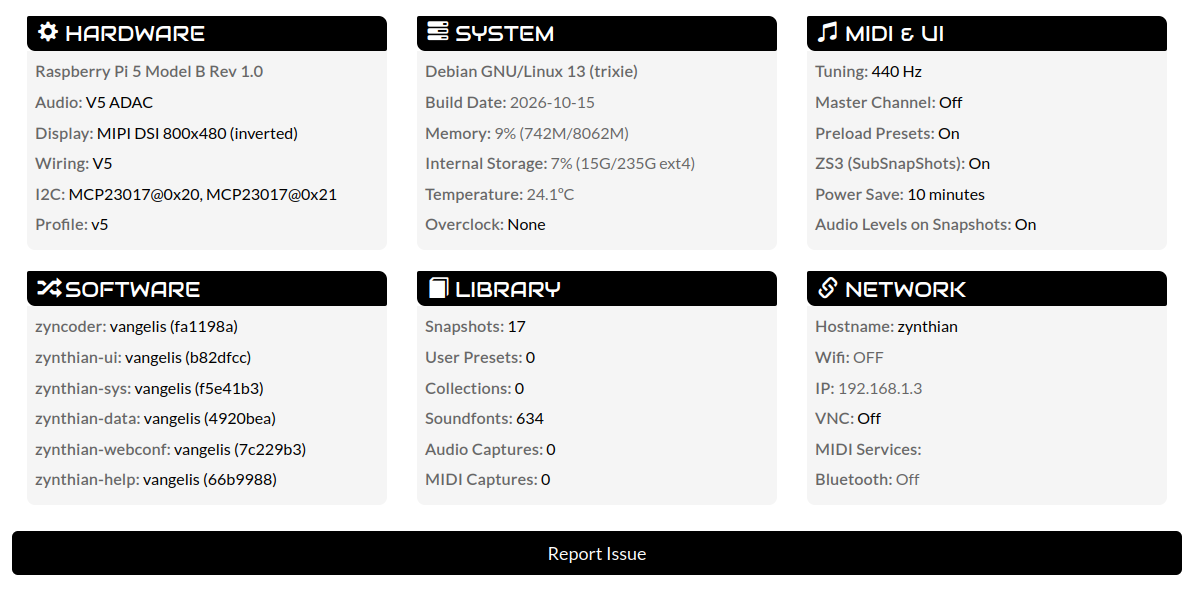
I wish to acknowledge @jofemodo and @riban for having (deliberately I presume, unless it’s related to changes in Trixie) recently introduced in Vangelis the long-awaited self-detection of the USB touch function for HDMI displays.
It seems that the days of having to disconnect and reconnect the USB cable, for the touch functionality to work, are over. This opens new possibilities for custom builds with embedded HDMI touchscreens.



 .