Hi @anirbanray1981! A warm welcome to the community and what a cool way to introduce yourself! Unfortunately, my attempt to build the plugin fails with a cmake error:
cmake -B build -DBUILD_LV2=ON -DCMAKE_BUILD_TYPE=Release
-- RTNeural -- Using Eigen backend (Default)
CMake Error at CMakeLists.txt:46 (find_library):
  Could not find LV2_ONNXRUNTIME_LIB using the following names: onnxruntime
I tried installing the onnx dev and runtime libs but with no success. I don’t find help in the (rather extensive and impressive) README.
Can you please try with the pipitch_tune app and see if you are able to transcribe the audio? The plugin instantiation might be due to the improper runtime library setup.
That did it! I have compiled and tested that the plugin loads and does audio to MIDI conversion. I need to crash so will have a more in-depth play tomorrow.
I notice that audio input routing works but MIDI output routing does not (if the plugin is in an audio+MIDI chain) so we need to fix this bug in zynthian. If we want to replace aubionotes (which attempts a similar job) then we will want to integrate into the core autoconnect code. I will have to assess how good this is and whether it is worth integrating… but for now, thanks for the plugin.
Hi @anirbanray1981! This is a cool plugin. It does seem to work better than aubionotes, particularly reaching lower registers. (Aubio cuts out around the low G on a standard guitar tuning.) The onset / detection / trigger latency is noticable in the lower registers but becomes much better from about half way up the range of a standard tuning guitar. Input level needs to be carefully adjusted. The plugin may benefit from a monitoring output that shows the detected input level and maybe some other parameters.
I need to read all the README when I have some more time. I played with the controls (money testing) today and could not improve detection. There is a “Pitchbend” parameter that I am yet to get to do anything.
Picking has to be very deliberate, percusive and fairly slow but I can see this providing some users with an alternative input method. (FYI I have a split pickup MIDI guitar so am less likely to use this plugin.)
If we decide to replace aubionotes, then this would be run as a MIDI input rather than a chain plugin, although we could offer both.
There are audio outputs. What are these used for? (In zynthian we can bypass the effect which stops MIDI output and passes audio along the chain which some may find useful.)
While patiently observing the development of that case I wonder from reading the readme if this plugin would offer polyphonic audio-midi conversion, because it says it takes monophonic sources but has polyphonic modes.
Not yet, and I really should. I also will check soon if we have the MOD devices Gsynth plugin available which seems to output pitch CV data. But the reason I’m hoping for this would be the H90’s excellent polysynth algorithm which would be best immitated by outputting proper polyphonic audio to midi data to a synth chain I guess.
By design, to pass MIDI from an audio-to-MIDI processor on to a MIDI chain, the a2m processor must be the last processor in the chain. This means that it must be post-fader (because the audio mixer is a processor). This means that to get an a2m processor to work you must:
Add a MIDI + Audio chain.
Add the audio to MIDI processor to this chain.
Move the a2m processor to the end of the chain.
Click the “MIDI Output” box in chain manager and send MIDI from to the target chains.
I can see the logic to why we coded it this way (you want to send from a processor to another chain it should be at the end of the chain) but in service, I am less sure it is the right workflow. I may review this.
Anyway, there is a way to add this plugin into a chain and for it to fully work without any faffing around with manual routing (outside the UI).
[ Edit] I saw there was a bug in the existing code so I fixed that and removed the limitiation so that now an audio-to-midi processor may be anywhere in the audio chain. I have amended the process listed above.
[Edit] I have simplified the process:
Add audio to MIDI processor to audio chain.
In chain manager, click the “MIDI Input” box for a MIDI or Instrument chain.
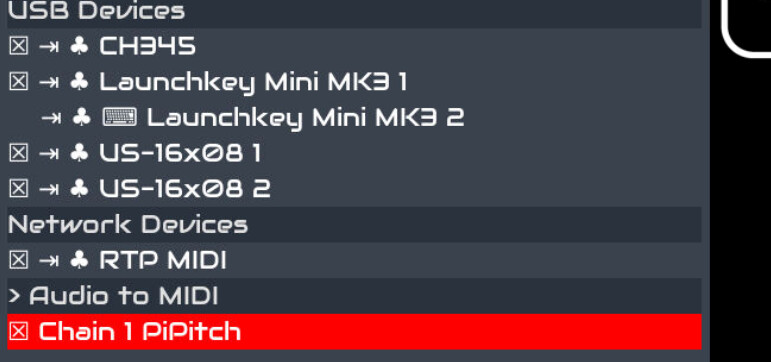
Select the MIDI input from the Audio to MIDI section of the list.
Thank you. Will this be included in the next build?
Regarding the other questions:
There are audio outputs. What are these used for?
The audio output is off from this plugin. I can take that out.
The Goertzel Mono and Poly modes are the preferred ones for mono and poly, but only applies to RPI5. The bend only works for Swift Mono mode. Other modes can be ignored, they were organically developed. I can remove them from the plugin.ttl.
Ever since the Polytune pedal came out, it’s seemed to me that we don’t really need hex pickups anymore, at least for a2m applications, if there’s enough math horsepower in play.
I don’t know, but I would imagine that the Polytune (I have one, it’s not often used but it’s miraculous), as well as the various Boss/Roland guitar synths that don’t use GK pickups, are based on some sort of FPGA hardware, though a very fast DSP could do it as well I guess.
My guess is that this software is great, but the CPU is the limitation.
I’m not promoting, but I’m pretty keen on grabbing one of the newer SBCs with AI boosters on em - I daresay there’s some very cool mindbending guitar effects buried in there that someone has to find.