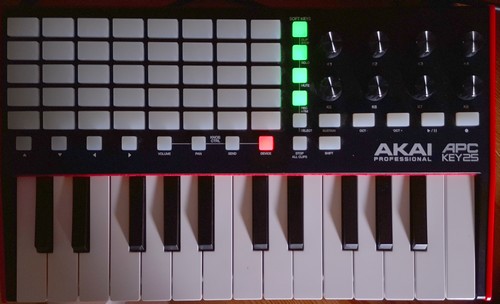
Yes. It works for me.
On this mode the knobs control the active chain’s favorite controllers.
If no favorite controllers are assigned, then it returns “False” so the knobs can be MIDI learned normally. When operating favorite controllers, fine adjustment works. As normal CC (MIDI learn), fine adjustment is challenging and it’s not implemented..
Accessing the StepSeq mode is quite easy by using “Shift+PAD”, so i don’t think this suppose a serious drawback.
I don’t like neither. I broke my head, but couldn’t find a better solution (until now). I’m open to proposals.
Anyway, i think i made a nice work and the “STOP_ALL_CLIPS + knob1” works fine. If you are careful, you can use it safely. You don’t need to adjust the main volume very often. And if you are really scared about it, you can adjust main volume from the “device mode” without any risk.
I know, it’s not ideal, so please, tell me if you find a better solution,
Fine adjustment is really needed, so the solution should keep this function. Using shift for it can be revised.
Yes, i tried to do the modification with this in mind, but i couldn’t test it. I need your help fir this.
Hi @jofemodo, I looked a little bit more at the knobs in apckey25. It looks like you only broke volume and balance in MixPad mode. Using set_mixer_param with the 0..127 value from MIDI CC, instead of 0..1 for volume and -1..1 for balance.
And the knobmoves trick was there iirc to get pick-up movements: only sending out the value if in the vicinity of the current value or when the last value sent was a very short time ago (to acount for quick turns).
If this can be handled directly by more generic code, that would be lovely. There is pickup code for zctrls, and since volume and pan are now effectively zctrls, that may be the way.
Anyway, two things need addressing:
Translation of MIDI 0..127 to the range of volume/pan.
device mode in mixer mode did not react at all to the three pots one would expect to be working (level, balance, main level). I will investigate further. Probably no zynpot_abs() on that screen. Yes, that it was. Even before the refactor, haha. Added zynpot_abs() to the mixer screen.
I was mistaken about the pickup code ‘existing’ for zctrls. The pickup code is there only for zynthian_gui_controllers, and only when they are shown, and only when invoked via zynpot_abs.
Also, they are marked as pickup when shown, then whenever the value crosses the current value, pickup is removed, so going to another mode, moving the dials, then returning to device mode would still cause a jump. And also anywhere when CC-invoked.
I think a time/value-based solution would be better, and implemented on a deeper level. Or at least easily choosable by consuming code. I have some ideas:
a) a method called zctrl.propose_value(), that works like a pickup, yet not immediately replaces current set_value(), and
b) zctrl.get_abs_midi_ctrl_val() helper function to get the zctrl value for a given cc value (and current zctrl state), if device drivers should do this on their own.
What do you think @jofemodo and @riban (who I believe wrote the zynthian_gui_controller pickup code)?
Do people expect/want pickup or jumping? Looking at the other drivers, I think pickup is nowhere used, even though plenty have faders.
Fixed vol/pan CC → 0..1 / -1 .. 1 in mixpad by using zctrl.midi_control_change
Just bought an Akai APC KEY25 mk2 and connected to my V4 with Vangelis
I noticed that after pushing a series of buttons on Akai (because I am studying interaction between Akai and Zynthian) , Zynthian interface (buttons and pots) stays stuck for some seconds: is it normal ?
I am studying Device Mode: is the wiki updated about it? this picture does not match with my item status
 and connected to my V4 with Vangelis