Today I’ve spent some time exploring my new Sound Blaster G8. This thing has a second USB-C audio port that actually allows integrating the Zynthian into a DAW. With the help of FlexASIO it also works both ways in and out at 48kHz and 96kHz.
The second USB is a line in/out to the host computer and it can be directly monitored or muted from the output mix.
For Zynthian, it is Hotplug USB Audio with stereo in and out.
Interface latency is not obvious, so may be actually quite low.
For me this is a really great find, given that audio via OTG still seems impossible and the crook via overpriced S/PDIF interfaces has never been attractive enough.
No. I’m not affiliate with the makers of this G8 and this is not meant to be an ad. It is simply an information about possibilities and a base for discussion.
Can you give any more information about your setup? I have been wanting a way to get audio from the Zynthian to my DAW digitally, which was something I sort of thought would be built-in.
It seems from what I am reading that it only partially works under Linux, so it is probably not the answer for me, but it is good to know that other people are looking for ways to do this.
The G8 is connected to the Windows DAW PC via USB using USB port 1 of the G8. The Zynthian is connected via USB to USB port 2 of the G8. For Linux would be the same connections. Mac I don’t know, but would guess it is like Linux.
Zynthian has USB Hotplug active and the builtin audio card. Sample rate is set to either 96kHz or 48kHz in the Zynthian. It also works if Generic USB Audio is selected in Zynthian with one of the same sample rates.
On the DAW is FlexASIO by Deschamps from the Github installed and handling the G8 audio in and out.
Midi via USB OTG “Gadget Mode” to and from Zynthian via the USB-C (or the B-type connector on V5.1) is connected to another USB of the DAW.
So the DAW sees Zynthian MIDI and handles it as an expander or gets MIDI from the Zynthian.
Audio is then received by the DAW via USB of the G8 and also sent to the Zynthian from DAW for processing, all via FlexASIO on the DAW.
On Linux you have Jack or Pipewire do the same like ASIO on Windows. I’ve tested the same connections and functionality with Ardour on Ubuntu Studio and it works flawlessly. (ed_ted sone fussled name)
Well done @fussl! It really looks like a very flexible setup, for full audio and Midi integration of the Z in a DAW environment. This G8 of yours is an interesting piece of gear to consider .
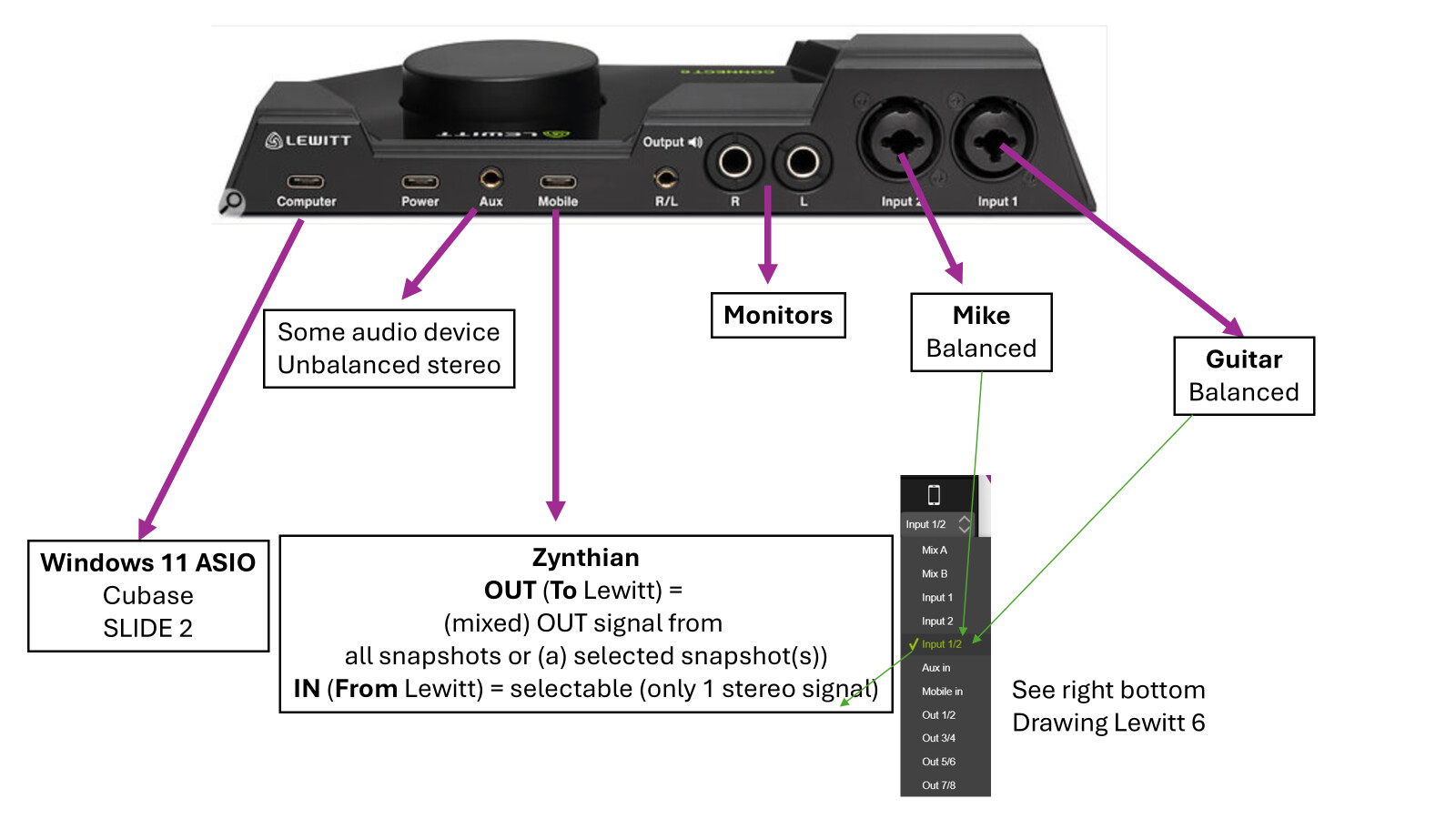
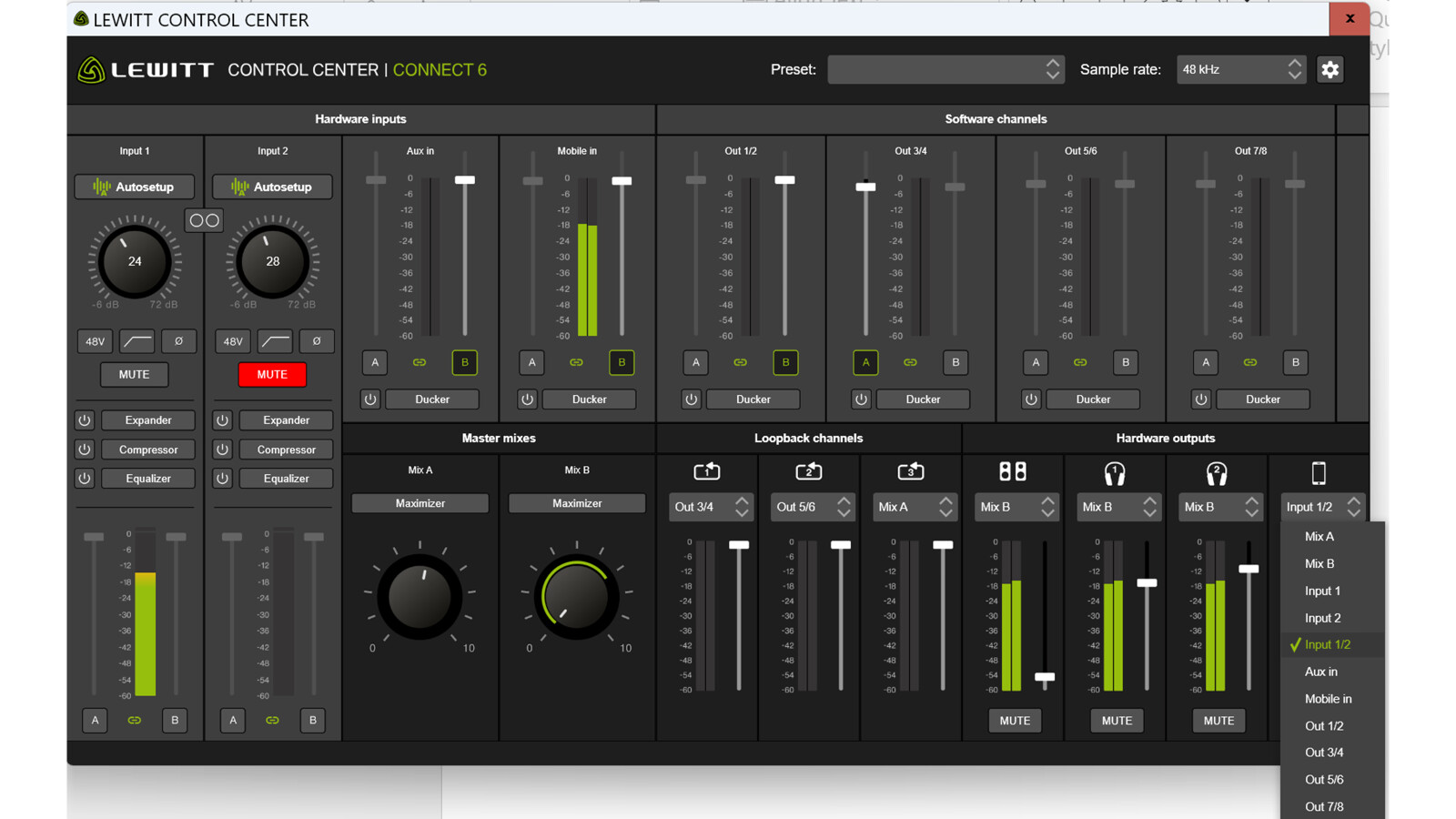
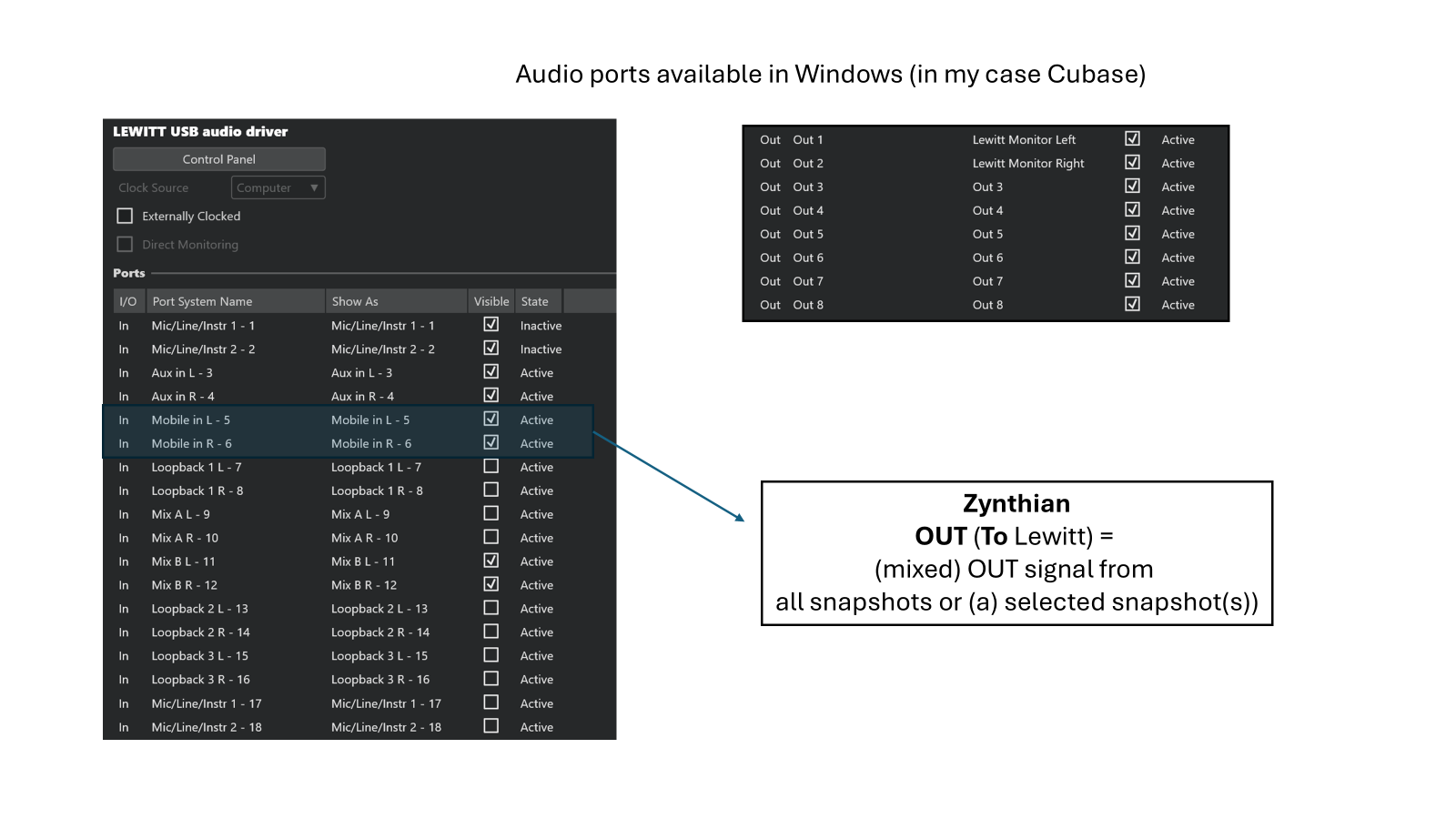
I use a LEWITT CONNECT 6 that has fast usb audio and a mobile-phone (usb-c) in and output (also an analog aux in/output). The zynthian is connected to the mobile-phone usb-c and the ‘regular’ audio usb-c is connected to my windows 11 PC. This works fantastic!!! All signals enter my DAW digitally!!! And FAST!!
I have the zynthian audio signal available in my DAW. So I can record the Zynthian digitally.
At the same time I can record anythin. that is connected to the LEWITT 6 so Guitar (analog channel) on channel 1 and Mike (analog channel) on channel 2. Also AUX IN 1 and 2 (analog channels) are available. The “mobile phone” usb-c is connected to the Zynthian and is my main USB-card in Zynthian. Zo guitar and Mike are on channel 1 and 2.
Perhaps I will make a scheme tomorrow if you would like.
Three drawings. Youshould keep in mind that I use my PC DAW as recording device. Meaning that Zynthian is for me an input device delivering Voice via mike, guitar via effects and keys via several plugins. Since I overdub into different tracks of my daw, I do not need all signals at once.
Here we go:
That looks cool. Do the left (mic) and right (guitar) inputs have separate impedance settings? It is cool to see built-in effects for the inputs (similar to my US-16). Really cool way of interfacing to multiple devices.
So @maartmaart, you have on the Lewitt two separate bidirectional stereo audio channels on USB-C, to/from your computer (Cubase) and the Zynth. Correct? I assume you connect Z to the L6 with an USB C to B cable, through the hexagonal gadget port. Right?
Connection Zynthian ↔ Lewitt is via USB-A (one of the 4 USB ports of the PI5) to USB-C.
So, the “normal” audio card connection, set as “Generic Usb Device” at 48000/64/3
(so NO gadget port. That could be added in the future :-))
Ah, of course Maarten , you btw probably need the USB B port for Midi connection to PC/Cubase, unless you drive the Zynth through classic 5-DIN Midi cables.
 .
.

 , you btw probably need the USB B port for Midi connection to PC/Cubase, unless you drive the Zynth through classic 5-DIN Midi cables.