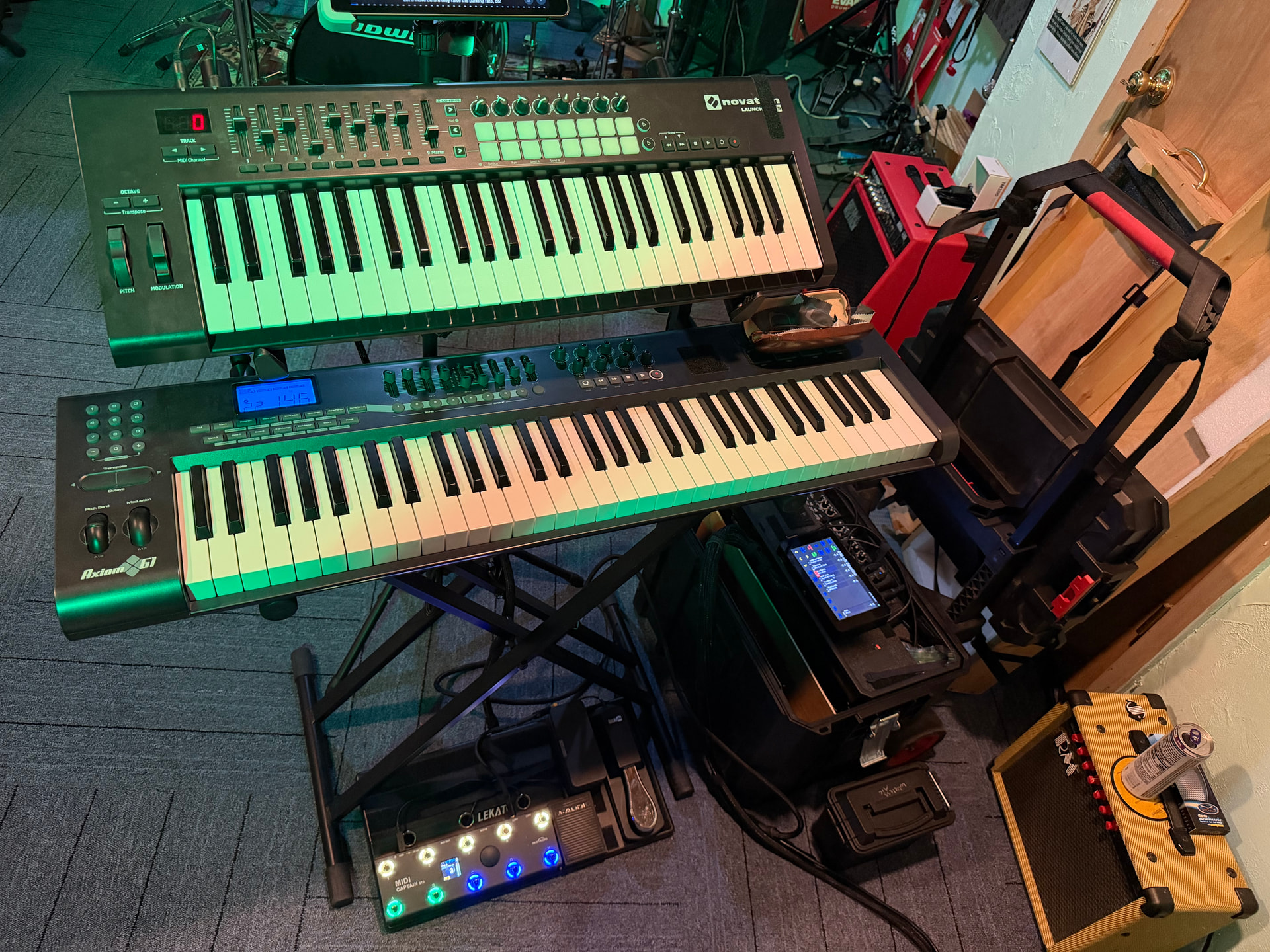
I’m having trouble with the volume CC #7 (and others, but this one is obvious)
I have 2 keyboards in multitimbral mode, one on MIDI channel 1 and the other on MIDI channel 2
I have 2 instruments, one on MIDI 1 and one on MIDI 2
Notes played on each keyboard, are played on the appropriate instrument.
Changing the volume using MIDI 1 CC#7 is received by the active instrument in the mixer.
Changing the volume using MIDI 2 CC#7 is received by the active instrument in the mixer.
I expect MIDI 1 CC#7 to be received by the instrument attached to MIDI 1 rather than the active channel.
How do I fix this???
I’ve tried the Admin menu → “Active MIDI Channel” and it is not clear if this should be selected or disabled, but neither option fixes this issue for me.
Is your desired setup to play two Zynthian synth chains (Midi 1 and 2) from two keyboards, while also sending to Midi channels controller data independently?
If you want to send CC messages to specific Midi channels, I suggest you check that:
Active Midi Channel is unchecked (disabled).
Multitimbral mode is enabled, in the options of the synth chains.
Also, have a look at the settings of the Midi options panel in webconf.
Active Chain mode works on notes, deciding whether to send note on/off to the active chain or to the chain with the corresponding MIDI channel. There is an option in the menu to allow this to layer across all chains on the same MIDI channel or to only go to the last chain that was active, a kind of multit-timbral semi-active mode.
CC are (normally) bound to each control, no matter the active/multitimbral mode but they have different learn modes. You can bind a CC to a control in Chain Learn mode in which case the CC will drive that control only when the chain is selected. This is similar to the Active mode for notes and you can consider this as being able to switch your CC controller between chains. You can bind CC to a control in Global Learn mode in which case the MIDI controller will always control that parameter, no matter the active chain.
There is another option to bypass CC binding and allow the CC to control the processor directly / natively. This can be useful to provide the processor’s intended CC behaviour if that is beneficial.
You can learn about CC binding in the built-in help page on Chain Control.
What I’m looking for is for all CC to be routed like the Sustain pedal CC64 by default where each CC gets sent to the MIDI CH it was sent on, not intercepted by the “active” chain, and filtered out on the CH# it was received on.
Is CC64 the only one treated differently? What about the MOD wheel CC01? This would seem to want the same treatment as the pitch wheel and go to the CH it was sent on.
If I understand the design I think “active” mode is borne out of the USB-MIDI and control surface devices that do not allow configuration of the MIDI channel. I’m looking for more of the old DIN-5 behavior, where you set your controllers channel and that’s where all of the MIDI goes.
Active channel means nothing to me, as I don’t switch active channels on-stage.
Top line keyboard, bottom line keyboard, 2 sustain pedals, 1 volume pedal, and a Midi Paint Captain for PC changes, and additional CC messages mapped within the controller itself.
Single Touchscreen Zynth, with 5ish MIDI channels defined. setbFree, Pianoteq, Fluidsynth for Brass, Strings, and Horns as needed.
A workaround that has served me well when two keyboards each need their own volume: stop relying on CC7 meaning the volume of whichever chain happens to be active, and give each keyboard a distinct CC number instead. If the lower keyboard’s fader sends CC7 and the upper one sends, say, CC11 or another unused CC, you can bind each one globally to the level of its own chain, and then it no longer matters which chain is selected - each fader always moves the chain you intended. Most controllers let you change the CC number a slider or pedal transmits, so this is usually a change on the keyboard rather than on the Zynthian.
It’s also worth separating two things while you test: whether the CC is reaching the right chain at all, and whether the binding is per-chain or global. Watching incoming MIDI while you move just one fader will tell you quickly whether the channel is what you expect, since a controller quietly transmitting on channel 1 for a pedal jack while the keys send on 2 is a common surprise. Once you can see the channel is right, the remaining behaviour is down to which learn mode the binding was made in.
One more thing worth trying: bypassing the binding so the CC reaches the processor natively will make the engine’s own CC7 handling apply, which for some engines is per-MIDI-channel and can behave closer to what you’d expect from a multitimbral rig than the mixer level does.
@HelenMarsh, Thank you for the suggestion. The novation launchkey is dumb and can’t be remapped. I do not have any global or per-chain mappings, this is out of the box Vangellis (updated to latest)
@Aethermind , Yes I went back and unchecked “Active Midi Channel”, and I went into the USB menu and made sure all of my devices were in multitimbral mode.
@riban , I don’t have any custom CC mappings assigned at this point.
I want the CC from each keyboard routed to the same destination CH# as the notes. I have confirmed in the logs that the CC CH# sent by each keyboard is the same as the note on/off CH# that I have it assigned to. In my picture, MIDI CH#3 is upper keyboard, and MIDI CH#4 is lower keyboard, configured at the keyboard itself.
I was hoping there was a UI option I had misconfigured somewhere that was causing them to be rerouted, but it sounds like that is by design.
@riban
To explain this with code, I want all CC to be treated as direct by default, the code currently has a “special list of 4 items” (64, 66, 67, 69)
I made a code change in my device for range(128) but it did not work on reboot. I’ll try recreating my chains with this change to see if that’s the trick…
CC 64, 66, 67 & 69 are treated as pedals. These have special behaviour that differs from everything else, including state management in active mode, etc. All other CC (including CC1 mod wheel) have the behaviour I described. By default they are not bound to any controls, although some instruments do have default mapping of some CC. All can be overridden.
You have a couple of options:
Bind each CC to the required parameter in global mode. This means that for example, CC 10 on MIDI channel 1 will control the cutoff frequency of MiMi-d on chain 1.
Forward each CC to the engine. This means CC 10 on MIDI channel 1 will do whatever the synths on MIDI channel 1 expect CC 10 to do.
Forwarding CC to the engine is a meachanism to bypass the flexible and powerful MIDI learning that zynthian is predicated on. Both approaches require you spend some time deciding what control should control what parameter and making the relevant mapping / binding.
I would recommend you plot out your MIDI controllers and instrument parameters, e.g. in a spreadsheet / table so that you can show what you want to control what. Then it will be clear what is required and hence how to achieve it. This isn’t hard, it is just a little time consuming and needs a slight pivot of thinking. We approach instruments with the idea that they have a fixed CC mapping but in zynthian, we have dozens of instruments that can have limitless configuration so we provide a flexible and powerful CC binding mechanism. Once you separate those in your mind, it makes sense.