Hi everyone! My Chain Manager issue shows up on Pi5, with both HDMI screen and HDMI touchscreen. As of now, I am unable to measure the CPU cores usage with htop, because both my concerned installations are frozen in a release-less state by @riban’s line commad. How could I possibly reinstate the update process to the current testing release? (and possibly revert to the frozen mode without breaking the system beyond repair?)
1/ Enable VNC in webconf UI options
2/ Save settings
3/ Turn off
4/ Unplug HDMI components
5/ Turn machine on with hdmi unplugged and access machine from VNC Gui option that should appear in INterface screen.
Alright @wyleu, this is a useful system recovery workaround, but in this way we loose direct screen visualisation and onscreen workflow, adding significant CPU overhead and operational latency with VNC…
Agreed. But we have, at least pinned it down to a specific area with something hat can put the GUI on a screen somewhere. Quite how much load VNC puts onto the machine above and beyond maintaining possibly 2 HDMI monitors is something for someone to measure. . .
Pi4 versus Pi5 would also play a factor in such situations, involving loads.
For the cajon application after a couple of unsuccessful attempts to hook up an HDMI monitor to the device I prefer VNC access over a wirelessly connected tablet. The wires simply don’t work in a field without being stood on and yanked in incidents involving the word SORRY!
It’s a functioning system and even with the display corpsed the audio stuff works but you loose the ability to modify and shut down involves access via webconf at the easist.
But the inability to use an HDMI monitor is a serious handicap, and needs attention.
Don’t know quite how it intercts with other display configs and whether or not plugging an hdmi monitor into that specific rig.
Version v5.0 removed HDMI access from the zynthian so a case could be made that it isn’t a supported output but it does seem worthy of a little attention at the moment.
my setup (HDMI+USB) is working. So, something changed that affects HDMI functionality. The weird thing is, why only fails when accesing chain options?.
I wonder if others HDMI setup works in current Vangelis?
I already tried to ascertain this, by asking publicly a while ago: not sure anyway of how many custom Vangelis setups with HDMI screen are being experimented with at the moment. And it has perplexed me too, why the management subsystem of the overhauled UI only fails when Chain Manager is evoked. Maybe, something related to the new and sophisticated drag - place - set interactive processor actions devised by @riban?
Now that we have the suspicion of HDMI triggering the issue, I can try to reproduce and if successful, it will assist with debugging the problem. I will look at it over the next few days.
and restore the normal Vangelis testing sequence (would something like git checkin work?).
The idea is to try and swap the HDMI monitors, while concurrently reaching the UI through VNC and measuring CPU cores usage, and see if it changes the behaviour of the Chain Manager lock.
I don’t know if this Will help to isolate the issue but very rarely clicking chain options works. If you go back and trigger again then fails. The issue occurs not only powering on, It occurs as well rebooting and systemctl restart zynthian.
Thanks for everyone’s perseverance here. I have just pushed a fix for this to vangelis. Please update and test.
The cause was some bad code trying to resize text to fit in a box. The trigger was the screen resolution which changes when attaching to some HDMI monitors.
I hope this fixes your issues. Sorry it took so long but it was a tricky thing to diagnose without the trigger conditions.

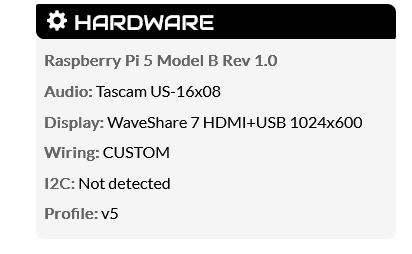
 . I will try this.
 , because at least we have a solid debugging base to start from!