Connecting and using Zynthian as a MIDI device

Hello Zynthian community and developers,

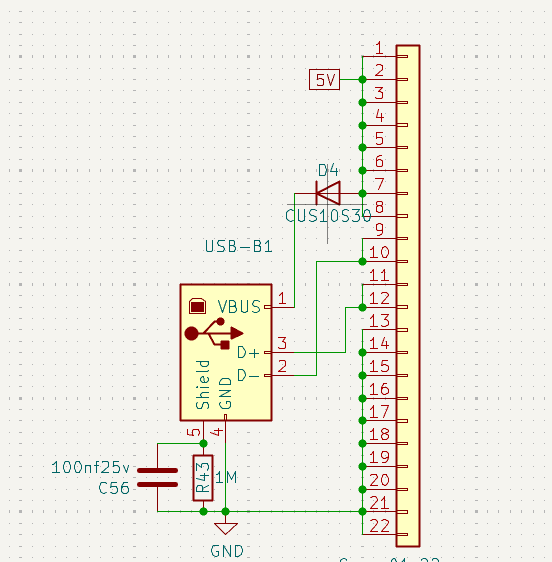
I’ve been using Zynthian for nearly 2 years, and recently I looked at the v5 mainboard schematic. I noticed that, besides providing power, the USB Type-C port is also used to connect to the USB Type-B port. I’d like to ask:

  • Can that port be used for Zynthian as a MIDI/audio interface, or only for MIDI?

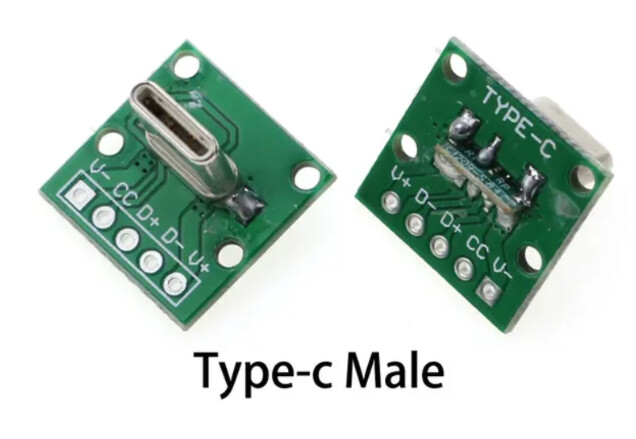
  • If I use a Type-C breakout board, is it correct and sufficient to connect V+ and GND for power, share it with USB Type-B, use the CC pins for PD negotiation, and connect D+ and D− to the USB Type-B? Do I need any additional configuration?

  • In the schematic, I see VBUS connected to pin 7 through a diode. I’m not sure which pin that refers to—can it be ignored?

I don’t have much experience, so I want to make sure before proceeding. I’m using an RPi 5.

Thank you, and have a great day.
Hi @sangto2906, Zynthian V5/V5.1 is seen by an external computer connected to the USB-B (gadget) port as a Midi destination exclusively. No audio transfer on USB-B.

Regards

Thank you. So if I want to connect via USB Type-B, do I only need to connect the D+ and D− pins, or do I also need to connect VCC and GND?

Hi. I never delved in this level of advanced DIY soldering practice, but I think you can safely address on the subject one of the many experienced forum members with extensive skills in electronics design.
Or, you could also ask some preemptive advice to AI.

Regards :slight_smile:

In the original instructions @jofemodo told us:

The color code for the harness is:

  • Green → D+

  • White → D-

  • Red → VCC (5V) → Unconnected. Take care of short circuit with some tape!

  • Black → Ground → Unconnected. Take care of short circuit with some tape!

The 5V and Ground connections to the female USB B connector are not cut by our surgery, so they don’t need to soldered from the USB C harness.

This is from thread:

3 Likes

Thank you—this is exactly what I needed to feel confident about proceeding.

2 Likes