Connecting capacitive buttons to mcp23017

Hi all,

I can imagine everyone’s busy right now with zynbleton and stuff. Maybe someone has capacities for this little issue:

I have lying around some parts with which I wanted to upgrade my custom made zynthian since a while. One of these are some capacitive buttons I planned to install underneath the wooden surface. Now tonight I thought I wanted to just loosely connect one of them for a proof of concept:
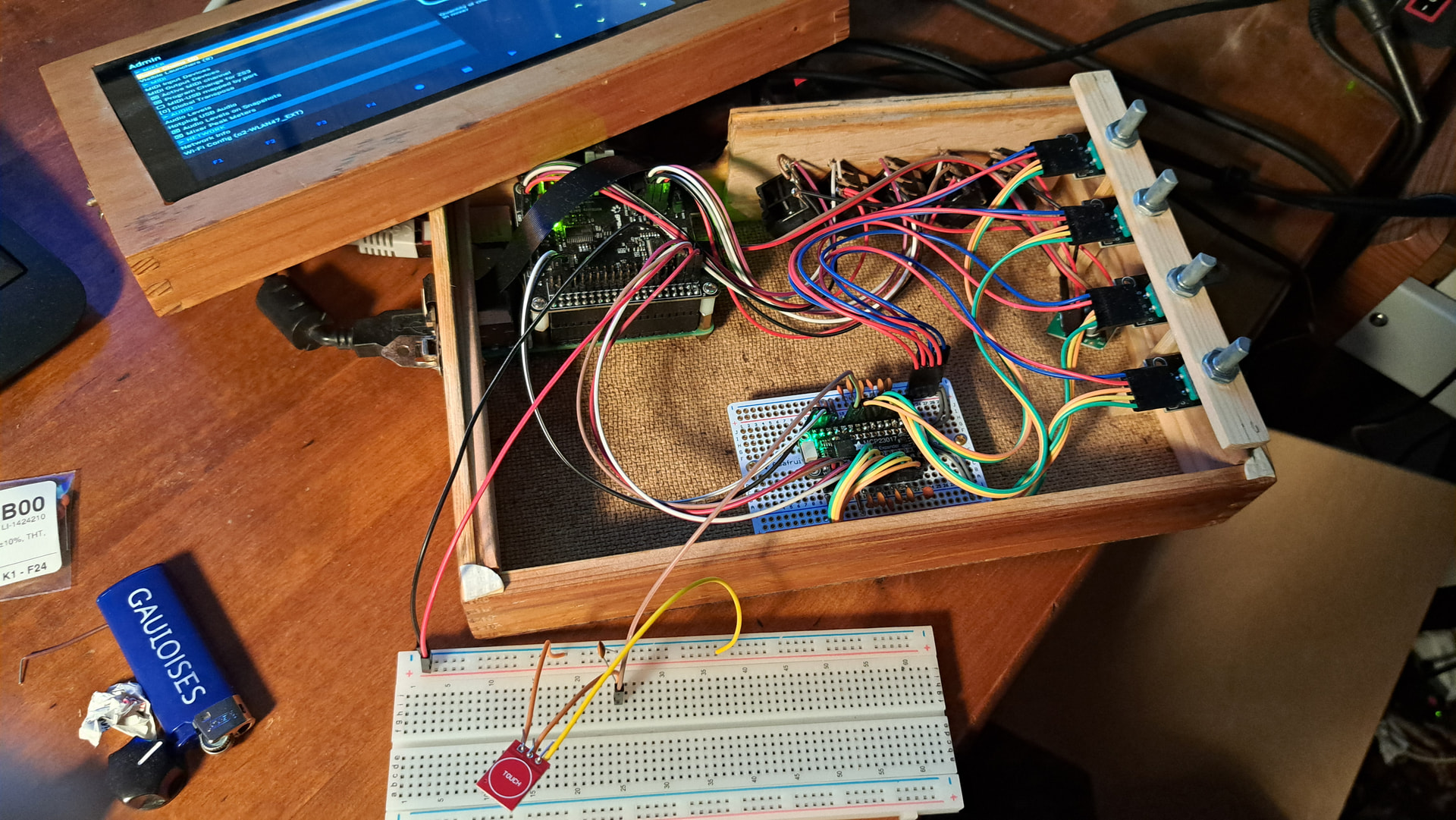
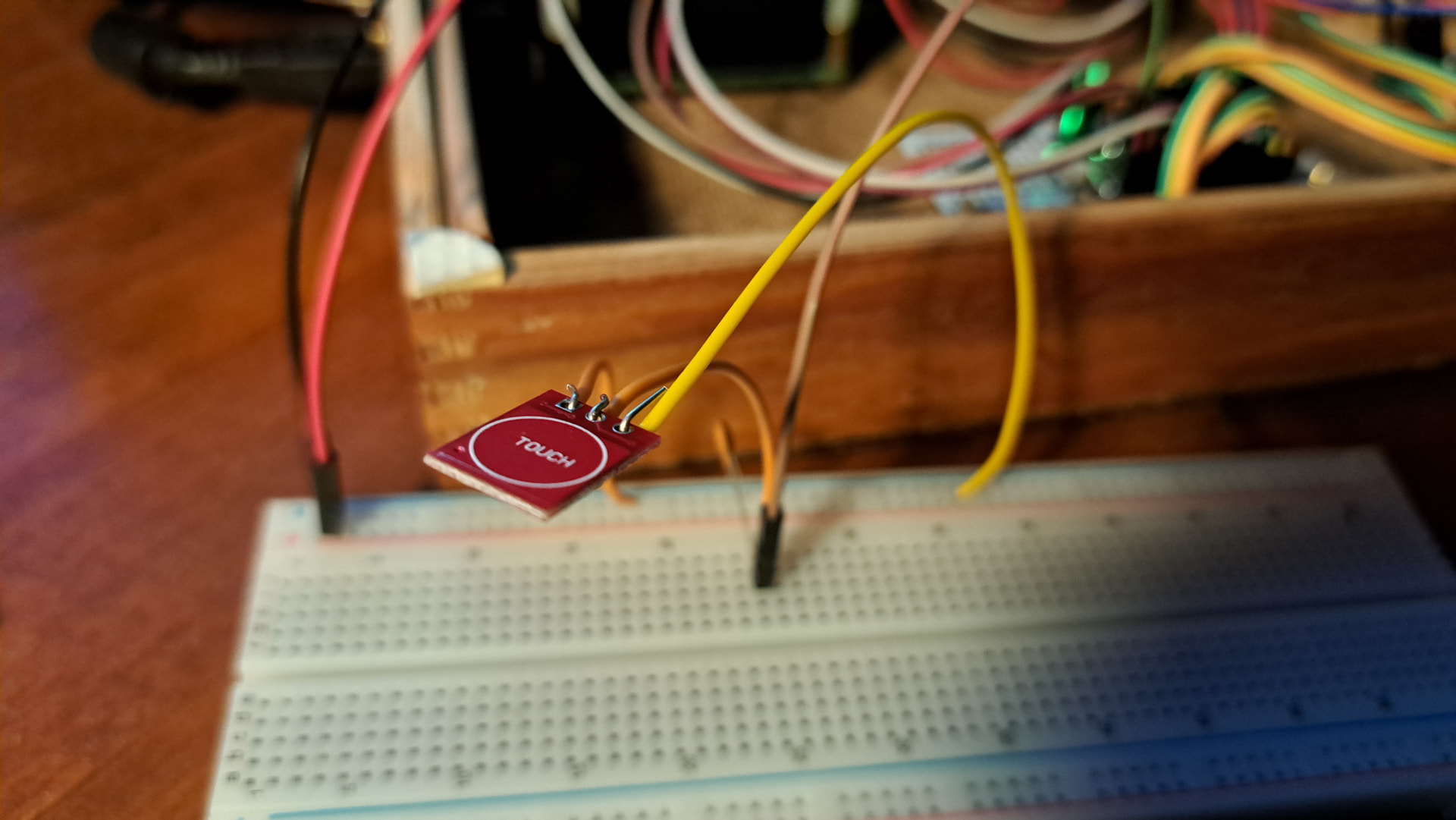
The working state of the machine was 4 encoders to 12 pins of an MCP23017 multiplexer. You can see on the photos what I tried: I connected the data pin of the button to a spare MCP pin and VCC and GND to spare corresponding pins directly on the Audio DAC (mirroring the PI’s GPIO), additionally I tried the setup with and without a 47nF ceramic cap to GND. Then I stated the correct pin number (115 here for the B7 MCP pinout) in the wiring setup:

 ##########################       ----------------------------------------
#                          #      ZynthianOS ORAM-2505
#            ##            #      Timestamp: 2025-05-30
#      ##   #  #   ##      #      Built from RaspberryPiOS Bookworm (aarch64)
#     #  #  #  #  #  #     #      ----------------------------------------
###   #  #  #  #  #  #   ###      Kit:           Custom
#  #  #  #  #  #  #  #  #  #      Display:       Generic HDMI/DSI Display
#   ##   #  #  #  #   ##   #      Soundcard:     HifiBerry DAC+ ADC PRO
#         ##    ##         #      Wiring Layout: MCP23017_ENCODERS_V5TOUCH
#                          #      ----------------------------------------
 ##########################
                                  zynthian-ui: vangelis (4ce678)
                                  zynthian-webconf: vangelis (0e2c25)
                                  zyncoder: vangelis (dbc512)
                                  zynthian-sys: vangelis (8e9180)
                                  zynthian-data: vangelis (b358f8)
                                  ---------------------------------------

Linux hannes-zynthian 6.12.47+rpt-rpi-2712 #1 SMP PREEMPT Debian 1:6.12.47-1+rpt                                                                                                                                                                                                                                             1~bookworm (2025-09-16) aarch64
# Zynthian Wiring Config
export ZYNTHIAN_WIRING_LAYOUT="MCP23017_ENCODERS_V5TOUCH"
export ZYNTHIAN_WIRING_ENCODER_A="112,108,104,100"
export ZYNTHIAN_WIRING_ENCODER_B="113,109,105,101"
export ZYNTHIAN_WIRING_SWITCHES="115,-1,-1,-1,-1,-1,-1,-1,-1,-1,-1,-1,-1,-1,-1,-1,-1,-1,-1,-1,-1,-1,-1,-1,114,110,106,102"
export ZYNTHIAN_WIRING_MCP23017_I2C_ADDRESS="0x20"
export ZYNTHIAN_WIRING_MCP23017_INTA_PIN="27"
export ZYNTHIAN_WIRING_MCP23017_INTB_PIN="25"

Result:

  • On touch the control light on the back of the button lights up
  • Short press shows results on the UI, sometimes, but not always the expected one. I chose the OPT/ADMIN button for the experiment and it sometimes enters the admin menu, sometimes the main menu and sometimes the snapshot saving menu
  • long press (and I think also bold press) doens’t work at all
  • On shutdown Miss Oram confronts me with a “SegFault” error and then reenters the UI instead of shutting down, in some cases it stays in the “saving snapshots” state forever. The error also persist after disconnecting every altered connections. (EDIT: The segfault error didn’t occure now after removing all the chains before shutdown)

I mean, I didn’t solder the connections, you can see on the pictures that I just winded some jumper cables around the connectors. Might be this is the problem, but I am not in the state of mind to finalize the concept with the soldering iron right now.

A question would also be if anyone of you has experience with these kind of capacitive buttons: must they be powered and how (I used 5V)? Should I use the debouncing cap?

Might someone have an idea about the issue?
1 Like

By the way: One other question would be: If I don’t use the capacitive buttons, just to test, could I short the mcp output pin to ground to simulate an ordinary push button, or how would that work? Would that include a VCC connection?

Interesting idea. I like the idea of captivate buttons.

They do need powering and will put out whatever voltage they are supplied with and provide a connection to +V when energised and 0V when not.
THe connectors on the Zynth are scanned by some code and the operated switch is identified by the circuit so unless I m barking up the wrong tree ( always a destinct possibility) it will get rather confused in such a situation. You could perhaps use a small reed relay to operate the switching mechansism on pressing the switch but I suspect this might become rather cumbersome rather quickly.
I wonder if a small Field effect transistor might be added to simulate the switch push. I don’t know if that woudl work but it’s sometihn to try.

I’ve not looked closely at the membrane switches on the Zynthian 5 , as 1) I don’t have one, 2) all my zynthians feel deeply honoured if they get four function switches, so light up buttons is the sort of thing we’d probably burn as a witch if we got the chance, just to be sure.

2 Likes

I was actually hoping these were just capacitive equivalents to physical push buttons. That’s actually why I’m wondering how to simulate an ordinary push button by just holding to wires together (which I thought a push button would do essentially). I actually tried to just short the MCP out pin to ground to test if it is working, but nothing happened there.

If I got to get into this I’d probably rather buy some push buttons.

Exactly this. I was actually surprised these buttons had a control light.

It’s very clever & not something you can buy as an independent device outside of Qwerty key caps.

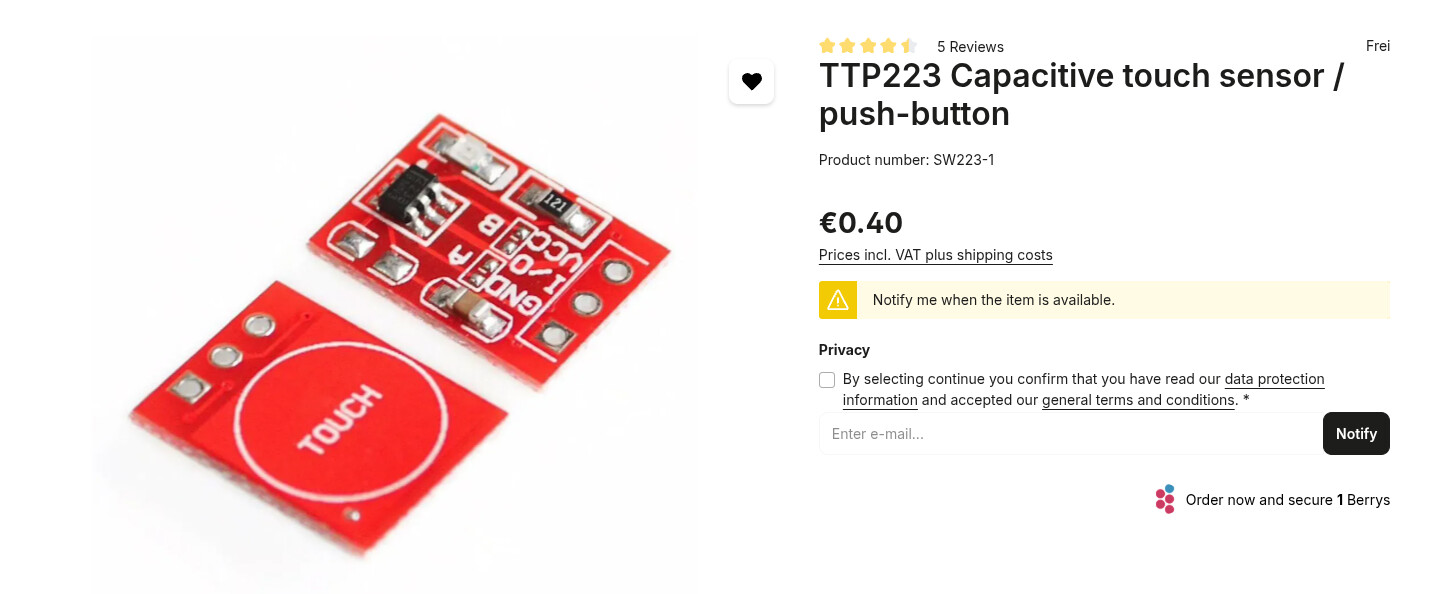
If you close jumper A, output becomes active low. You can then use the same power supply from the MCP to supply the touch sensor. Connect I/O to one of the MCP button inputs and it will act like the original button.

Can you elaborate that? You mean, if I solder-close this A connection, it just works like intended?

Is the elaborate version of a solder bridge.

1 Like

Thanks a lot! I was wondering foremost about the function. I read now about the jumper states and wanted to affirm that the state that the mcp (or Pi’s GPIO) in the zynthian operation state expects always high input and recognizes input when low, and that this is realized by solderning that connector (switch-ttl-low).

There is a concept of “switched ground” which may initially seem unintuitive. This is that an input is (weak) pulled high by a resistor to +V and is pulled low to GND by a switch. There are good reasons for this:

  • Use of “voltl-free contacts” - you can connect a passive switch without proving power.
  • Noise rejection - this form of switching if more imune to noise (and hence false triggers).
  • Common ground - you can use the GND as the switching signal which is safer (and easier) to distribute. (Think of common ground or negative earth vehicles.)
  • Simpler interfacing - the above points means that other devices just need to provide a GND signal which can be done with active, passive or volt-free contacts, e.g. relays.

So, you could power your active capacitive buttons from the RPi 3.3V supply (don’t use the 5V) and use its active-GND configuration to pull the MCP23017 inputs low.

I would recommend testing functionality with simple switches first to prove the thing works as expected. This will prove the software and hardware is working before you attach an unknown entity which may not work or worse, may damage something. Knowing it worked before and being able to repeat those earlier tests gives you confidence that the core hardware and software continues to work throughout your experiments.

Good luck with this. I had considered using touch sensors in riban modular but was worried about how well it would work with false or failed triggers when you want positive feedback and consistent control.

2 Likes

Thanks a lot for the explanation.

I didn’t have any other buttons lying around, so i wanted to test it with just cables, but didn’t know which are the expected states.

The capacitive buttons seemed to work fine from the feedback of the control led (dead on from approx 10mm finger distance through 4mm plywood). They seem to be not well configured.

Can you please just for educational purposes tell me why you’d choose 3.3V over 5V? The button itself report a working voltage 2.5-5V.

Here is Google Gemini’s response to “voltages on gpio raspberry pi“:

Raspberry Pi GPIO pins use 3.3V logic levels, meaning they read high signals around 3.3V and output up to 3.3V (though voltage can drop under load), so you must never apply 5V or higher directly to a GPIO pin as it will damage the Pi. While some pins provide 5V power (Pins 2 & 4), the digital I/O pins operate at 3.3V, requiring level converters for higher voltages and limiting current draw per pin (around 16mA recommended) to prevent damage. [1, 2, 3, 4]
This video provides a beginner’s guide to the Raspberry Pi GPIO pins:
Key Voltage & Logic Levels:

• Logic High: A voltage near 3.3V (e.g., > 2.0V to 2.3V).
• Logic Low: A voltage near 0V (e.g., < 1.15V).
• Input/Output Limit: The maximum voltage you should apply to an input pin is 3.3V, and the maximum output current should be kept low (around 16mA per pin). [2, 4, 5]

You can see an example of how to use the GPIO pins in this tutorial:
Important Considerations:

• Damage Risk: Connecting 5V or more to a 3.3V GPIO pin will likely destroy the chip.
• 5V vs. 3.3V: Some header pins provide 5V (e.g., Pin 2, 4), but they are power pins, not digital GPIOs, and should be used carefully.
• Level Shifters: Use a logic level converter if you need to interface with 5V devices.
• Current Draw: Limit current from the GPIOs (e.g., for LEDs) using resistors to stay within safe limits (around 16mA per pin). [1, 2, 3, 4, 6, 7]

This video explains how to calculate the current for an LED circuit:
In summary: Treat your Raspberry Pi GPIOs as 3.3V devices for digital signals and power them appropriately to avoid damage. [1, 2]

AI responses may include mistakes.

[1] Everything You Want to Know About Raspberry Pi GPIO: But Were Afraid to Ask • Circuits.dk
[2] https://raspberrypi.stackexchange.com/questions/3209/what-are-the-min-max-voltage-current-values-the-gpio-pins-can-handle
[3] Raspberry Pi Pinout Guide: How to use the Raspberry Pi GPIOs? | Random Nerd Tutorials
[4] Voltage and Amperage Specs for GPIO Pins - Raspberry Pi Forums
[5] https://www.youtube.com/watch?v=gIL19I4xwno
[6] GPIO UART voltages - Raspberry Pi Forums
[7] https://www.youtube.com/watch?v=dQusWUx7Y5c

1 Like

Soldering right now. Meanwhile I have the idea that the above mentioned segfault error might be not related to this open heart surgery:

Jan 17 14:02:18 hannes-zynthian startx[2379]: DEBUG:zynthian_gui.zynswitch_long: Looooooooong Switch 4
Jan 17 14:02:18 hannes-zynthian startx[2379]: DEBUG:zynthian_gui.callable_ui_action: CUIA 'POWER_OFF' => None
Jan 17 14:02:19 hannes-zynthian startx[2379]: DEBUG:zynthian_gui.zynswitch_short: Short Switch 3
Jan 17 14:02:19 hannes-zynthian startx[2379]: INFO:zynthian_gui_confirm.switch_select: callback None
Jan 17 14:02:19 hannes-zynthian startx[2379]: DEBUG:zynthian_gui.prune_screen_history: SCREEN HISTORY => ['mixer']
Jan 17 14:02:19 hannes-zynthian startx[2379]: DEBUG:zynthian_gui.prune_screen_history: PRUNE 'confirm' FROM SCREEN HISTORY => ['mixer']
Jan 17 14:02:19 hannes-zynthian startx[2379]: DEBUG:zynthian_gui.close_screen: CLOSE SCREEN 'confirm' => Back to 'root'
Jan 17 14:02:19 hannes-zynthian startx[2379]: DEBUG:zynthian_gui.prune_screen_history: SCREEN HISTORY => []
Jan 17 14:02:19 hannes-zynthian startx[2379]: DEBUG:zynthian_gui.prune_screen_history: PRUNE 'mixer' FROM SCREEN HISTORY => []
Jan 17 14:02:19 hannes-zynthian startx[2379]: INFO:zynthian_gui_admin.power_off_confirmed: POWER OFF
Jan 17 14:02:19 hannes-zynthian startx[2379]: INFO:zynthian_state_manager.save_snapshot: Saving snapshot /zynthian/zynthian-my-data/snapshots/last_state.zss ...
Jan 17 14:02:19 hannes-zynthian startx[2379]: INFO:zynthian_gui.exit: STOPPING ZYNTHIAN-UI...
Jan 17 14:02:19 hannes-zynthian startx[2379]: INFO:zynthian_gui.osc_end: ZYNTHIAN-UI OSC server stopped
Jan 17 14:02:20 hannes-zynthian startx[2379]: ERROR:zynthian_chain_manager.remove_processor: Chain None doesn't exist!
Jan 17 14:02:20 hannes-zynthian startx[2379]: INFO:zynthian_gui.stop: All threads finished normally
Jan 17 14:02:20 hannes-zynthian startx[2379]: INFO:zynthian_main.<module>: Exit with code 0 ...
Jan 17 14:02:21 hannes-zynthian startx[2379]: zynmixer ended
Jan 17 14:02:21 hannes-zynthian startx[2379]: libzynaudioplayer exiting...
Jan 17 14:02:21 hannes-zynthian startx[2214]: ./zynthian.sh: line 316: 2379 Segmentation fault ./zynthian_main.py
Jan 17 14:02:21 hannes-zynthian startx[2214]: *******************
Jan 17 14:02:21 hannes-zynthian startx[2214]: EXIT STATUS => 139
Jan 17 14:02:21 hannes-zynthian startx[2214]: *******************
Jan 17 14:02:21 hannes-zynthian startx[2563]: /zynthian/config/img/fb_zynthian_message.jpg is a 1280x800 JPEG image, color space YCbCr, 3 comps, Huffman coding.
Jan 17 14:02:21 hannes-zynthian startx[2563]: Zooming image by 100%...done
Jan 17 14:02:21 hannes-zynthian startx[2563]: Merging...done
Jan 17 14:02:21 hannes-zynthian startx[2563]: Building XImage...done
Jan 17 14:02:31 hannes-zynthian startx[2567]: INFO:zynthian_gui_config.<module>: ZYNTHIAN-UI CONFIG ...
Jan 17 14:02:31 hannes-zynthian startx[2567]: INFO:zynthian_gui_config.<module>: Kit Version: Custom
Jan 17 14:02:31 hannes-zynthian startx[2567]: INFO:zynthian_gui_config.<module>: Wiring Layout: MCP23017_ENCODERS_V5TOUCH
Jan 17 14:02:31 hannes-zynthian startx[2567]: DEBUG:PngImagePlugin.call: STREAM b'IHDR' 16 13
Jan 17 14:02:31 hannes-zynthian startx[2567]: DEBUG:PngImagePlugin.call: STREAM b'bKGD' 41 6
Jan 17 14:02:31 hannes-zynthian startx[2567]: DEBUG:PngImagePlugin._open: b'bKGD' 41 6 (unknown)
Jan 17 14:02:31 hannes-zynthian startx[2567]: DEBUG:PngImagePlugin.call: STREAM b'pHYs' 59 9
Jan 17 14:02:31 hannes-zynthian startx[2567]: DEBUG:PngImagePlugin.call: STREAM b'tIME' 80 7
Jan 17 14:02:31 hannes-zynthian startx[2567]: DEBUG:PngImagePlugin._open: b'tIME' 80 7 (unknown)
Jan 17 14:02:31 hannes-zynthian startx[2567]: DEBUG:PngImagePlugin.call: STREAM b'IDAT' 99 8192
Jan 17 14:02:31 hannes-zynthian startx[2567]: ZynCore: Configured 28 x Logical Zynswitches...
Jan 17 14:02:31 hannes-zynthian startx[2567]: ZynCore: Setting-up 4 x Physical Zynswitches...
Jan 17 14:02:31 hannes-zynthian startx[2567]: ZynCore: Setting-up 4 x Zynpots (zyncoders)...
Jan 17 14:02:31 hannes-zynthian startx[2567]: ZynCore->gpiod_start_callbacks: Callback thread created successfully
Jan 17 14:02:32 hannes-zynthian startx[2567]: INFO:zynthian_gui_config.config_zynpot2switch: zynpot2switch => [24, 25, 26, 27]
Jan 17 14:02:32 hannes-zynthian startx[2567]: DEBUG:zynthian_lv2.load_engines: Loaded engine config with timestamp: 1768515326.3700478
Jan 17 14:02:32 hannes-zynthian startx[2567]: Loaded libzynaudioplayer using libsndfile-1.2.0
Jan 17 14:02:32 hannes-zynthian startx[2567]: INFO:zynthian_engine_audioplayer.zynthian_engine_audioplayer: Supported Audio Codecs: ['aiff', 'aifc', 'au', 'caf', 'flac', 'mp3', 'vox', 'opus', 'ogg', 'wav']
Jan 17 14:02:32 hannes-zynthian startx[2567]: INFO:zynthian_main.<module>: STARTING ZYNTHIAN-UI ...
Jan 17 14:02:32 hannes-zynthian startx[2567]: INFO:zynthian_state_manager.__init__: Creating state manager
Jan 17 14:02:32 hannes-zynthian startx[2567]: Started zynmixer_chan
Jan 17 14:02:32 hannes-zynthian startx[2567]: Started zynmixer_bus
Jan 17 14:02:32 hannes-zynthian startx[2567]: INFO:zynthian_chain_manager.__init__: Creating chain manager
Jan 17 14:02:32 hannes-zynthian startx[2567]: Started libzynseq
Jan 17 14:02:32 hannes-zynthian startx[2567]: DEBUG:zynthian_chain_manager.add_processor: Adding processor 'MX' with ID '-2'
Jan 17 14:02:32 hannes-zynthian startx[2567]: DEBUG:zynthian_engine_alsa_mixer.get_controllers_dict: MIXER CTRL LIST: ['Digital_0', 'PGA_Gain_Left', 'Digital_1', 'PGA_Gain_Right', 'ADC_Left_Input', 'ADC_Right_Input']
Jan 17 14:02:32 hannes-zynthian startx[2567]: DEBUG:zynthian_chain_manager.add_processor: Adding processor 'TP' with ID '-4'
Jan 17 14:02:32 hannes-zynthian startx[2567]: Started libzynsmf
Jan 17 14:02:32 hannes-zynthian startx[2567]: DEBUG:zynthian_state_manager.start: Opened temperature sensor '/sys/class/hwmon/hwmon0/temp1_input'
Jan 17 14:02:32 hannes-zynthian startx[2567]: DEBUG:zynthian_state_manager.start: Opened undervoltage sensor '/sys/class/hwmon/hwmon3/in0_lcrit_alarm'
Jan 17 14:02:32 hannes-zynthian startx[2567]: DEBUG:zynthian_chain_manager.add_chain: ADDED CHAIN 0 => midi_chan=None, zmop_index=None
Jan 17 14:02:32 hannes-zynthian startx[2567]: DEBUG:zynthian_ctrldev_manager.update_available_drivers: Loaded ctrldev driver class 'zynthian_ctrldev_akai_apc_key25_mk2_sooperlooper'
Jan 17 14:02:32 hannes-zynthian startx[2567]: DEBUG:zynthian_ctrldev_manager.update_available_drivers: Loaded ctrldev driver class 'zynthian_ctrldev_akai_apc_key25'
Jan 17 14:02:32 hannes-zynthian startx[2567]: DEBUG:zynthian_ctrldev_manager.update_available_drivers: Loaded ctrldev driver class 'zynthian_ctrldev_akai_apc_key25_sooperlooper'
Jan 17 14:02:32 hannes-zynthian startx[2567]: DEBUG:zynthian_ctrldev_manager.update_available_drivers: Loaded ctrldev driver class 'zynthian_ctrldev_launchkey_mini_mk3'
Jan 17 14:02:32 hannes-zynthian startx[2567]: DEBUG:zynthian_ctrldev_manager.update_available_drivers: Loaded ctrldev driver class 'zynthian_ctrldev_launchpad_x'
Jan 17 14:02:32 hannes-zynthian startx[2567]: DEBUG:zynthian_ctrldev_manager.update_available_drivers: Loaded ctrldev driver class 'zynthian_ctrldev_mackiecontrol'
Jan 17 14:02:32 hannes-zynthian startx[2567]: DEBUG:zynthian_ctrldev_manager.update_available_drivers: Loaded ctrldev driver class 'zynthian_ctrldev_behringer_motor'
Jan 17 14:02:32 hannes-zynthian startx[2567]: DEBUG:zynthian_ctrldev_manager.update_available_drivers: Loaded ctrldev driver class 'zynthian_ctrldev_riband'
Jan 17 14:02:32 hannes-zynthian startx[2567]: DEBUG:zynthian_ctrldev_manager.update_available_drivers: Loaded ctrldev driver class 'zynthian_ctrldev_launchkey_mk4_37'
Jan 17 14:02:32 hannes-zynthian startx[2567]: DEBUG:zynthian_ctrldev_manager.update_available_drivers: Loaded ctrldev driver class 'zynthian_ctrldev_akai_midimix'
Jan 17 14:02:32 hannes-zynthian startx[2567]: DEBUG:zynthian_ctrldev_manager.update_available_drivers: Loaded ctrldev driver class 'zynthian_ctrldev_akai_mpk_mini_mk3_moder'
Jan 17 14:02:32 hannes-zynthian startx[2567]: DEBUG:zynthian_ctrldev_manager.update_available_drivers: Loaded ctrldev driver class 'zynthian_ctrldev_akai_apc_40_mk2'
Jan 17 14:02:32 hannes-zynthian startx[2567]: DEBUG:zynthian_ctrldev_manager.update_available_drivers: Loaded ctrldev driver class 'zynthian_ctrldev_launchpad_pro_mk3'
Jan 17 14:02:32 hannes-zynthian startx[2567]: DEBUG:zynthian_ctrldev_manager.update_available_drivers: Loaded ctrldev driver class 'zynthian_ctrldev_launchkey_mini_mk4_37'
Jan 17 14:02:32 hannes-zynthian startx[2567]: DEBUG:zynthian_ctrldev_manager.update_available_drivers: Loaded ctrldev driver class 'zynthian_ctrldev_fostex_mixtab'
Jan 17 14:02:32 hannes-zynthian startx[2567]: DEBUG:zynthian_ctrldev_manager.update_available_drivers: Loaded ctrldev driver class 'zynthian_ctrldev_duopiano'
Jan 17 14:02:32 hannes-zynthian startx[2567]: DEBUG:zynthian_ctrldev_manager.update_available_drivers: Loaded ctrldev driver class 'zynthian_ctrldev_launchpad_pro_mk2'
Jan 17 14:02:32 hannes-zynthian startx[2567]: DEBUG:zynthian_ctrldev_manager.update_available_drivers: Loaded ctrldev driver class 'zynthian_ctrldev_akai_mpk_mini_mk3'
Jan 17 14:02:32 hannes-zynthian startx[2567]: DEBUG:zynthian_ctrldev_manager.update_available_drivers: Loaded ctrldev driver class 'zynthian_ctrldev_worlde_mini_moder'
Jan 17 14:02:32 hannes-zynthian startx[2567]: DEBUG:zynthian_ctrldev_manager.update_available_drivers: Loaded ctrldev driver class 'zynthian_ctrldev_launchpad_mini_mk3'
Jan 17 14:02:32 hannes-zynthian startx[2567]: DEBUG:zynthian_ctrldev_manager.update_available_drivers: Loaded ctrldev driver class 'zynthian_ctrldev_korg_nanokontrol2'
Jan 17 14:02:32 hannes-zynthian startx[2567]: DEBUG:zynthian_ctrldev_manager.update_available_drivers: Loaded ctrldev driver class 'zynthian_ctrldev_launchpad_mini'
Jan 17 14:02:32 hannes-zynthian startx[2567]: DEBUG:zynthian_ctrldev_manager.update_available_drivers: Loaded ctrldev driver class 'zynthian_ctrldev_akai_apc_key25_mk2'
Jan 17 14:02:32 hannes-zynthian startx[2567]: INFO:zynthian_ctrldev_manager.update_available_drivers: Found ctrldev driver 'zynthian_ctrldev_akai_apc_key25_mk2_sooperlooper' for devices with ID 'APC Key 25 mk2 MIDI 2'
Jan 17 14:02:32 hannes-zynthian startx[2567]: INFO:zynthian_ctrldev_manager.update_available_drivers: Found ctrldev driver 'zynthian_ctrldev_akai_apc_key25_mk2_sooperlooper' for devices with ID 'APC Key 25 mk2 IN 2'
Jan 17 14:02:32 hannes-zynthian startx[2567]: INFO:zynthian_ctrldev_manager.update_available_drivers: Found ctrldev driver 'zynthian_ctrldev_akai_apc_key25' for devices with ID 'APC Key 25 MIDI 1'
Jan 17 14:02:32 hannes-zynthian startx[2567]: INFO:zynthian_ctrldev_manager.update_available_drivers: Found ctrldev driver 'zynthian_ctrldev_akai_apc_key25' for devices with ID 'APC Key 25 IN 1'
Jan 17 14:02:32 hannes-zynthian startx[2567]: INFO:zynthian_ctrldev_manager.update_available_drivers: Found ctrldev driver 'zynthian_ctrldev_akai_apc_key25_sooperlooper' for devices with ID 'APC Key 25 MIDI 1'
Jan 17 14:02:32 hannes-zynthian startx[2567]: INFO:zynthian_ctrldev_manager.update_available_drivers: Found ctrldev driver 'zynthian_ctrldev_akai_apc_key25_sooperlooper' for devices with ID 'APC Key 25 IN 1'
Jan 17 14:02:32 hannes-zynthian startx[2567]: INFO:zynthian_ctrldev_manager.update_available_drivers: Found ctrldev driver 'zynthian_ctrldev_launchkey_mini_mk3' for devices with ID 'Launchkey Mini MK3 IN 2'
Jan 17 14:02:32 hannes-zynthian startx[2567]: INFO:zynthian_ctrldev_manager.update_available_drivers: Found ctrldev driver 'zynthian_ctrldev_launchpad_x' for devices with ID 'Launchpad X IN 1'
Jan 17 14:02:32 hannes-zynthian startx[2567]: INFO:zynthian_ctrldev_manager.update_available_drivers: Found ctrldev driver 'zynthian_ctrldev_mackiecontrol' for devices with ID '*'
Jan 17 14:02:32 hannes-zynthian startx[2567]: INFO:zynthian_ctrldev_manager.update_available_drivers: Found ctrldev driver 'zynthian_ctrldev_behringer_motor' for devices with ID 'MOTÖR61 Keyboard IN 1'
Jan 17 14:02:32 hannes-zynthian startx[2567]: INFO:zynthian_ctrldev_manager.update_available_drivers: Found ctrldev driver 'zynthian_ctrldev_behringer_motor' for devices with ID 'MOTÖR49 Keyboard IN 1'
Jan 17 14:02:32 hannes-zynthian startx[2567]: INFO:zynthian_ctrldev_manager.update_available_drivers: Found ctrldev driver 'zynthian_ctrldev_riband' for devices with ID 'riband Bluetooth'
Jan 17 14:02:32 hannes-zynthian startx[2567]: INFO:zynthian_ctrldev_manager.update_available_drivers: Found ctrldev driver 'zynthian_ctrldev_launchkey_mk4_37' for devices with ID 'Launchkey MK4 37 DAW In'
Jan 17 14:02:32 hannes-zynthian startx[2567]: INFO:zynthian_ctrldev_manager.update_available_drivers: Found ctrldev driver 'zynthian_ctrldev_launchkey_mk4_37' for devices with ID 'Launchkey MK4 37 IN 2'
Jan 17 14:02:32 hannes-zynthian startx[2567]: INFO:zynthian_ctrldev_manager.update_available_drivers: Found ctrldev driver 'zynthian_ctrldev_akai_midimix' for devices with ID 'MIDI Mix IN 1'
Jan 17 14:02:32 hannes-zynthian startx[2567]: INFO:zynthian_ctrldev_manager.update_available_drivers: Found ctrldev driver 'zynthian_ctrldev_akai_mpk_mini_mk3_moder' for devices with ID 'MPK mini 3 IN 1'
Jan 17 14:02:32 hannes-zynthian startx[2567]: INFO:zynthian_ctrldev_manager.update_available_drivers: Found ctrldev driver 'zynthian_ctrldev_akai_apc_40_mk2' for devices with ID 'APC40 mkII IN 1'
Jan 17 14:02:32 hannes-zynthian startx[2567]: INFO:zynthian_ctrldev_manager.update_available_drivers: Found ctrldev driver 'zynthian_ctrldev_launchpad_pro_mk3' for devices with ID 'Launchpad Pro MK3 IN 1'
Jan 17 14:02:32 hannes-zynthian startx[2567]: INFO:zynthian_ctrldev_manager.update_available_drivers: Found ctrldev driver 'zynthian_ctrldev_launchkey_mini_mk4_37' for devices with ID 'Launchkey Mini MK4 37 IN 2'
Jan 17 14:02:32 hannes-zynthian startx[2567]: INFO:zynthian_ctrldev_manager.update_available_drivers: Found ctrldev driver 'zynthian_ctrldev_fostex_mixtab' for devices with ID '*'
Jan 17 14:02:32 hannes-zynthian startx[2567]: INFO:zynthian_ctrldev_manager.update_available_drivers: Found ctrldev driver 'zynthian_ctrldev_duopiano' for devices with ID 'GENERAL IN 1'
Jan 17 14:02:32 hannes-zynthian startx[2567]: INFO:zynthian_ctrldev_manager.update_available_drivers: Found ctrldev driver 'zynthian_ctrldev_launchpad_pro_mk2' for devices with ID 'Launchpad Pro IN 1'
Jan 17 14:02:32 hannes-zynthian startx[2567]: INFO:zynthian_ctrldev_manager.update_available_drivers: Found ctrldev driver 'zynthian_ctrldev_akai_mpk_mini_mk3' for devices with ID 'MPK mini 3 IN 1'
Jan 17 14:02:32 hannes-zynthian startx[2567]: INFO:zynthian_ctrldev_manager.update_available_drivers: Found ctrldev driver 'zynthian_ctrldev_worlde_mini_moder' for devices with ID 'WORLDE MINI IN 1'
Jan 17 14:02:32 hannes-zynthian startx[2567]: INFO:zynthian_ctrldev_manager.update_available_drivers: Found ctrldev driver 'zynthian_ctrldev_launchpad_mini_mk3' for devices with ID 'Launchpad Mini MK3 IN 1'
Jan 17 14:02:32 hannes-zynthian startx[2567]: INFO:zynthian_ctrldev_manager.update_available_drivers: Found ctrldev driver 'zynthian_ctrldev_korg_nanokontrol2' for devices with ID 'nanoKONTROL2 IN 1'
Jan 17 14:02:32 hannes-zynthian startx[2567]: INFO:zynthian_ctrldev_manager.update_available_drivers: Found ctrldev driver 'zynthian_ctrldev_launchpad_mini' for devices with ID 'Launchpad Mini IN 1'
Jan 17 14:02:32 hannes-zynthian startx[2567]: INFO:zynthian_ctrldev_manager.update_available_drivers: Found ctrldev driver 'zynthian_ctrldev_akai_apc_key25_mk2' for devices with ID 'APC Key 25 mk2 MIDI 2'
Jan 17 14:02:32 hannes-zynthian startx[2567]: INFO:zynthian_ctrldev_manager.update_available_drivers: Found ctrldev driver 'zynthian_ctrldev_akai_apc_key25_mk2' for devices with ID 'APC Key 25 mk2 IN 2'
Jan 17 14:02:32 hannes-zynthian startx[2567]: INFO:zynthian_autoconnect.init: Initializing 27 slots for MIDI input devices
Jan 17 14:02:32 hannes-zynthian startx[2567]: INFO:zynthian_autoconnect.init: Initializing 24 slots for MIDI output devices
Jan 17 14:02:32 hannes-zynthian startx[2567]: DEBUG:zynthian_chain_manager.add_processor: Adding processor 'MR' with ID '-1'
Jan 17 14:02:32 hannes-zynthian startx[2567]: DEBUG:zynthian_autoconnect.midi_autoconnect: Connected MIDI-in device 0: system:midi_capture_1
Jan 17 14:02:32 hannes-zynthian startx[2567]: DEBUG:zynthian_autoconnect.midi_autoconnect: Connected MIDI-in device 1: ttymidi:MIDI_in
Jan 17 14:02:32 hannes-zynthian startx[2567]: DEBUG:zynthian_autoconnect.midi_autoconnect: Connected MIDI-out device 0: system:midi_playback_1
Jan 17 14:02:32 hannes-zynthian startx[2567]: DEBUG:zynthian_autoconnect.midi_autoconnect: Connected MIDI-out device 1: ttymidi:MIDI_out
Jan 17 14:02:32 hannes-zynthian startx[2567]: DEBUG:zynthian_autoconnect.midi_autoconnect: Connected MIDI-out device 2: ZynMaster:midi_in
Jan 17 14:02:32 hannes-zynthian startx[2567]: DEBUG:zynthian_autoconnect.midi_autoconnect: Connected MIDI-out device 3: ZynMidiRouter:seq_in
Jan 17 14:02:32 hannes-zynthian startx[2567]: WARNING:zynthian_autoconnect.cb_jack_xrun: Jack Audio XRUN! =>count: 1, delay: 18.0us
Jan 17 14:02:32 hannes-zynthian startx[2567]: WARNING:zynthian_autoconnect.cb_jack_xrun: Jack Audio XRUN! =>count: 2, delay: 8.0us
Jan 17 14:02:32 hannes-zynthian startx[2567]: WARNING:zynthian_autoconnect.cb_jack_xrun: Jack Audio XRUN! =>count: 3, delay: 18.0us
Jan 17 14:02:32 hannes-zynthian startx[2567]: DEBUG:zynthian_chain_manager.add_processor: Adding processor 'AP' with ID '-3'
Jan 17 14:02:32 hannes-zynthian startx[2567]: INFO:zynthian_state_manager.set_power_save_mode: Power Save Mode: OFF
Jan 17 14:02:33 hannes-zynthian startx[2567]: DEBUG:selector_events.__init__: Using selector: EpollSelector
Jan 17 14:02:33 hannes-zynthian startx[2567]: INFO:multitouch._run: Starting multitouch on 'Waveshare Waveshare '
Jan 17 14:02:33 hannes-zynthian startx[2567]: DEBUG:zynthian_gui_brightness_config.get_backlight_sysctrl_fpath: Can't find a display brightness control file
Jan 17 14:02:33 hannes-zynthian startx[2567]: INFO:zynthian_gui_brightness_config.init_ctrls: Setting LED brightness to 1.0.
Jan 17 14:02:33 hannes-zynthian startx[2567]: INFO:zynthian_gui.zynswitches_init: INIT 28 ZYNSWITCHES ...
Jan 17 14:02:33 hannes-zynthian startx[2567]: INFO:zynthian_gui.wiring_midi_setup: CUSTOM I/O SETUP...
Jan 17 14:02:33 hannes-zynthian startx[2567]: INFO:zynthian_gui.osc_init: ZYNTHIAN-UI OSC server running in port 1370
Jan 17 14:02:33 hannes-zynthian startx[2567]: DEBUG:zynthian_gui.prune_screen_history: SCREEN HISTORY => []
Jan 17 14:02:33 hannes-zynthian startx[2567]: DEBUG:zynthian_gui.prune_screen_history: PRUNE 'loading' FROM SCREEN HISTORY => []
Jan 17 14:02:33 hannes-zynthian startx[2567]: DEBUG:zynthian_gui.close_screen: CLOSE SCREEN 'loading' => Back to 'root'
Jan 17 14:02:33 hannes-zynthian startx[2567]: INFO:zynthian_state_manager.load_snapshot: Loading snapshot '/zynthian/zynthian-my-data/snapshots/last_state.zss' ...
Jan 17 14:02:33 hannes-zynthian startx[2567]: INFO:zynthian_processor.get_bank_list: Loaded 0 banks
Jan 17 14:02:33 hannes-zynthian startx[2567]: DEBUG:zynthian_gui.prune_screen_history: SCREEN HISTORY => []
Jan 17 14:02:33 hannes-zynthian startx[2567]: DEBUG:zynthian_gui.prune_screen_history: PRUNE 'mixer' FROM SCREEN HISTORY => []
Jan 17 14:02:34 hannes-zynthian startx[2567]: DEBUG:zynthian_state_manager.update_thread: ************ CHECKING FOR UPDATES ... ************

Hi everyone and @riban,

I did manage one capacitive button to work. I did assume that switch 1 in the wiring config was the virtual button in the first position, but then I counted the “-1” and saw it was 28 in total including the zynpot switches. So switch one seems to be the virtual button in the fifth position. I don’t know what the first for are referring to.

As you can see in the short video, the button works really reliable (Showing short, bol, long press here.)

Also thanks to @fussl for suggesting the A-jumper for low-on-tap functionality. Little odd is that the control led on the button also reflects this, so in that state it is always lit and goes out when pressed…

If someone can assist me in finding out what the segfault error on shutdown is coming from I would be very thankful.

1 Like

You are on Vangelis, and as such there is a known Seg Fault error on shutdown that people have seen. I’ve seen it on unrelated stuff and it’s been acknowledged and is on the big heap of things that will get done.

Here’s some chat about it.

I don’t think it’s made it into a bug report as yet, perhaps it should, but it’s certainly a known problem .

Yeah, but I’ve been on vangelis all the time, but the error only occured after my open heart surgery with this button thing. And it is possible that zynthian got some uncontrolled voltage here and there.

The seg faults started occurring on my rack7 machine when I did a recent big pull up to date to have a look at the chain manager.
One should, only make one alteration at a time, is what one should do. But once you are on a roll with a bit of hardware the software updates can be easily slipped by and then it turns into an allocation of blame bug hunt, when you think it should, and it doesn’t.

The stories I could tell!!

I’ve only ever blown up one Pi related device and that was a Pi Zero that had the misfortune to have 12 Volts applied where it really only expected 5 volts. Quiet ceremony, no flowers.

They are pretty sturdy, and I suspect 5V’s has on occasion gone where only 3v3 should go but I’ve not noticed any untowards effects and I’ve commited every sin one can with encoders & LED’s .

I have no clue how to track that down. The line 316 in zynthian.sh os only the end of the “throw some errors” function obviously.

Anyway meanwhile I got to solder another MCP-veroboard for the other 19 buttons.

Yep, that’s the badger.

These issues have a rather peculiar habit of disappearing unannounced when something is learnt up among the mages.

I etched a new SD and left it with Oram, and the error doens’t occure there. Anyways, like in the other thread this line drew my attention:

I don’t know what the machine was trying here, but it seems it try to delete a non existing chain?