There is no naught-step here mate! Just good advice on best practice. Following such advice may reduce the burden of merging future upstream changes and better integrate with zynthian’s wider feature set.
2 Likes
Hi @chrismat !
If i understand well what you are doing, it seems you are calling CUIA_ZYNSWITCH all the time to manage the zynthian UI remotely from your Mackie controller. This is suboptimal and totally dependent of the wiring layout configuration. Please, consider calling the right specific CUIAs instead. Indeed you can (and should!) go ahead of the CUIAs and use the full zynthian API, so you can get the state to feedback the mackie controller. In this way your driver will be much better and usable with any zynthian device and not just with devices configured as V5.
You can find good examples of how to do this in the current ctrldev drivers. Use them to learn and don’t hesitate to ask! Please!
For instance, i would recommend to take a look to this one:
The best,
2 Likes
It’s amazing what you both have delivered in both hardware and software for Zynthian, this is not an empty compliment, there are so many different types of musicians using Zynthian in different ways it blows my mind. If someone can describe a new workflow they need you make this possible, I take my hat off to your commitment. As such my approach to anything I add will never undermine the high standard/quality that’s already there. As you don’t know me, I have to prove myself and I will not do this with words but in what I code. You have every right not to accept what I program, but don’t make assumptions before it’s presented.
All the best Chris
4 Likes
Ohhh yesssss!!! 
I find that a little bit annoying too, but I do not have any comparison with the LEDs. Can you find any potential cause of the delay?
The only problem I could imagine was the more complex calculation needed to change the colour of image buttons, as mentioned before. But that concerns only the “metronome”. All other buttons use a trivial change of button configuration with rather trivial numeric calculations on the way.
My first guess would be a refresh loop that is running at a defined rate, hence variable latency based on the refresh rate.
Absolutely! Do you feel this is the case?
This is the most important priority for any long time project (and “product”) management. I am probably not the best manager so that I respect your decisions, however I may like them or not.
I have a slightly different point of view here - the DIY dimension: I don’t see Zynthian as a closed product, but as an extensible platform. You can add custom hardware buttons and controllers and you can freely configure their functions. In the same way, I see a possibility to have virtual “onscreen” buttons (and controllers?) that you can potentially fully customize. In this way, I perceive the touchkeypad an extension/addition to the basic UI that should be as much isolated as possible (therefore I also prefer the implementation “outside” of the UI, not as an integral part of it like your excellent dynamic buttons).
However, in the end, the code must be technically part of the zynthian-ui codebase, so that the priority of sustainable maintainability (oh, these buzzwords sometime may even have a meaning!?) still applies.
And, yes… the current ambition really is just substituting the physical V5 buttons. I just always tend to see the potential possibilities opening further and further… sorry, I just cannot help  (and I don’t know what comes with a V6
  )
)
Is there still any confusion in the current implementation? That is why I have been asking for advice on the proper way of integration all the time. I started with zynthian_gui hosting the touchkeypad, but I quickly found out the more reasonable way was the other way around. And that is how it should work now. I hope I have obtained some better insight into the structure of the codebase during the time, but it is true that in some cases I just could’t find a solution that I would personally consider “ideal”. So it may not be separated as properly as I would wish myself. I did not dare to try any more ambitious changes to your existing code - also because I definitely don’t really have such a good overview of the whole “picture” yet, as you have, of course - not even by far!
I thought about something like that. But I don’t see into the tkinter toolkit that well. Should we trigger some “update” explicitly with some call?
UPDATE: Yeah, it must be something like a delayed refresh, not a slow code. The pulsation seems fluent and there are dozens or hundreds of colour changes involved there each second…
I just switched to the upstream and I can see the changes made to the configuration, touch keypad being now exclusive with touch widgets, which probably makes sense. Nicely integrated, anyway.
But the buttons are grey instead of black now. And I see the stuck highlighting issue is not resolved either. Is this on purpose or just some intermediate state of work-in-progress?
Hello there.
Do you have a screenshot of how it look right now ? 
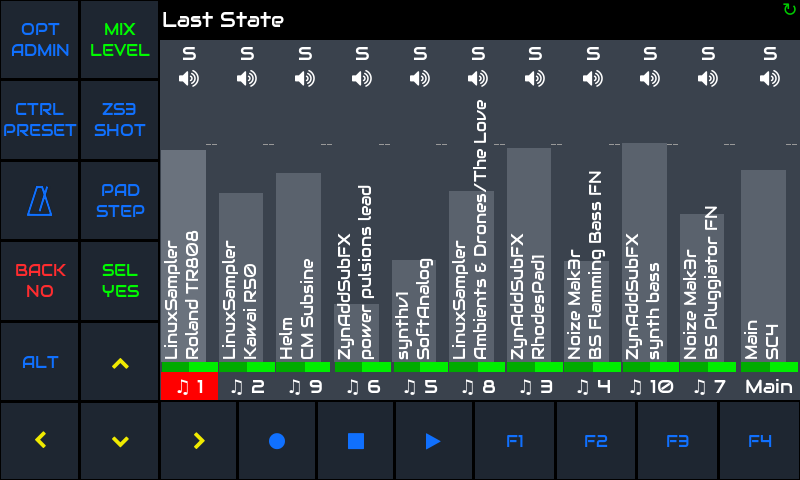
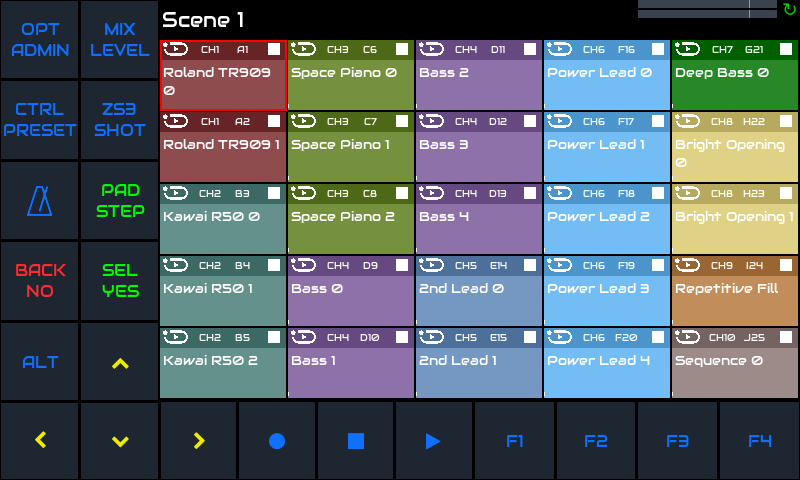
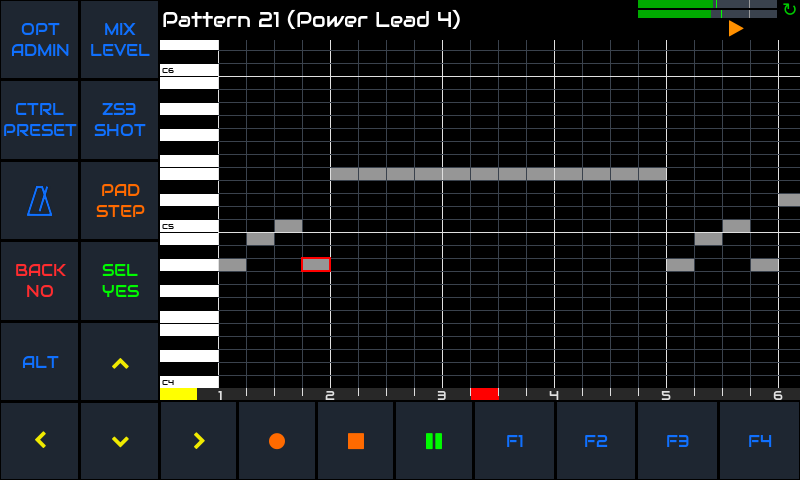
I thought you were one of those, who preferred the black background of the buttons, weren’t you? Did you change your mind, then?
This was fixed but was subsequently intentionally regressed. I don’t like the current behaviour. Zynthian UI is never intended for use with mouse as primary interface and so should not have fancy higlighting elements that adversely impact the core workflow… but what do I know about GUI design? Everything I do is ugly!
You know what ? I think it’s wonderful.
It may need a pencil to click on the tracks but wow.
I have to take a look of how many parts I can keep from V4 to make such v5 with pi5.
New screen new case and it can be a perfect mix of pot/screen.
2 Likes
But your soul is beautiful, mate!! 
4 Likes
This is true @riban… All bad!!! 
But you invented something wonderful!!! Are you looking for compliments? Here they are. 
3 Likes
Until now I never managed to see the coloured labels of the touch buttons on the display. They usually show either blue or black, do not react to ALT or page and once triggered, stay black. I tried touch only wiring and activated touch buttons in ui, on Vangelis and Oram. Buttons trigger their actions, it is just the issue of labes not showing correctly.
Where could I look for errors or misonfiguration? Could it be due to HDMI display, not rendering some SPI-related display data or drawing functions? Some framebuffer misconfiguration?
A fresh image did not (yet) help.
That’s strange. Which version of the system do you use?
The colours on the button labels are controlled by the same subsystem as the wsLEDs in the physical buttons of V5. I don’t know what else can affect that functionality. Do you have the “Customization profile” set to “V5” in the “Wiring” configuration - or do you use some other customization of your own?
Black is the colour of a LED turned completely off. I have only seen it in some “Screen saving” mode, but that one now turns the whole display off so I have’t seen it for a long time. If the colours of other UI widgets (e.g. the mixer) are as expected, there is no reason to suspect a display issue.
Hardware->Kit is set to Custom
HDMI screen and touch configured and working correctly.
Hardware->Wiring->Wiring Layout is set to Touuch Only.
Customization Profile is set to V5.
Interface->UI Options->Touch Navigation is set to V5 keypad at left
Controller widgets layout is set to Auto.
Did I set something wrong?
PS: This is a photo of how it looks like. Scrot does not work here.
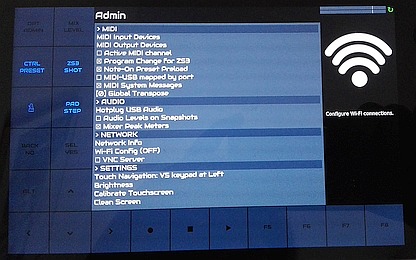
PPS: Yes, the Update was done after the photo, but the issue with the touch buttons remains the same.
BTW: The update via Webconf did not make the update sign go awayt, only the update via touchscreen did Looks like the update via Webconf does not complete.