export DISPLAY=:0.0
Before scrot allows scrot to work.
I also start an http server so I can get the pictures off easily…
python3 -m http.server 8000&
export DISPLAY=:0.0
Before scrot allows scrot to work.
I also start an http server so I can get the pictures off easily…
python3 -m http.server 8000&
The picture looks really somehow “bluish” (kind of monochromatic) to me, but that may be a problem of the photo. The green symbol in the upper right corner seems to have the green colour, right? Anyway, there should be some red cursor somewhere in the menu, at least. Is it displaying red colours at all? In any case, even blue and green should highlight more buttons than just the four.
The display shows all colours, it is just that scene with few colours.
If I boot a USB stick with Ubuntu, I can watch films and see photos, all full colour.
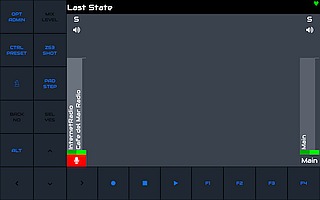
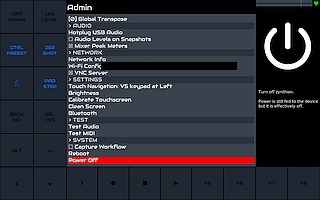
Thanks @wyleu Now I have the screenshots:
They look the same on screen and on VNC.
This display is colorblind like me… 

No. The camera had wrong white balance setting.
Is there a solution for the black labels on the touch buttons, or not?
In the screenshots / scaled down to 50% and jpeg, there is still visible that the labels on the touch buttons are just blue and black and they instantly turn black once tapped. See the Admin button that turned black after calling up the admin menu.
Is that now so difficult to understand?
Yes, it is difficult to understand, unfortunately. I cannot replicate your problem, not even with the same settings. Can you see any issues in your logs?
What version of the system do you use? My versions (I have updated just now) are:
 zynthian-ui: vangelis (b972f7)
 zynthian-webconf: vangelis (435981)
 zyncoder: vangelis (092fb2)
 zynthian-sys: vangelis (ddc98c)
 zynthian-data: vangelis (087b8f)
I’ve too updated right now:
zynthian-ui: vangelis (b972f7)
zynthian-webconf: vangelis (435981)
zyncoder: vangelis (092fb2)
zynthian-sys: vangelis (60b27e)
zynthian-data: vangelis (087b8f)
Zynthian.sys is different.
This is all I can get with updating.
I’ve also reimaged from Last Stable, numbers are the same.
Something seems to be really wrong.
Your version of zynthian-sys is the correct, most up-to-date one. Mine was stuck and I had to reset the git index to get up-to-date. However, no problem.
There must be some error report from python in the logs. Otherwise, I have no idea how to find the problem. Obviously, it must be some software issue, but I have no idea what could cause such a problem.
You say, once you touch any button, it turns black and never lights up again in any colour? But otherwise, everything else seems to continue working correctly? And at the start, all buttons are blue?
There are no erros in the logs, that is exactly what leaves me puzzled.
Some buttons are blue in the beginning, like in the upper screenshot. Once touched, they turn black and stay black.
Functions are like expected.
I’ve tried different versions of Zynthian software, images, fonts, whatever. No avail. No errors shown.
Yes, the blue ones on your screenshot are those that start as blue ones. Something strange is happening once there is another colour applied: it turns into black and does not even change back into blue anymore.
I suppose you have not played with configurations … well, the colours should not be customizable anymore, unless you edit zynthian_envvars.sh manually. And even if all the other colours were manually reconfigured to black, then at least the blue one should return back.
I will have a look at the code and think about any potential culprits. We will probably need to do some modifications for closer debugging of what’s actually going on there. But you will have to carry out the experiments, since I am not able to replicate it on my zynthian… 
I chose V5 keypad at right UI for my Zynthian touch screen only and I found it very useful for my use of Zynthian.
I have some questions:
The touch buttons have exactly the same configuration, possibilities and limits as the corresponding physical buttons of V5. Their configuration is in the advanced view of the wiring(?) setup (if I remember correctly).
You can’t really tell what exactly are the F1-F4 buttons, but you’ll recognise them by their preconfiguration as “Program Change 1-4” in the wiring section I guess.
Hello, does it slow down your Zynthian with the button displayed ?
Found the solution: The LED Brightness setting has to be at 100% for the touch buttons to show correctly. If the setting is lower, the labels on the touch uttons will turn dark or even black as soon as they have been touched. Some touch buttons turn dark or black instantly after changing the LED Brightness.
This is the solution for the problem. It’s not a bug, it’s a feature.
As far as I can tell, on an RPi5 it has no measurable effect on performance.
Webconf > Hardware > Wiring > Customizable Switches
F1 is Switch-8
F2 is Switch-12
F3 is Switch-16
F4 is Switch-20