I’m really looking forward to the first main market piece of kit that offers this capture workflow feature . . .
3 Likes
Hi @jofemodo
Following your post I went back to record that issue, switched it on and… everything works fine as expected. Maybe the reboot solved something that was screwed up….
Thanks and… Sorry for the noise!
Best
Keep looking for it, but you won’t find it 
1 Like
And what about a mainstream device that offers a capture workflow and lets you define per-synth CC parameter ranges (i.e., mapping a CC to a specific parameter with a customized value range)? It may look like a small detail, but it massively improves Zynthian’s playability and usability. I wouldn’t be afraid to call it a milestone.
It also feels like @jofemodo, @riban, and others keep hitting one milestone after another. Thanks, guys!
2 Likes
Yet.
Nope, I’m not missing that one!!!
What if we turn the “V5 mockup” in a remote interface for Zynthian. Headless zynthian owners would find it super useful. And future JFK owners would have a way to access the full zynthian power.
Don’t find the raw VNC UI too austere? I’m really surprised nobody has asked for this. It’s so evident … and we are so close!! 
2 Likes
Excellent idea, especially to solve the missing encoder issue for starters or external audio interface setups. The encoders could support click/tap and drag up/down.
In VNC mode on TouchOnly Wiring and Customization Profile V5 drag up/down is working. But click/tap not.
And if it would have 4 extra virtual encoders it would almost be there.
I got a bit further with the mapping issues I had. When saving and recalling these controller mapping ranges in zs3 states they are not properly restored (and/or updated in the chain). Graph display, values used by the plugin and values shown in the control ranges dialog differ after restoring a ZS3. I think this is how I got what I called strange graph ranges. Try to repeat saving and recalling ZS3s with different settings for controller mappings. This time I’m attaching a capture. Not a complaint, this is Vangelis and recent stuff, but maybe helpful to go on 
Best
I just upgraded Oram stable (installed from stable a couple weeks ago) to Vangelis.
I can’t edit chains! When I go to a chain and click the chain name at the top of the screen, the UI locks up, and I have to systemd restart zynthian to recover. This happens on any configured chain.
I don’t have zynth hardware, just an RPi 4, with screen and mouse.
I opened an issue: Clicking on chain name locks up UI · Issue #1585 · zynthian/zynthian-issue-tracking · GitHub
(PS: how can I revert back to Oram?)
It’s not recommended. Going back from Vangelis to Oram is not a tested path. Anyway you could try and see what happen.
Please, read this:
We warned about it.
PLEASE TAKE NOTE
Within the next few days we will be merging our bleeding-edge development into vangelis (testing) branch. This will make vangelis a development branch that should not be used for production. (Not that you should have been anyway!)
Please move to oram to continue to experience a (relatively) stable workflow. Vangelis may be broken at any point (hopefully for not too long!) and should only be used to test the latest bleeding-edge developments. We strongly recommend using a dedicated device (or boot media) for vangelis, separate to your normal, day-to-day zynthian usage (which should use oram).
There are many changes in this development version and full forward / backward compatibility is not guaranteed. Indeed, you are unlikely to be able to move between oram and vangelis without a degree of hurt.
Please heed this warning! Move from vangelis to oram and / or do not update vangelis unless you want to feel the same hurt that we developers experience.
Regards
Thanks, noted. Fortunately I backed up, so I can just load another SD card.
2 Likes
I’d really like to try this, but I can’t because I can’t upgrade from Oram to Vangelis. When I try, anytime I click in the title bar (for example, where the chain name appears) the UI locks up.
I reported this as Clicking on chain name locks up UI · Issue #1585 · zynthian/zynthian-issue-tracking · GitHub . @riban was unable to reproduce it and marked it as unreproducible, but I can do it, and have done it on both Pi4 and Pi5, from two different stable Oram versions.
Note that I’m using HDMI monitor and USB mouse & keyboard, with no Zynth hardware, and that might be a factor.
Please, send the UI logs to see the error that blocks the UI.
Regards,
Just tell me where to get them. I did UI log from webconf, in debug mode, and it’s posted in the issue (with nothing other than the startup.)
Just tested this lovely feature! Works well. However, I have one suggestion for my use case, which is as follows:
-
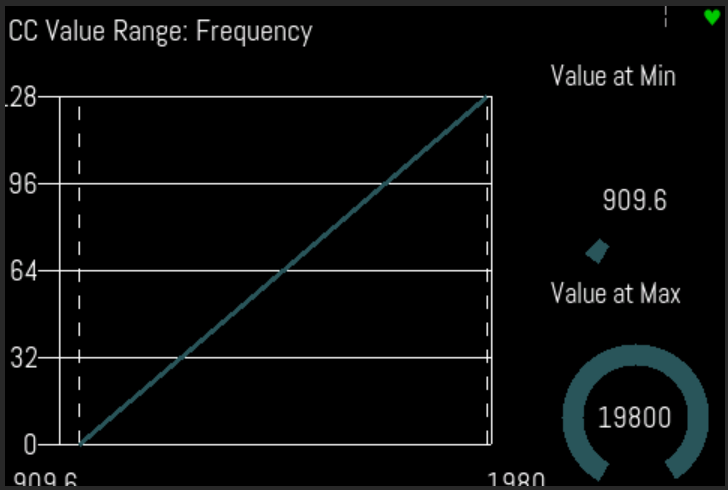
Currently I have a instrument chain with an instrument followed by Calf Filter. I have mapped channel pressure to control the filter frequency. Works super well, especially now that the range can be set.
-
What I want to do next: I’m using an external USB MIDI controller with knobs and buttons. I would like to assign this MIDI controller knobs to control Value at Min min and Value at max. This would give me a quick access to use my MIDI controller to adjust how aftertouch affects the filter. However, it seems these controls cannot currently be mapped to a CC. So my small suggestion is to make these two controls learnable
1 Like
That sounds like a reasonable feature request. Please add a ticket to the issue tracker.