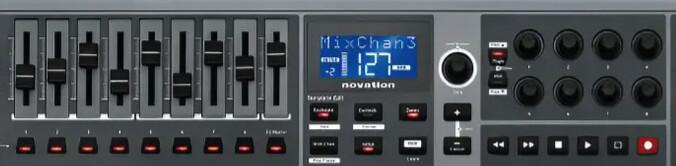
“To save processing power, I have several channels loaded, each with a MIDI event filter mapped to a knob. I open and close these filters depending on the sound I need. However, I’m currently using two knobs for this: one for volume and another to toggle the MIDI filter. Is it possible to combine these into one? Can I automatically block MIDI input whenever the volume reaches zero? I do this in MainStage and want to replicate it on Zynthian.”
Sorry, i can’t understand what do you want to achieve. Please, be more verbose.
Regards,
Sounds like he wants to stop incoming midi when chain volume is at minimum to reduce audio resource load. I think it’s a suboptimal way to acheive a very reasonable goal. I personally like how e.g. Reaper bypasses plugins for muted chains.
But of course it’s best @richard_brasil speaks for himself. 
Sorry for the delay, I had personal issues
Today I like to have multiple instrument chains in a snapshot and adjust their volume up and down without having to switch snapshots, like in the image below.
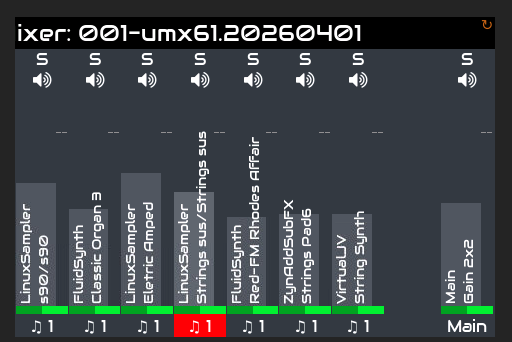
The problem is that on my RB4, sometimes it makes a popping sound and the memory and CPU usage go very high. To fix this, I add a MIDI event filter to each instrument chain and map it to a knob, as shown in the images below , in order to block the instrument’s MIDI notes and avoid triggering it.
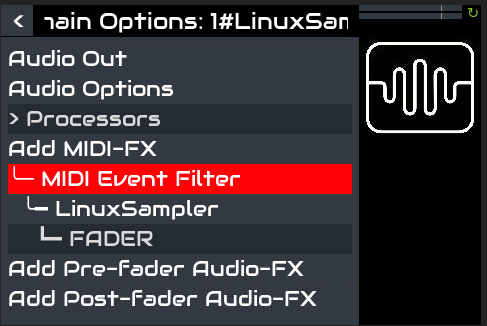
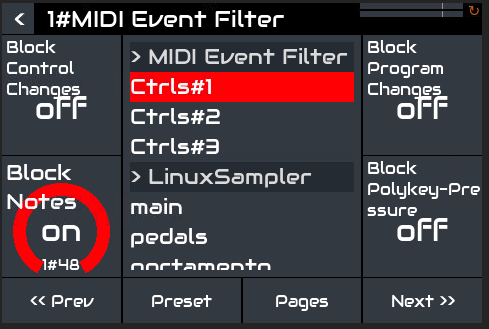
It worked perfectly. The problem is that in practice this costs me two knobs—one for the event filter and another for the volume—for each instrument chain, and it also makes it more work to quickly open and close the sound.
Is there a more efficient way to do this? For example, when the volume reaches 0, could it block the MIDI signals?
1 Like
Do you play more than one chain at a time? It sounds like you want to use “Active mode”. This will only play the highlighted chain. In the MIDI input submenu of the admin menu, bold SELECT your MIDI input and ensure it is set to Active Mode, not Multitimbral. Then just select a chain to play it. If Active MIDI Channel is enabled in the admin menu then all chains with the same MIDI channel will sound, allowing you to layer chains whilst using active mode.
1 Like
Yes, I usually use more than one sound at the same time… for me that wouldn’t work. I’ve also tried using a subsnapshot with preset configurations before, but it’s very limiting. I like to bring sounds in and out during the performance, and the combinations are endless
1 Like
are the knobs encoders or potentiometers?
What piece of hardware are you using as controller.
I’m thinking of two possible paths
- Using ctrldev to control the two functions, this would be irrelevant to which knob type it would be.
- That the midi filter would only be active (not yet knowing how to do this) when the ccval would be zero, both midi filter and volume control set/mapped to the same knob (in this case potentiometer)
I hope there is something helpful here but the more details we hear the better chance we can help.
@richard_brasil I like what you’re trying to do but it could be really difficult to achieve.