One workflow might be possible. As you already described you have a snapshot functional with 64 SubSnapShots. Calling this in organised manner maybe possible with midifilters i.e.
-if first row first pad is pressed then send pc 1-8 with second row pads.
-if first row 2nd pad is pressed then send pc 9-16 with second row pads.
Is there way to quickly change program changes that m-audio sends?
Or otherwise get zynthian somehow translate pc messages conditionally. One way copilot suggests to do this is below(might not work):
MIDI-FX mapping with CC-controlled bypass
This builds four parallel MIDI-FX layers that convert your second-row pad messages into different PC ranges. You “select the bank” by enabling one FX layer (bypass off) and disabling the others via CC. It’s not as elegant as true conditionals, but it’s reliable and fully native.
What you’ll need
Controller setup:
First row pads send unique CCs (e.g., CC20–CC23) on one MIDI channel.
Second row pads send eight Notes (or CCs) consistently (e.g., notes 60–67 or CCs 30–37).
Zynthian setup:
Four MIDI-FX layers (one per bank).
Each layer maps the same incoming second-row messages to a different PC range.
Steps
Pick the trigger type
Goal: Decide what the second row sends.
Recommendation: Use notes 60–67 for second-row pads — they’re easy to map repeatedly.
Create the first MIDI-FX layer (Bank 1)
Action: Add a MIDI-FX layer (e.g., x42 MIDI Map or similar available MIDI map).
Map:
Note 60 → PC 1
Note 61 → PC 2
…
Note 67 → PC 8
Bypass control: Assign the plugin’s bypass (or enable) parameter to a free CC (e.g., CC20). Set it so CC20=127 disables bypass (active), CC20=0 enables bypass (inactive), depending on plugin behavior.
Duplicate for additional banks
Action: Create three more MIDI-FX layers:
Bank 2: Note 60–67 → PC 9–16, bypass mapped to CC21.
Bank 3: Note 60–67 → PC 17–24, bypass mapped to CC22.
Bank 4: Note 60–67 → PC 25–32, bypass mapped to CC23.
You can add more banks if needed (up to your CPU/organization tolerance).
Route MIDI in parallel
Action: Ensure your controller’s MIDI input is routed to all four MIDI-FX layers simultaneously. Each layer should output to the Zynthian engine/UI that handles Program Change for SubSnapShots.
Set initial state
Goal: Only one bank active at startup.
Action: Bypass three layers, leave one active. Store this state in a Zynthian snapshot.
Program the first row pads
Action:
Pad 1 → CC20 value 127 (activate Bank 1) and optionally send CC21/22/23 value 0 (bypass Banks 2–4).
Pad 2 → CC21=127 (activate Bank 2), CC20/22/23=0 (bypass others).
Pad 3 → CC22=127, others 0.
Pad 4 → CC23=127, others 0.
If your controller can only send one CC per pad, you’ll need to manually toggle or add more banks on different CCs and ensure previous banks are bypassed via Zynthian UI before performance. Some controllers support “multi-messages per pad” or “macro” — use that if available.
Test the flow
Action:
Press a first-row pad to select a bank (activates its MIDI-FX, bypasses others).
Press a second-row pad — it sends Note 60–67, which the active MIDI-FX converts to PC in its range (1–8, 9–16, etc.).
Confirm Zynthian recalls the correct SubSnapShot.
Save a master snapshot
Action: Store the whole routing and bypass states so you can boot into this performance setup.
Notes and tips
Scaling to 64 slots: Add four more banks (Banks 5–8) mapping to PC 33–40, 41–48, 49–56, 57–64 with CC24–CC27 for bypass.
Visual feedback: If your controller LEDs can follow CC, map them to mirror which bank is active.
Fallback: If bypass isn’t CC-assignable on your chosen plugin, use another MIDI-FX with a mappable “enable” or “mix” parameter you can drive to 0/100%.
Master Channel Program Change will select the first (alphanumerically sorted) snapshot file that matches “nnn-*.zs3” within the currently selected snapshot bank, where “nnn” is the MIDI Program Change number (not +1).
You can send up/down messages for snapshot and bank selection on the master channel but not a configurable offset.
So if I understand you correctly, in- and decremental changing snapshots is not possible?
What I mean is it possible to change the snapshot to the next snapshot in in the list when sending the PC as defined for master program change…?
(Is it at all possible to change presets/banks/…. in- or de cremental?)
To me the wording up/down message is confusing since there is no up/down? It is ‘only’ selecting the snapshot that matches the PC number…. Or am I totally confused?
Cheers,
Maarten
PS I only succeed in ‘absolute‘ selection… so selecting the snapshot that matches the PC number….
Although slightly off-topic, I exploit the chance of your useful recap, on the implementation of Program Change in the Zynthian, to try and advance my own understanding of this matter, about which I would gladly hear any possible corrections and amendments:
1] Regular Program Changes are received by Zynthian on the Master (Midi) Channel set in webconf, on the numeric scale 1-xxx, and load, in slow startup fashion, the saved ZSS snapshot with the corresponding number (a layout of processor chains with related Midi channels, Mixer setup and parameters settings).
2] Users can define any amount of ZS3 sub-snapshots for each saved snapshot, activating Midi-Learn in an instrument/processor/chain by entering its ZS3 page, where they can send to the chain’s Midi Channel a trigger Program Change, which from there henceforth will be associated with a bank, preset and parameter configuration, of the processor/instrument loaded in the chain.
This binding of a processor’s state with an external Program Change defines a ZS3 Sub-Snapshot, that can be recalled on-the-fly in fast-loading fashion, by sending its associated PC number to the Midi channel of the processor.
I think for ZS3 your description is almost right. Except that for ZS3, PC’s can be received on the MIDI channel that is received when on the ZS3 page in lerning mode. Also, on the Admin page, “Program Change for ZS3“ needs to be activated.
So when you have 5 ZS3 subsnapshots numbered from 001 to 005. You can select then individually by any channel and PC that is received when a ZS3 subsnapshot name is selectedon the ZS3 user screen. It does not matter to which MIDI channel is defined for the Snapshot itself.
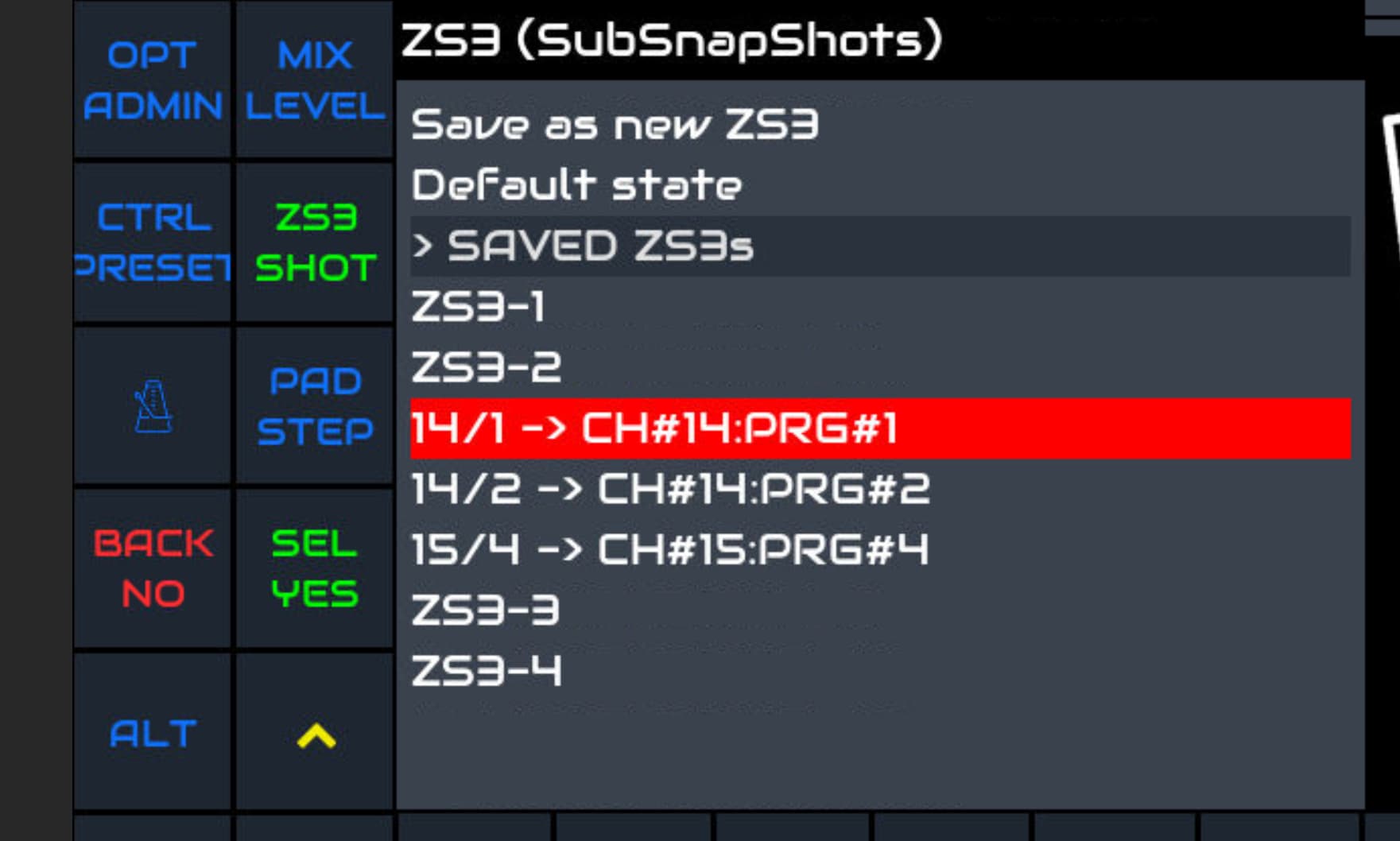
In the picture below the Snapshot receives MIDI on channel 1 and PC’s on channel 15 and 16.
PS…. It is all ‘Absolute‘ adressing. The number of the PC is selecting the ZS3 with corresponding number.
PPS The shown MIDI channel nummbers on the UI have confusing numbers; they are one number lower than expected. (depends on whether the first channel is defined as 1 or 0). This is mixed up in the Zynthian UI interface. So in teh picture you see PC on channel 14 and 15. In fact they are channel 15 and 16.
Alright @maartmaart, thanks for promptly pointing out at some useful clarifications, on the ZSS/ZS3 subject.
I would just suggest, for the sake of keeping things tidy, that it might be logical to Midi-Learn Sub-Snapshot configurations of a chain/processor in its own Midi channel. Otherwise, keeping track later, at archival level, of which ZS3 does what to which processor might turn up to be quite confusing.
I would even go as far as to propose, for further development, to force by-design that program changes for ZS3 be stored with the Midi channel of the receiving chain, if the snapshot layout is set in multitimbral mode.
The ZS3 subsnapshot selection contains settings of the WHOLE snaphot… so several chains with each their own MIDI channels. So the MIDI channel of the ZS3 selection is not related to the MIDI settings of each chain within the snapshot.
Pffff…. getting dizzy… Perhaps time for a concise summary…
No need to be sorry at all @maartmaart : your further clarification sheds light on any residual doubts, and possible misinterpretations on my part!
If I read your words correctly, we could maybe summarise the topic in this way:
Saved ZS3s linked to an incoming Midi-learned Program Change recall the whole presets and parameters layout of a snapshot (quickly), unless the Program Change is sent to the Master Channel, in which case it will be interpreteded as a request to unload the current snapshot ZSS configuration and load a new one (slowly), providing a saved snapshot ZSS file exists with the same PC number.
If you have the master channel enabled you can select indeed snapshots via the MIDI master channel. At the same time you can still switch ZS3 as before except not via the the Master channel (I think…otherwise you could get conflicting messages) The other MIDI channels can be used for ZS3 selection.
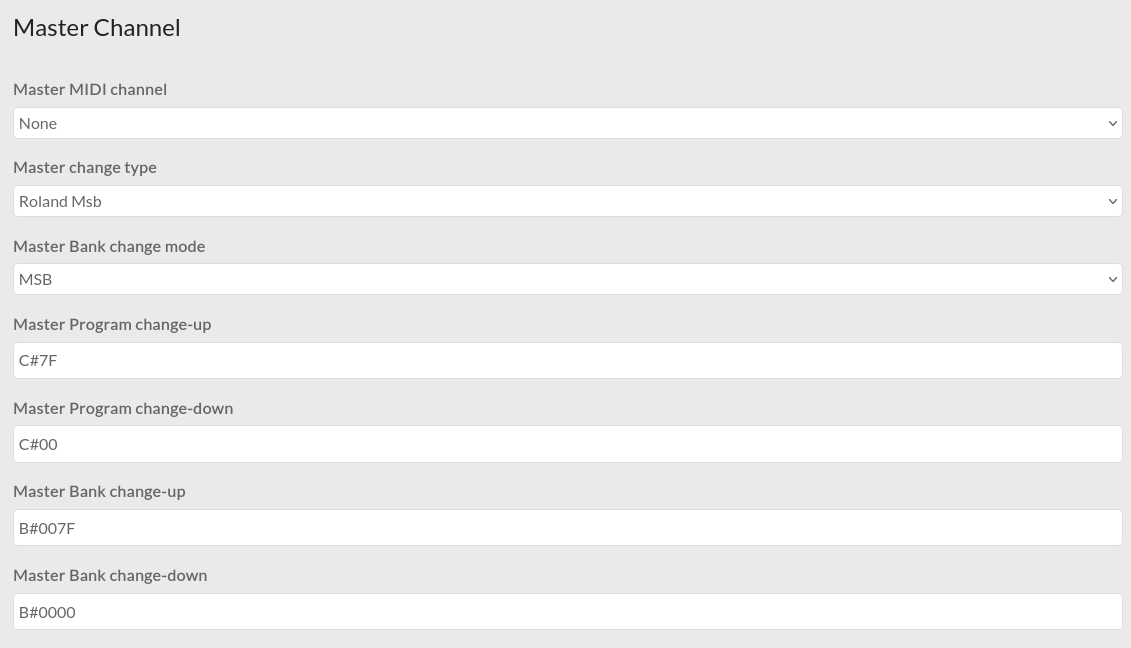
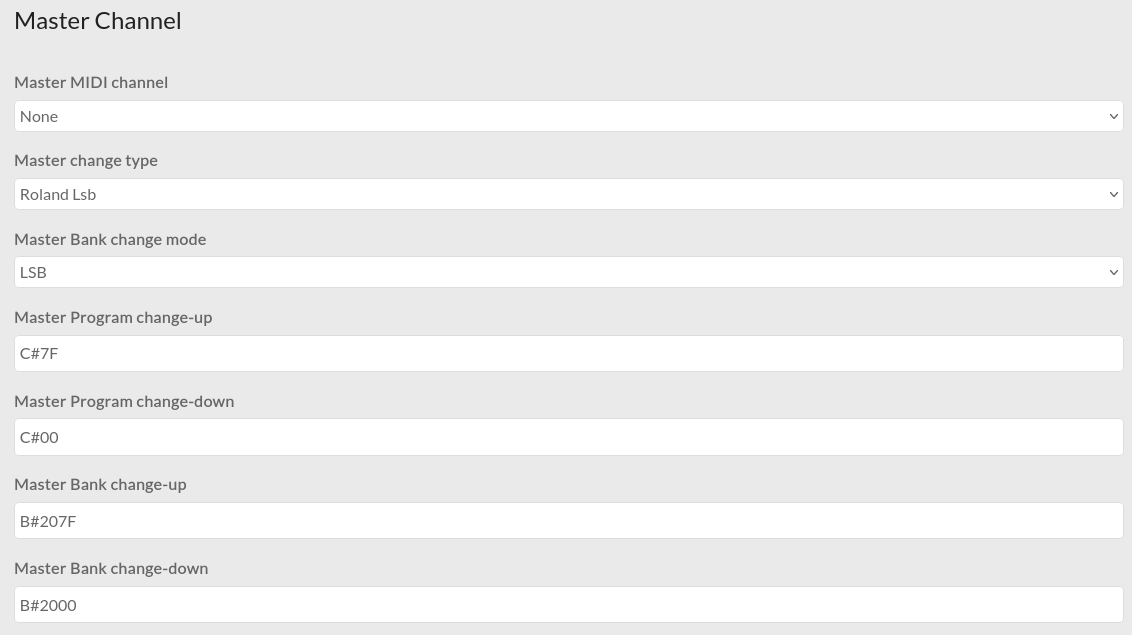
This is possible. In webconf INTERFACE→MIDI Options there are configuration entries for:
Master Program change-up
Master Program change-down
Master Bank change-up
Master Bank change-down
which allow you to configure MIDI commands that can be sent on the master channel to increment and decrement the program (snapshot) and bank (snapshot bank).
I used the webconf page for defining PC’s in order to select ZS3 subsnapshots…
When I defne 4 for Master Program change-up then ZS3 with 004 is selected… when I press again still ZS3 with 004 is selected… So no incremental selection. That why I was so eh confused because the naming suggests that is works incrementally and decrementally, but it doesn’t unfortunately.
I didn’t quite understand what value to enter and what MIDI command to send. I saw it in the source code but did not have time to investigate. (I am replacing the roof on my garage so doing proper building work that is weather dependent, hence urgent.)
Thank you for your reply. Unfortunately I do not get it to work .
Selecting a snapshot by a fixed number works, but not incremental/decremental.
Also I do not really understand your mail…
What I understand is the foolowing:
In the screen pictue the Master MIDI channel is not defined. I think this is mandatory? For me selecting a snapshot (absolute by number) only works when there is a channel defined… I use channel 16
I think that ‘C#7F’ stands for ‘Program Control Number HEX 7F’ = 127 decimal? So I need to fill in 127 in my remote controller for program change number…? This does not work. When I fill in 0 (zero for decremental) then something happens… the message on the screen indicates that a snapshot is loaded but the current snapshot is stil loaded. (I think it wants to load snapshot number 0 (zero) ?) . By the way, Absolute selection is independent from the selection for Master change type ‘Custom’ or ‘Roland MSB’.
What is ‘Bank 0x7F’? Is that a Program change number or Control Change number?
The ZS3 remote switching works but unfortunately also only absolute… no plans for incremental/decremental ZS3 change?




 .
.
