Grouping presets/chains

Well, with Zynthian, I’ve discovered a whole new universe of possibilities, and now I want to put it into action for live performances. Until now, I’ve had various keyboards, and during live performances, I’ve developed some habits that are hard to let go of :frowning:. Specifically, I’m looking for a way to create a snapshot that would allow me to use the M-Audio Oxygen 61 Pro MIDI keyboard with Zynthian as if I were using an electric piano, and to switch instruments in a similar way. I’d use that keyboard for intros and improvisations on stage as a secondary keyboard. I’ve read the manuals (as much as I can understand as a fresh Zynthianer), but I just can’t figure out how to customize things my way.

Here’s what I’m trying to achieve, for example: In the mixer, we have Chain 1 VirtualJV Piano, Chain 2 VirtualJV Piano EP, Chain 3 VirtualJV Rhodes, Chain 4 Fluidsynth Bright Piano…

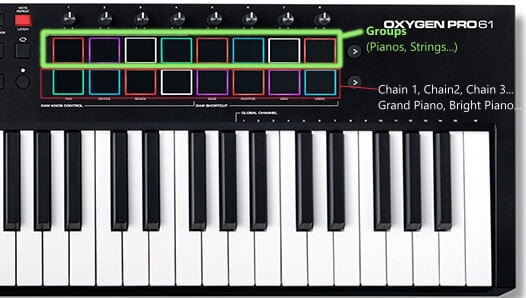
On the M-Audio Oxygen61 Pro MIDI controller, I have 2 rows of 8 pads each. The top row of pads would be used to select instrument groups, Pad 1 – Pianos, Pad 2 Guitars, Pad 3 Sax’s, Pad 4 Strings/Pads, etc. When I press Pad 1 on the top row, the bottom row would have Pad 1 Chain 1(Instriment1), Pad 2 Chain 2(Instrument2), Pad 3 Chain 3(instrument3) - according to selected group, and so on…

I know that for the top row of pads, I could set them to MIDI channel 16 and use them to call snapshots, and use the bottom row of pads to call ZS3. The problem is that the snapshot loads slowly, even though the engine doesn’t change in the chain (Chain 1, 2, 3 is always VirtualJV, and Chain 4 is Fluidsynth).

I’d appreciate some help; I have no idea how to organize the grouping of instruments so I can switch them quickly.

I’m using Zynthian Vangelis, RPi5 8GB, Apacer microSDHC (until my NVMe arrives).

Thank you all for your help and advice.
You can use zs3 which does not change the loaded instruments but recalls presets and parameter changes. This is quick and designed for this workflow. You can recall a zs3 with a MIDI program change.

2 Likes

Yes, I’m interested, can the active chain be changed with the Program Change command (or CC)? I read about it somewhere on the forum, but I don’t know how to set it up. The left-right arrows can change active chain, but that’s not adequate for me when jumping from the 1st to the 5th chain. I also tried the solo option, but that doesn’t work for me either because multiple chains can be solo at the same time, and that doesn’t suit me.

I don’t understand what you want. Will you please describe step-by-step what actions you want to perform and what result you want from zynthian?

Yes, recalling a zs3, e.g. with MIDI Program Change will set the active chain to what it was when the zs3 was saved.

I agree, but that method excludes the possibility of calling groups of instruments/chains with the upper buttons/pads.

So, I would somehow group the instruments so that with the upper pads I select the group of chains that will appear in the mixer, and with the lower pads I activate the chain.

1 Like

Changing the processors, e.g. instruments in a chain is slow. Snapshots do this. If you want to do that then you will have to recall snapshots with your top row. I don’t know if there is a way to do that.

…that’s what I thought as well. I hope the snapshot will load at an acceptable speed once I install the NVMe drive. I’m curious, what’s the difference in speed and responsiveness when Zynthian runs from an NVMe drive, especially when a snapshot is selected?

If i understand well, you would like to select chain using top row, and them changing presets for that chain using second row.

This workflow is not “zynthianic”, as it’s too restrictive. ZS3s offers much more power, but currently we have no ZS3 banks, what would enable an easy way to get what you want. We could consider this workflow, but we would need a feature request in our tracking system.

Regards

2 Likes

As it currently stands, the upper buttons, which represent groups of instruments, are used to select snapshots (8 snapshots in total). Each snapshot has 8 chains. The lower row of buttons uses the Program Change command to call its ZS3, effectively activating a predefined chain (MIDI channel). Everything works perfectly, but changing snapshots takes too long. It would suit me perfectly if, when I load a snapshot, I have 8 chains in the mixer, each on its own MIDI channel (in my case, from 1 to 8). Then, I could use the lower buttons to activate the desired MIDI channel (chain). As far as I understand, chains can only be activated using the arrow keys (left, right) or by touching the screen. There is no option to select a desired chain via a MIDI command. If an option were added to change the active chain (MIDI channel) via a MIDI command, then I could handle the whole thing using ZS3. For now, such a feature seems impossible.

AI responses may include mistakes! But here goes anyway:

prompt: how do you select a zs3 subsnapshot via midi?

To change a Zynthian ZS3 snapshot via MIDI, you need to enable “Program Change ZS3” in the Admin menu, then from the control screen, bold-press the snapshot button to enter MIDI learn mode for Program Change, and finally, send a Program Change message from your external MIDI controller to load the desired sub-snapshot. You can also use MIDI CC messages to control the ZS3 screen by mapping them to MIDI Note-On events in the webconf interface, allowing for more granular control.
Steps to Load a ZS3 Snapshot via Program Change

  1. Enable Program Change ZS3:
    In the Zynthian interface, go to the Admin menu and enable “Program Change ZS3”.
  2. Enter MIDI Learn Mode:
    From the Zynthian control screen, you can:
    Bold-press: the snapshot button to enter the ZS3 Program MIDI-learn mode.
    Alternatively, from any selector screen, touch the loading logo to enter the ZS3 learn mode.
  3. Send MIDI Program Change:
    Send a Program Change (PC) message from your external MIDI controller.
  4. Load ZS3 Snapshot:
    The ZS3 screen will change to the designated sub-snapshot based on the PC number sent.
    Steps to Control the ZS3 Screen via CC Message
    Access Webconf: Open the Zynthian web interface and go to INTERFACE->MIDI Options.
    Set Master MIDI Channel: Ensure the master MIDI channel is set correctly.
    Add MIDI Filter Rule: Create a new filter rule to map a specific CC message to a MIDI Note-On event that controls the ZS3 screen. For example, you could map CC 101 on MIDI channel 16 to a Note-On event for the ZS3 screen.
    Send CC Message: From your external MIDI device, send the programmed CC message on the specified MIDI channel.
    Control ZS3 Screen: This will trigger the ZS3 screen to appear.
    Example Scenario
    You’ve created several ZS3s (sub-snapshots).
    You save the first ZS3 to be loaded by MIDI Program Change 1, the second by PC 2, and so on.
    To switch to the second snapshot, you send a MIDI Program Change message of “2” on the designated MIDI channel.
    Your Zynthian device receives the message and loads the corresponding sub-snapshot, changing the active configuration of your layers and instruments.
    Map SCREEN_ZS3 and scroll through sub-snapshots to midi …
    Nov 30, 2024 — In webconf INTERFACE->MIDI Options you can set Master MIDI channel and then assign a Master Key Actions for a MIDI not…

Zynthian Discourse
ZS3 Programchange - Using Zynthian
Apr 17, 2020 — That’s not how I’ve been using ZS3. I’d create one layer, load in the Piano sound and set the volume. Save that to a s…

Zynthian Discourse

Close, but no Banana… - Software - Zynthian Discourse
Dec 19, 2021 — To add a ZS3: * Within admin menu, enable “Program Change ZS3” * Create a layer and configure as desired. * Within la…

Zynthian Discourse

Show all
Dive deeper in AI Mode
AI responses may include mistakes. Learn more

1 Like

Thank you for the detailed response, but configuring and loading ZS3 here is not the problem. That works perfectly. As I drew in the image above, I would like to set the buttons in the upper row as banks, where each bank has eight presets, and then use the buttons in the lower row to activate the presets within the selected bank. Currently, each button in the upper row has its own snapshot, and when I call it, I get eight presets (chains or whatever we call them) on the screen, as I’ve defined them. I activate the specific preset with the corresponding button in the lower row. So, in the upper row, I have buttons 1 to 8, and in the lower row, buttons 9 to 16. For example, button 1 is for pianos, button 2 is for guitars. When I press button 1, Zynthian loads a list of presets: Grand Piano on MIDI channel 1, Bright Piano on MIDI channel 2, EPiano on MIDI channel 3, and so on. When I want to activate Grand Piano, I press button 9, and it calls the appropriate ZS3. When I want to activate Bright Piano, I press button 10, and so on. The problem arises when, during playing, I want to switch from piano to guitar. Then I have to wait for the entire snapshot to load in order to select the appropriate guitar, and this way of switching instruments is simply not acceptable. That’s why I’m looking for a way to define banks as ZS3 and call presets by using a MIDI command to activate preset within the selected instrument bank. I hope I’ve explained it a bit better. It’s really easy to get confused with the terminology and different interpretations.

1 Like

Thank’s for the answer. That’s exactly what I need. It may be a bit ‘restrictive,’ but it allows me quick and easy access up to 64 instruments that I can switch while playing, which is especially important during club performances when playing without breaks between songs. In those situations, I can’t afford to wait for a snapshot to load.

How can I send feature request?

1 Like
1 Like

Do I understand you right, you want to mimic a stage piano which has banks of instrument groups with sub instruments, but basically only using 2 engines which are VirtualJV and Fluidsynth (for sf2), so you want 64 patches preloaded without loading time?

So, as far as I know 64 preloaded chains do not work. It seems like the best way would be if it would just load only one preset at least. So an organizing system which would merge engine and preset choice into one menu, featuring a “favorite” system also organized in banks, which would be accessible via MIDI input.

The question would be, if it suits the way zynthian is heading to.

Yes, exactly. Just like on digital piano, digital work station…

So far, I’ve experimented with soundfonts and managed to create a snapshot that has 64 ZS3s. The M-Audio Oxygen61 Pro has a pad with 16 buttons across 4 banks. Now, I wanted to create something similar but better structured.

I don’t understand why all 64 chains would need to be preloaded?

As far as I understand, ZS3 doesn’t work that way. The snapshot loads the engine and arranges the patches across presets/MIDI channels. When a ZS3 is activated, Zynthian only needs to switch the patch. With soundfonts, you send a MIDI Program Change command because the entire soundfont is already loaded into memory. I’m not sure how VirtualJV works, but considering how quickly it loads patches when I browse, it probably just pulls the parameters from the ROM. Why couldn’t it do the same when I trigger a Program Change and call the corresponding ZS3?

1 Like

Loading a snapshot applies (almost) the whole configuration: chains, processors, sequences, etc.

Loading a zs3 applies presets (patches), parameter changes, active chain selection, etc. i.e. changes the condition of the loaded processors.

You can change preset (patch) manually or with MIDI program change.

You can change zs3 with MIDI program change.

You decide which (preset / zs3) that MIDI program change recalls with the admin menu, “Program Change for ZS3”.

If you just want to change the preset (patch) of the loaded instruments, then disable zs3 recall and use MIDI program change, just like you would on any individual instrument. (There is a little bug that the mixer view does not show the new preset name until the display refreshes, e.g. change view.)

If the MIDI input is in “Active mode” then all MIDI Program Change only affect the selected chain. If the MIDI input is in “Multitimbral mode” then MIDI Program Change affects the chain based on its assigned MIDI channel.

There is an option in the admin menu to enable bank select. This should listen for MIDI Bank Select MSB (CC 0) & LSB (CC32) to switch banks but I see a bug that is stopping it working. (There is even a comment in the code asking why! I will chat with @jofemodo about this. Issue 1456)

Hopefully this information will let you do what you want.

4 Likes

Obviously, what I’m currently asking for isn’t posible. I’ll wait for the NVMe disk to arrive, as it might improve/reduce the patch loading time. In any case, I’ll write my first impressions here on the forum after changing the storage. Thank you all for your effort and time spent—I’m truly honored to be in such good company. :blush:

1 Like

I ran into this yesterday, took a while to find out what was happening, it’s worth fixing this.

I raised an issue https://github.com/zynthian/zynthian-issue-tracking/issues/1457

Kind regards,

Hans

2 Likes