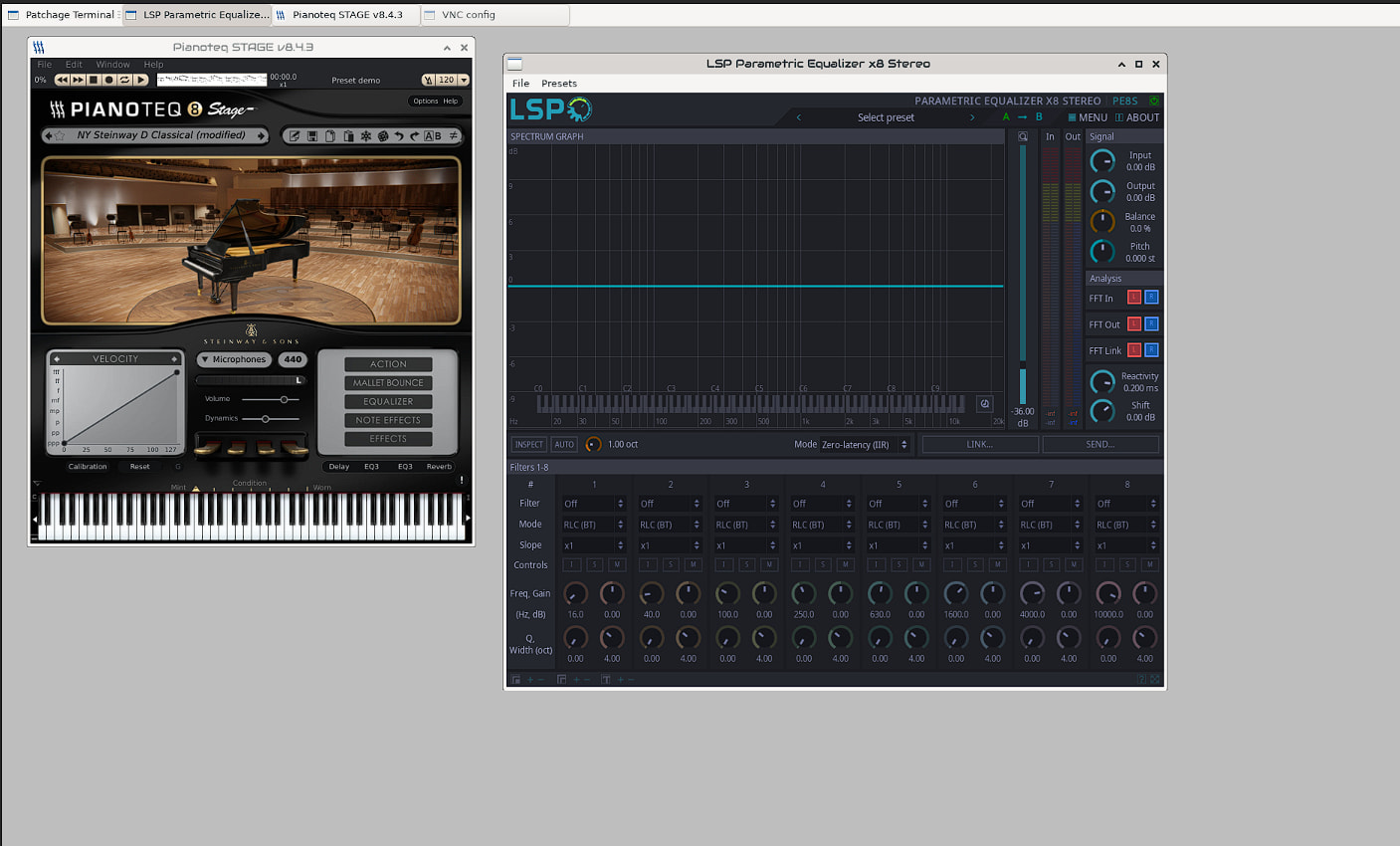
How to Enable Native X11 GUIs for LV2 Plugins on Zynthian

:brazil: While using Zynthian ORAM, I tried to open the graphical interface of some LV2 plugins directly from the Zynthian GUI, but the interface would not open.

The plugins were installed correctly and working, but Zynthian was launching them without their native graphical interface.

After investigating, I found that some plugins were configured in engine_config.json with:


"UI": null

even though they provided a native X11 GUI.

Changing this value to:


"UI": "X11UI"

allowed Zynthian to launch the plugin’s native graphical interface.

This solution does not require modifying Zynthian source code.


Step 1 - Backup the configuration file

Before making any changes:


cp /zynthian/config/engine_config.json /zynthian/config/engine_config.json.bak

Step 2 - Edit the plugin configuration

Open:


/zynthian/config/engine_config.json

Find the plugin entry you want to modify.

Example:

Before:


{
    "NAME": "Plugin Name",
    "UI": null
}

Change to:


{
    "NAME": "Plugin Name",
    "UI": "X11UI"
}

Save the file.


Step 3 - Restart Zynthian


systemctl restart zynthian

After restarting, the plugin should launch using its native graphical interface.


Tested plugins

The following plugins were tested successfully:

  • x42 IR Convolver Stereo

  • Dragonfly Reverb

  • LSP Parametric Equalizer

  • LSP Multiband Compressor

All of them opened their native GUI after changing:


"UI": null

to:


"UI": "X11UI"

Why does this work?

Zynthian uses the UI field in engine_config.json to decide how to launch an LV2 plugin interface.

When the field is:


"UI": null

the plugin runs without trying to open its native GUI.

When changed to:


"UI": "X11UI"

Zynthian launches the plugin using its X11 interface.


Notes

  • Tested on Zynthian ORAM.

  • This should work for LV2 plugins that include a compatible X11 native GUI.

  • Plugins without a native GUI will not be affected.

  • Always create a backup before editing configuration files.


Need help?

If you are not comfortable editing engine_config.json, you can paste this guide into ChatGPT and ask it to guide you step by step.

ChatGPT can help you:

  • create a backup;

  • locate the correct plugin entry;

  • modify the UI field safely;

  • verify the change;

  • restore the original configuration if needed.

2 Likes

ps: I’m not a programmer, just did everything with help of chatgpt.
I dont know if this was an issue of my zynthian or if it happens with everyone.
but i need to see the lv2 interface, so… :sweat_smile:

tell me if this post helped you.

:brazil: :brazil: :brazil: :brazil: :brazil: :brazil: :brazil:

Hello! Yes, very helpful. I’ll give it a try, since I’m developing some plugins and having a GUI would be useful. I should also check the CPU overhead.

Thanks for sharing!

2 Likes

Mano, que bom encontrar um brasileiro por aqui. você fala de onde? vamos tocar ideias? estou querendo usar o zythian para usar ao vivo e nos meus testes estou caminhando para essa forte possibilidade. Abraço.

Hi @igorrod!

Modifying the engines DB by hand is not a very good idea. This file is auto-generated and your changes will be totally lost when updating.

Anyway, the analysis is good. The “UI” field is used to “flag” when a plugin has a native GUI available. This should be auto-detected and you shouldn’t need to tweak it at all.

I have checked and you are right. Some plugins are not being detected correctly, so i’m working to fix this ASAP. Expect this to be fixed in the next hours :wink:

Thanks for reporting !!

2 Likes

Hi @igorrod !

Hi checked this 4 plugins and the only one that has the UI field to None is the first one (x42 IR Convolver). All the rest work fine for me.

Regarding the first one, it has the UI field to None because it has not a native GUI. What you get when setting the UI fields to “X11UI” is a generic UI auto-generated by Jalv. This could be useful in some cases, but normally we prefer to not have the generic UI enabled. Perhaps we could change this.

All the best,

1 Like

Done!
I think this can’t harm:

  • Auto-generated GUIs have very low CPU impact.
  • Sometimes they can be useful.
  • It’s weird (and it feels wrong) having native GUIs for some plugins and not for others. If you are using VNC for adjusting parameters, having an autogenerated GUI is better than not having it.
  • Yes. they are mostly ugly and not very useful, but they doesn’t harm.

If some users prefer to not have these GUIs, we could find a way to start minimized, or perhaps, add an admin flag to enable/disable.

Regards,

1 Like

To not overpopulate the VNC view with lot of ugly autogenerated GUIs, they are created minimized by default. Those wanting these “ugly” native GUIs, can have it by simply clicking it in the top bar.

Let’s see how this works …

Regards,

2 Likes

I have been looking at how we can launch native UI on demand. I think I have a plan but it is on the back burner whilst we get Vangelis out the door.

2 Likes

Nice!

Thank you for your replie. I understand why plugin do not show the UI. I posted my experience because I wanted to see things that dont appear at zynthian to assign. Thanks for your hard work :+1:t2:

Please use PM for these kind of messages :wink:

Regards

1 Like