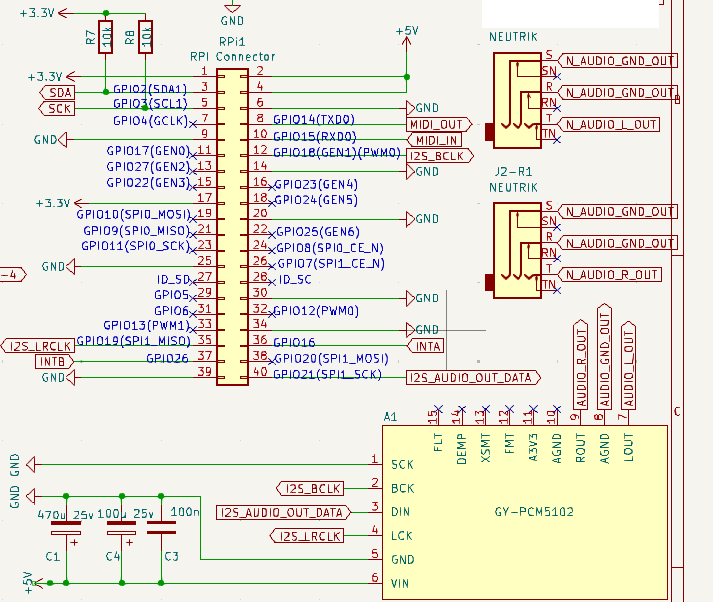
I am currently trying to accomplish a separate audio output for the zynseq metronome.
I have tried this with a simple 2ch USB audio stick, but as expected the overall latency/delay seem to be rather big (felt like several tens of ms). For a click at least I feel this is a bit too much.
The headphone plug cannot be used as a separate output I believe.
Has anyone tried to get a similar thing on your zynthians?
Could an additional lv2 metronome be set with delays to get at least closer to the real ticks when clicking?
Is there a possible dac replacement for the hifiberry with 4 output channels and two inputs? So far I’ve only found an 8 channel output hifiberry with no inputs
There are many audio devices (soundcards) that have 2, 4, 8, 16 outputs, usually with similar quantity of inputs. There are USB devices and I2S devices. In this forum there has been discussion on a multport I2S device that was prototyped. (I have a 4x4 prototype sitting on my desk.) You need to figure out what best suits your needs, form factor, etc.
The metronome is part of the sequencer. Its output feeds the main mixbus. In Vangelis this has changed so that it shares a dedicated Aux mixbus with the global audio player, allowing control of their level, pan, etc.In theory this could be routed seperately but currently that is not exposed in the UI.
There are no (useful) metronome LV2 plugins. The “Example Metronome” breaks the transport and the “C* Click Metronome” does not sync with transport.
We have the aspiration to add a dedicated audio output for accessibility, to offer a spoken prompt for user interface, but we have not had the time to progress this. (It nags at me every week.) The idea of metronome, etc. via a separate output fits into a similar concept.
For now, there are options like:
Pan everything left/right and use mono (only works in vangelis where aux (including metronome) can be panned.
Use main output for metronome and other meta audio. Route instruments to another audio output, e.g. via a group channel. (Opposite to what it was designed for but does the job!)
Hello, good morning. I would also like to use 4 outputs using 2 common DAC5102s… and I’m using the Zynaptic 3 schematic… how could I add or configure a second DAC5102?
To fit my purpose I posted at the beginning, it can also be time-shifted forward and backward. Now when testing it in zynthian oram staging I realize the pad sequencer doesn’t seem to reset (or respect or stop) jack transport position when the last pattern finishes (or the first pattern starts), please correct me if I’m wrong.
Would it be possible to do this? I’ve seen (probably a commit) that you were modifying something regarding jack transport in the new zynbleton implementation, so I thought maybe this could be somewhat “backported” to oram?
I’m insisting a bit because this click metronome should serve as a click output for a drummer….
It is very unlikely that we will be changing the trassport and clock handling in Oram. This is a delicate bit of code that underpins a lot of zynthian’s timing and sync and changes need to be carefully considered, planned and executed. The kind of changes required to improve (that we are doing in vangelis) are substantial and we don’t plan to make such radical and intrusive changes to the stable Oram, which is now pretty much in its autumn period… receiving major bug fixes only.
added an instrument chain with only that metronome
connected the 7€ hotplug usb device (“bakibo”) and assigned the midimet chain to this usb audio device
set midimet to host transport and time shift of -43ms (a lot, but this seems to be the alsa_out time difference with the jack backend, with this device)
On another track, I configured an empty pattern in the zynbleton lauchers for a count-off click, followed by the normal sequence patterns below
This now gets me a click perfectly (to my ears) on time and I’m happy with this, a test with the drummer and band is upcoming
Zynbleton and the Vangelis workflow and options are just great, compliments really!
How about misusing the midi out? One could easily solder an adapter cable. It just depends on what is sent over the midi out. The clock would already make a noise at the right time if frames and time are not sent. Just leave out events that are not needed for the metronome use. Midi in would still be functional.
An additional USB midi out could then take over the original job. No sound handling needed.
Good idea, but in my case I need the (classical) midi out so I would need an external device, too. Also I’m not sure if that would produce efficient click sounds one could stand for the duration of a song. If you mean Midi clock that is too fast and odd (24 tpb? ).
Could the Raspberry Pi’s built-in audio jack be used for this purpose? My understanding is that it’s not usable for hi-fi audio, but neither metronome nor speech output for accessibility have the highest requirements for audio fidelity. Latency, maybe? I’m not sure how it does on that front.
Would be neat if all the required hardware changes were an extra hole coming out of the right side of the V5.1, and a short connection cable to funnel the connection to the outside.
We did consider using this for accessibility but later models do not have this jack so we would need different solutions for different models. For accessibility this is fine because we don’t need any synchronisation with the main jack audio but metronome could be more of a challenge because that must be synchronised. In practice it may be less of an issue because of the space between ticks but there would still need to be some synchronisation between the jack and separate non-jack alsa output, probably with some form of latency compensation.