Issues setting up minix sf10t display

Hi guys,

So far I was using a V4 official kit and now I’m trying upgrade to pi 5 in a new “custom” setup. The hardware used is a Pi 5 8GB with a 128 GB nvme in a case Argon Neo 5 NVME and a 10 inches touchscreen Minix SF10T, the soundcard will be an Arturia minfuse 2 OTG.

I downloaded the latest stable zynthian image and flashed to SD. After first boot, setting up the soundcard was straightforward. Configuring the display was not so easy.

The display has hdmi connection and usb touch interface and 1920x1280 resolution. In webconf, Waveshare hdmi+usb 1920x1080 profile worked (tweaking resolution to 1920x1080). Then I tried to rotate display, first I tried to set display_rotate=2 in Webconf, that didn’t work. Searching the forum I found @Lanfranco solution that worked for me:

sudo nano /usr/share/X11/xorg.conf.d/90-monitor.conf
Section “Monitor”
Identifier “HDMI-1”
Option “Rotate” “inverted”
EndSection

The touch interface was way more difficult to meke it work. I first noticed that touching the display only worked in a small square area in the upper left corner. I did a lot of research in the forum without success. Then I tried IA help and finally got the following script that worked.

echo ‘#!/bin/bash
export DISPLAY=:0
export XAUTHORITY=/root/.Xauthority
aplicar_config() {
DEV=“Silicon Integrated System Co. SiS HID Touch Controller”
ID=$(/usr/bin/xinput list --id-only “$DEV” 2>/dev/null)
if [ -n “$ID” ]; then
/usr/bin/xrandr --output HDMI-1 --rotate inverted
/usr/bin/xinput enable “$ID”
/usr/bin/xinput reattach “$ID”
/usr/bin/xinput set-prop “$ID” “Coordinate Transformation Matrix” -1 0 1 0 -1 1 0 0 1
fi
}
(
for i in {1..12}; do
aplicar_config
sleep 10
done
) &’ > /zynthian/zynthian-my-data/scripts/touch_fix.sh && chmod +x /zynthian/zynthian-my-data/scripts/touch_fix.sh

Then I had to add this: bash /zynthian/zynthian-my-data/scripts/touch_fix.sh to rc.local

Perhaps is not the smarter way to achieve what I wanted, but in the end it’s now working.

I’m wondering now how I can automatically recreate all this configuration in case I need to reflash Zynthian OS.

As a side note, I have a minor issue using my new setup. Very ofthen (but not always) when using touch keyboard (renaming a snapshot i.e.) the keyboard seems to enter in loop and didn’t accept anything unless cancel. I don’t know if it’s related to my hardware or not.

BTW, @riban script to move Zynthian OS to nvme worked.

Best regards.
Be careful because, as I wrote in that post, shortly after doing that, Zynthian wouldn’t boot and I had to reflash it. I connected a 7-inch display with HDMI and USB touch, and everything started on the first boot by selecting it from webconf. Wait until one of the developers says anything, because @riban told me it wasn’t worth doing that.

Hi, @Lanfranco

For me is working after several reboots. As I said before I think is not the smarter solution, but it works….wating our fantastic developpers give us a better solution. I assume I must pay something extra (in patience terms) going off road.

Best regards.

1 Like

I am not sure if paying works, but audio examples are much appreciated in this forum :optical_disk:.

1 Like

Hi, guys,

Return to this post. Finally I’ve got mi raspberry pi 5 with the boot order: usb, sd, nvme. My goal was to test Vangelis on a usb pendrive. Surprisingly, booting from usb pendrive is rather faster that I expected, so I think is a good idea to have one as a backup device, just in case.

To test Vangelis I have flashed the pendrive and tried to setup my soundcard and tochscreen Minix SF10T before to change to Vangelis branch. I managed to do it as explained above in this post, but now the procedure doesn’t work, probably I missed something that I cannot remember.

I’ve found that issuing this commands via SSH makes the touch interface to work and image inverted:

DISPLAY=:0 xrandr --output HDMI-1 --rotate inverted
DISPLAY=:0 xinput reattach 6 2
DISPLAY=:0 /usr/bin/xinput enable 6
DISPLAY=:0 /usr/bin/xinput set-prop 6 “Coordinate Transformation Matrix” -1 0 1 0 -1 1 0 0 1

Reattach and enable command is because system let touch interface as floating.

The point is I cannot make this command to be executed at boot time.

I tried to put it in /zynthian/config/zynthian_custom_config.sh without succes

I also tried to create the script in /zynthian/zynthian-my-data/scripts/ and launching via rc.local and neither worked.

Any suggestion on how to address the issue?

If fixed, the settings will persist when changing to Vangelis?

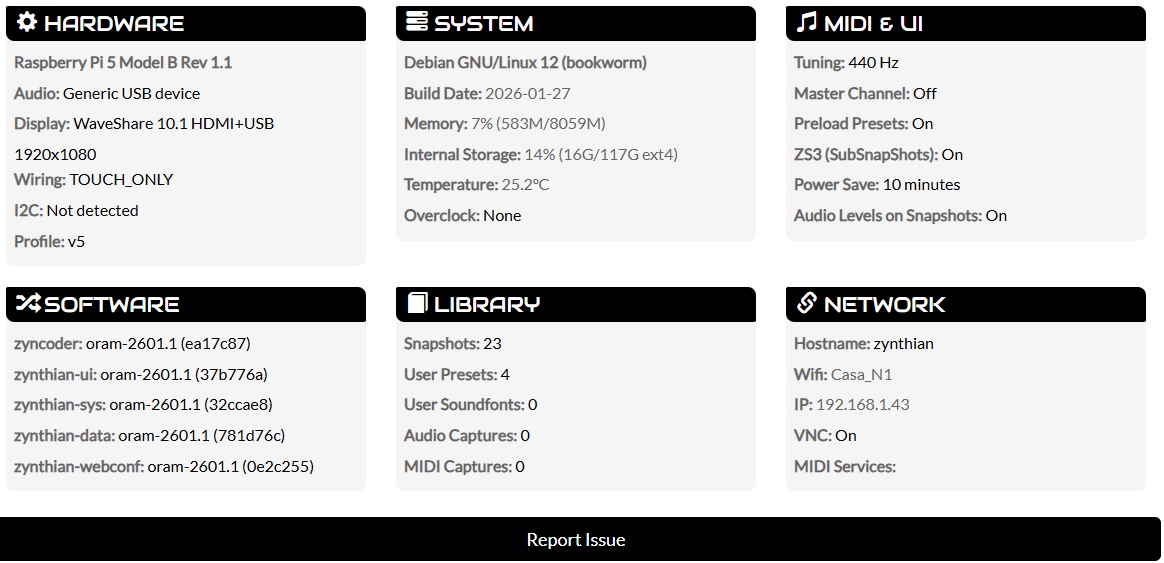
########################## ----------------------------------------

# ZynthianOS Oram-2601-1

## # Timestamp: 2026-01-27

## # # ## # Built from RaspberryPiOS Bookworm (aarch64)

# # # # # # # ----------------------------------------

# # # # # # ### Kit: Custom

# # # # # # # # # Display: WaveShare 10.1 HDMI+USB 1920x1080

## # # # # ## # Soundcard: Custom device

## ## # Wiring Layout: TOUCH_ONLY

# ----------------------------------------

##########################
zynthian-ui: oram-2601.1 (37b776)
zynthian-webconf: oram-2601.1 (0e2c25)
zyncoder: oram-2601.1 (ea17c8)
zynthian-sys: oram-2601.1 (32ccae)
zynthian-data: oram-2601.1 (781d76)

Best regards.

Hi, guys,

This is my experience so far configuring my display. I’ve learned a lot from this forum and I also used Gemini IA.

Finally I found the most easy and functional (for me) way to make my display to work.

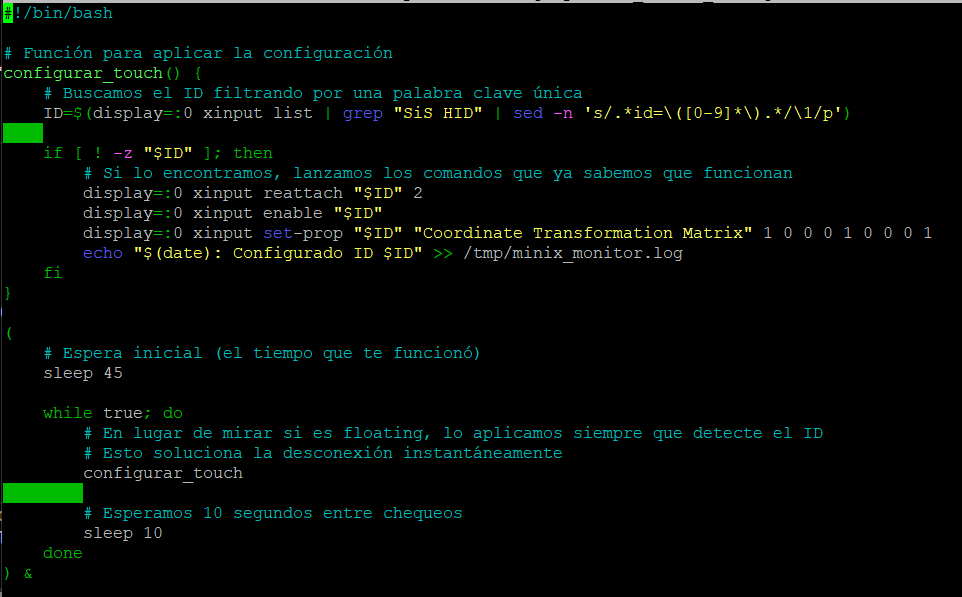
Using a fresh Oram install, I used the script: /zynthian/config/zynthian_custom_config.sh

with this content:

Then chmod a+x /zynthian/config/zynthian_custom_config.sh

First I must wait (45 seconds is enourgh) until Zynthian is fully loaded, then reattach and enable the touch device. As you can see the script loops because sometime (not very often) something happens with the usb hub that disconnet the touch interface.

This way after a few seconds Zynthian is loaded the touch interface start to work.

Using Webconf to setup my hardware I noticed that my usb soundcard (Arturia Minifuse 2 OTG)m is detected and presented as “M2”, I just selected it (under usb generic device) and it worked nicely. This drove me to think that, in the background, Zynthian looks for soundcards candidates. Should this process be an option to setup display/touch interface (including transformation matrix if needed)?

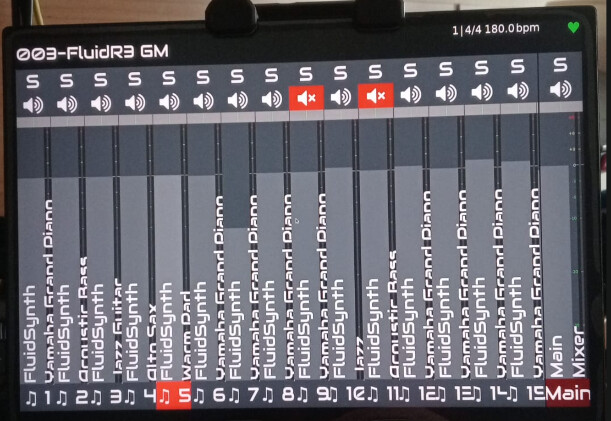
Having this working I decided to give a try to Vangelis. The update process was straightforward. Nevertheless the first boot shows as follow:

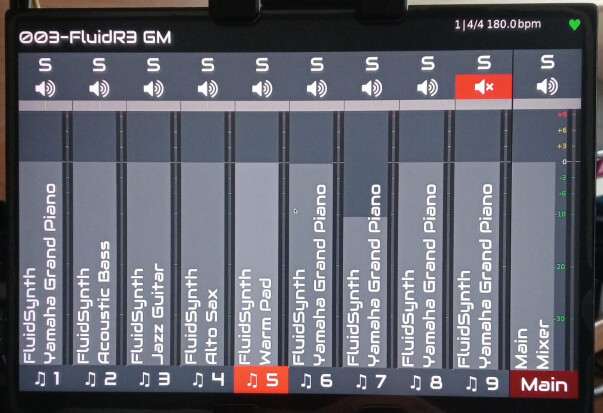
and the touch interface is not working properly. After a big while I’ve found that changing the number os strips from Automatic (I think is the default value) to 10 the mixer view changed and looked much better and surprisingly (for me) the touch interface started to work as it should be.

May this be related to my hardware?

Best regards.

Hi, guys,

Finally I think I’ve found a clever solution about my floating slave touch device. It works for me, I don`t know if it is a valid recipe for others.

With the help of Gemini IA I’ve found the “problem” is in the way Zynthian scans for multitouch devices. This happens here: /zynthian/zynthian-ui/zyngui/multitouch.py

Gemini point to replace this line:

if idev_caps[ecodes.EV_ABS][ecodes.ABS_Z][0] == ecodes.ABS_MT_SLOT:

for this one:

if ecodes.EV_ABS in idev_caps and ecodes.ABS_MT_SLOT in idev_caps[ecodes.EV_ABS]:

This simple line of code did the trick…for me.

To configure the display I used “WaveShare 10.1 hdmi+usb 1920x1080” changing the resolution to 1920x1280.

This way I don’t need the script I posted a few days ago.

I’ve created this script: nano /zynthian/zynthian-my-data/scripts/touch-patch.sh
to be run whenever needed.


#!/bin/bash

# Ruta al driver de Zynthian
DRIVER_PATH="/zynthian/zynthian-ui/zyngui/multitouch.py"

echo "Aplicando parche de compatibilidad táctil Minix..."

if [ -f "$DRIVER_PATH" ]; then
    # Creamos una copia de seguridad por si acaso
    cp "$DRIVER_PATH" "${DRIVER_PATH}.bak"
    
    # Buscamos la línea restrictiva y la cambiamos por la versión compatible
    # Usamos sed con una expresión regular para localizar el patrón exacto
    sed -i 's/if idev_caps\[ecodes.EV_ABS\]\[ecodes.ABS_Z\]\[0\] == ecodes.ABS_MT_SLOT:/if ecodes.EV_ABS in idev_caps and ecodes.ABS_MT_SLOT in idev_caps[ecodes.EV_ABS]:/' "$DRIVER_PATH"
    
    echo "Parche aplicado con éxito."
    echo "Reiniciando el servicio Zynthian..."
    systemctl restart zynthian
    echo "¡Listo! El táctil debería estar operativo."
else
    echo "ERROR: No se ha encontrado el archivo $DRIVER_PATH"
    exit 1
fi

I did this code patch over a fresh Oram install. Then I upgraded to Vangelis and I had to reapply the patch that worked just fine.

Best regards.

Edit. It worked but suddenly pointer follows the finger but no action is triggered. I will keep trying.

1 Like

Here again with my new findings.

Gemini IA and I have been working on this hardly today and finally I am pretty sure the problem I have with my new display is fixed. Follow a brief resume of findings by Gemini IA

Technical Summary: Zynthian Multitouch Robustness Patch

1. The Problem

The Zynthian “Multitouch” driver (multitouch.py) had two main issues with the Silicon Integrated System (SiS) touch controller:


  • Detection Failure: The original code looked for a specific hardware capability (ABS_Z) to identify a multitouch device. The SiS controller uses a different reporting method, so Zynthian ignored it, making the touch interface unresponsive even if the hardware was present.

  • Fragility (The “Hang” during rehearsals): The driver was designed to “kill” the touch thread if any communication error occurred (like a USB power surge or CPU spikes). Once the thread died, the only way to get the touch back was a full system or service restart, which is unacceptable during a live performance.

2. The Solution

We implemented a two-part software patch to ensure the touchscreen is “indestructible” during live use:

A. The Compatibility Fix (Hardware Detection)

We modified the hardware detection logic. Instead of looking for a specific (and sometimes absent) axis, we changed it to check if the device supports the standard Multi-Touch Protocol (ABS_MT_SLOT).

  • Why: This allows Zynthian to correctly identify the Silicon Integrated controller as a valid touch device.

B. The “Infinite Retry” Loop (Live Robustness)

The most critical change was in the event processing loop. We removed the break command that killed the driver on error.

  • How: We injected a “retry” mechanism. Now, if the driver loses connection (due to a cable wiggle, EMI, or power drop), it waits 2 seconds and automatically calls self.open_device() to reconnect.

  • Why: This ensures that the audio engine keeps running uninterrupted. If the touch fails, it simply “self-heals” in the background within seconds without stopping the music.


#!/bin/bash
echo "--- Restaurando y Parcheando Multitouch ---"
cd /zynthian/zynthian-ui
git checkout zyngui/multitouch.py
DRIVER_PATH="/zynthian/zynthian-ui/zyngui/multitouch.py"

# Parche de detección SiS
sed -i 's/if idev_caps\[ecodes.EV_ABS\]\[ecodes.ABS_Z\]\[0\] == ecodes.ABS_MT_SLOT:/if ecodes.EV_ABS in idev_caps and ecodes.ABS_MT_SLOT in idev_caps[ecodes.EV_ABS]:/' "$DRIVER_PATH"

# Parche de auto-reconexión (bucle infinito)
sed -i 's/logging.info(f"Multitouch device {self.device_name} disconnected")/logging.warning("Táctil perdido... Reintentando en 2s"); import time; time.sleep(2); self.open_device()/' "$DRIVER_PATH"
sed -i '/break/d' "$DRIVER_PATH"

# Zynthian restart

systemctl restart zynthian
echo "¡LISTO! Táctil blindado y auto-recuperable."

Above the final script that apply the patch.

I’m pretty sure the patch is reliable because even if I disconnect and reconnect usb cable the touch interface return to work.

Best regards.

3 Likes

Hi, guys

I decided to improve my method. The goal is to configure any usb touchscreen. The procedure needs to be run from terminal/ssh, and needs to be run as long as you update zynthian.

What I did is to create the script /zynthian/zynthian-my-data/scripts/touch-setup.sh that makes:

  1. Running the script will present a list of devices candidates in order to choose the correct one. With the choosen device a touch-device.txt is created
  2. The script patch multitouch.py in order the Zynthian core recognize (using touch-device.txt) the device almost natively. This is the reason why the script needs to be run when updating because multitouch is rewriten

I tried to disconnet and reconnect the touch usb interface and it resume to work.

#!/bin/bash
# /zynthian/zynthian-my-data/scripts/touch-setup.sh

echo "--- Zynthian Touchscreen Auto-Installer (Git-Clean Edition) ---"

# 1. ENSURE DIRECTORY EXISTS
mkdir -p /zynthian/zynthian-my-data/scripts/

# 2. PREPARE ENVIRONMENT & X11 AUTHORITY
# Finds the dynamic 'key' required to communicate with the X server
XAUTH=$(ps aux | grep -ve "grep" | grep -oP '(?<=-auth )\S+' | head -n 1)
export DISPLAY=:0
export XAUTHORITY=$XAUTH

# 3. DEVICE SELECTION
# Scans xinput for hardware candidates (SiS, Touch, etc.)
mapfile -t candidates < <(xinput list --name-only | grep -iE "Touch|SiS|Wacom|Pen" | grep -v "XTEST")

if [ ${#candidates[@]} -eq 0 ]; then
    echo "Error: No touch hardware detected via xinput."
    exit 1
fi

echo "Detected touchscreens:"
for i in "${!candidates[@]}"; do echo "[$i] ${candidates[$i]}"; done
read -p "Select your device number: " choice

SELECTED="${candidates[$choice]}"
# Stores the clean hardware name for the Python script
echo "$SELECTED" > /zynthian/zynthian-my-data/scripts/touch-device.txt
echo "Device saved: $SELECTED"

# 4. RESTORE ORIGINAL FILE VIA GIT
# Discards any previous manual edits to ensure a clean patch baseline
UI_DIR="/zynthian/zynthian-ui"
TARGET_FILE="zyngui/multitouch.py"

echo "Restoring $TARGET_FILE to factory settings via Git..."
cd "$UI_DIR" || exit
git checkout "$TARGET_FILE"

# 5. PATCHING MULTITOUCH.PY
FULL_PATH="$UI_DIR/$TARGET_FILE"

# The Python block to be injected. It handles X11 authorization and device re-attachment.
python_patch="
        # --- START CUSTOM TOUCH HACK ---
        try:
            import os, subprocess, logging
            conf_file = '/zynthian/zynthian-my-data/scripts/touch-device.txt'
            if os.path.exists(conf_file):
                with open(conf_file, 'r') as f:
                    target_name = f.read().strip()
                
                # Find the Xauthority cookie for the current session
                xauth_cmd = \"ps aux | grep -ve 'grep' | grep -oP '(?<=-auth )\\\\S+' | head -n 1\"
                xauth = subprocess.run(xauth_cmd, shell=True, stdout=subprocess.PIPE, text=True).stdout.strip()
                
                env_config = {'DISPLAY': ':0'}
                if xauth:
                    env_config['XAUTHORITY'] = xauth

                if target_name:
                    process = subprocess.run(['/usr/bin/xinput', 'list'], stdout=subprocess.PIPE, text=True, env=env_config)
                    for line in process.stdout.splitlines():
                        if target_name in line and 'id=' in line:
                            dev_id = line.split('id=')[1].split()[0]
                            # Force the device to attach to the Master Pointer (Rescue)
                            subprocess.run(['/usr/bin/xinput', 'reattach', dev_id, '2'], env=env_config)
                            # Map the device to the default output (Calibration)
                            subprocess.run(['/usr/bin/xinput', 'map-to-output', dev_id, 'default'], env=env_config)
                            logging.info(f'TOUCH HACK SUCCESS: {target_name} (ID {dev_id})')
                            print(f'TOUCH HACK SUCCESS: {target_name} (ID {dev_id})')
                            break
        except Exception as e:
            print(f'TOUCH HACK ERROR: {e}')
        # --- END CUSTOM TOUCH HACK ---
"

echo "Injecting rescue code into $FULL_PATH..."
# Uses sed to insert the block right after the 'def open_device(self):' line
sed -i "/def open_device(self):/a $(echo "$python_patch" | sed 's/$/\\n/' | tr -d '\n')" "$FULL_PATH"

echo "Patch applied successfully!"
echo "Please reboot your Zynthian now."


Don`t forget chmod +x /zynthian/zynthian-my-data/scripts/touch-setup.sh

Best regards.

3 Likes