AFAIK, CUIAs GLU and GLO doesn’t exist.
Hello Jofemodo
I know that these CUIAS do not exist 
What bothers me is that the release of the button has no CUIA log so I am wondering if the release of a button is an event that can be used in Zynthian
I want to have this behaviour
I have 8 of the thin buttons with these CUIAs
            elif ccnum == 0x69:
                self.state_manager.send_cuia("ZYNPOT",[0,1])
            elif ccnum == 0x05:
                self.state_manager.send_cuia("ZYNPOT",[0,-1])
            elif ccnum == 0x6a:
                self.state_manager.send_cuia("ZYNPOT",[1,1])
            elif ccnum == 0x06:
                self.state_manager.send_cuia("ZYNPOT",[1,-1])
            elif ccnum == 0x6b:
                self.state_manager.send_cuia("ZYNPOT",[2,1])
            elif ccnum == 0x07:
                self.state_manager.send_cuia("ZYNPOT",[2,-1])
            elif ccnum == 0x6c:
                self.state_manager.send_cuia("ZYNPOT",[3,1])
            elif ccnum == 0x08:
                self.state_manager.send_cuia("ZYNPOT",[3,-1])

it works great but increment of 1 is for some parammeters very slow

so I was thinking of having the value of the cnum (ccval) used this way

While the button is pushed (so while ccval is 7F) the parameter is incremented by step 1
When the button is released (so when ccval = 00) the incremention stops

and what I have seen with my stupid test is that the push of button is "seen" by
Zynthian but the release is not

So I wanted to know if button-release events can be used in a ctrldriver

May be it is more clear (I hope) wiyh the work in progress thing
zynthian_ctrldev_launchpad_pro_mk3_wip.py (9.0 KB)
Alain
Perhaps the controller send note-off messages instead of note-on with velocity 0. You should consider both cases in your controller code.
Regards
Hello thank you but
it is not notes but CC and the only values that are sent are 7F (127) when button is pushed
and 0 when button is released
So my question is “Is the ZynthianOS ‘listening’ to button release or only button push ??
Thank You
Yes. All MIDI events are listened.
Okay I get it
So maybe I am not doing the right thing but look at this piece of code
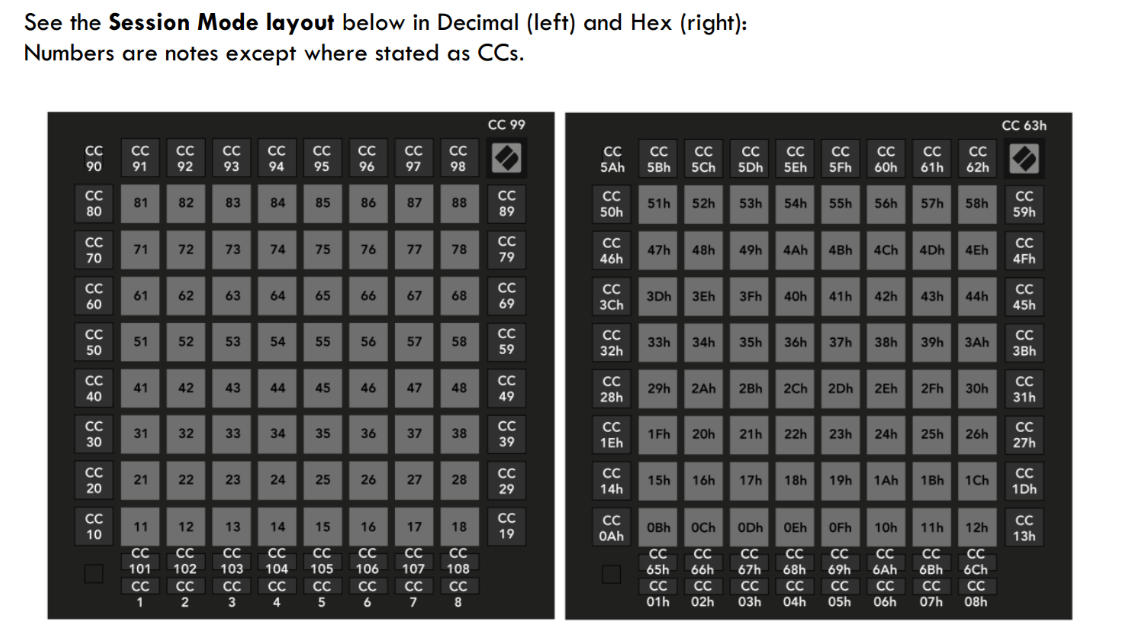
(ccnum 0x65 is the first of the 16 buttons at the bottom of the LP Pro MK3)
…….
            elif ccnum == 0x65 and ccval == 0x7F:
                self.state_manager.send_cuia("ZYNPOT",[0,1])
            elif ccnum == 0x65 and ccval == 0x00:
                self.state_manager.send_cuia("ZYNPOT",[0,-1])


So with this piece of code I should have the parameter (let’s say Amp Attack) go up when I press the button (7F) and go back down when I release it (00)

But it only works for the up way

So maybe the cc events with a "0" value are filtered somewhere

Thank You for reading
Events are not filtered. You should receive all of them.
Are you using the webconf’s MIDI log to see the events coming out from your device?
Regards
It was just behind my nose and I did not see it
    # CC => arrows, scene change, stop all
    elif evtype == 0xB:
        ccnum = ev[1] & 0x7F
        ccval = ev[2] & 0x7F
        if ccval > 0:

it is the if ccval > 0 that prevents the CC with value of '0' to be seen

so I am going to try with "if ccval >= 0" after a good night sleep


Sorry for that
Next time, copy/paste the full code, please.
Regards
This should not be required. ccval is always >= 0. If you want to capture all ccval, then just omit the condition.
1 Like
Hello riban
I know that CC values cannot be negative but I did not want to mess too much with my
(for the momment) working driver
So the good news is that if I push a button the parameter goes UP and if I release the same button
the parameter goes down.
Not very useful but now I have to find a way to say to Zynthian
“As long as I push the button the parameter goes UP (by +1 or -1)
and when I release the button the parameter does no longer change”
So I guess that I need to have a loop that sends a repetitive
self.state_manager.send_cuia(“ZYNPOT”,[0,1]) at button push
then a sleep ,so that the loop does not go too fast
and finally a break when I release the button..
Let’s try
Thanks
Alain
What are you trying to do? If you want to emulate the zynthian buttons push and release (which handle short, bold, long press and auto-repeat in lists) then you can use the CUIA switch function with “P” and “R” parameters for push and release.
1 Like
Hello riban
On the LaunchPAD pro MK3 I have 16 buttons that can send CCs
So I am thinking of having 4 * 4 sets of buttons
One set will have 2 buttons for emulation of Zynpot Rotating behaviour and 2 buttons for Short and Bold Push.
For emulating Zynpot Rotating behaviour I have a working solution but
self.state_manager.send_cuia(“ZYNPOT”,[0,1])
and
self.state_manager.send_cuia(“ZYNPOT”,[0,-1])
are in some cases very slow if I have to push let’s say 20 times the same button
That is why I was thinking of checking the value of the CC send by the button (127 or 0)
and use it to have only one push to increment (or decrement) parameter when CC value is 127
and stop increment (or decrement) parameter when CC value is 0
Maybe there is a more simple solution ??
Thank You
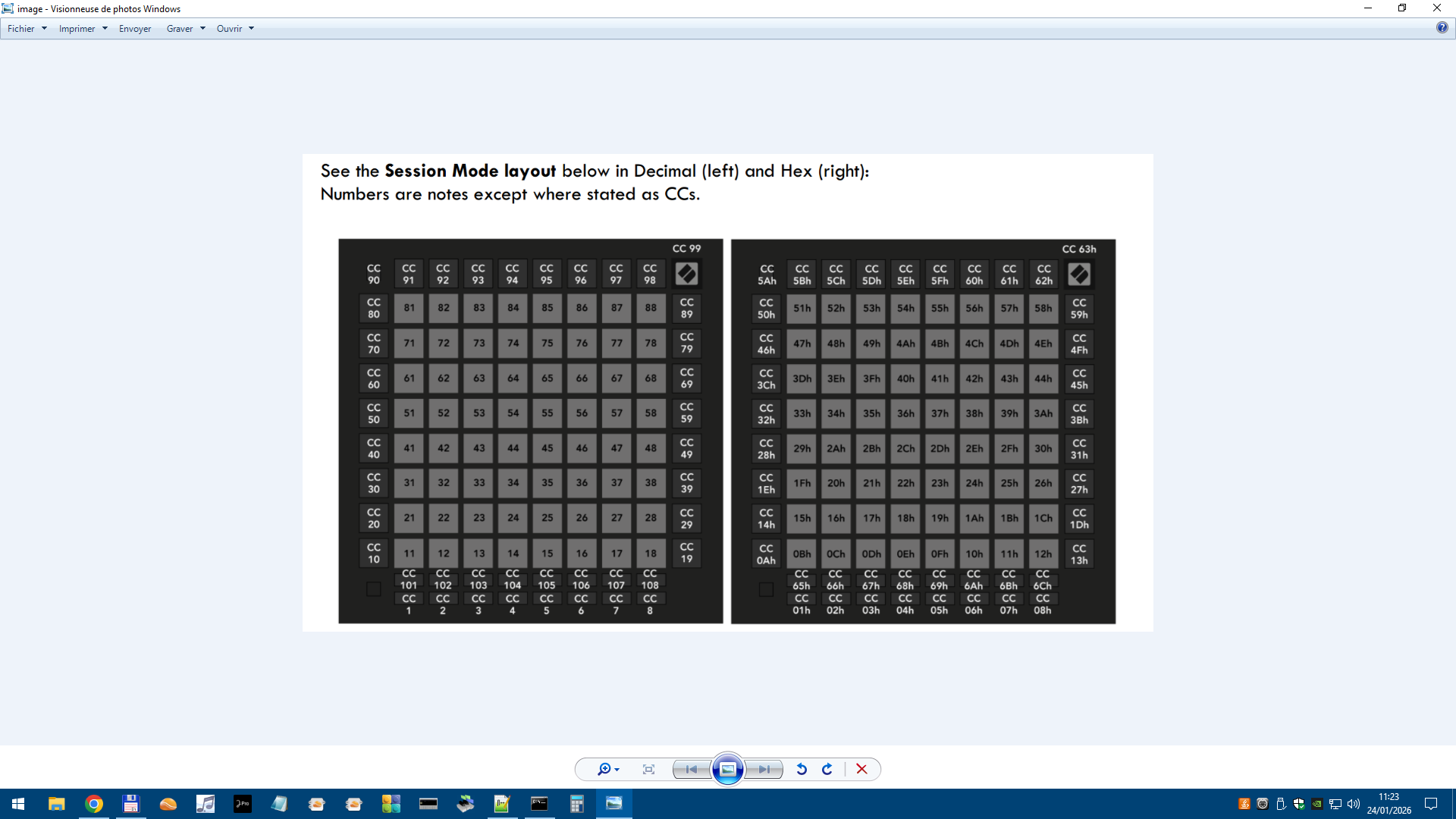
The 16 thin buttons at the bottom can send CC with value of 127 at push and 0 at release
Hello guys
I am not very good at Python coding so I have this piece of script for the 4 arrows
            if ccnum == 0x50:
                if ccval == 0x7F:
                    self.state_manager.send_cuia("ARROW_UP")
            elif ccnum == 0x46:
                if ccval == 0x7F:
                    self.state_manager.send_cuia("ARROW_DOWN")
            elif ccnum == 0x5B:
                if ccval == 0x7F:
                    self.state_manager.send_cuia("ARROW_LEFT")
            elif ccnum == 0x5C:
                if ccval == 0x7F:
                    self.state_manager.send_cuia("ARROW_RIGHT")

And it works fine so I can check the ccnum and the ccvalue and run the correct CUIA

But I have to push the down arrow "X" times if I want to go "X" times down

so I guess I have to replace "if ccval == 0x7F" with "while ccval == 0x7F"
but if I symply do that it does not work , I see in the logs that the CUIA repeats itself but in the UI nothing happens

It must be something very basic for Python Wizards but I am (very very) far to be one of them (you)

Any help will be very appreciated

Thanks

Alain