MIDI Strumming

Hey ya’ll!

I thought i’d share a project that I’ve been working on for a bit, and I think its in a (fingers crossed) decent place.

In fact, @riban here helped with some knowledge to make this work in Zynthian and gave the great suggestion to not make it an actual plugin, but a background service. And I do much appreciate especially that last bit because it’s working everywhere now!

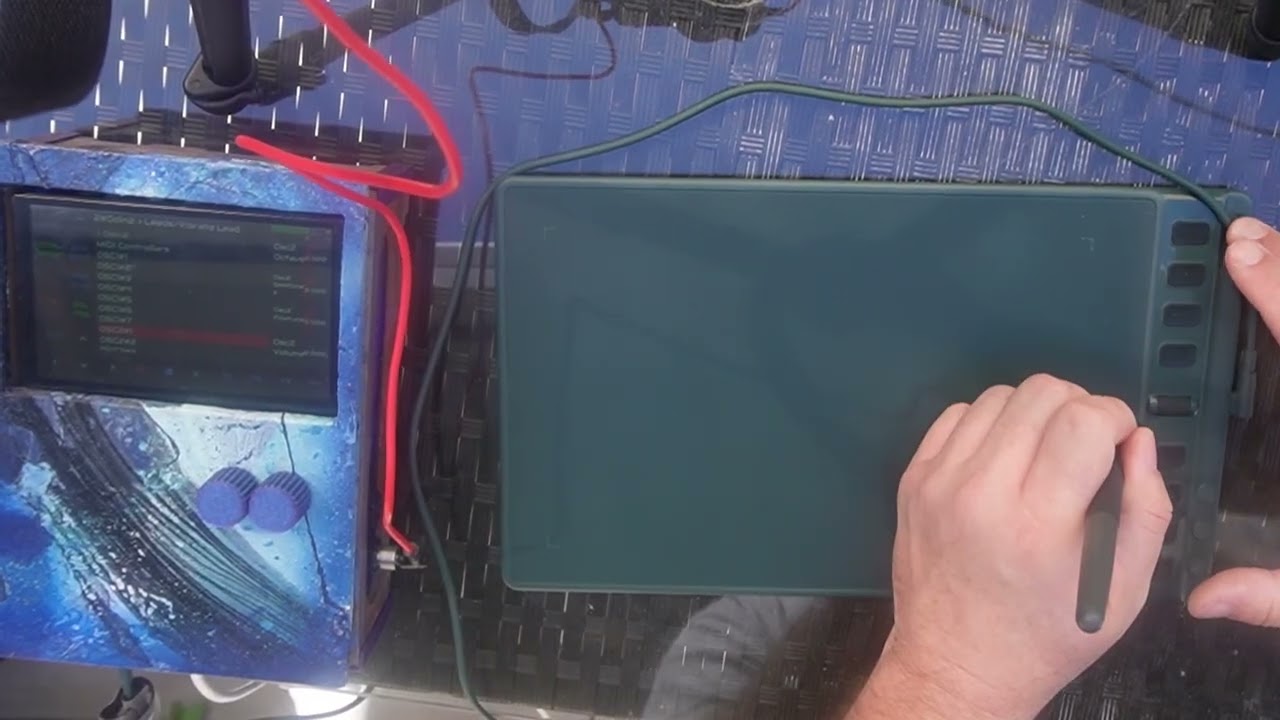
Anyway - my idea was a drawing tablet that basically has virtual strings on it that you can strum like a guitar and it acts as a MIDI controller.

I’m calling it Sketchatone and you can find it at sketchatone.com

You’ll find more explanation there including an intro video on the front page. I’ll keep this post short, but I’ll directly share a quick video I made today trying out some of the Zynthian synth leads

5 Likes

Far Out! Now where is that drawing tablet? Do you think the drawing tablet resolution is necessary to have a good ‘musical feel’ or would a multitouch display perhaps be OK - I’m thinking the Zynthian V5 5 inch screen and-or a cell phone screen or even an Android or Apple tablet, with the added advantage that you could display the strings.

Is Sketchatone an open source project?

Yeah, its fun to use!
So yes, I think a touchscreen could have plenty of resolution in theory. I would imagine on tinier screens if you were using your finger it might be harder to hit the right string (of course you’re right….you can see them in this case, so that’s better). Either way, maybe a stylus would be better.

That said, there are a number of things a tablet gives you that a screen can’t AFAIK.

So this project takes advantage of a few other things past strumming. All are configurable, but as default:

  • Vertical coordinates allow pitch bending when you get to the top or bottom of the tablet (yes I know a screen can do this)
  • The stylus supports something like 16,000 levels of pressure. I use this to map note velocity (how hard its pressed)
  • The stylus supports reporting tilt in both the horizontal and vertical direction. I use this right now to control how long the note is held. Straight on interaction will give normal long notes. Tilting will offer various degrees of cutting the note short

Past that, the drawing tablet I have in the video has some nice tactile buttons - and I if you’re using them to chord switch like I am, it goes a big way to feel like a real instrument.

Last point on a tablet vs a screen - when I get into it and really have fun playing and strumming, I’m using some force. I’m hitting things. I feel like if this was on my screen, I’d be a lot more careful and delicate and it just wouldn’t be the same!

In terms of it being open source - not quite. I made it Creative Commons. Basically, I’m happy if people want to fork it and make other awesome stuff with it, but I think I’d be bummed if some corporation just stole and started making money off of it.

So Creative Commons isn’t technically open source. Folks can use it, fork it, do whatever, non-commercially with credit to the original. That said, I’m open to feedback on this if it prevents something I didn’t anticipate

Thanks for the info on what makes the drawing tablet a good choice and the physicality of it!

Creative commons sounds fine, and I wasn’t so much concerned with the details as much as your general intentions.

So maybe one of those mil-spec ruggedized tablets? :wink:

And speaking of strumming, are you aware of Artiphon Instrument 1, and Chorda?

They each, in their own way, try to provide strumming - kind of like a more modern take on the Omnichord. Sadly, Artiphon has ceased operations, but the instruments are still available on the usual used markets.

No! I hadn’t heard of Artiphon, but I came across a few diy Arduino projects. All looked cool, but def more electronics/hardware than I am comfortable with

1 Like

Hi @ben4real !

Congrats for your creation, and thanks for sharing! This really looks like a ton of fun and perfectly aligned with the zynthian spirit.

Do you think we could integrate your driver in the zynthianOS and UI? It would simplify the steps for a lot of potential users.

The sketchatone device should be detected and shown in the MIDI-IN device list, like any other MIDI device, so you can decide from the UI what chains you want to connect, etc.

Ideally, this would be automatic if your software could work as a standard USB-MIDI driver. If not possible/easy, we could find another way.

All the best,

Hey! Glad you dig.

So @riban, when I originally was asking about this pointed me in a good direction. He helped me make it so that “Sketchatone” actually appears in the Zynthian UI as a MIDI device. I wanted to make sure this worked because being able to manage it and go into multitimbral mode is important.

In terms of integrating it into Zynthian, that’s perfectly fine with me - but if I were a maintainer, I might hold out and see if folks can use it well enough as is before I do.

The main reason for this is to get a feel for how folks use this and what’s successful and whats not (especially in terms of all the configuration options) before rolling it into something like Zynthian.

The more specific thing I’d be worried about is drawing tablet support. Right now, it only supports 2 tablets - and thats because those are the ones I currently own. I have a separate project Blankslate: Welcome to Blankslate to test and configure tablets. Basically the “driver” that makes drawing tablets work in this project can be generated here. But again, I’ve only tested on the 2!

Bottom line - if folks want to leverage my work to integrate into Zynthian, I’m all for it. Ya’ll def have my permission. But if I was maintaining Zynthian, there are some complexities that might give me pause!

4 Likes

I found an interesting MIDI Strumming Controller:

1 Like

I swear this was sold out before I started this project - or maybe it was another project like it. Either way I’m glad I didn’t try this. I’m TERRIBLE with hardware. I literally just melted a battery case a month ago because I wasn’t careful with my soldering. I also destroyed 2 Raspberry Pi 5s until I realized I was attaching the GPIO pins the wrong way.

Nope. Software for me.

1 Like

@mr_floydst has experimented with something similar GitHub - mrfloydst/midistrumming: Lets you strum chords on a synthesizer using a smartphone or computer and mouse · GitHub

1 Like