I think the new behaviour makes sense. If you have an operational requirement to change sound whilst holding a chord, you can use a zs3 or MIDI program change to achieve this. This workflow matches other MIDI device workflows. Triggering preset change on note-on is an unorthodox concept .
3 Likes
As much as I like the preset preload in theory, but as expected with huge soundfonts it’s less usable. As someone who uses soundfonts quite often I’d personally vote for optional preload on note-on.
2 Likes
Still haven’t managed to get the presets up for Orisus after upgrading to Oram-2511. One thing I’ve noted is that after running:
regenerate_lv2_presets.sh http://theusualsuspects.lv2/Osirus
the file /zynthian/config/jalv/presets_Osirus.json which it creates is basically empty, just containing the line:
{“None”: {“bank_url”: null, “presets”: [{“label”: “default”, “url”: “http://theusualsuspects.lv2/Osirus:preset1”}]}}
I suppose this means that the preset regeneration for whatever reason failed to find any presets?
This probably means you don’t have the LV2 presets generated in the right folder:
/zynthian-zynthian-my-data/presets/lv2
Could you check they are there?
If they are there, perhaps they are wrong. You could try to remove them. Then, after running the plugin to get the presets generated again, try regenerating the presets cache again.
Regards,
1 Like
The LV2 preset directories such as Osirus_Rom_C.lv2/ etc are there, with the preset files in them.
So are they generated automatically when the plugin starts? I’m thinking perhaps since I’ve done an upgrade I’ve got an older version of the plugin which is not compatible with the cache regeneration script, so if removing the presets doesn’t help I’ll try running the download script to update the plugin itself too.
EDIT: After some combination of removing the old preset directories, running the regeneration script, and rebooting, the cache has been rebuilt and the presets now show up in the GUI. I don’t know if the format of the preset files have changed between versions and that’s the reason. I tried to compare a couple of the files visually but I couldn’t see anything obvious, on the other hand, the bulk of the file is a binary string containing the plugin state, but I suppose that’s just handled by the plugin itself and not something that Zynthian tries to interpret? Sorry I can’t be more specific about exactly what I did which might have proved helpful to others in the same situation.
Anyway, one thing I’ve learnt is to check the file /zynthian/config/jalv/presets_Osirus.json which seems to be the cache of available presets; if the file is very small with basically no presets listed, the cache generation has failed, if it does contain the presets but they still don’t show up in the UI, it seems Zynthian needs rebooting for them to be located properly.
(Another thing I’ve noticed is that the ROM preset .ttl files are much smaller than those saved from the UI; the ROM files are 904 bytes in size, whereas ones I’ve saved myself are around 145875 bytes. Well, a subject for another day (and another thread)).
I moved to Oram staging.
Since the change I’ve never had updates.
It is right or there is a problem in my Zynthian?
zyncoder: oram (e4c91c4)
zynthian-ui: oram (b4a605b)
zynthian-sys: oram (8c25073)
zynthian-data: oram (e4e24b8)
zynthian-webconf: oram (f851967)
No. It’s perfectly normal. Oram staging is not updated everyday.
1 Like
Perhaps disabling the preset preload could work for you. You simply click the preset when you want to change. The option has moved down in the list because it’s no longer a MIDI option but a UI option, but it’s still in the admin menu.
Regards,
2 Likes
Yes I could do that, but I had gotten rather fond of the old method, which I found much faster when searching for a sound. For that particular use of course the new method also works, it’s just that one gets used to various quirks and one starts exploiting them, so they’re missed when they go away, even if they may have been suboptimal to start with.

Magnific!!!
1 Like
Has the behavior of the display of bipolar parameters been changed on purpose?
E.g. the detune parameter was previously centered around 12 o’clock:
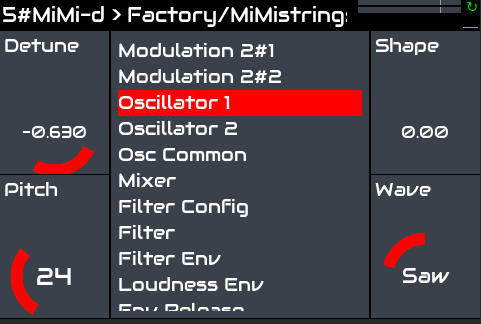
No! It is a bug. I will fix it.
[Edit] This is fixed in Oram staging and will get pushed to Oram stable in a hotfix… (soon - @jofemodo )
3 Likes
I did change now to staging like recommended.
Can somebody please verify: What is the current function of the staging branch? Since there is no staging branch on github: I suspect staging is the current “nightly” state of the oram branch, while oram stable is the point release thereof?
If not, how is stable and staging differ from each other right now?
While I am just asking: what does it mean when for example zynthian-data (also zynthian-sys) vangelis branch is 18 or n commits behind oram? I was just looking it up because I was surprised how many updates changing from vangelis to staging was producing.
The Oram branch is the current stable release branch. The tip of this branch is used for validating any changes to the stable release. We can this “staging” because we stage the changes there. When we are confident this is stable, we tag the commit with a stable (point) release name and flag it as a stable update. So stable release is a point on the Oram branch which is mostly at the tip but is someone below this if we are validating a new (point) release.
Vangelis is our testing branch where we validate the various development branches. It has been closed to oram for a while so we could roll out changes from there to stable but that is about to change.
Is there a way to save a config file and load that after doing a fresh burn of the image ?
Like all the web config stuff i changes, the DSP53600 Roms i uploaded , presets i made etc pp.
Or is it a clean sheet and rebuild every time ?
because then i will definityl try to update instead of install it fresh
1 Like
In webconf under the system menu - backup and restore.
So you can save changes, and ‘generally’ restore them to a fresh-new-any system.
Subject to compatibility issues, e.g. - You can save an Oram configuration, and restore it on Vangelis-Zynbleton Zynthian. But you can’t save on Vangelis-Zynbleton, and restore on Oram, Oram won’t know how to load the file, and even if it did, the contents don’t make sense for Oram.
3 Likes
SOLVED - Just created a new sd and i’m getting an error at the start. Can’t reach the main menu, so no webconf.
Ok, i had two damaged sd 
Hi @hannesmenzel ,
I agree, I can’t get used to it, so I opened a feature request]
1 Like