EDIT on 27/08/2025:
Here is my first zynthian plugin:
AutoLeveler (lv2 headless, v0.1.2beta)
It is an automatic downleveller sitting on a chain or the master chain. You set the peak and RMS threshold in dBfs, if the output exceeds that threshold it smoothly downlevels the output.
Why:
It can have two purposes: It may work as a security downleveller if anything before the chain pushes the volume in unhealthy manners (eg. on the master chain). The main purpose is to put it on every chain in your snapshot for equaling the outputs of very silent marimba soundfonts and very loud square wave synth leads alike. It processes peak and rms measurements.
How to use:
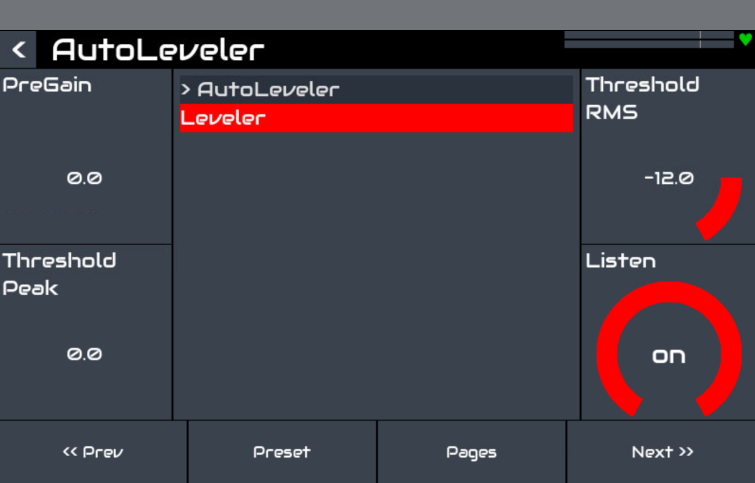
It features four controls:
- Pre Gain (dBfs)
Adjust the pre amplification in case you deal with quieter sources (like soundfonts) you want to boost before getting into the automatic levelling. - Theshold Peak (dBfs)
Set your maximum peak levels you want to have. Setting the threshold will reset your former gain reduction so it can listen from the start again. When “Listen” is on, it will only turn the volume downwards. Recommended values are between 0 and -4 dBfs. - Theshold RMS (dBfs)
Set your maximum RMS levels you want to have. Setting the threshold will reset your former gain reduction so it can listen from the start again. When “Listen” is on, it will only turn the volume downwards. The detector is estimating RMS values of a 300ms window by a using a lowpass filter. Recommended values are between -14 and -18 dBfs. - Listen (bool)
When engaged (by default) it will perform detection and level matching. When disengaged it will keep the current gain, but will not further listen. If engaged again, the gain reduction will be reset.
You can think of it as your angry sound engineer in a live situation, both during soundcheck and during the gig. Initially it will turn your output volume down to a reasonable level. It will also do that if anything unforseen happens in the chain (you add another plugin which features an integer gain multiplier and is set to gain=20). When set the right values (try the preset “Tuned”) it should level any source to a loudness level somewhere into yellow meter territory.
It also features two programs:
- Init: All set to zero. It will not perform anything unless your level is above 0 dBfs, which is always bad.
- Tuned: Set the parameters to reasonable values: Pre Gain will boost the signal by +6 dB to compensate quiet engines like soundfonts, peak threshold is set to -4 dBfs and RMS to -18 dBFS to keep more or less transient heavy signals somewhere in yellow area of your mixer.
How is it working / Signal chain
Signal chain is like this: Pregain → Detector → Apply AutoGain → Calculate overshoots and set post gain processor.
During calculation it will chose the lower value of Peak/RMS detector and will only apply it in case the volume gets turned down. The Pre Gain features a parameter smoothing of 1000 samples (typically about 20 ms), the autogain processor uses 10000 samples (about 200 ms).
Why does it reduce the volume when I play expressive notes? Will it mess with my dynamics when performing live?
Zynthian is technically a DSP plugin host. In the digital domain you should keep peaks always below 0 dBfs, because digital clipping is very nasty sounding. You should anyhow keep the peak threshold near 0dBfs to not produce too quiet signals. The goal is to keep chain output level somewhere in the yellow meter territory for all the chains.
It will not mess with your dynamics. After automatically turning down the volume it will not do anything to your signal. If you’re scared it will interfere with your live situation, you have several options:
- After inserting it you just bang the loudest note already
- If you worry about aprupt peak levels just only use the RMS detector
- If you’re still scared, turn the listening parameter off, so it will keep the current level.
Why not using a Limiter/Compressor?
The limiter/compressor is intended to keep or raise perseived loudness by reducing the peak levels. It will therefore mess with your dynamics. This plugin is actually an automatic gain plugin. After detecting and altering the gain it should do nothing but keeping a reasonable post gain value. A safety limiter at the end of the master chain is a good idea anyway.
What about xruns, popping noises when plugin in my guitar cable, loud transients of other heritage lowering my volume?
These kind of noises should be prevented anyway in the first place when performing live or in rehearsals. Xruns shouldn’t trigger loud traisients anyway because the nasty noise is high frequent spike produced by a a non zero signal immediatly going to zero.
I have a mixing guy/gal. Does it replace him/her?
No, it’s not intended to do that. He or she is a fundamental aspect of leveling your band. The plugin is only intended to send reasonable output to FOH/In ear monitoring/your home studio speakers for further processing. Ready made electric pianos / synths / keyboard extenders might or at least should try to level match their presets. In an open source project like Zynthian is with its variety of open source engines you cannot guarantee that.
Why doesn’t it recover the level in case you have quieter signals?
Automatic upward gain compensation can be risky. It needs to constantly listen and apply upward leveling in smart ways even if you just don’t play at the moment. The plugin choses safety over convenience in that regard. If you want to recover loudness, just turn any threshold parameter or turn the listen parameter from off to on.
I don’t trust that thing because I don’t know what it does
Check the source code linked below. It just does what is written in the main code and the two member functions you’ll find in the #include statements.
What’s next?
The plugin might stay in the current state because for me at least it succeeds in providing the functionality for the intended use case. If worries about one sample peaks remain in practical use the peak detector might get a short detector window instead of looking at every sample.
Binaries and source
When using self coded plugins of dumbasses like me always use with care, turn down volume, use your regular safety routines or check the source code if screwed up in the first place.
Download here (v0.1.2 from 27/08/2025)
- Extract to /usr/lib/lv2
- update plugin and preset database from webconf
- reboot
or
- use version from zynthian repostory
Finally
I’ll not convince anybody to use it. But for me it is useful and I had some fun getting into coding again. So in cases…
- you like it
- you like it but have ideas to improve it
- you don’t like it because you have ideas to improve it
- you don’t like it but want to encourage changes to improve it anyway
… I’m open for any suggestions.

