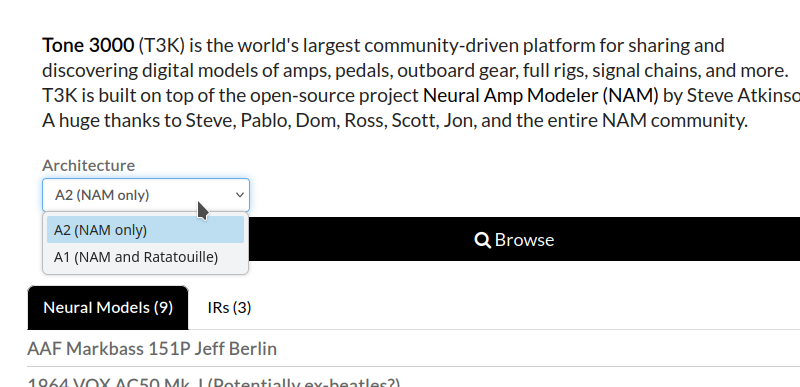
Okay, downloaded it manually to Zynthian, the NAM plugin loads it, and the current Ratatouille does not (A2 models are selectable, but when leaving the file dialog the value is reset).
Okay, the t3k integration in Zynthian does not send the architecture field to t3k.
When adding "architecture": 2, to the authorize url (in lib/t3k_handler.py) I am able to select A2 models. And it seems that if they also support a1, these can be used in ratatouille.
architecture: Filter by model architecture. Accepts 1 (A1), 2 (A2), or custom. Omitting falls back to A1 + Custom (legacy default; excludes A2). Applies to select_tone and load_tone flows.
Thanks for putting the captures up, and for chasing the A1/A2 filter down to the actual API parameter — that’s a genuinely useful find, because the failure mode (“selectable, then the value silently resets when you leave the file dialog”) is exactly the kind of thing people would otherwise report as a broken capture rather than an architecture mismatch.
Two thoughts on the fix, since it’s being worked on anyway.
Defaulting the architecture parameter based on which engine is actually loaded would be nicer than sending 2 unconditionally. If the target is Ratatouille, offering A2 models it can’t load just reproduces the same dead end from the other direction. If the handler knows the engine, it can request A1 for Ratatouille and A1+A2 for NAM, and nobody has to know the architecture generations exist.
Failing that, the browse list showing the architecture tag inline would at least make the mismatch visible before the download rather than after.
On the re-training: 2h per capture is a lot of GPU time to spend twice. Worth checking whether the standard trainer can export an A1-compatible model from the same captured input pair rather than re-capturing — the reamp recording is the expensive part to get right (levels, latency alignment), and that file is architecture-agnostic. If you’ve kept the raw input/output wavs, re-running training at a different architecture is just compute, and you can queue them overnight instead of doing them one at a time.
One tuning note on the amp itself: on a GrandMeister the sag and power-amp response change quite a lot with the master volume, and a capture bakes in whatever position you had. If you’re regenerating anyway, capturing two masters — one edge-of-breakup, one wide open — usually turns out more useful than two architectures of the same setting.
Also worth stating in the T3K description that these are head-only and need an IR, since you mention it here but people often grab the file from the browse list without reading the notes and then wonder why it sounds like a fizzy DI.
I think this is not so easy because your are acting from webconf view and not from engine view. So webconf does not know for what engine you are redirected to T3K. Perhaps we will find a good way how to get this working anyway but currently I have no idea.
(BTW: My Mooer GS-1000 can also read NAM files since the last update - reportedly even A2, but when I upload A2 files I cannot use them… A1 (0.5.x) works (A1 0.7.0 doesn’t).)
I trained the basic A2 at T3K (uploading a generated profile). But from what I’ve seen, this method is only ever used to generate A2. So if you need A1 you have to do it by yourself and upload the files later (or I have missed something…).
I used Nam-A2A1 converter (without GPU)… it took about 60 Minutes for one profile. This software can generate A1 0.5.x and A1 0.7.0, so I had to create 8 profiles. They are now all uploaded to T3K.
Not the best way, but I found no other way…
Yes. I currently used the master at 12 o’clock - that’s what sounds good for me in the rehearsal room. Maybe I should create some more captures. I will think about this.
This has not much sense with the current zynthian workflow and could cause more trouble than benefit.
The Zynthian UI (aka. the “physical performance interface”) has no access to the TONE3K download tool.
The TONE3K download tool is integrated into the zynthian’s webconf tool, that is accessed from the browser to download & save the models into the zynthian library, so they can be used at any moment. At the moment of downloading the models, perhaps no engines are running or perhaps several engines are running at once, or the running engines are not the engines the user wants to use with the models. We can’t make assumptions about this on zynthian.
So in our case, it’s probably better to let the user choose explicitly the model type.
 )
)