Hi, @ToFF ,
Your setup is really impressive as well as your work on OSC CUIA.
I thought my setup and workflow were very simple and easy to achieve. I was wrong or rtpmidi for PC (program change) has some limitations I’m not aware.
Ok, I’m not going to give up…at the moment.
I remembered that some years ago i bought a tiny device like this.
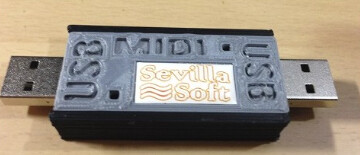
I tested it and it works…more and less. When it is recognized by Zynthian my setup works, but most of the times it wasn’t recognized. Another issue to deal with. Windows always recognize it when it’s connected (who would say windows system works better  ) That’s lead me to think the device works.
When it’s recognized:
(venv) root@zynthian:~# lsusb
Bus 003 Device 001: ID 1d6b:0002 Linux Foundation 2.0 root hub
Bus 002 Device 001: ID 1d6b:0003 Linux Foundation 3.0 root hub
Bus 001 Device 004: ID 04d8:f3ea Microchip Technology, Inc. MIDI USB-USB
Bus 001 Device 002: ID 2109:3431 VIA Labs, Inc. Hub
Bus 001 Device 001: ID 1d6b:0002 Linux Foundation 2.0 root hub
(venv) root@zynthian:~# aconnect -l
client 0: ‘System’ [type=kernel]
0 'Timer ’
1 'Announce ’
Connecting To: 128:0
client 14: ‘Midi Through’ [type=kernel]
0 ‘Midi Through Port-0’
Connecting To: 128:0[real:0]
Connected From: 128:0
client 28: ‘f_midi’ [type=kernel,card=3]
0 'f_midi ’
client 32: ‘MIDI USB-USB’ [type=kernel,card=4]
0 ‘MIDI USB-USB Puerto 1’
1 ‘MIDI USB-USB Puerto 2’
2 ‘MIDI USB-USB Puerto 3’
3 ‘MIDI USB-USB Puerto 4’
(venv) root@zynthian:~#
When not recognized:
(venv) root@zynthian:~# lsusb
Bus 003 Device 001: ID 1d6b:0002 Linux Foundation 2.0 root hub
Bus 002 Device 001: ID 1d6b:0003 Linux Foundation 3.0 root hub
Bus 001 Device 002: ID 2109:3431 VIA Labs, Inc. Hub
Bus 001 Device 001: ID 1d6b:0002 Linux Foundation 2.0 root hub
I don’t know if it is worth it to spend more time debugging…unless someone can point me the way to continue the endevour.
Thanks for your time.