Hi, all, I need some help to diagnose why rtpmidi is not working properly.
What I’m trying to do is to connect my windows 11 pro laptop to my zynthian. I Installed rtpmidi software from Tobias Erichsen website and started RTP-MIDI service in the Zynthian admin menu. Apparently it start all working but a few minutes after connection dropped (??? symbols in latency box of rtpmidi window). Then, I try to connect again and sometimes I can see it is connected for one second and the drops again, but normaly it doesn’t connect at all.
What I did so far to solve the issue without success:
a) On the laptop:
1.- Reinstalled rtpmidi twice, no luck
2.- Checqued that windows firewall is not blocking rtpmidi or bonjour and port 5004 is open (I thought this was not necessary as rtpmidi worked for some minutes)
3.- Checked that “core isalation memory integrity” is disable. I read this somewhere when googling for a solution.
4.- Changed interface property to have fixed IP and disabled ip v6.
5.- Laptop is updated.
6.- I tried to use a windows 11 tablet that I own with same results
b) On the Zynthian
1.- Reflashed mi SD card (I used Balena Etcher, as I always do)
2.- Stop/Start RTP_MIDI doesn’t help. I noticed a weird behavior: rarely without touching anything RTP-MIDI gets unchecked in the admin menu.
Zynthian is using wifi and laptop cable to router. I think is not a network issue as pinging zynthian from the laptop using a big packet size works without losing any packet.
Edit. I also tried using Zynthian hotspot and the behavior is the same. I think this way I can check my home network is not involved.
Any help will be much appreciated.
Configuration
Hardware
Raspberry Pi 4 Model B Rev 1.5
Audio: HifiBerry DAC+ ADC PRO
Display: ZynScreen 3.5 (v1)
Wiring: MCP23017_ZynScreen
I2C: MCP23017@0x20
Profile: v4_stage
I have used myself recently rtpMIDI with the same Windows app, on a Surface Pro 9 connected through an ethernet cable, so I guess that I am somehow entitled to comment on a similar scenario.
I am not at home now, and thus without access to my Z boxes, but I remember that, on the left-hand side of the RTP window, the user has sometimes to reinstate/reinitiate the current Zynthian session.
Moreover, please make sure that rtp-Midi is enabled as an active midi input on a per-chain basis (select the chain > long press > Midi Input).
Thank you @Aethermind. I tried to disconnect/connect Zynthian rtpmidi in rtpmidi windows, as well as disabled/enabled my session…several times. In the other hand, RTP-MIDI is checked in admin=>midi input. My primary plan is to send Program Changes to load snapshots, so no chain involved…at the moment.
The core is a dedicated RPI4 running PatchBox OS. On it, I have two RTPMIDI connections running—one to zynthian1.local, and the other, unsurprisingly, to zynthian2.local. I’m using McLaren’s RTPMIDI. It’s set up so that after boot, the RPI4 attempts to auto-connect to the Zynthians. It’s nearly flawless—any issues that do occur are usually on the PatchBox RPI4 side.
In addition, that machine also runs Bome Network, as does my PC (dual booting both Windows and Linux, with Bome Network installed on both). I also have a BomeBox, which connects all my other synthesizers.
Currently, I have my Torso T-1 sequencer connected to my PC, and from there, routed via Bome Network into zynthian1.local. I can also route other sequencers or keyboards from the BomeBox to any of the Zynthians.
Everything is wired via Ethernet, which is key. Another crucial aspect is that I don’t need to have the PC turned on. Importantly, from my experience, the RTPMIDI side on the Zynthians has been rock solid the whole time.
@ToFF, seems to me you are using linux, that’s not my case. I’m suspecting the problem is windows related, I’ve read many people using windows 10 without issues and, apparently, when they upgrade to windows 11 it also works. In my case both, laptop and tablet were installed from scratch.
I think I’ve found why I’m having the rtpmidi issue, and it’s my fault. To install windows 11 on my laptop and my tablet I used Chris Titus winutil tool to create a “microwin” install media. This install has worked for me flawesly so far, until I needed to use rtpmidi. I think microwin removed something that rtpmidi needs to work properly. I’m now reinstalling full windows and I hope the issue it’s gone.
Hi @Aethermind, an update to my issue, apparently microwin is not guilty. I spent all the morning installing official windows 11 pro image and all the stuff I need, including rtpmidi. At first rtpmidi worked then I started to build my setup. I installed Bome MIDI Translator PRO which I use to send midi messages to Zynthian via rtpmidi then issue is again here. What I thought is Bome is involved so I decided to try send midi messages using Reaper but the problem is apparently the same. Reaper can send the midi message and Zynthian reacts accordenly and inmediantly after the connections drops.
After all this test I decided to install Windows 10 pro in the tablet without any success with the issue.
Something I cannot understand is Zynthina sometimes get RTP-MIDI option in admin menu is unchecked without touching anything.
Try switching from RtpMidi over WiFi to a physical ethernet cable, if you already haven’t. Also, disable WiFi from the Admin menu on the Zynth.
Check the LAN port on your laptop: are you hooking the Z to an ethernet connector directly, or through a LAN-to-USB adapter (as on my Surface Pro)? In this case, Is the adapter reliable?
Opt if possible for a proven and robust DAW platform like Cubase or Protools, for sending MIDI data
Try playing Midi stuff through the RtpMidi connection, instead of just sending MIDI PC/CC/Sysex messages, because there might be some kind of output or input filter in place somewhere.
Hi, @Aethermind and thank you for your tips. Unfortunatelly none of them worked, however I did some other test that may help focusing the problem.
Using Reaper I can play the keyboard routing midi via rtpmidi to zynthian without any issue, even if rtpmidi window shows latency as ???, I thought that means the connection dropped, now I know I was wrong.
The keyboard has some pads configured to send PC, when pressing any of them I can see Zynthian to load the snapshot but inmediatly shows the message RPT-MIDI is stopping.
Might this means Zynthian cannot accept PC midi messages?
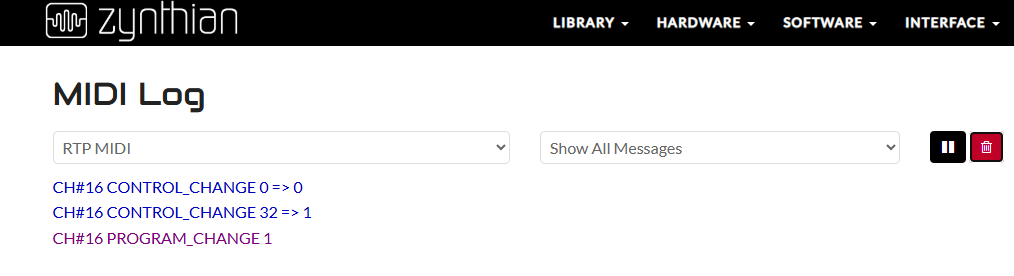
This is the midi log shown in webconfig, snapshot 1 is loaded correctly and inmediatly Zynthian Stops RTP-MIDI. Sending only PC 1 (not CC0 1 nor cc32 1) the issue is the same.
Have you read the Oram manual’s part related to the specific management of presets change, i.e. the temporary state of a snapshot (chains layout) called ZS3? (Sub-snapshot).
The way in which Zynthian is meant to receive program changes is explained here, in the 2.5 paragraph:
Hi and thank you for being so patient and helpful.
Yes, I do search user’s guide. Topic 2.5 is about sub-snapshot which I’m not using…at the moment. My goal is to change snapshots using PC messages. If you (or anybody) knows a different way to change snapshot that would be great.
The workflow I want to achieve is:
Windows 10/11 tablet with pdf music sheets.
Usb midi footswitch (m-vave chocolate plus) connected to tablet. Pressing one switch shows next pdf and a second one shows previous pdf. The pdf’s number order in the directory is assumed as the program change to be sent.
All midi messages handled by Bome midi Traslator PRO that communicate to Zynthian via rtpmidi using built-in Zynthian hotspot (if possible).
So far pdf handling is working, I’m stuck in midi messages due to rtpmidi disconnecting.
I thought to use a different approach as:
Connect midi footswitch to Zynthian, this way I will not have issues (I guess) changing snapshot (I do this right now using my keyboard pads). I wonder how to send messages to Bome in order to show the apropiate pdf. Perhaps midi rules will work for this, I did not investigate yet.
Direct connection between Zynthian and BomeBox via the internet is not possible. BomeBox does not have rptmidi, but its own communication protocol. Apparently sometime in the future it will be able to support MIDI 2.0 UMP, they have been promising it for a year. Which Zynthian already can do, more here..
In my case, which I have already described above, I have an RPI4 inserted as a converter/router for rtpmidi to ensure a network connection. EDIT:I remembered a possible replacement. There is this DIN MIDI → RTP MIDI converter.. But I haven’t tried it. In your case, don’t complicate your life and proceed as follows.
According to the specification above, your Zynthian looks like a V4. In that case, the easiest way to connect to BomeBox will be via USB-MIDI Interface (one of the best is ESI MidiMate eX).
If it is a Zynthian built from scratch and does not have midi din connectors, then get a Y cable for USB-C and take advantage of the fact that the USB-C power supply is an OTG USB port, the description is here.
If you have other MIDI devices, connect them via a powered USB HUB to BomeBox.
Your setup is really impressive as well as your work on OSC CUIA.
I thought my setup and workflow were very simple and easy to achieve. I was wrong or rtpmidi for PC (program change) has some limitations I’m not aware.
Ok, I’m not going to give up…at the moment.
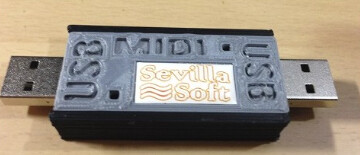
I remembered that some years ago i bought a tiny device like this.
I tested it and it works…more and less. When it is recognized by Zynthian my setup works, but most of the times it wasn’t recognized. Another issue to deal with. Windows always recognize it when it’s connected (who would say windows system works better ) That’s lead me to think the device works.
When it’s recognized:
(venv) root@zynthian:~# lsusb
Bus 003 Device 001: ID 1d6b:0002 Linux Foundation 2.0 root hub
Bus 002 Device 001: ID 1d6b:0003 Linux Foundation 3.0 root hub
Bus 001 Device 004: ID 04d8:f3ea Microchip Technology, Inc. MIDI USB-USB
Bus 001 Device 002: ID 2109:3431 VIA Labs, Inc. Hub
Bus 001 Device 001: ID 1d6b:0002 Linux Foundation 2.0 root hub
(venv) root@zynthian:~# aconnect -l
client 0: ‘System’ [type=kernel]
0 'Timer ’
1 'Announce ’
Connecting To: 128:0
client 14: ‘Midi Through’ [type=kernel]
0 ‘Midi Through Port-0’
Connecting To: 128:0[real:0]
Connected From: 128:0
client 28: ‘f_midi’ [type=kernel,card=3]
0 'f_midi ’
client 32: ‘MIDI USB-USB’ [type=kernel,card=4]
0 ‘MIDI USB-USB Puerto 1’
1 ‘MIDI USB-USB Puerto 2’
2 ‘MIDI USB-USB Puerto 3’
3 ‘MIDI USB-USB Puerto 4’
(venv) root@zynthian:~#
When not recognized:
(venv) root@zynthian:~# lsusb
Bus 003 Device 001: ID 1d6b:0002 Linux Foundation 2.0 root hub
Bus 002 Device 001: ID 1d6b:0003 Linux Foundation 3.0 root hub
Bus 001 Device 002: ID 2109:3431 VIA Labs, Inc. Hub
Bus 001 Device 001: ID 1d6b:0002 Linux Foundation 2.0 root hub
I don’t know if it is worth it to spend more time debugging…unless someone can point me the way to continue the endevour.
I’m typing a description of the image above to make it searchable text, although I imagine our AI friends who will be doing the searching in the future won’t really need it.
It appears to be a Sevilla Soft MIDI USB-USB - a device that allows you to establish a fast and secure MIDI connection between two hosts.
$92.02 · Out of stock on Reverb
Elektronauts forum had a post about Sevilla Soft from 2016:
I would hope that Zynthian would provide equivalent function without the need for MIDI USB-USB but maybe that is a goal rather than reality today.
This is/was a spanish company specilized in MIDI devices. The device I think is dicontinued. You can find some YouTube videos from Hispasonic demostrating how It works but in spanish.
@ToFF provided several good alternatives in this post above:
I understand that it made sense to try Sevilla Soft MIDI USB-USB so it seems the choices are - try to find the cause of Zynthian not recognizing MIDI USB-USB, ot choose which one of @ToFF 's approaches to try. They were largely dependent on what type of Zynthian you’re actually running. And may the Force be with you.
Try to see if ground or any other connection exists between the two sides.
Normally, one would make such a thing with two optos inside and two separate MIDI-to-USB controllers, but if this one is just a controller with two ports, you will encounter ground loop problems and, due to the fact that the Zynthian uses a Class II power supply, problems with leakage current as well.
Normal USB can handle that, but a simple microcontroller usually can not, at least without extra parts, and who knows how that thing is designed?
Maybe try connecting two simple isolated USB2MIDI cables?

 ) That’s lead me to think the device works.