Hi, To isolate de issue I only connect to Zynthian the MIDI bridge usb-usb with the behavior described above: very ocassionally the connection is established.
The device has 2 leds, one in each usb port, and I noticed that when connection is established led in the zynthina side port goes off. Windows side led always go off as soon it’s connected.
Trying to avoid power issues I used and usb c hub with PD and I tried to connect to Zynthian usb c port, Zynthian boots but MIDI bridge never gets detected.
It is very unlikely the Zynthian causing problems here, so it may be better to refer to the manufacturer of that USB-USB thing. You may try to use an old USB2.0 hub on the Zynthian side, just to clean the signals, maybe that helps. Anyway, this thread is about RTP-MIDI.
Whilst we currently have RTP-MIDI working and don’t have plans to disable it, we should probably be trying to move to MDUI 2.0 for a native, MIDI standard mechanism for transporting MIDI over network. It is now supported on the major operating systems so I expect to see it used more in DAW, soft synth, etc.
This is a long shot, but you might be able to isolate the issue a bit more by running standard Raspian on the RPi with an HDMI monitor. This might tell you (if it identifies reliably) if the issue is the Zynthian software.
Can you please describe your Zynthian? Is it a classic kit from the store? Or did you build it from scratch? We advise you here, but we don’t know the basics.
Personally, I would power the Zynthian with the official RPi power supply. I would connect a powered USB port to the USB and connect all devices to it. I personally prefer USB hubs equipped with buttons that turn on individual ports.
I understand you, I also prefer to move MIDI signals over the network, but I’m afraid that until MIDI 2.0 is fully implemented, finding the right solution will be frustrating.
My zynthian is an oficial V4 and reflashed SD card twice.
What it’s surprising is I am able to use my keyboard with Reaper using rtpmidi over wifi to play chains in Zynthian. That means no Network issue, right? I wonder why PC message, a few bytes, is causing rtpmidi to stop working in the Zynthian side. I posted a couple of days ago the MIDI log in webconfig and, I think, message Zynthian receives is correct.
I think I will order a USB to MIDI Converter as @Toff adviced. It’s not worth It to spend more time.
Yes, no Network issue. If it plays immediately after pressing the key, everything is fine
About PC messagies. Check out the wiki Web Configuration User Guide - ZynthianWiki and check how your MIDI options are set (I assume the same as in the picture in the wiki). I think you probably know this too, but just to be sure. I’ll try what sending PC messages via RTPmidi does for my Zynthians.
So far i was using my keyboard (directly connected to zynthian) pads to change snapshot without any issue. I’m using the exact same message over rtpmidi with the results I explained: the MIDI message arrives to zynthian then loads the snapshot and inmediatly after I can see in the Zynthian display rtp-midi is stopping.
Last, maybe stupid question. Is RTPmidi in enabled in the other Snapshots as well? EDIT: Really stupid question. I take it back.
EDIT2: Maybe not such a stupid question. I looked at the first standard snapshot in zynthian and it doesn’t know anything about RTPmidi on the input.
EDIT3: Yes, if a snapshot is loaded that doesn’t have the input in RTPMidi turned on, then RTPMidi turns off. It even flashed on my screen (vangelis version)
I created Bank 001 with several snapshots. I can load any of them using keyboard pads. Now I would want to change the same snapshots (and using the same MIDI message) remotely. If the MIDI message works when it’s sent by the keyboard, It should work vía rtpmidi…or am I wrong?
Yes, if RTP MIDI was enabled in the admin menu in MIDI Input Device before creating the snapshots.
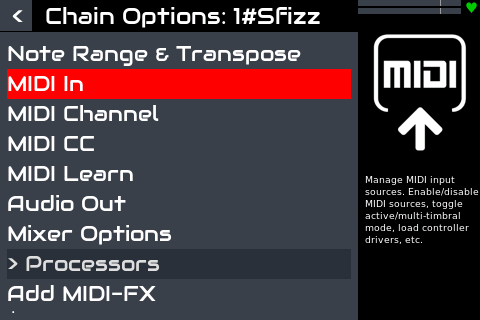
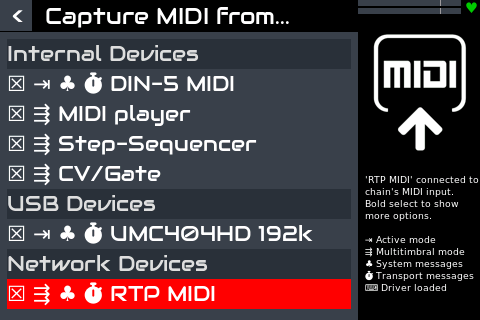
Check each snapshot to see if it has the RTP Midi item in OPTIONS/Midi in.
The admin menu enables RTP-MIDI service. This is saved in the snapshot, so loading a snapshot with RTP-MIDI enabled will enable the RTP-MIDI service.
The chain options, MIDI Input menu enables RTP-MIDI input to a chain. (The service must already be enabled in admin menu.) This is saved in ZS3, so loading a ZS3 will recall each chain’s RTP-MIDI routing.
Similary, each MIDI chain’s output may be routed to RTP-MIDI which is also saved in ZS3.
Note that when the snapshot is loaded, ZS3-0 is loaded which is the state of the system when the snapshot was saved.
What you say about how rtpmidi has to be setup it’s, I think, the piece I need to complete my puzzle. I thought that activating rtpmidi in admin-midi input menú was a global setup and didn’t need something else. I think this is the same @ToFF wrote yesterday and I didn’t undersrand…till now.
Later I will try and give feedback with the results.
The way I used to build my snapshots missed the step of saving the sanpshot AFTER rtpmidi is enabled in admin menu. Anyway I double check that chain option midi in has rtpmidi tick before saving.
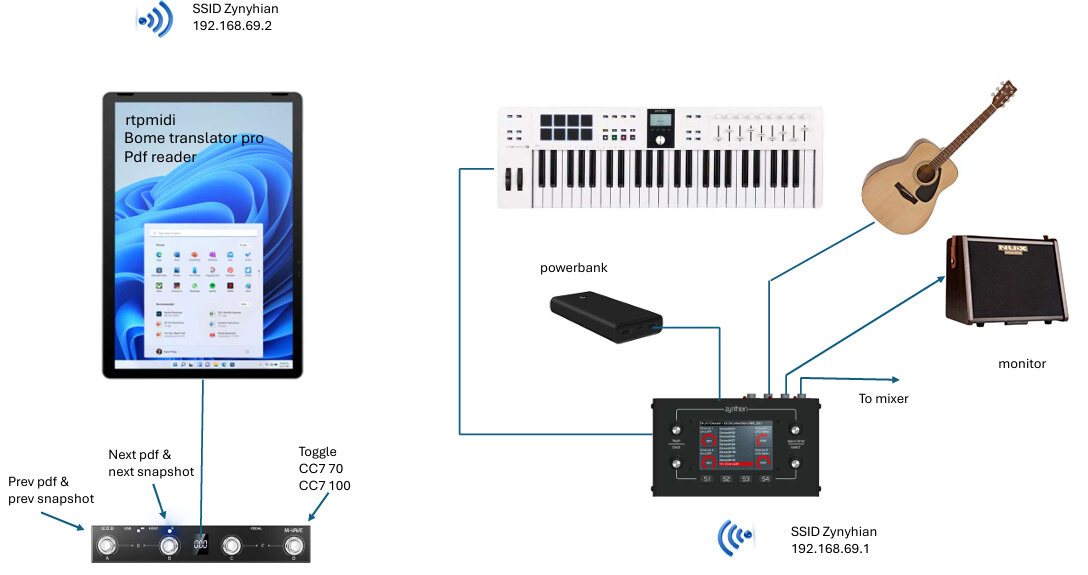
Now my rig and workflow is as simple and friendly as I wanted. It’s a modest one but enough for me
When switch “next” is pressed, the tablet loads next pdf on the list and loads next snapshot (via Bome and rtpmidi). Obviously, pdf list match snapshots list. Same apply to prev switch. Monitor speaker is battery powered and lasts for hours as well as the powerbank.
Next to do is setup toggle switch.
Thanks to all for your help
Edit. Footswitch can be bluetooth paired but it’s not enough reliable, so I decided to use USB cable.