One thing I’ve noticed when uploading Osirus ROMs is that uploading one replaces the other one. Perhaps not a big issue, and perhaps by design, but Osirus itself accepts having a B and C ROM in place, allowing the user to switch between them using the UI. It’s fairly easy to upload them using other means than via webconf, so it’s not a big issue (and I’m thinking most users probably would stick to one anyway).
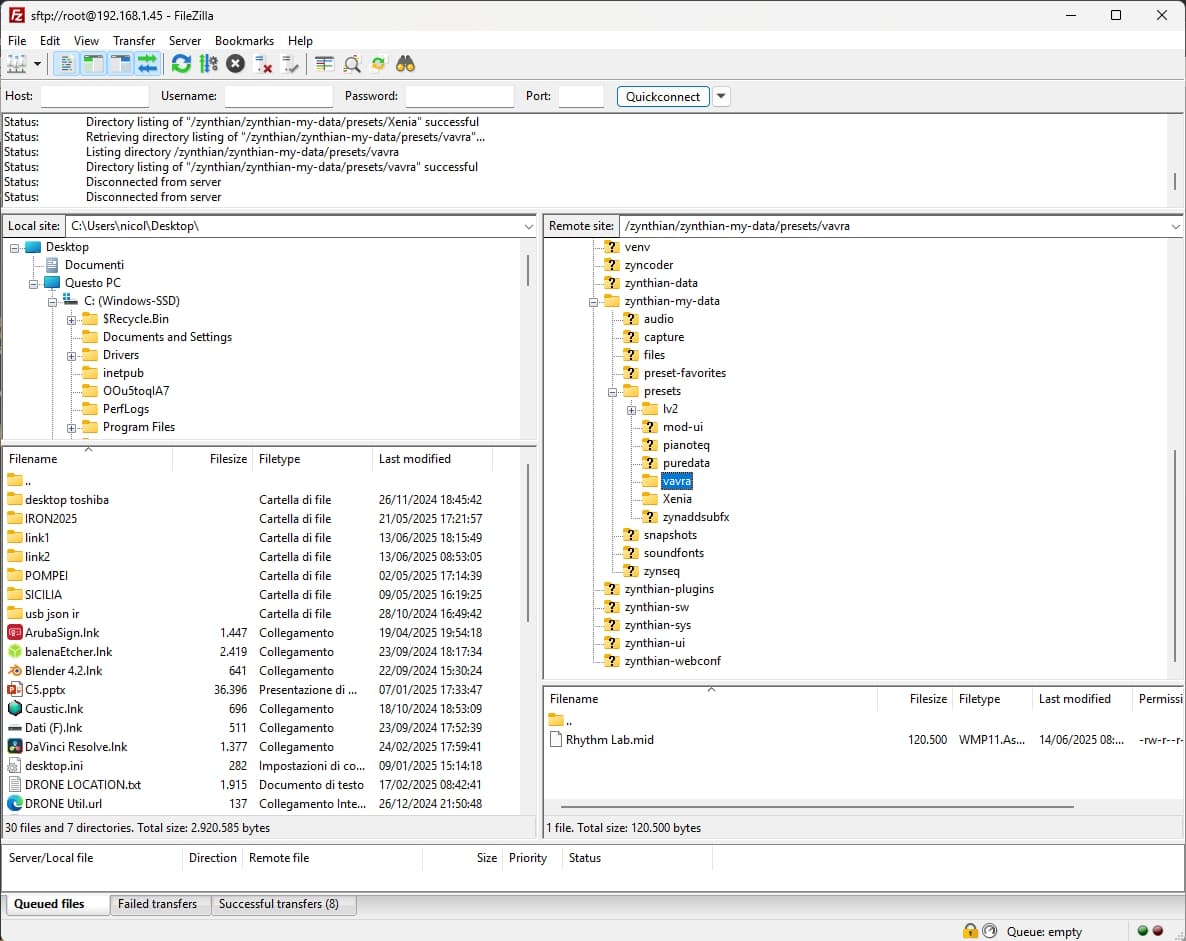
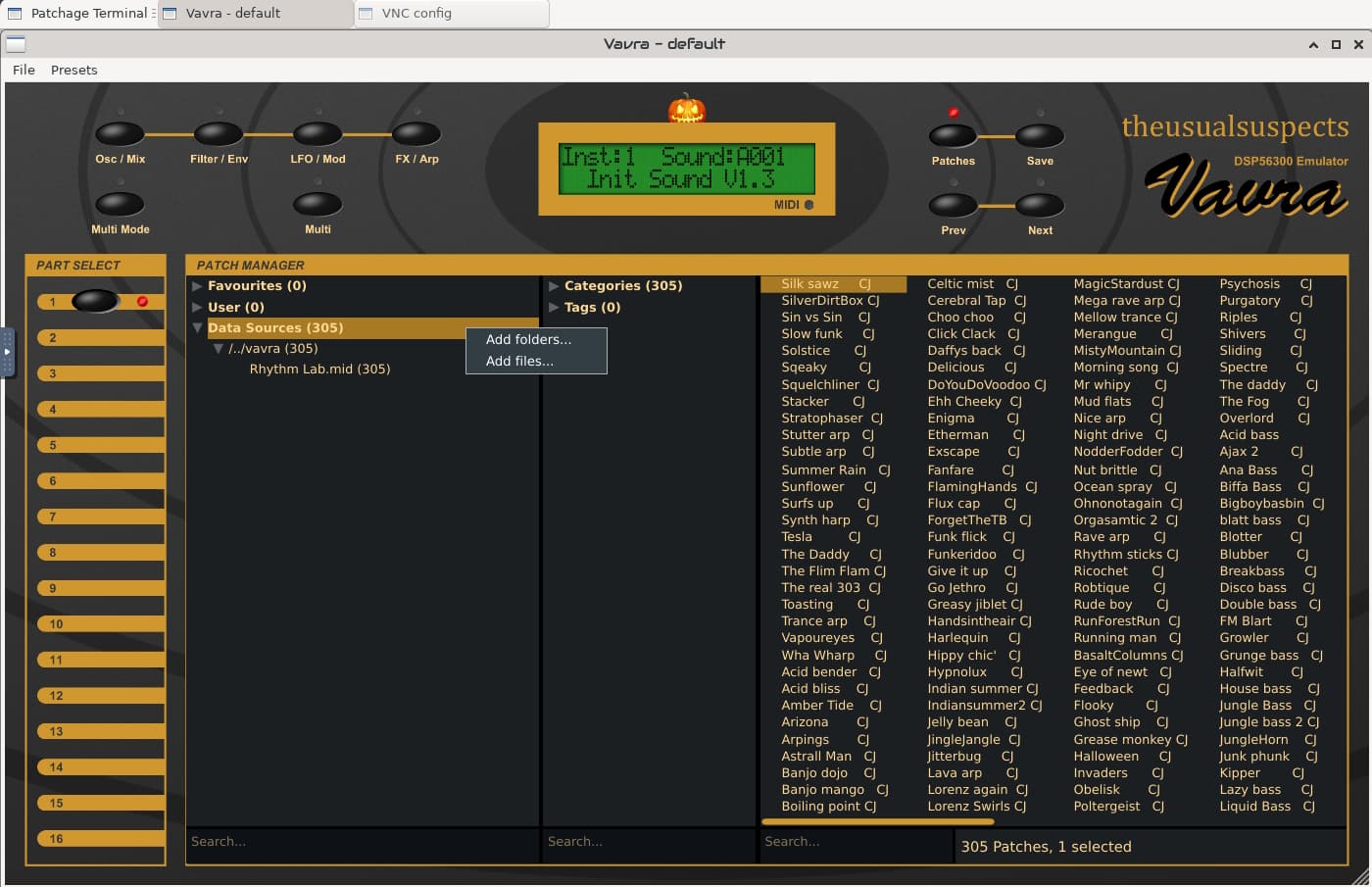
I was able to load presets using Filezilla and VNC-Engines interface. Simply put a presets bank in a folder with Filezilla and load that using VNC interface. Just right-click on “Data Sources” in the patches browser and add a folder or a file (.mid or .syx). I loaded a free Micro Q bank from Rhythm Lab wich you can easily find searching on the net.
Unfortunately I can’t see and load the presets from Zynthian. They’re available only in the VNC interface. I have no idea how it can be done.
1 Like
I can verify that this doesn’t work in vangelis. Started with latest oram image, then upgraded to vangelis (couldn’t find a vangelis image among the Zynthian OS images at https://os.zynthian.org/ .
Attempting to upload the ROM file via the webconf seemingly goes well, but afterwards it still says None in the " Osirus ROM file (Access Virus A/B/C):" box, and the ROM file is not written to /usr/local/lib/lv2/Osirus.lv2/ where Osirus expects to find it.
EDIT: If you manually copy the file to the required location (e.g. using scp), it shows up in the webconf as the installed ROM file.
EDIT2: It’s possible to add a chain with it, but when the chain starts, you’re dumped directly into the UI without the option to select a ROM preset, and backing out of the UI shows no ROM banks in the Zynthian UI.
Regarding finding the presets, my experience (with oram) has been that when one adds an Osirus chain, if one doesn’t select a preset as part of that process (i.e. if, when the list of ROM banks comes up once the chain has been added, you back out and go somewhere else), the bank/preset list does not come up again. You need to select a ROM preset when adding the chain for the list to appear next time. But right now in vangelis, the bank/preset list does not come up at all when adding the Osirus chain.
Could this be the size of the he ROM image? Zynthian uses it’s tmp partition to store uploads and this is RAM disk with fairly small size. Is this ROM image larger than others? (I don’t know but the thought occurred so I’m sharing it!) @jofemodo we should add a check of file size and available temp storage in the upload process so that we can earn of an upload will fail, or if the remote file size is not available then we can try the upload and report failure.
2 Likes
I hope it’s solved now. Please, update and test.
Regards,
2 Likes
Yep it’s working now. Thanks! Only remaining issue is loading presets from the Zynthian UI.
1 Like
LV2 preset export is only implemented for Virus emulators:
For Xenia & Vavra there is no LV2 preset export code. Someone should implement it 
The right place to implement seems to be the patch manager code. This for Xenia:
This for Vavra:
Regards,
2 Likes
When does the LV2 preset export actually happen, i.e. what triggers the generation of the LV2 files?
installation of roms.
Ok, that explains why when I install the ROM manually by copying it to the relevant location there are no presets.
I’m just doing in the boring way so far. I load the presets i like in the VNC interface then i save them manually on my Zynthian 
What about the parameters? Would it be possible in the future to have them on the Zynthian screen? It would be great, expecially for Vavra and the use of midi learn. The big problem with Micro Q is, indeed, the lack of physical knobs.
Can someone give a hint where to put the ROM?
Hi @C0d3man ,
You can either manually place the ROM file in the Osirus folder, created under:
/root/usr/local/lib/lv2
or use the ROM upload service available in webconf > DSP56300.
1 Like
Ok, but I think I have another problem: I am using the latest Vangelis:
zyncoder: vangelis (f4fed76)
zynthian-ui: vangelis (0bb18ac)
zynthian-sys: vangelis (a7b9ad6)
zynthian-data: vangelis (bf4e7b4)
zynthian-webconf: vangelis (bd2afee)
I was regenerating the engine database (from webconf and from bash). Also searching with lv2ls in bash (the plugins were found). But they are not in the list of engines on webconf, so I cannot enable them…
Anyone any idea?
Pi4? Somewhere I remember the DSP56300 are disabled for Pi lower than 5 due to severe performace issues.
Yep… ahhh, ok. That’s it. Thanks!
Of course: it wasn’t openly stated that the attempted installation was on a Pi4. 563XX emus are disabled by default by the OS, on anything but the Pi5.
Best regards 
1 Like
I found a solution for the LV2 parameters issue in all DSP56300 plugins. Just changing the LV2 URI solves the issue. I just created a PR:
I will try to update the plugins ASAP so all of you can enjoy this.
Enjoy!
6 Likes
This is exciting news @jofemodo !
Thanks for this remarkable improvement in the DSP56300 emus management. 
I look forward to experimenting, with this further step in Zynthian integration!
All the best
Is there a way to show presets within the zynthian ui for vex?