Two Zynthians: Virtual JV ...and DSP56300

I have two Zynthians based on PI5:
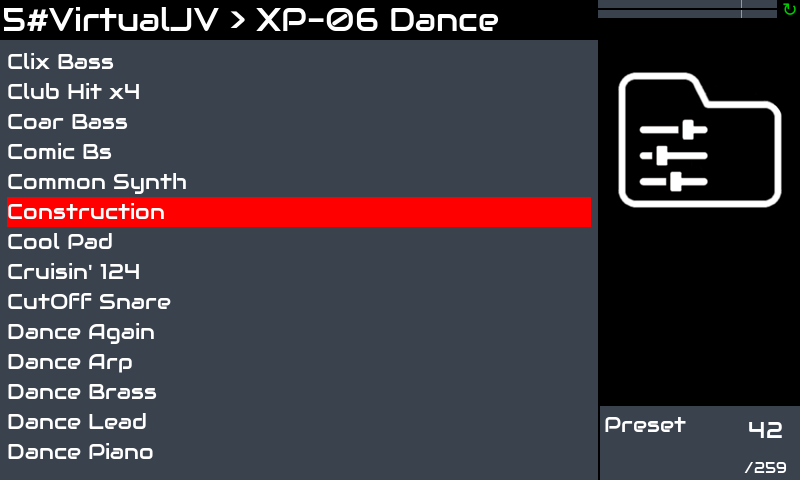
the first with updated Oram: Virtual JV has presets accessible by hardware
the second with updated Vangelis: Virtual JV has presets accessible only by Webconf

I tried all I know to make the second work as the first about Virtual JV but unsuccesfully.
So my idea now is to synchronize by Filezilla all the VirtualJV relevant files using the first as reference.
Could it work?
Which are the relevant files and their relevant folders?

Hi Paolo,

Hmmm… I have no specific technical cues, as how differently Vangelis works when compared to Oram, but I suspect that their system frameworks may/should differ substantially. Thus, I am not sure that simply mirroring the VirtualJV Oram folders structure in Vangelis would do the trick, of making them work in the same way or even just plainly having the plugin itself functioning correctly in Vangelis.

Just my guess,

Cheers :slight_smile:

I would like to share my empiric study

Zynthian A (VirtualJV presets selectable on display and from Webconf) Zynthian B (VirtualJV presets selectable only from Webconf)
after launching from terminal regenerate_lv2_presets.sh GitHub - giulioz/jv880_juce no changes
after Search for presets from Webconf, no changes
/root/.config/JV880 roms files roms files *** only original for copyright reasons
/zynthian-data/lv2-custom/jv880.lv2 preset_names.txt preset_names.txt
/config/jalv presets_VirtualJV.json (392.815 bytes) presets_VirtualJV.json (2 bytes) after mirroring A>B: presets list on display once selected a preset, it is not loaded
/zynthian-my-data/preset-favorites JV_VirtualJV.json — after mirroring A>B: presets list on display once selected a preset, it is not loaded

any idea to go ahead and fix the problem?

Hi @piattica :slight_smile:,

You have done a nice job, in reporting and categorising your undertaken steps to mirror the two installations. Nevertheless, I wonder if it’s really required, in order to have VirtualJV properly working also in Vangelis.

I suggest you keep in mind that what an installer package does most of the times - with few exceptions for simple desktop applications (which is not the Zynthian case) - is not only transferring files and archives to specific mass storage locations, but also configuring and setting a number of system pointers and environment variables, without which the raw installation data (that you are trying to transfer between systems) is unlikely or outright impossible to function.

Cheers!

Hi @piattica !

These are the steps i just followed to get my Virtual JV running with all presets from the ROMs:

  • From webconf, open the “File Browser” and login => zynthian, opensynth
  • Drag and drop my ROM files into folder “roms/JV880”
  • From command line, run this command to regenerate LV2 presets:

regenerate_lv2_presets.sh https://github.com/giulioz/jv880_juce.git

Ready! It worked at first try:

I followed these steps in a fresh burned image updated to vangelis without issues.

Enjoy!

2 Likes

Similar procedure should work for any TUS plugin:

  • osirus
  • osTIrus
  • JE8086
  • Vavra
  • Xenia

Regards,

1 Like

it does not work to me

i did nothing special. Fresh burn latest image, change to vangelis and the 3 simple steps above.

Did you follow these exact steps?

Regards

I reflashed, chosen Vangelis, updated and installedation of VirtualJV following:

it is OK :ok_hand:

but…
later I installed Vavra, etc. and presets are accessible nly by VNC {once more}
even after launching Search for presets either from Zynthian either for webconf
so I believe there would be something wrong in Vangelis

I am open to follow your further instructions

Hi @piattica,

As far as I know, Vavra and Xenia have been made to run effectively on the Zynthian, but their parameter control and presets listing haven’t been integrated yet. Therefore, their reported behaviour should be nominal for the time being.

Cheers :slight_smile:

Hi @Aethermind !

Vavra and Xenia have no presets available in the zynthian UI. This has been already explained in a previous message:

Regards,

sorry I forgot it

Thanks @jofemodo, :slight_smile:

Anyway, I was already aware of the subject. :wink:

Cheers!

what about the JE8086 presets? I can’t see them in Zynthian screen

Hi @piattica !

JE8086 has no presets in the UI yet.
I forgot to include JE8086 in the list, although it’s well explained in the linked post.

Regards,

1 Like

@jofemodo can i install a virtualJV in a old oram build? was build in 2024-10-02..

I don’t want to update because my RP4’s performance got worse with the latest versions. It might be psychological, but I’d rather stick with the 2024 version.

Probably psychological :grin:

Yes, you can, but it’s not documented.
Try running the JV install script.

Regards