Thanks for your response. Let me provide all the info I have.
The packaging refers to the model as CX090PI-B, and it is this “7 Inch Touchscreen for Raspberry Pi,5-Point 1024 * 600 IPS touchscreen Portable Monitor with HDMI Interface Dual-Speaker for Raspberry Pi 5/4B/3B+/3B/B+ Jetson Nano Win11/10/8/7(7’’ 1024*600-b)1” on Amazon. It’s a 7” 1024x600 IPS display with capacitive touch, enclosure, fan, speakers (hdmi), and 12v 2A power supply. At only $35, I’ve now bought two of them  The name brand listed is ‘Gallagher’ but I’ve also seen several identical items with different brand names on Amazon, eBay, and Ali Express. This seems to be a newer revision than some of the videos of it that I found. The internal label on the board is CX 070HD-P-V4.1
I’ve done everything in webconf’s “Advanced mode” and I have the Waveshare 7 HDMI+USB 1024x600 selected as shown in the screenshot above. I’ve tried the recipe provided by waveshare:
hdmi_force_hotplug=1
hdmi_drive=1
hdmi_group=2
hdmi_mode=87
hdmi_cvt=1024 600 60 6 0 0 0
dtoverlay=vc4-kms-v3d
both with and without dtoverlay=vc4-kms-v3d (and rebooted multiple times to test with each variation).
Here is a picture of the inside of the unit:
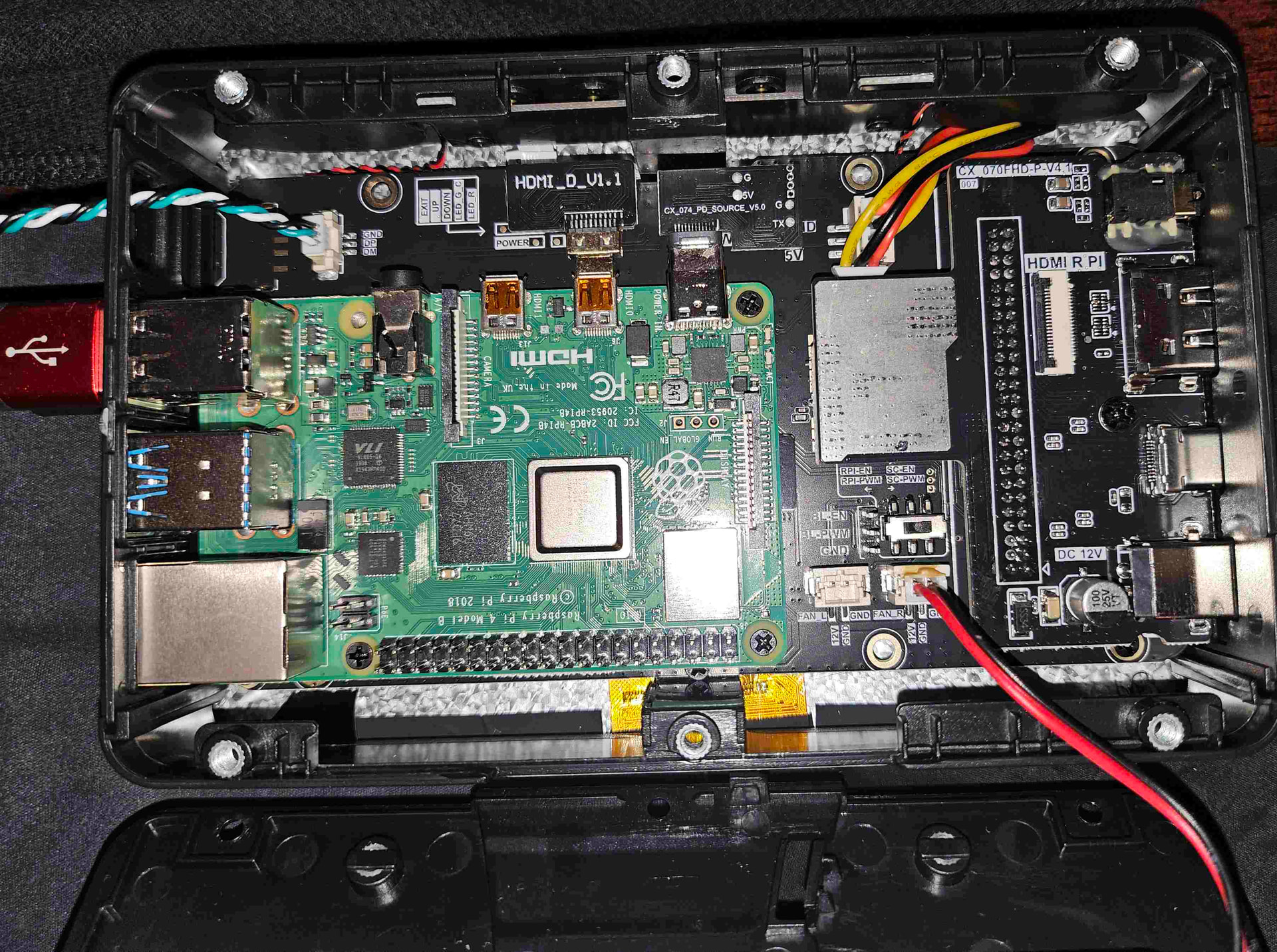
I cannot figure out why zynthian coming up causes this xinput error? –if I could fix this, I could specify the translation matrix which I’m reasonably sure could fix the scaling of input. Again, a regular 64bit Bookworm image works fine with this touchscreen with no calibration issues, but they use wayland/wayfire.
I also don’t know why can others just unplug and replug their USB connector to make it work, but that doesn’t work for me? Peculiar.
When I ssh into the device and I run ts_touch, touching the top left and bottom right give pretty reasonable events. E.g., coordinates in the range of about [8,7] top left and [1000,571] bottom right.
When I run xinput_calibrator I don’t get any events from touch at all until I reattach and re-enable the xinput id of the TSTP MTouch touchscreen device. E.g.,
root@zynthian://zynthian# xinput_calibrator
        Setting calibration data: 0, 1920, 0, 1080
Calibrating EVDEV driver for "TSTP MTouch" id=8
        current calibration values (from XInput): min_x=0, max_x=1920 and min_y=
0, max_y=1080
root@zynthian://zynthian# ### *** No events and timed out !!!
root@zynthian://zynthian# xinput reattach 8 2
root@zynthian://zynthian# xinput enable 8
root@zynthian://zynthian# xinput_calibrator
Calibrating EVDEV driver for "TSTP MTouch" id=8
        current calibration values (from XInput): min_x=0, max_x=1920 and min_y=
0, max_y=1080
Doing dynamic recalibration:
        Setting calibration data: 37, 1900, 20, 1103
        --> Making the calibration permanent <--
  copy the snippet below into '/etc/X11/xorg.conf.d/99-calibration.conf' (/usr/share/X11/xorg.conf.d/ in some distros)
Section "InputClass"
        Identifier      "calibration"
        MatchProduct    "TSTP MTouch"
        Option  "Calibration"   "37 1900 20 1103"
        Option  "SwapAxes"      "0"
EndSection
Running that command doesn’t fix the alignment in Zynthian, it’s still misaligned, but what’s funny is that’s in the scale of ~1920x1080 when the display is 1024x600…
EDIT with some great news!
So, I had been experimenting with a coordinate transformation matrix, but I only now realized I was “doing it wrong” –I thought I needed to scale to 0.5, but that was wrong. 2.0 was also wrong. For the first time in the last two days of experimentation, I have aligned touch events with the following!!
xinput set-prop ‘pointer:TSTP MTouch’ ‘Coordinate Transformation Matrix’ 1 0 0 0 1 0 0 0 1
So, now I have to find a way to make this permanent and keep it from crashing/detatching on load….
OK. Another improvement: Adding the above to a 98-calibration.conf (99 is already there for the v3d driver), after I reboot “all I have to do” is run the two lines to reattach and enable the device by id and my touch works with proper alignment
root@zynthian://zynthian# export DISPLAY=:0.0
root@zynthian://zynthian# xinput --list
⎡ Virtual core pointer                          id=2    [master pointer  (3)]
⎜   ↳ Virtual core XTEST pointer                id=4    [slave  pointer  (2)]
⎣ Virtual core keyboard                         id=3    [master keyboard (2)]
    ↳ Virtual core XTEST keyboard               id=5    [slave  keyboard (3)]
    ↳ GHW Micro GHW USB AUDIO Consumer Control  id=6    [slave  keyboard (3)]
    ↳ GHW Micro GHW USB AUDIO                   id=7    [slave  keyboard (3)]
    ↳ TSTP MTouch                               id=9    [slave  keyboard (3)]
    ↳ vc4-hdmi-0                                id=10   [slave  keyboard (3)]
    ↳ vc4-hdmi-1                                id=11   [slave  keyboard (3)]
∼ TSTP MTouch                                   id=8    [floating slave]
root@zynthian://zynthian# xinput reattach 8 2
root@zynthian://zynthian# xinput enable 8
root@zynthian://zynthian# cat /etc/X11/xorg.conf.d/98-calibration.conf
Section "InputClass"
        Identifier "calibration"
        MatchProduct "TSTP MTouch"
        MatchIsTouchscreen "on"
        MatchDevicePath "/dev/input/event2"
        Option  "TransformationMatrix" "1 0 0  0 1 0  0 0 1"
        Option  "Calibration"   "37 1900 20 1103"
        Option  "SwapAxes"      "0"
EndSection
root@zynthian://zynthian# xinput --list
⎡ Virtual core pointer                          id=2    [master pointer  (3)]
⎜   ↳ Virtual core XTEST pointer                id=4    [slave  pointer  (2)]
⎜   ↳ TSTP MTouch                               id=8    [slave  pointer  (2)]
⎣ Virtual core keyboard                         id=3    [master keyboard (2)]
    ↳ Virtual core XTEST keyboard               id=5    [slave  keyboard (3)]
    ↳ GHW Micro GHW USB AUDIO Consumer Control  id=6    [slave  keyboard (3)]
    ↳ GHW Micro GHW USB AUDIO                   id=7    [slave  keyboard (3)]
    ↳ TSTP MTouch                               id=9    [slave  keyboard (3)]
    ↳ vc4-hdmi-0                                id=10   [slave  keyboard (3)]
    ↳ vc4-hdmi-1                                id=11   [slave  keyboard (3)]
If I can figure out how to get the device to not detatch in the first place, I’ll be all set! I tried a /zynthian/config/zynthian_custom_config.sh but it did not work. I wonder if it runs “too early” –no, it doesn’t run at all according to the source. Looks like this file was moved to /zynthian/config/user_config.shbut this file isn’t making the difference either.