Greetings one and all.
I’m posting under “Using Zynthian” as that is what I am doing, at least trying to.
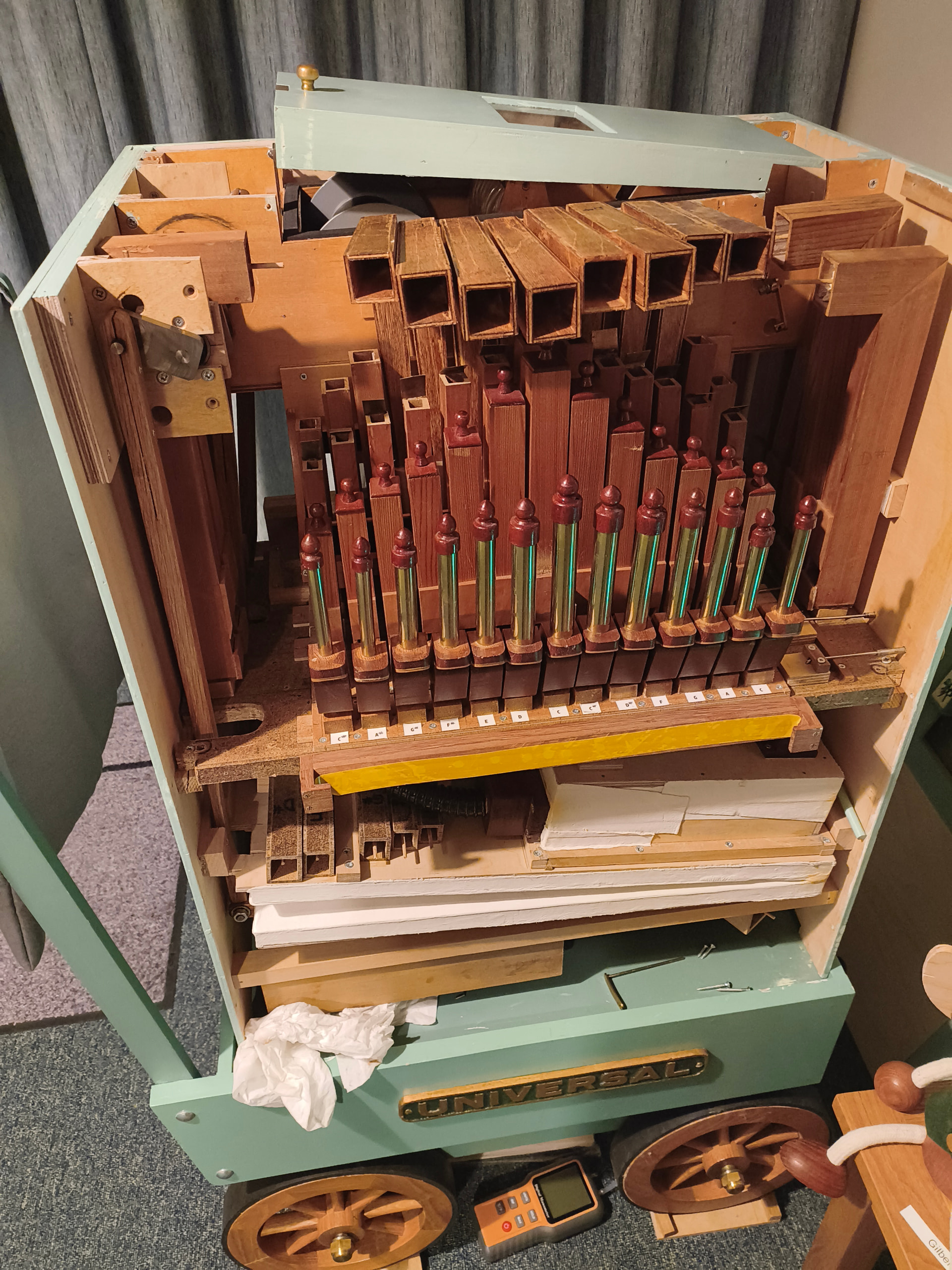
I bought a 26-note hand-built mechanical crank organ, second-hand, last year, and I am working through a slow project to add MIDI capability, including adding MIDI-out and extra digital pipes. There are 5 bass, 8 accompaniment and 13 melody notes, with stopped flutes for all notes, and three extra ranks of open octave, piccolo, and accordion free-reed pipes on the melody only. Working from paper roll music, I plan to add pressure switches to the tracker bar pipework, and use this to drive Zynthian with Aeolus to provide extra digital organ pipes. In some arrangements, the melody descends into the accompaniment, and when using one or more of the extra ranks the ‘missing pipe notes’ become obvious, hence the desire to match the real melody pipe with an electronic equivalent for just the accompaniment. I also wish to add a good trumpet stop across all notes, extra 16 and 32 foot pipes for the bass, a full ‘church organ’ sound, and possibly a piano. If it works, I might add drums, chimes, and MIDI playback loop to cover when I am manually rewinding the paper roll.
Given the limited space and power, and minimal demands on the setup, I am using just a basic Raspberry Pi 4 running headless.
After several months experimentation, and having almost given up, I have at long last got a working prototype. I have to access Zynthian UI / engines via my PC, which has not been ideal and is certainly not a good way to learn all the screens and controls. I started with a cheap Waveshare DAC/amp hat, which was frustratingly way far too much trouble, so I have now switched to a HiFiBerry Amp4 pro. This ‘works out of the box’, can be powered by a 12v battery pack, also powers the Pi and drives speakers directly.
I bought a dedicated keyboard scanner board, outputting to USB MIDI, but since I want to control Aeolus stops using just push buttons on the organ case, I switched to using an Adafruit Grand Central M4 Express running Circuit Python. This board plugs directly into the Pi, from which it is powered, and with a bit of basic code I have a matrix keyboard that drives the notes on/off, as well as Aeolus stops, and Zynthian CUIA commands. I have set up Aeolus as pedal board and two manuals, on channels 1, 2 and 3, and map the physical key matrix for the bass notes to channel 1, accompaniment to 2, and melody to 3. Stop control has cancel (clears all stops), latching, momentary, and preset (radio button selection). I have even managed to get one key to power off Zynthian via CUIA, and plan to add a few extra buttons for things like midi-recording start and stop.
It all works, at least on my desktop. Next step is to test it out in the organ itself.
However I do have a couple of sticking points. Any enlightenment would be most welcome.
Loudspeakers. Currently using a couple of 4 Ohm 3 Watt ‘cavity’ mini speakers, which are good and will fit, but I almost certainly need a bit more volume. The organ is loud (it is designed to play in an open street) and I probably need 8-10 Watt speakers, which seems to mean I have to move to 8 Ohm speakers. The HiFiBerry amp can drive 8 Ohm but I suspect it then needs 18-24v. My ‘big ask’ is for small (hand sized) full range, 10W speakers to run off the HiFiBerry amp at 12v.
- Does anyone here have suggestions for sourcing of such speakers (I am UK based), and in running HiFiBerry amp4 with 8 Ohm speakers like this at 12v, and getting good volume? Digital organ pipes, particularly 32 foot, usually require speakers the size of dustbin lids with chambers to match, but I am willing to compromise!
MIDI cloning. I have Aeolus on channels 1, 2 and 3 in multi-timbrel mode, and can add a separate piano synth engine on channel 4. I could modify my M4 Circuit Python code to duplicate each note on/off MIDI to channel 4 also, but only if the ‘piano’ stop is on. Alternatively, I would like to use Zynthian to have a switchable clone for note on/off from channel 1/2/3 to 4. If I read correctly, the old ‘clone’ option has been upgraded to the mapping rules. These certainly work as a ‘map’ and redirect, but don’t appear to ‘clone’, just ‘move’ from one channel to another. I could set the piano chain to ‘all’ channels, but then I will need to have some way of using CUIA to change the channel (between all / 4) or cut the chain volume or something else (mute audio?) to be able to effectively turn the piano ‘stop’ on and off from just a push button.
USB memory stick. My M4 Express appears nicely in Zynthian as a USB MIDI device, both for input and output. Recording audio or MIDI however goes to the M4 flash memory, which clearly I don’t want it to do. When I plug in another plain USB memory stick as well, Zynthian still treats the M4 as the USB memory drive, rather than the stick.
I was going to ask how to force Zynthian to select the memory stick USB rather than the M4 Express, but I solved this myself just today. The extra memory stick drive was called “New”, and my M4 Express appears as “Circuitpy”. I tried plugging into different USB ports, but the answer was right there - the USB devices are sorted alphabetically, and “NEW” always comes after “CIRCUITPY”. I just had to rename my memory stick drive “AARDVARK” and it now works. Obvious really.