Can you try:
zynthian.sh
Please, don’t send files. Best copy/paste in the message body and use the discourse format possibilities (see your above message that i just edited to include the pstree result)
Thanks!
Can you try:
zynthian.sh
Please, don’t send files. Best copy/paste in the message body and use the discourse format possibilities (see your above message that i just edited to include the pstree result)
Thanks!
I think I know why I was having some problems I was having before
cheers
Observations from newly created SD card Vangelis Beta.
Hifiberry DAC+ Adc Pro (that is installed)not found to SndrpihifiberryRestart, and boot is now succesfull.
Hardware:
Zynthian V5.1 clone with HifiBerry ADC+ DAC Pro audio card.
Complete syslog available upon request, but problem and remedy look obvious.
Regards,
Hans.
ps. Top right shows there is an update, and in webconf there is a version testing (vangelis). Is that the right one or is that a leftover from the previous bookworm installation?
Hi @HansR !
I would say everything worked as expected.
Your V5.1 clone has different hardware than the oficial kit, so it’s not detected nor configured.
Only the kits listed above will be detected and configured in the firt boot, all the rest will fail and users would have to configure by hand.
Please, remember that most hardware for RBPi is not “plug & play”. PnP mechanisms are well defined for the Intel/AMD platform, but not so extended for SoC platforms like RBPi.
All the best
Understood. I first selected V5 and then switched to custom (same as in Oram) and that works ok. My 5.1 kit stays on Oram for the time being 
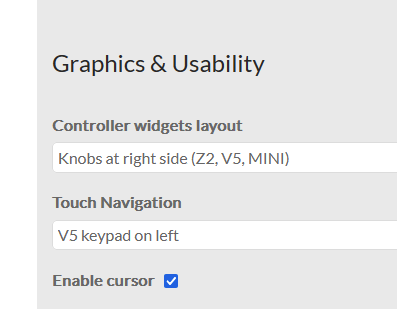
I select touch navigation,
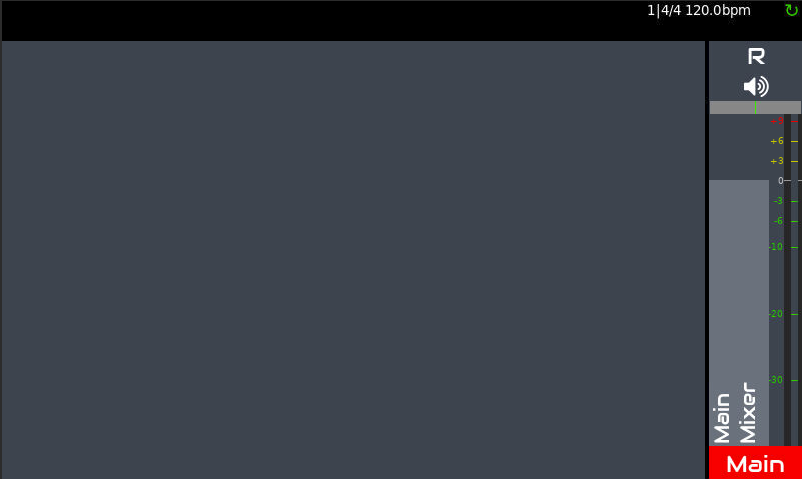
but no buttons show on the screen
Which is not very convenient.
Did you see mij ps. question in previous post?
You have to push the top-right bar to toggle the buttons. It’s always like this!
@riban, perhaps the buttons should be shown by default after enabling?
Regards
Vangelis is still the testing branch. Nothing wrong with this. And of course, there will be pending updates. We keep fixing bugs.
the best
It wasn’t in Oram.
I understand you have been working on Vangelis for months now, but for me it is all new, so please forgive my noob questions.
Hi @jofemodo,
By Bookworm-based Vangelis, do you mean the current testing OS progressively updated through releases?
If so, and if I read your words correctly, should we Vangelis Testers jump asap on the beta Trixie-based image, in order to avoid possible system crashes beyond recovery upon updating, or keep certain particularly critical Zynthian installations untouched by updates for the time being?
Just in case, is the snapshot compatibility between Vangelis branches guaranteed?
Regards 
Ah, the peak meters are fixed. Thanks a lot for the quick response
Yes. As i told iny message above:
But remember this is not a stable release yet. it’s a BETA release. It shouldn’t have serious errors, but It could. The BETA goal is this. Testing everything and ensuring no serious errors are hidden. Fixing as many bugs as we can find so the stable version works as flawlessly as possible.
Regards
Yes. We are not going to change the snapshot format except for fixing errors.
Regards
Ups!! Sorry, i have almost forgotten how Oram works …
Pi5
PSTREE
 systemd-+-NetworkManager---3\*\[{NetworkManager}\]
 |-agetty
 |-avahi-daemon---avahi-daemon
 |-dbus-daemon
 |-devmon---udevil
 |-filebrowser.sh---filebrowser---6\*\[{filebrowser}\]
 |-2\*\[jack_wait\]
 |-sshd-+-sshd-session---sshd-session---bash---pstree
 |      `-sshd-session---sshd-session---sftp-server
 |-systemd---(sd-pam)
 |-systemd-journal
 |-systemd-logind
 |-systemd-timesyn---{systemd-timesyn}
 |-systemd-udevd---9*[(udev-worker)]
  `-wpa_supplicant
fgconsole just returns a “2”
chvt 2 doesn’t return anything
reattaching firstboot for completeness.
Running autoconfig...
Detected I2C Chips: \['HDMI-1'\]
Checking Boards: \['V5_MAIN', 'V5_CONTROL'\]
ERROR: Undetected Hardware \['PCM1863@0x4A', 'PCM5242@0x4D', 'RV3028@0x52', 'TPA6130@0x60', 'MCP23017@0x20', 'MCP23017@0x21', 'DSI-1'\]
Checking Boards: \['Z2_MAIN', 'V5_CONTROL'\]
ERROR: Undetected Hardware \['PCM1863@0x4A', 'PCM5242@0x4D', 'RV3028@0x52', 'MCP23017@0x20', 'MCP23017@0x21', 'DSI-1'\]
Checking Boards: \['Z2_MAIN', 'Z2_CONTROL'\]
ERROR: Undetected Hardware \['PCM1863@0x4A', 'PCM5242@0x4D', 'RV3028@0x52', 'MCP23017@0x20', 'MCP23017@0x21', 'ADS1115@0x48', 'ADS1115@0x49'\]
Checking Boards: \['Z2_MAIN_BETA', 'Z2_CONTROL'\]
ERROR: Undetected Hardware \['PCM1863@0x4A', 'PCM5242@0x4D', 'MCP23017@0x20', 'MCP23017@0x21', 'ADS1115@0x48', 'ADS1115@0x49'\]
Checking Boards: \['ZynADAC', 'ZynScreen'\]
ERROR: Undetected Hardware \['PCM1863@0x4A', 'PCM5242@0x4D', 'MCP23017@0x20'\]
Checking Boards: \['HifiBerryDAC+', 'ZynScreen'\]
ERROR: Undetected Hardware \['PCM5242@0x4D', 'MCP23017@0x20'\]
Checking Boards: \['V5_CONTROL'\]
ERROR: Undetected Hardware \['MCP23017@0x20', 'MCP23017@0x21', 'DSI-1'\]
Detected Custom kit!
Configuring Zynthian for Custom ...
Copying config file 'zynthian_envars_Custom.sh' ...

Reconfiguring system ...
Updating System configuration...
SOUNDCARD_MIXER is OK
BOOT LOG ENABLED
OVERCLOCKING => None
RBPI AUDIO ENABLED
OTG ENABLED
SOUNDCARD CONFIG => dtparam=audio=on\\naudio_pwm_mode=2
DISPLAY CONFIG => dtoverlay=vc4-kms-v3d
CUSTOM CONFIG =>

Preparing reboot after config...
Enabling Zynthian UI ...
Reboot...

Running autoconfig...
Detected I2C Chips: \['HDMI-1'\]
Checking Boards: \['V5_MAIN', 'V5_CONTROL'\]
ERROR: Undetected Hardware \['PCM1863@0x4A', 'PCM5242@0x4D', 'RV3028@0x52', 'TPA6130@0x60', 'MCP23017@0x20', 'MCP23017@0x21', 'DSI-1'\]
Checking Boards: \['Z2_MAIN', 'V5_CONTROL'\]
ERROR: Undetected Hardware \['PCM1863@0x4A', 'PCM5242@0x4D', 'RV3028@0x52', 'MCP23017@0x20', 'MCP23017@0x21', 'DSI-1'\]
Checking Boards: \['Z2_MAIN', 'Z2_CONTROL'\]
ERROR: Undetected Hardware \['PCM1863@0x4A', 'PCM5242@0x4D', 'RV3028@0x52', 'MCP23017@0x20', 'MCP23017@0x21', 'ADS1115@0x48', 'ADS1115@0x49'\]
Checking Boards: \['Z2_MAIN_BETA', 'Z2_CONTROL'\]
ERROR: Undetected Hardware \['PCM1863@0x4A', 'PCM5242@0x4D', 'MCP23017@0x20', 'MCP23017@0x21', 'ADS1115@0x48', 'ADS1115@0x49'\]
Checking Boards: \['ZynADAC', 'ZynScreen'\]
ERROR: Undetected Hardware \['PCM1863@0x4A', 'PCM5242@0x4D', 'MCP23017@0x20'\]
Checking Boards: \['HifiBerryDAC+', 'ZynScreen'\]
ERROR: Undetected Hardware \['PCM5242@0x4D', 'MCP23017@0x20'\]
Checking Boards: \['V5_CONTROL'\]
ERROR: Undetected Hardware \['MCP23017@0x20', 'MCP23017@0x21', 'DSI-1'\]
Detected Custom kit!
Zynthian already configured for Custom.

Fixing ALSA mixer settings...

Regenerating keys...
Removing current system SSH keys...
Generating new system SSH keys...
Generating public/private rsa key pair.
Your identification has been saved in /etc/ssh/ssh_host_rsa_key
Your public key has been saved in /etc/ssh/ssh_host_rsa_key.pub
The key fingerprint is:
SHA256:MUcy+uByfeACCPl16II0gOp3/WoY5N48tk9WJJBOJu8 root@zynthian
The key's randomart image is:
+---\[RSA 3072\]----+
|=.   . .+ .      |
|o+ .o..=.+       |
|oooo..O +...     |
|o o .+ B =o      |
|.  .+ \* S ..     |
| . . \* E ..      |
|  . o = .o       |
|     o *o.       |
|      oo=.       |
+----\[SHA256\]-----+
Generating public/private ecdsa key pair.
Your identification has been saved in /etc/ssh/ssh_host_ecdsa_key
Your public key has been saved in /etc/ssh/ssh_host_ecdsa_key.pub
The key fingerprint is:
SHA256:jHL1NveUoL5X3fVlstwU0rvVydNBs3ST6V6IJhFpXyA root@zynthian
The key's randomart image is:
+---\[ECDSA 256\]---+
|          Eo..o=+|
|          +. .o*=|
|        .. o.o+oB|
|       + ...+.oBX|
|    . o S =o..+BX|
|     o   o o o+o=|
|          .  ..  |
|           ..    |
|          ..     |
+----\[SHA256\]-----+
Restarting SSH server ...
Removing current webconf cookie secret...
A new webconf cookie secret will be generated on next request.
Removing current SSL certificate...
Generating new SSL certificate for 100 years...
Disabling first boot process ...
Resizing partition...
Rebooting to start zynthian-ui ...
What about this?
This is by design. The idea is that you can show the buttons when needed similar to how the previous touch workflow only shows buttons when necessary. Those used to using the V5 button overlay may expect them to appear by default. Let’s see what further feedback we get.
(venv) root@zynthian:~# zynthian.sh
X.Org X Server 1.21.1.16
X Protocol Version 11, Revision 0
Current Operating System: Linux zynthian 6.18.34+rpt-rpi-2712 #1 SMP PREEMPT Debian 1:6.18.34-1+rpt1 (2026-06-09) aarch64
Kernel command line: reboot=w coherent_pool=1M 8250.nr_uarts=1 pci=pcie_bus_safe cgroup_disable=memory numa_policy=interleave nvme.max_host_mem_size_mb=32 numa=fake=8 system_heap.max_order=0 iommu_dma_numa_policy=interleave smsc95xx.macaddr=2C:CF:67:62:D7:B4 vc_mem.mem_base=0x3fc00000 vc_mem.mem_size=0x40000000 root=PARTUUID=e249d476-02 rootfstype=ext4 fsck.repair=yes rootwait console=tty1 logo.nologo modules-load=dwc2,libcomposite
xorg-server 2:21.1.16-1.3+rpt1+deb13u2 (Debian -- User Support)
Current version of pixman: 0.46.4
Before reporting problems, check http://wiki.x.org
to make sure that you have the latest version.
Markers: (–) probed, (**) from config file, (==) default setting,
(++) from command line, (!!) notice, (II) informational,
(WW) warning, (EE) error, (NI) not implemented, (??) unknown.
(==) Log file: “/var/log/Xorg.0.log”, Time: Fri Jul 31 22:53:17 2026
(==) Using config directory: “/etc/X11/xorg.conf.d”
(==) Using system config directory “/usr/share/X11/xorg.conf.d”
(EE)
Fatal server error:
(EE) Cannot run in framebuffer mode. Please specify busIDs for all framebuffer devices
(EE)
(EE)
Please consult the The X.Org Foundation support
at http://wiki.x.org
for help.
(EE) Please also check the log file at “/var/log/Xorg.0.log” for additional information.
(EE)
(EE) Server terminated with error (1). Closing log file.
xinit: giving up
xinit: unable to connect to X server: Connection refused
xinit: server error
or properly…
./zynthian.sh: No such file or directory
Sorry - been about 10 years since I used Linux regularly…
does it matter which I run?
/zynthian/zynthian-sys/sbin/zynthian.sh
/zynthian/zynthian-ui/zynthian.sh
Have you tried to configure your hardware from webconf?