V4 mod with P5
Just reflashed and gone to Vangelis and updated.
It is impossible to connect with Zynthian either by zynthian.local either by IP
I tried with SSH: ssh zynthian.local The authenticity of host ‘zynthian.local (192.168.32.13)’ can’t be established. ED25519 key fingerprint is SHA256:R5WCet6pyR1J50SycbCAQvsjuxZaDADiuV059supfu4. This key is not known by any other names. Are you sure you want to continue connecting (yes/no/[fingerprint])? yes Warning: Permanently added ‘zynthian.local’ (ED25519) to the list of known hosts. izzmint@zynthian.local’s password: opensynth Permission denied, please try again.
I’m not much of a CLI wizard or Linux expert, and I’m not even sure that this applies to your specific situation, but I have found in the past that sometimes the following procedure resurrected a reluctant webconf interface:
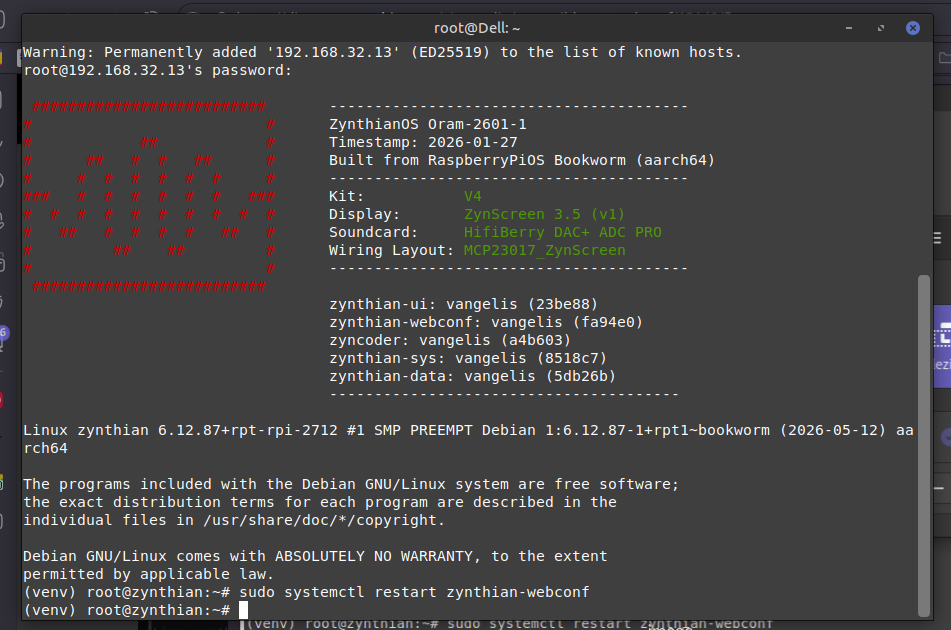
Open an SSH session directly in 192.168.32.13. That should give you a connection with your Zynth, if the IP address is correct;
I just had an issue accessing my V5’s webconf but could still connect via ssh (using user root). I saw some errors in webconf log about certificate. I was able to connect by entering https://ip_address which warned about insecure connection but allowed me to connect.
As @HansR justly pointed out, you might find that your custom credentials for
Oram don’t apply to Vangelis, as a distinct OS with default username and pw.
After restarting webconf as advised, have you tried simply to paste 192.168.32.13 in your browser prompt and, providing you reach the webconf access mask, enter root and opensynth?
The login banner shows the version of the image installed (Oram-2601-1 in your case), plus current configuration and versions.
Try running: journalctl -fu zynthian-webconf to monitor the webconf log and then attempt to access webconf via a browser. See what is logged during the connection attempt.
Looks like you are lacking py7zr py7zr · PyPI a compression utility.
Might be a faulty download or a successive set of dynamic moving around the repos.
You can probably resolve this issues by typing ..
pip install py7zr
or failing that installing from
Have you got valuable files on the machine? If so you can log on to the machine via ssh
ssh -X root@zynthian.local
the -X allows X window access. not needed in this case but a good habit to get into..
and you can copy off the /zynthian/zynthian-my-data/ folder using scp or similar. Personally I log onto the zynth from the Pi os64 file manager and then it’s nice and drag and drop.
If there’s nothing precious on there, burn a new SSD from.
First, check you are fully updated by going to the admin menu in the main UI and cursoring to the bottom. Select, Update Software if it is available. This should install any dependencies in the right way. (There are some constraints around when and how we use pip )
Yes, pip is a bit off piste but has worked in that it can dig throu missing imports it can get you enough of a webconf to allow you to run away and tidy up in a more approved fashion…
But ultimately if you’ve ended up with this situation you should really be considering bailing out via a good backup.
It’s best in the long run to stick to the official elephant paths.
Please resopond to this post. We need to know the current state and how you got there. I assume that you installed Oram image 2601-1 and then switched to Vangelis using webconf. This should git an up-to-date vangelis but please ensure you have done the check that you are fully up to date.
Finally Paolo! I felt for your unpleasant predicament, maybe (?) related to your specific upgraded V4 kit. Anyway, now everything seems set. Have a nice evening
 .
.

 I felt for your unpleasant predicament, maybe (?) related to your specific upgraded V4 kit. Anyway, now everything seems set. Have a nice evening