Fixed!!
Thanks
Fixed!!
Thanks
Hi @riban  ,
,
This is a follow-up from a recent collateral discussion in the DSP 563XX thread, about engaging presets visualisation, which I thought it would have been advisable to move in the place where I think it naturally belongs, that is here, in the Vangelis testing thread.
According to your directions, I have checked the Switch 3 settings in Wiring, for my three Vangelis Zynths (one V 5.1, two Pi5 custom setups), and have discovered that all three devices - presumably due to some unintended change of UI buttons configuration, during a Vangelis update - were set with short-press action of Switch 3 as Layer Control (perhaps a remnant of the old times, when a Chain was named a Layer?..) instead of Chain Control.
I have swiftly amended this wrong configuration of Switch 3 on all three units, and now - as expected - the sequence of actions and responses for CTRl/PRESET is as per the nominal behaviour pointed out in your post.
See attached the erroneous setting of Switch 3 found on webconf > hardware > wiring (advanced).
Cheers
With touch screen how to exit from help page?
Hi @Aethermind ,
Thanks for the report. It turned out I had the same problem. I initially thought it was a new “feature,” so I stopped testing Vangelis (I know, I have too little patience for annoying software behaviour).
Now I’m on the boat again 
Swipe should close help but it is broken. @jofemodo please look to see what changed?
It works with mouse but not with finger
Hi @riban !
I can confirm something changed in the help screen and now touch doesn’t work for me.
ERROR:multitouch._process_touch_events: Can't find a widget for touch event
ERROR:multitouch._process_touch_events: Can't find a widget for touch event
ERROR:multitouch._process_touch_events: Can't find a widget for touch event
ERROR:multitouch._process_touch_events: Can't find a widget for touch event
ERROR:multitouch._process_touch_events: Can't find a widget for touch event
ERROR:multitouch._process_touch_events: Can't find a widget for touch event
ERROR:multitouch._process_touch_events: Can't find a widget for touch event
ERROR:multitouch._process_touch_events: Can't find a widget for touch event
History is broken too. It can’t go back until the initial help page. It exits help instead reaching the initial help page.
Regards,
Fixed!
Can anybody please confirm if host tempo sync from engines is working for him/her?
Specifically for me at least regrader with respecive settings is broken (was sitting on a mixbus) with latest vangelis.
I’m trying to find my way in Vangelis sequencer, but with little success.
Where can I find the menus?
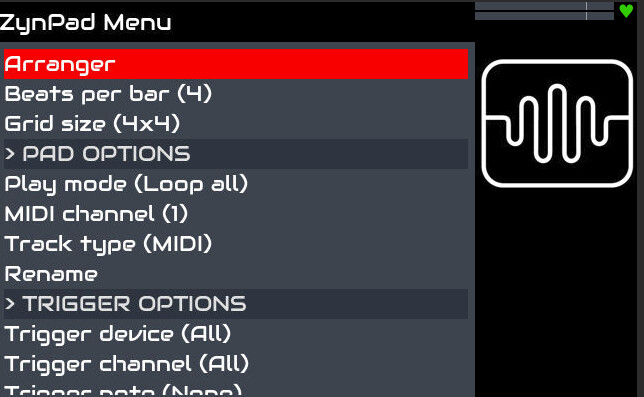
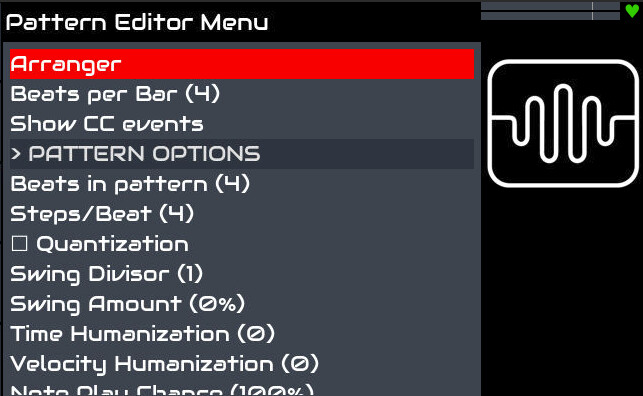
These are available in Oram:
The wiki is of no use, it only describes the Oram situation.
The new built in help system is of no use either, that only describes the working of the current screen, not where the screens are that you cannot find 
Hi @HansR,
You might find that the implementation of the sequencer section in Vangelis is notably different from that available in Oram.
You basically enter the sequencer view, organised in rows (multi-timbral scenes) and columns (patterns belonging to a given chain and mixer channel), by pressing PAD. If you select a pattern cell and press again PAD you then access its note editor in piano-roll fashion. Once there, you can edit that pattern’s preferences by pressing OPT/ADMIN. Furthermore, you can arrange the phrases performance order in the rightmost column of the sequencer/pad screen, by bold-pressing on a phrase and entering the dedicated phrase menu.
Thanks @Aethermind, that helps a lot!
You may already be aware of this, I mention it because on your 2 screenshots you have Arranger selected - in Vangelis the Arranger is gone. There is some of its function available by other ways now, and some possibility that it will be back in the future, but for now, you won’t find it.
Thanks @tunagenes, I was starting to suspect this, but I wasn’t sure. That saves me a lot of searching.
So while there is the workaround described by @riban , temporarily switching the wiring config and back again, shouldn’t this be logged as a bug?
If there is a fault then please report it in the issue tracker. All I know is that a misconfigured device behaved as it was configured to behave.
As of now, the behaviour of Switch 3 is nominal on my Zynths (Chain Control), even after the latest substantial Vangelis update. Should I detect that at a given point of the development branch the wrong setting is somehow restored, I will certainly create a case in the issue tracker.
All the best 
I have reproduced the issue with a fresh installation, documented here.
Hey everyone! We have been demonstrating and you have been testing Vangelis for a while. This is how we do things in the open source community - publish early and often which is in stark contrast with closed business models that do a big reveal. I hope you are enjoying this early preview.
We now want to concentrate on a stable release and so I encourage you to report any issues with Vangelis in the issue tracking system on GitHub. We will be triaging tickets and scheduling resolution based on our opinion of urgency and importance.
So, you can keep testing and suggesting ideas for enhancements, e.g. via GitHub feature requests but we will concentrate on fixing the bugs. If you don’t report it, we may not fix it!
Again, a big thanks to all of you that are investing your time, effort and brains in making Vangelis the best version of zynthian.

 ,
,