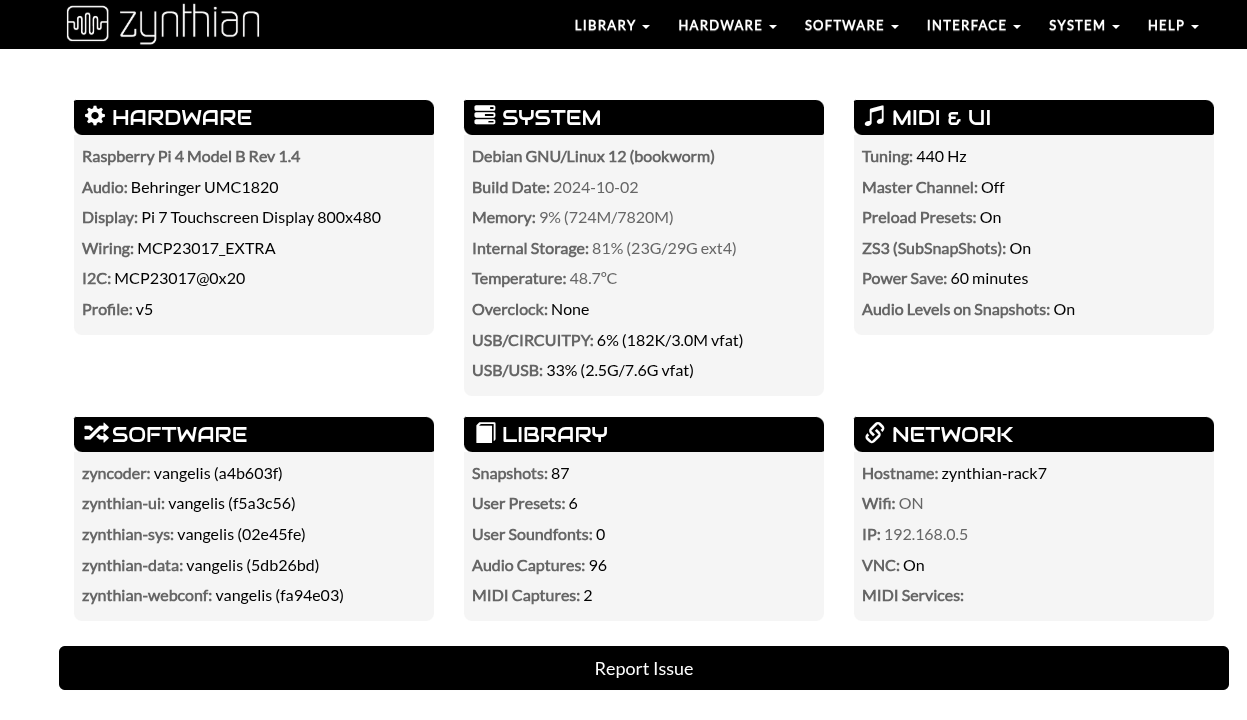
The Report Issue button in webconf is a very efficient mechanism for also reporting.
2 Likes
I have already started cataloguing Vangelis bugs. I raised a case for a known one: very slow display of snapshots library in webconf, on a V 5.1 kit.
Regards 
I am not finding, either in the pattern editor options or in the general admin settings, a way to enable scrolling, while playing in the piano-roll view a pattern longer than the music visible within the screen. Is there some buttons combination or switch that I missed, maybe hidden somewhere in the ALT functions?
Thanks 
1 Like
Do yo mean horizontal auto-scrolling following the playing head? This is not implemented currently. Never has been 
And it’s not implemented because it’s not a trivial feature. It’s potentially disruptive with typical workflows. Imagine you are editing steps in the grid while playing the pattern…
And hey! I’m not saying we don’t have to implement it, but we need to define how.
IMHO, enabling/disabling auto-scroll from a menu is not a good option, so let’s try to think something better. For instance, it could auto-scroll only when recording. We could try this.
Thanks!
2 Likes
Hi!
I certainly see your point and its underlying rationale @jofemodo, but I also invite you to consider that, beyond a purely rhythmic writing and editing of short segments, then combined in cell-based songs through the phrase menu (and maybe one day the arranger again!), every other kind of composition on the sequencer tends to require patterns longer than what is visible on the screen
At least in my corner case, of forcing the Zynthian in a sort of electronic symphony territory, step-inserting, midi-recording and fine-editing a pattern of ten or more bars (effectively, a whole compositional segment) requires a particularly demanding exercise of visual memory and eye-muscle coordination, when one is obliged to follow hectically with the cursor music that is skipping continually outside the viewing field.
This said, do you think that I should raise a feature request, for music live-scrolling in the pattern editor, or do you deem it premature in the current development stage?
Cheers!
1 Like
Gosh! 10 bar patterns is not what I envisaged when I designed the sequencer but I appreciate we are in a different place now and it may be some time before we see the arranger type editing again. You can raise a feature request at any time. We decide priorities.
3 Likes
Hi Zynthianic friends
I just wanted to report that, somewhere after the latest releases, the Vangelis update process has become perceptibly slower on the official V5.1 device, in comparison with my other custom Pi5 Zynths running the testing OS.
Moreover, webconf access sometimes becomes unavailable on the V5, requiring a reboot before being online, and the registered WiFi connections are at times reset, and need to be re-established. Not sure if it is somehow related, but I noticed that some new kernel RPi components seem to have been overwritten, during the most recent updates.
Regards
1 Like
PS: All three Zynthians concerned by my post are connected though WiFi, and none of the three has a bare-bone RPi5 SBC, with the net ICs directly exposed to external waves reception.
1 Like
There is a function that I am missing in the Vangelis pattern editor. Before submitting a feature request, I wonder if it’s either not implemented yet or already available somewhere/somehow.
I need to set the global level of velocity for all pattern notes reached by a multi-velocity editing (action: bold press encoder 4 on an existing pattern step, turn to find velocity, bold press again). I noticed that all velocity levels jump straight to max (127), irrespective of both the originating step’s velocity (not followed as a model setting) and the default global velocity level for note insertion (100).
I tried to turn encoders while in the process of multi-velocity, but I did not find a way to see and perform a variant setting.
Is maybe this function meant to operate in the same way as multi-duration?
Thanks
1 Like
Hi @Aethermind !
I tested just now and it works OK for me. As you don’t describe the steps you followed, i can’t know where the problem is. I will tell you what i’ve done in my V5:
- Add a few notes in an empty pattern, setting different velocities by hand, so i can check later. To be detailed, i added 3 notes with velocities 25, 50, 100.
- Select the notes like this:
- position the cursor in the top-left corner of the desired selection window
- short knob#3 to enter block selection
- move cursor by rotating knob#3 & knob#4 until having selected the 3 notes.
- bold knob#4 to end selection and enter block-edit mode. The selected notes color change to blue. (*)
- Select velocity parameter by rotating knob#4
- Adjust velocity for the 3 notes at once by rotating knob#3
- Exit block edit mode with short knob#4 (**)
Then i check that velocities have changed incrementally (relative) to their original values. They are. Indeed i already knew it was working fine because i saw how color changed while adjusting the velocity and also hear it (i was playing the pattern while editing).
(*) Note this workflow is common to the different block operations, being step 4 what makes the difference:
- short knob#4 => copy/paste mode (selected notes color change to green)
- short knob#3 => cut/paste mode (selected notes color change to green)
- bold knob#3 => block-edit mode (multi-edit => (selected notes color change to blue)
(**) Finally I would like to document an “extra feature” here:
- When you exit the edit-block mode, the block is still “selected”. You know this because of the “blueish” color.
- Although the block is still selected, you can add notes, edit single notes, etc. normally. So having the block selected doesn’t affect normal operation.
- You can enter multi-edit mode again by bold pushing knob#4 twice.
- You can un-select the block by pushing back.
Regards,
2 Likes
While capturing a demo workflow for illustrating my last post, i discovered a subtle issue that prevented multi-edit param selection to work properly. I’m not sure if it’s related with your issues, but anyway, it’s fixed now.
The workflow capture:
Regards!
1 Like
Thank you @jofemodo, for the detailed explanation, for swiftly committing to solve a related issue, and for sending me a video capture of the procedure.
I look forward to following your steps, and verifying if they work correctly also on my V5.
Cheers!
Got it! That was the step which I was unaware of. Now I can enter multi-velocity or multi-duration mode (selectable by turning/toggling encoder 4) by bold-pressing encoder 4, after having entered block selection by short-pressing knob 3. I can see indeed the hue of step colours change, according to the global velocity change imparted by turning knob 3. Terrific! 
That is useful to remind and document  .
.
I haven’t been able to replicate this action  .
.
Regards
1 Like
Hi @riban,
I have devised a rather toilsome way to input demisemiquavers in pattern editor, inserting notes with 0.5 steps of duration, alternatively on the beat (1/16th) and displaced by half step through a 50% offset.
I wonder if there is a handier way to input notes on a tighter snap grid of 1/32nd, without having to rewrite the music at double speed with doubled durations.
Cheers!
The pattern editor allows each pattern to be defined with 1, 2, 3, 4, 6, 8, 12 or 24 steps per beat. A beat is a quaternote. so the minimum note length is 1/96 note. Selecting 8 steps per beat gives you 1/32 note resolution.
On a different subject: During last night’s zynthclub I was made aware of a requirement for more gain control in the mixer. (The case was to boost orchestral instruments from sfizz which are generally far quieter than other synth engines. The actual request was for a gain stage immediately after the synth but you can already do this manually by adding a gain processor to the chain.) So I have added a pre-fader gain adjustment to each mixer channel (including mix buses). This is a stepped control, like a switch with discrete 1dB steps from -40dB to +40dB. Default is 0dB (unity gain). Like a switch, there is no smoothing so you may hear switching noise but this is intended to be a configuration element. The fader is smoothed which is used for live performance adjustment. The gain is pre-fader, so it impacts signals that are sent to effects chains via the pre-fader send. Now - please stop tickling me. I need to stop scratching these itches!
4 Likes
Just perfect @riban, I had missed this useful setting, which I surmise is per pattern and to be found in the pattern options. I will check it out
1 Like
Hi,
Follow up questions:
- Is it useful to have a Wiki page focused on what’s new, and what’s gone when upgrading from ORAM? So not the entire user guide but more a one pager mentioning the highlights and things no longer supported.
- Could it be helpful to have a target miletone indication for the Vangelis release + later milestone to help triage the issue in github?
Regards,
Bernard
There already are milestones in GitHub for Vangelis and release+1.
The one-pager sounds a lot like release notes which do accompany every release.
Excellent news! Sorry for overlooking the milestones page.
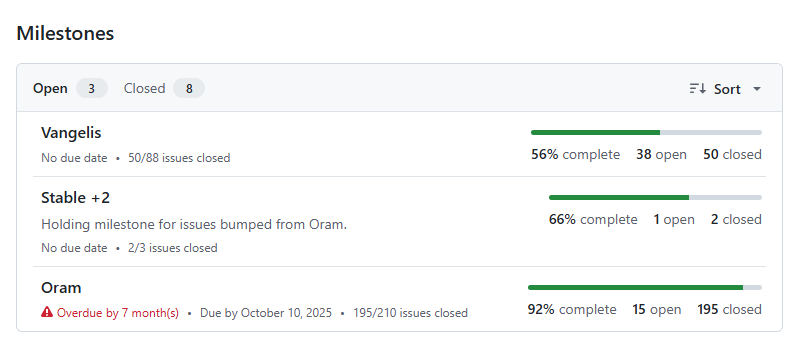
Probably the ORAM milestone can be closed after reassigning the issues?
And the Stable +2 can get an updated description where Oram is replaced with Vangelis?
Double issue or feature?
Updated to latest vangelis (see below).
A midi signal is sent from an external device.
A midi chain is created to receive clock information from this midi device.
Midi Din output is choosen for getting midi clock information.
- issue
Although the external midi device is not sending any midi clock infos, the output midi signal contains clock information (metronome is “OFF”).
Starting and stopping midi signals from the external midi device are not transported to the midi output. I checked this by directly investigating midi signal flows with the help of midisnoop. Midi transport informations are going into zynseq, but did not leave it.
When starting a pattern from within Zynthian, start/stop signals are sent.
- issue
Start/stop signals from external devices are not delivered through zynseq.
2 bug reports? (Yes/no/solved)
Regards
zyncoder: vangelis (a4b603f)
zynthian-ui: vangelis (d92058b)
zynthian-sys: vangelis (5d564c8)
zynthian-data: vangelis (3f50b18)
zynthian-webconf: vangelis (a76cf7a)