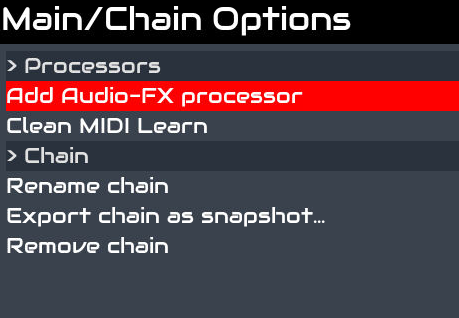
Chain Learn: Restricted to the active chain. Imagine you have a keyboard with 8 knobs. You can map the 8 knobs to 8 parameters on each chain. Only the active chain mappings are active at any moment.
Global Learn: Globally mapped parameters are always active, not matter the selected chain. For instance, you can globally learn sooperlooper record, overdub, etc. to your keyboard pads, and control sooperlooper not matter the chain you are playing
You can map a single knob/pad to several parameters from the same or different chains, and they can be chain or global. For instance you could have a knob mapped globally to setBfree and chain mapped to pianoteq. When you rotate the knob, setBfree volume will be changed not matter the selected chain, but pianoteq’s volume would only be changed when pianoteq’s chain is active.
Sorry, operating V4 UI (no touch buttons) under VNC in Vangelis is still sub-optimal. There is a pending task to fix this, but it could take some time. The task is “blocked” because we need a new feature from ffmpeg that is not available in bookworm. Moving to trixie wouldl unblock the task.
V4: 4 physical encoders can do everything. Touch and 4 function buttons offer some workflow benefits.
V5: 20 physical buttons can do everything. Touch and 4 physical encoders offers some workflow benefits.
Touch only: Enable V5 Onscreen Buttons to follow V5 workflow.
Those are the fully supported workflows. You can also use VNC, keybinding, mouse (including wheel), MIDI binding, OSC, etc. to implement custom control. A combination of these allows full remote control, e.g. I can drive everything from VNC only with QWERTY keyboard and mouse.
For plugin parameters, make them a “chain controller” by bold pressing the parameter knob and select “chain controller”, brings a new line called “Controllers 1”. This should help to have dedicated controller parameters at the top of the list.
When I select this line “Controllers 1”, leave the control screnn to another chain, or the mixer screen or any other screen… and come back to this screen, the first line of the regular controller parameters is selected instead of the “Controller 1” line.
This IMO is somehow counter-intuitive, because atm I had to select the first line again and then only have my dedicated “favourite” chain controllers selected.
Is this by purpose? IMO, like with the other selected (regular) parameter lines in the control screen, the “Controllers X” selection should be kept while changing the view and back.
Another small thingy: I’m on Vangelis (testing), NOT the new testing image, and I couldn’t find vaporizer plugin. I refreshed the engines, did a manual update, rebooted, but… no success
I want to try this wavetable synth, please, without burning a new image.
Responding to a stale post, but, my kid just gifted me an Akai Mini Mk2, which has identical controls to your Mk3, minus the screen. I’m currently trolling threads looking for the bit where you said where drivers are stored - once I find the file I expect it won’t be a big task to add Mk2 support.
Just booted and updated my Vangelis machine after almost 10 days without it. And i can not find out how to add a chain. This bugs me as i of course have added hundreds or thousands of chains. And i have this feeling that there is something elementary that i have forgot to do!
I go to the Chain Manager view, and there is no option to add:
Thx, but not really. I Can navigate to the ChainManager and access the Main/Chain options. But i do not see an option to add new chain there…
And it is there it should be right? (the option to add new chain)