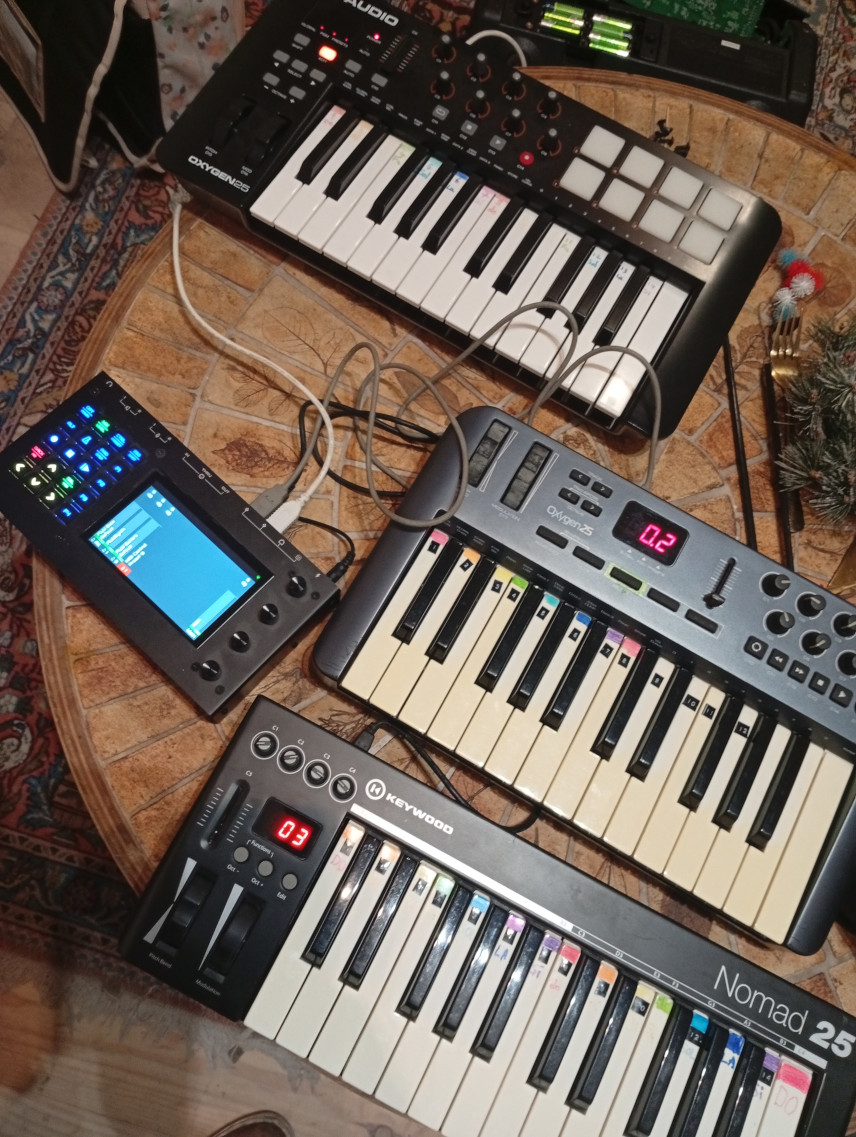
Today I updated the software and the multi-timbral option seems to have disappeared… Or am I missing something?
Cheers, Roel.
Today I updated the software and the multi-timbral option seems to have disappeared… Or am I missing something?
Cheers, Roel.
All is changing…
So more from @jofemodo
and here
Ok, thank you for the info, I am new to Zynthian so I thought I was doing something wrong 
Cheers, Roel.
You have arrived at a time where the v5 hardware has landed and the next generation of software is being chipped out of this new rock. There are several changes at this sort of level, and it’s nearly always about increasing flexibility above a technique that demonstrates the concept but is starting to creak under the increased number of use cases. . .
So stick at it and ask lots of questions.
There’s nearly always a reason.
You can throw a contribution as described by this link… in if you feel it would suffice. It’s always appreciated.
This really threw me for a couple of hours after updating an old v4. I’d suggest putting global parameters in some global place since I wouldn’t think to find midi input configuration in the layers config.
It’s not a global parameter though. It’s per layer.
Actually, it is per MIDI input. You can configure DIN-5 input as multitimbral whilst configuring LaunchKey as active mode.
We are improving the documentation but this is detailed fairly prominently in the user guides on the wiki. These guides refer to the current stable release and things have changed a bit in Oram, e.g. we only provide 2 MIDI input modes now:
These are all, per-input, e.g. DIN-5 may be configured as Active mode whilst LaunchKey may be configured as multitimbral.
Just updated (to a Pi5) and noticed something was not right… then found this.
Does this mean we now lost multi-timbral functionality on Network Devices?
I have heavily invested in getting TouchOSC to work with this for a project… i regret updating at the moment 
edit: i mean the internal devices can be ‘long-pressed’ to reach a menu to choose mode… but the network devices only have a checkbox to be active or not.
Dug a little deeper and it can be changed in the instrument’s ‘Midi In’ menu… and this seems to set Multitimbral mode globaly… for me luckily it does not only make a multi-timbral instrument like ADLplug react to it’s own multi timbre mode (which would be cool if that too could work in the future)
Multitimbral and Chain modes relate to how MIDI input to the Zynthian behave.
Each MIDI input may be configured to work in multitimbral or chain mode. This is done by bold press of the MIDI input to access its context menu.
In multitimbral mode, the MIDI channel is used to decide which chain receives the incoming MIDI messages, based on each chain’s assigned MIDI channel, e.g. you can have MIDI channel 1 going to the first chain and MIDI channel 4 going to the second chain.
In chain mode, all MIDI channels from an input go to the currently selected chain.
You can configure different inputs to have different modes.
The sequencer works in multitimbral mode. Each sequence has a MIDI channel assigned which feeds the appropriate chains.
This is all similar to how it used to work but has been made more robust. Chain mode used to be called Stage Mode.
If there is a workflow that you need that you can’t create, please describe the workflow so that we can see how it might be achieved.
I would add that vangelis branch allows you to control how step sequencer is routed to chains. I mean zynseq is managed as any other MIDI input source and you can check/uncheck it from the chain’s MIDI IN view. Same applies to the SMF player (mid file player).
Regards,
I have had to switch my MIDI inputs to multitimbral mode several times. There seems to be some tendency to forget that setting after some time…? But I cannot clearly reproduce it, so I have not reported anything yet.
MIDI input mode is saved and recalled with the snapshot. There is also a mode to associate physical USB port with devices (set in admin menu “MIDI-USB mapped by port” ) so that a USB MIDI device will appear to be a different device if plugged into a different USB port which will have its own mult-timbral mode setting. This seting is disabled by default.
Few things are random. It helps to understand how things work so that you can make informed decisions. 
Thanks. I suspect something like this. Can temporary detaching of one MIDI controller also “break” the configuration of another one?
Anything is possible, but this should not happen. I have experienced USB connections upsetting jack and stopping things working until a restart. I think this is with devices that draw a lot of current.
Strange. It seems now I have to reconfigure the ports after each restart. At least for the second external MIDI controller (appears just as “USB-MIDI” in settings) that does not turn on automatically after Zynthian power-on (it is powered from its USB, but I still have to press a kind of “power button” manually).
But the setting is also being reset for the internal “DIN-5 MIDI” - which is actually not physically connected to the UART anymore, since I have been using the X-Station controller as external USB MIDI, but I still somehow use to spontaneously reconfigure all the available interfaces by habit.
Add a GitHub ticket and I will take a look.
Hello everyone,
Thank you for starting this thread. Like many of you, I had a moment of panic. I thought I could figure it out on my own. No, as Riban so aptly put it, it's important to understand.

I'm working on a great project, which I'll gladly tell you more about. I need several mini MIDI keyboards, each controlling a different sound on the Zynthian. It's very easy with the old omni and single modes. This is a big challenge for me; I need to learn how to do it!

I also like the six panels: Synth, Sampler, etc. See you later.
If you want a keyboard to control a chain, use the MIDI input option of the chain to enable that MIDI input and set it to multitimbral. Ensure the same chain number. Repeat for each MIDI keyboard on a different MIDI channel. If you can’t change the MIDI channel of a keyboard then you could disable that input on other chains.
Assuming you have set the three keyboards to MIDI channels 1, 2 & 3 and have chains set to MIDI channels 1, 2 & 3, you need to adjust the MIDI inputs for each of your keyboards.
Bold SELECT any channel and select the MIDI Input menu (or you can do this from Admin menu→MIDI Input too).
For each MIDI input of your 3 keyboards, bold SELECT, then SELECT to toggle “MIDI Input Mode” to “Multitimbral mode”.