I have a snapshot with three ZS3s that I can load pressing S1 S2 and S3 switches of my V4 Ztnthian.
I set 8 pads of M.Audio Axiom to send PCs:
PAD1 → sends PRG#1, MIDI Channel#1 to load ZS3-1 (PRG#1, MIDI Channel=Any)
PAD2 → sends PRG#2, MIDI Channel#1 to load ZS3-2 (PRG#2, MIDI Channel=Any)
etc.
(when I create a new ZS3 I can only edit the Program Change Number)
PS
I realized that all ZS3s I created have PRG Channel [Any]
then I tried to edit for example ZS3-1 adding the MIDI Channel#1: now if I press PAD 1 , any ZS3 is created but S1 cannot load ZS3-1
Only the ZS3s you create by pushing the zynthian’s F1-F4 buttons (or S1-S4 if you have V4) are created with channel “Any”.
The ZS3s you create by pushing MIDI controller pads should be created with the device’s MIDI channel.
as I wrote at beginning of this tread
in my maudio axiom each PAD sends a PGM under Midi ch#1
As example:
pad2 set to send prg#2 and midi ch#1 to load Zs3-2 set for prg#2
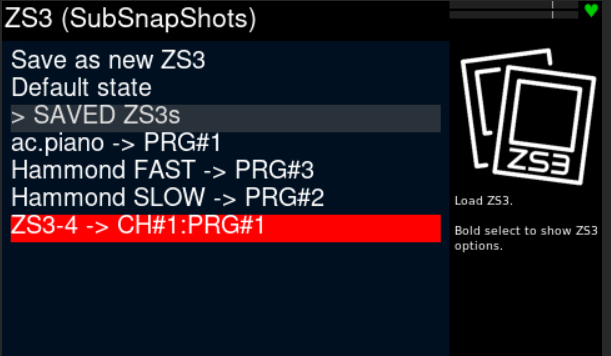
when I press a Pad 2 it creates automatically a new ZS3 with prg#2 and midi ch#1
When I press S2 on my V4, the automatically created ZS3 Is called instead the originally created
I think the ‘automation’ you are talking about is the MIDI learning in that specifc screen (the zs3 screen).
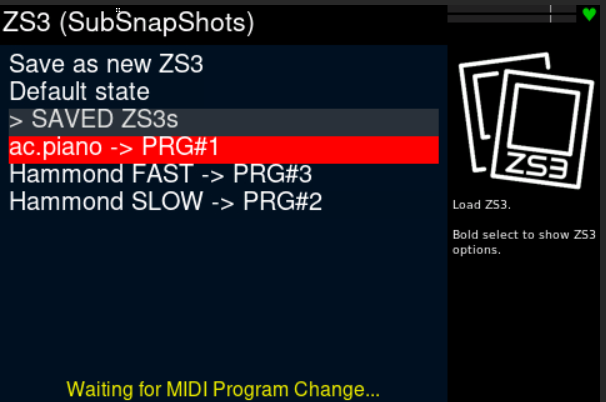
If that says ‘Waiting for program change’ it will take the first Program Change it receives and create a zs3 for it. Just make sure to not have this screen (or message) active when invoking a Program Change to switch zs3.
When you enter the ZS3 screen,MIDI learning is enabled by default. After any action, MIDI learning gets disabled. This has been like this from the beginning. No recent changes about this behaviour.
You are supposed to enter this screen by any of these reasons:
Creating a new ZS3 or updating an existing one.
Selecting a ZS3 from the list.
Modifying the ZS3 options
You don’t need to enter the ZS3 screen to change ZS3s using your controller pads.
I enter in this submenu to remember which ZS3 I set in the current snapshot
Maybe it could be useful as improvement when you load a snapshot to show a personal note/description of snapshot
My fault. I just fixed it.
Anyway, please, remember that in Vangelis, the S1-S4 button can be “stolen” for other uses in some screens, normally related with sequencer.
You can be sure S1-S4 buttons will work as configured in webconf in these screens:
Mixer
Chain Control
Chain Config
ZS3
Snapshots
All grid & list menus: main menu, admin, preset/bank, etc.
But for instance, the launcher view now use these buttons like this:
S1 / S2 => Copy paste
S3 => Add Chain / Move Chain
And the pattern editor:
S1 / S2 => Copy paste
S3 => Start Block Operation
S4 => Toggle CC / Note editor
And some other could be added to the list. Be warned!
It seems having touch navigation on changes the S1-S4 behaviour. When I turn this off S1-S4 ZS3 recall works, when on (to use new implementation of apckey25 device mode), they don’t.
Got about the same config as @piattica: v4 w/ pi5.
This is going to be difficult with the current implementation, but not impossible!
The virtual V5 touch buttons emulates the hardware buttons, what means they use the same logic and numbering. You can’t use touch buttons and V4 physical buttons, same you can’t have a zynthian with V5 & V4 buttons at once … with the “standard wiring config.”.
But you can tweak the wiring config a little bit. Try something like this
Setup the zynswitch pins like this:
100,103,108,111,-1,-1,-1,-1, … ,106,107,114,115
Note the first 4 pins are from the V4 encoders. The last 4 pins are from the V4’s S1-S4 buttons.
You have to put exactly 20 -1s, that will be used by the virtual V5 touch buttons. Save.
Then choose the V5 customization profile and configure your S1-S4 actions in the switches from 21 to 24. Save.
This is in theory. I never tested this config
When you get it working, save the wiring customization profile and share the profile with us. We could add the profile to the list.
NOTE that when using this profile and no touch, the device mode’s LEDs are also as they were with the v4 profile + no touch (no pad colors, only four small encoder buttons lighting up).