Perhaps i didn’t explain very well my POV about this feature. Of course i want it, but by itself it’s quite useless. We need some kind of “conditional follow action” (if) to take real profit from “arbitrary jumps” (goto).
It could be something like the classical notation DAL SEGNO + CODA or something better. Let’s think about it.
Until we have this “conditional action” mechanism, having the “JUMP TO PHRASE X” by itself is totally useless, excepting these 3 cases:
Yep! Going into move mode after cloning is trivial to implement. When it’s clear what is better, it can be implemented in 2 lines.
Record transport is always relative to the playing pattern.
When the phrase changes while you are recording a pattern, the pattern you are recording from the previous phrase stop playing, so you can’t live-record on it. I found this “problem” too and it could be annoying, but it’s the “intended” behaviour. If you are working in a phrase, recording some pattern on it, you should be looping the phrase without going into the next one.
I also kinda missed this feature to jump to a particular row. I’m not sure it is useless in its current state you mention, as long as the jump can be overridden by user action (on a pad or the display). Having it leave that otherwise infinite loop by button press can be quite useful. The user could enter and leave several of these lasting loops on command. This would break the concept of a fully linear song of course…
This is intuitively what I would do, not sure how other sequencer tools handle this…
Well, thanks for considering me “serious” because i consider myself just amateur
It was interesting to work on this track because in the meanwhile you were correcting and adding features, so the workflow had an evolution itself. Copy-paste for phrases is a huge improvement. The same for copy-cut-paste notes inside patterns. A further step could be the ability to move a note or a group of selected notes without the need to copy or cut. This would have been very usefull in the solo section (yes, i wrote the solo in Korla’s nightmare. Not able to play it, for now).
Another feature could be the ability to choose a complete arbitrary lenght of the pattern (bars+beats+steps), with the relative phrase that should follow exactly the timing in auto mode duration (in auto mode i take for granted that the phrase ends when the longest pattern ends).
I’m not sure about the “DA CAPO… + CODA” mechanism. I now see the phrase/song mode in a linear way, wich is simpler than a music score-like mechanism, but i should experiment with that.
About STOP follow action, i thought it would have been usefull at the end of a song but i got the same result just setting the follow action to none. It seems that using the same method in the middle of a song makes the phrase play in a loop, wich is usefull for a a use of the song mode in mixed live-pre ordered way.
Anyway, i hope to have more ideas working on other tracks!
Of course i agree! Let me just check if i can make some small improvements.
Well, it seems that there’s no need anymore to disable a sequence with the ongoing improvements. Could be just a waste of time to do that now. And the visual feedback is perfect, both on screen and in Launchpad.
Disabled sequence - the sequence is not launched by the phrase launcher. Any playing sequence from that group continues to play. This allows you to loop a sequence and not have to repeat it in subsequent phrases, just disable the sequence for that group.
Empty sequence - the sequence will play but being empty will be silent. Previously playing sequences will be stopped.
Indeed, I am aware that such a function would conflict with a launcher grid rationale. This is exactly what a separate Song Mode screen could take care of. The idea behind this request would be to avoid excessively long pattern blocks, for long phrases which evolve while still having internal sub-repetitions of harmonic and rhythmic structures. That would make more manageable to repeat a given section of an arrangement without having to break it in small blocks assembled in a long column.
Good! That would spare the user the hassle of having to clone and move long strings of phrases that form a larger episode, in order to repeat it entirely.
Yes, this feature would ease the current process of having to remember where in the letters column a certain copied phrase block must be placed.
I think it should be decided if the (necessarily imho) horizontal layout of the song mode will have to resemble a DAW screen of layered tracks a-la-Cubase, that I believe it would be the better model in this context of sequence-based composition. The Da Capo mechanism of repeated refrains, signalled by dots on the barlines, is essentially an exception in classical music, which tends to be integrally written in linear fashion. I think that it might be implemented as an added option of repetitions for a phrase, but without interfering with the horizontal progress of the other layered musical lines. Often the thematic material of the ritornello is varied, over an enriched iteration of the same harmonic and concertato framework, thus forming a musical whole not completely identical to the preceding model.
That would be indeed a huge addition to the Phrase Manager!
Now that we are here, three more suggestions and a potential bug:
Pasting notes between different patterns would be very useful, for elaborating on existing material.
Transposing notes up-down while pasting would be welcome as well.
Loading a saved pattern inside an active pattern at the cursor point, without erasing all the notes on importing the saved pattern, would also be beneficial.
Bug? Loading a saved pattern inside an empty one results in note lengths being null and invisible, thus wrongly imported, with held note trails like CC64 in full depressed mode.
Found a bug. Saving clippy chains with a clip set to one of its pads to a snapshot results in high pitched noise when that snapshot loads again, and you play that pad.
And is the Alt Mode special case of ctrl|preset to access main chain reverted? This does not work anymore.
Just tried it, both with on-screen buttons, from device driver, and from keyboard (last two send CUIA SCREEN_CONTROL). Just opens the control page for the selected chain.
Thanks. I got it working with the external keyboard and changed the driver to use CHAIN_CONTROL.
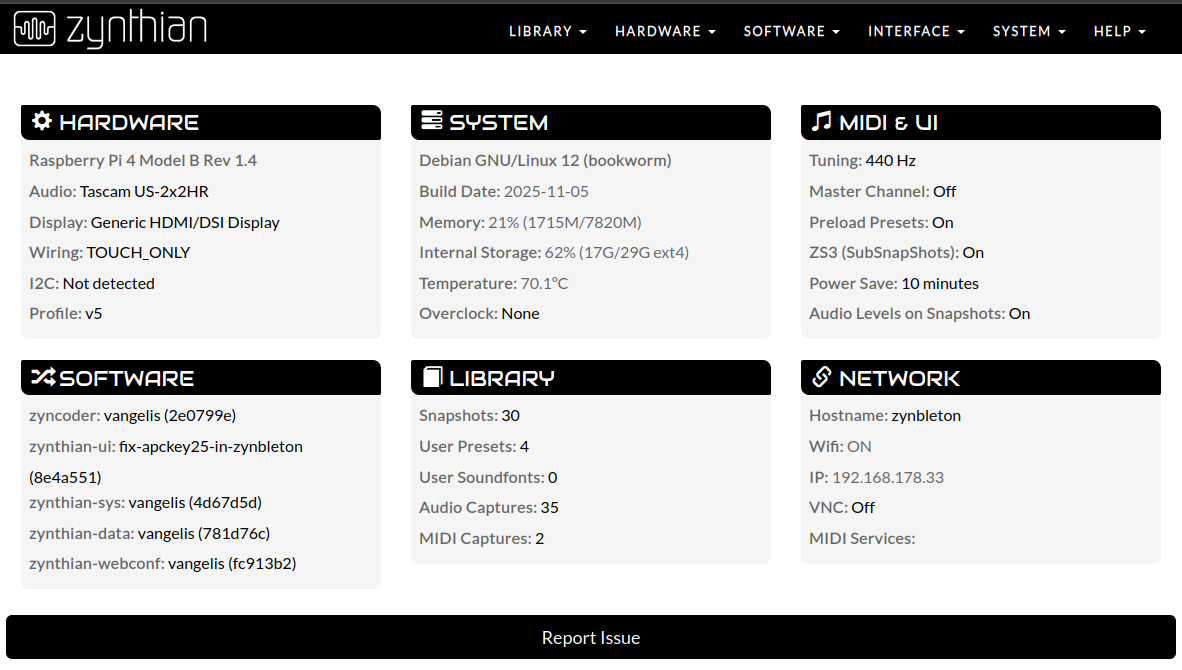
My setup for this is below. I also tested zynthian-ui with vangelis branch with same issue. The branch you see was rebased onto vangelis yesterday. It is a bare pi4 with external soundcard, hdmi display, keyboard and apckey25 mk2.
To make it work from touch, I delved into Profile: v5 and changed Switch-3 Action Short from ‘Layer Control’ to ‘Chain Control’. I have little idea why it was set to ‘Layer Control’.
Just saved a faulty loaded snapshot with a clip, and saved it again. Found that the warp setting in the clip was different (0 instead of 1). If you go into the clip’s settings and change the warp value, the load high pitched noise is gone, no matter what the value of warp is. Then I tried it with other values (crop start to wit), and the noise was gone as well. Have to go now and be merry, but this may provide some insight into why clips are loaded incorrectly.
I get an error opening webconf now in the Zynthian with Vangelis os i’m using, though Filezilla connect with no problems. No problems at all with an Oram device.
I guess by, “manual” you mean from the GUI admin menu and not from the command line? When there are updates available, an indication is shown in the top right of the screen and an entry appears in the admin menu. Both of these disaappear when the system is up to date.
@jofemodo says he fixed it so please check again. The admin menu entry should appear if you are connected to the Internet and there are updates available.


 .
.