I’m making my way into that, and have not explored all the opportunities, but from the POV of one who just started to climb a mountain, i do not see where the solution to the above mentioned challenge of mine lies. Please do not use valuable time trying to explain to me right now. I will have to work more the phrases looping functionality first 
I’ve changed the behaviour and not it works as you asked. It has more sense in this way.
Thanks!
1 Like
i updated Vangelis yesterday late evening, and it booted to some touch navigation screen, and showed no chains. I went to bed. Now i booted to the same screen - no access to webconf - not possible to restart webconf (systemctl restart zynthian-webconf) from terminal. But i updated from terminal (update_zynthian.sh).
But still the same. Is there a terminal command to get me back to the “ordinary view” - i do not remember what it is called, but it is V5 hardware controllers (the Romoral pads)?
from the logs
Mar 27 10:12:36 zynthian systemd[1]: Started zynthian-webconf.service - Zynthian Webconf.
Mar 27 10:12:36 zynthian zynthian_webconf.sh[2859]: ----------------------------------------------
Mar 27 10:12:36 zynthian zynthian_webconf.sh[2859]: Linux Version: bookworm
Mar 27 10:12:36 zynthian zynthian_webconf.sh[2859]: Kernel Version: 6.12.75+rpt-rpi-2712
Mar 27 10:12:36 zynthian zynthian_webconf.sh[2859]: ZynthianOS Version: 2505
Mar 27 10:12:36 zynthian zynthian_webconf.sh[2859]: Virtualization: none
Mar 27 10:12:36 zynthian zynthian_webconf.sh[2859]: Hardware Architecture: aarch64
Mar 27 10:12:36 zynthian zynthian_webconf.sh[2859]: Hardware Model: Raspberry Pi 5 Model B Rev 1.0
Mar 27 10:12:36 zynthian zynthian_webconf.sh[2859]: ----------------------------------------------
Mar 27 10:12:36 zynthian zynthian_webconf.sh[2882]: INFO:zynthian_gui_config.: ZYNTHIAN-UI CONFIG …
Mar 27 10:12:36 zynthian zynthian_webconf.sh[2882]: INFO:zynthian_gui_config.: Kit Version: Custom
Mar 27 10:12:36 zynthian zynthian_webconf.sh[2882]: INFO:zynthian_gui_config.: Wiring Layout: TOUCH_ONLY
Mar 27 10:12:36 zynthian zynthian_webconf.sh[2882]: DEBUG:zynthian_gui_config.: TOUCH NAVIGATION = v5_keypad_left
Mar 27 10:12:36 zynthian zynthian_webconf.sh[2882]: WARNING:zynthian_gui_config.get_env_int: Failed to retrieve environmental variable ZYNTHIAN_HOTPLUG_AUDIO
Mar 27 10:12:36 zynthian zynthian_webconf.sh[2882]: DEBUG:zynthian_lv2.load_engines: Loaded engine config with timestamp: 1774605664.498768
Mar 27 10:12:37 zynthian zynthian_webconf.sh[2882]: Loaded libzynaudioplayer using libsndfile-1.2.0
Mar 27 10:12:37 zynthian zynthian_webconf.sh[2882]: INFO:zynthian_engine_audioplayer.zynthian_engine_audioplayer: Supported Audio Codecs: [‘aiff’, ‘aifc’, ‘au’, ‘caf’, ‘flac’, ‘mp3’, ‘vox’, ‘opus’, ‘ogg’, ‘wav’]
Mar 27 10:12:37 zynthian zynthian_webconf.sh[2882]: INFO:audio_config_handler.: RBPi Device Name: ‘’
Mar 27 10:12:37 zynthian zynthian_webconf.sh[2882]: Traceback (most recent call last):
Mar 27 10:12:37 zynthian zynthian_webconf.sh[2882]: File “/zynthian/zynthian-webconf/./zynthian_webconf.py”, line 46, in
Mar 27 10:12:37 zynthian zynthian_webconf.sh[2882]: from lib.midi_log_handler import MidiLogHandler
Mar 27 10:12:37 zynthian zynthian_webconf.sh[2882]: File “/zynthian/zynthian-webconf/lib/midi_log_handler.py”, line 31, in
Mar 27 10:12:37 zynthian zynthian_webconf.sh[2882]: from lib.midi_config_handler import get_ports_config
Mar 27 10:12:37 zynthian zynthian_webconf.sh[2882]: File “/zynthian/zynthian-webconf/lib/midi_config_handler.py”, line 35, in
Mar 27 10:12:37 zynthian zynthian_webconf.sh[2882]: from zyngui.zynthian_gui import zynthian_gui
Mar 27 10:12:37 zynthian zynthian_webconf.sh[2882]: File “/zynthian/zynthian-ui/zyngui/zynthian_gui.py”, line 58, in
Mar 27 10:12:37 zynthian zynthian_webconf.sh[2882]: from zyngui.zynthian_gui_option import zynthian_gui_option
Mar 27 10:12:37 zynthian zynthian_webconf.sh[2882]: File “/zynthian/zynthian-ui/zyngui/zynthian_gui_option.py”, line 32, in
Mar 27 10:12:37 zynthian zynthian_webconf.sh[2882]: from zyngui.zynthian_gui_selector_info import zynthian_gui_selector_info
Mar 27 10:12:37 zynthian zynthian_webconf.sh[2882]: File “/zynthian/zynthian-ui/zyngui/zynthian_gui_selector_info.py”, line 32, in
Mar 27 10:12:37 zynthian zynthian_webconf.sh[2882]: from zyngui.zynthian_gui_selector import zynthian_gui_selector
Mar 27 10:12:37 zynthian zynthian_webconf.sh[2882]: File “/zynthian/zynthian-ui/zyngui/zynthian_gui_selector.py”, line 33, in
Mar 27 10:12:37 zynthian zynthian_webconf.sh[2882]: from zyngui.zynthian_gui_base import zynthian_gui_base
Mar 27 10:12:37 zynthian zynthian_webconf.sh[2882]: File “/zynthian/zynthian-ui/zyngui/zynthian_gui_base.py”, line 43, in
Mar 27 10:12:37 zynthian zynthian_webconf.sh[2882]: class zynthian_gui_base(tkinter.Frame):
Mar 27 10:12:37 zynthian zynthian_webconf.sh[2882]: File “/zynthian/zynthian-ui/zyngui/zynthian_gui_base.py”, line 47, in zynthian_gui_base
Mar 27 10:12:37 zynthian zynthian_webconf.sh[2882]: def init(self, parent=zynthian_gui_config.root_frame, topbar=None):
Mar 27 10:12:37 zynthian zynthian_webconf.sh[2882]: ^^^^^^^^^^^^^^^^^^^^^^^^^^^^^^
Mar 27 10:12:37 zynthian zynthian_webconf.sh[2882]: AttributeError: module ‘zyngui.zynthian_gui_config’ has no attribute ‘root_frame’
Mar 27 10:12:37 zynthian zynthian_webconf.sh[2882]: libzynaudioplayer exiting
Mar 27 10:12:37 zynthian systemd[1]: zynthian-webconf.service: Main process exited, code=exited, status=1/FAILURE
Mar 27 10:12:37 zynthian systemd[1]: zynthian-webconf.service: Failed with result ‘exit-code’.
Mar 27 10:12:37 zynthian systemd[1]: zynthian-webconf.service: Consumed 1.062s CPU time.
i tried this:
(venv) root@zynthian:~# systemctl stop zynthian-webconf
(venv) root@zynthian:~# systemctl start zynthian-webconf
(venv) root@zynthian:~# systemctl status zynthian-webconf
● zynthian-webconf.service - Zynthian Webconf
Loaded: loaded (/etc/systemd/system/zynthian-webconf.service; enabled; preset: enabled)
Active: activating (auto-restart) (Result: exit-code) since Fri 2026-03-27 10:18:17 GMT; 1s ago
Process: 4312 ExecStart=/zynthian/zynthian-webconf/zynthian_webconf.sh (code=exited, status=1/FAILURE)
Main PID: 4312 (code=exited, status=1/FAILURE)
CPU: 1.063s
(venv) root@zynthian:~#
And then this
(venv) root@zynthian:~# cd /zynthian/zynthian-webconf/
(venv) root@zynthian:/zynthian/zynthian-webconf# . zynthian_webconf.sh
INFO:zynthian_gui_config.: ZYNTHIAN-UI CONFIG …
INFO:zynthian_gui_config.: Kit Version: Custom
INFO:zynthian_gui_config.: Wiring Layout: TOUCH_ONLY
DEBUG:zynthian_gui_config.: TOUCH NAVIGATION = v5_keypad_left
WARNING:zynthian_gui_config.get_env_int: Failed to retrieve environmental variable ZYNTHIAN_HOTPLUG_AUDIO
DEBUG:zynthian_lv2.load_engines: Loaded engine config with timestamp: 1774605664.498768
Loaded libzynaudioplayer using libsndfile-1.2.0
INFO:zynthian_engine_audioplayer.zynthian_engine_audioplayer: Supported Audio Codecs: [‘aiff’, ‘aifc’, ‘au’, ‘caf’, ‘flac’, ‘mp3’, ‘vox’, ‘opus’, ‘ogg’, ‘wav’]
INFO:audio_config_handler.: RBPi Device Name: ‘’
Traceback (most recent call last):
File “/zynthian/zynthian-webconf/./zynthian_webconf.py”, line 46, in
from lib.midi_log_handler import MidiLogHandler
File “/zynthian/zynthian-webconf/lib/midi_log_handler.py”, line 31, in
from lib.midi_config_handler import get_ports_config
File “/zynthian/zynthian-webconf/lib/midi_config_handler.py”, line 35, in
from zyngui.zynthian_gui import zynthian_gui
File “/zynthian/zynthian-ui/zyngui/zynthian_gui.py”, line 58, in
from zyngui.zynthian_gui_option import zynthian_gui_option
File “/zynthian/zynthian-ui/zyngui/zynthian_gui_option.py”, line 32, in
from zyngui.zynthian_gui_selector_info import zynthian_gui_selector_info
File “/zynthian/zynthian-ui/zyngui/zynthian_gui_selector_info.py”, line 32, in
from zyngui.zynthian_gui_selector import zynthian_gui_selector
File “/zynthian/zynthian-ui/zyngui/zynthian_gui_selector.py”, line 33, in
from zyngui.zynthian_gui_base import zynthian_gui_base
File “/zynthian/zynthian-ui/zyngui/zynthian_gui_base.py”, line 43, in
class zynthian_gui_base(tkinter.Frame):
File “/zynthian/zynthian-ui/zyngui/zynthian_gui_base.py”, line 47, in zynthian_gui_base
def init(self, parent=zynthian_gui_config.root_frame, topbar=None):
^^^^^^^^^^^^^^^^^^^^^^^^^^^^^^
AttributeError: module ‘zyngui.zynthian_gui_config’ has no attribute ‘root_frame’
libzynaudioplayer exiting
(venv) root@zynthian:/zynthian/zynthian-webconf#
Vangelis is currently broken. @jofemodo will be working on it today to resolve some issues. You can temporarily get back to a working version by entering a command line:
git -C /zynthian/zynthian-ui checkout 71a8dc989f4424085b64aec2c3e7a2c6f7fc569b
systemctl restart zynthian
4 Likes
Thanks @riban - worked like a charm.

1 Like
True! Is any manual operation necessary to revert this when vangelis is “unbroken” again? Or just update away then?
We will notify here when it is fixed. Until then please ignore the update available indication. We will explain the steps to restore to the fixed version when it arrives.
1 Like
And now to something completely different. And please do not waste precious time helping me, but if there is an easy answer/explanation, please do
Forgive me, but my experience with MIDI started when i bought my V5.1 18 months ago. I see the midi clock is running non-stop, which is probably fine.
But i do not see any START and STOP messages when i start or stop any sequence in ZynSeq. I want my Zaquencer/BR2000 to sync to Zynthian. Tha Zaq-Manual says:
- On „Ext“ the Zaquencer expects from the master a Midi Start Clock or Midi Continue Clock Message (0xFA or 0xFB) to start the sequence, followed by Midi Clock messages (0xF8) to drive the clock. To cleanly stop and reset the Sequence a Midi Stop (0xFC) is neccessary.
I had it working once, but i guess that must have been on Oram…
Our wonderful @jofemodo has fixed the display issue in vangelis and also some issues with rebooting and shutting down. (It is plausible that this may have been causing last_state to sometimes not be saved.) If you rolled back vangelis to a fixed commit (as I described earlier) then you can now update:
- In webconf SOFTWARE->Version, select “Vangelis” then save.
- Perform a normal update.
4 Likes
Yes, this did change. I just pushed a fix so that MIDI START & STOP are sent when the transport starts and stops. This is only sent to MIDI outputs that are configured to send MIDI CLOCK.
4 Likes
Small enhancement: There is now a small active colour (red) strip at the bottom of the mixer / launcher to indicate the active MIDI chain. This is handy when you select a non-MIDI chain, e.g. audio input, clip launcher, etc. but want to see which chain will receive active MIDI input.
5 Likes
Tee Hee.
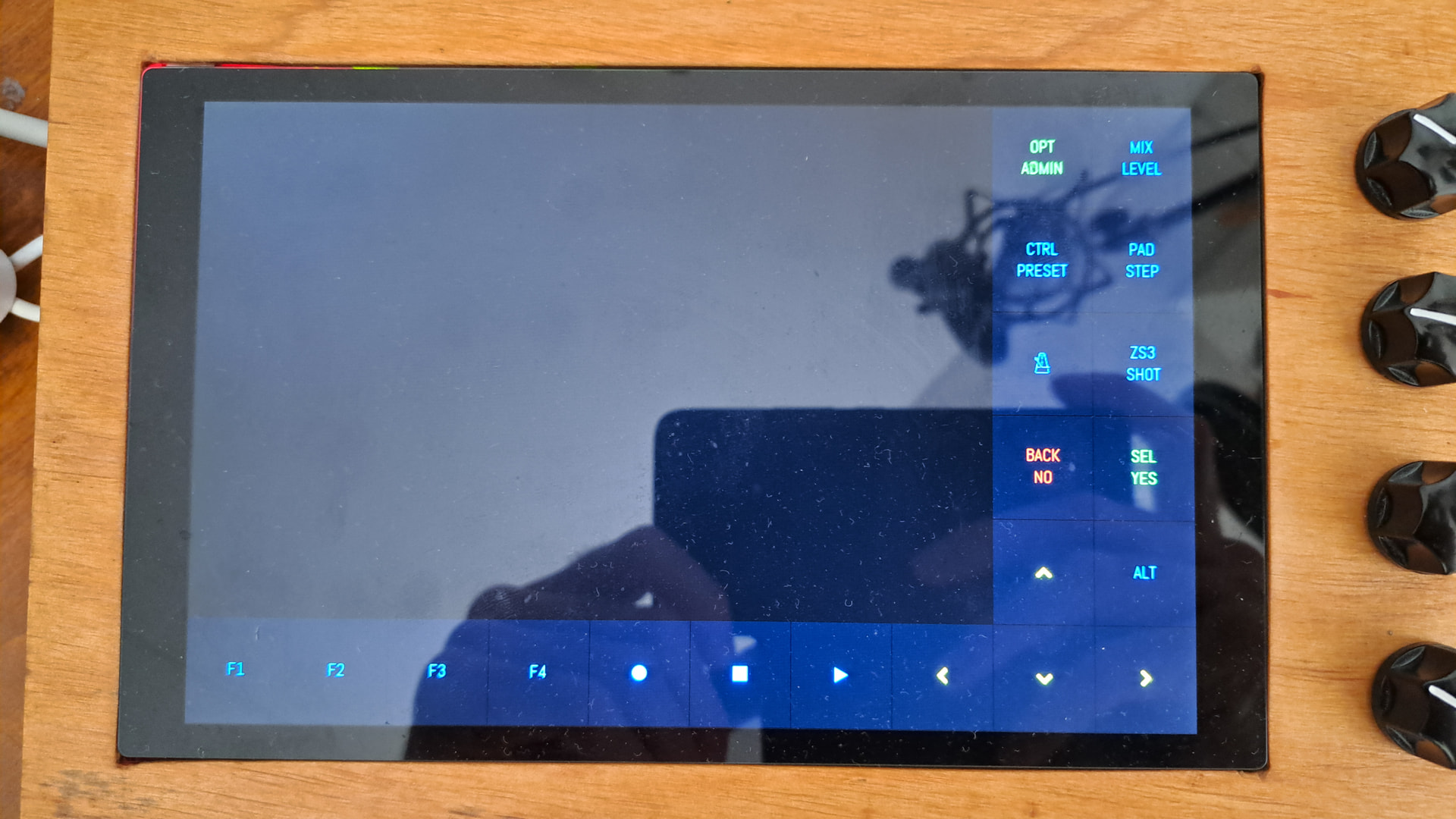
Context-sensitive button labels would be amazing. A short press on OPT/ADMIN button will always be either an OPT or an ADMIN button. BACK/NO is either BACK or NO. And so on. Perhaps there’s a different function on bold/long-press which would justify a secondary label, that’s a slightly different angle though.
A physical button needs to show both labels, and indeed very generalized labels, because the Zynthian isn’t a Stream Deck with LCD buttons. However, the built-in display is. It can indicate more clearly what a button will do in the current view.
3 Likes
Full disclosure, I haven’t tried Vangelis yet. (Catching up to the bottom of this thread is also an achievement, perhaps?) Either way, I wanted to see if this is a suitable spot for a wishlist item. If it isn’t, sorry and please move on.
What I’d really like to see eventually is pattern sequence automation not only for playback, but also for recording. For a performance setting, it would be awesome if I could press Record once, then a set of pre-configured patterns would either record, play back / loop previously recorded content, or simply let me noodle along according to which instrument should be active at the current part of my song.
So, the overall idea would be that I set up my patterns without initial MIDI contents, then during playback/recording they get populated with notes/CCs as defined by automation settings without me ever taking the hands off of my piano keys.
In practice, I figure this would mainly involve two extra settings for the pattern such as,
- “Automatically record”: Off/On
- “Stop recording after”: anywhere between 1 and beats (perhaps longer given overdubbed loops), or default “Manually”
Not sure about how to activate a different instrument automatically - perhaps by entering the pattern edit view after N beats or loops, as configured in one additional setting. Then the instrument gets activated together with the pattern view, and recording can continue to happen exclusively inside the pattern view? But also the view can be entered automatically without necessarily starting to record.
Other patterns subsequently activate and record by stealing the view when they start playing (or slightly after, again as configured).
And if, further down in the track, I pre-emptively place a mirror instance of the same pattern, then that mirror instance would play back the recorded notes from the original pattern instance further up. While I noodle or record more stuff simultaneously.
There are probably all kinds of reasons why you think this is a bad idea. Maybe I’m even embarrassing myself with my limited sequencer experience. Still curious about what you think 
It’s a process still ongoing.
It is the shift from a pre-defined set of paths presented in a GUI to a grammar to describe arbitrary paths and routes around the ordering of events on objects, that include the ability to manufacture instances of themselves.
All very meta at the end, and the difficulty becomes where does the predefined GUI components stop and the textual description start . . . ?
Within a specific view of the zynth infrastructure, we would persist with the gui by small telling additions to existing menu structure to match defined use cases, rather than unleash the text editor.
But we are privileged to be developing in an area where there is already considerable cross over in these elements as the definition of ttl files sems to be taking on a certain ease.
The zynth admin tools offers the workflow recorder which is an excellent device for recording working and failing or undeveloped workflows which is very illuminating from a creative development point of view.
Perhaps we could build a macro language within the workflow recorder to automate tasks ?
They could even count towards your soup intake . . . .
That’s the thing: I think with the three or so new settings per pattern, there has to be no text editor. The main idea is just, whenever a prepared pattern starts playing, it also starts recording. And once recorded, it continues to loop. By allowing multiple patterns to each be set up with this relatively simple config, a lot of flexibility can be achieved without any kind of macro language or such.
All the other stuff I mentioned is just activation/recording offsets within a pattern, to account for the fact that the pattern grid is kind of course-grained. And honestly this probably isn’t even necessary for a first iteration.
Actually let’s just go with this and reduce my suggestion to its most minimal form. Only one new setting per pattern:
- “Record when first played”: Off/On
And then see how far that can get us. Combined with mirror instances of patterns (i.e. “copy as reference to the original” as opposed to “copy as duplicate”), this can cover a lot of ground.
Yessss! 
I can confirm that the shutdown via touch on the former fast page power off field now works for me as it should, thanks!!!
Edit : too fast message, the button leds still stayed lit on the first time I tried. On the second time the shutdown didn’t work fully. The display stays black with backlight on, although the button leds go off