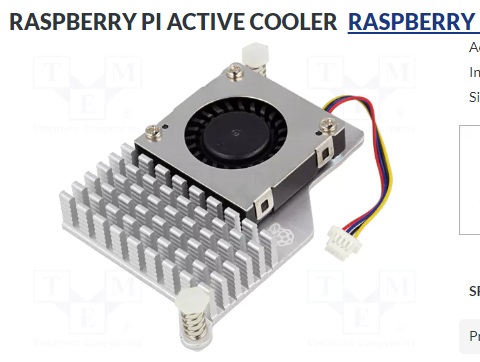
Personally, I’m happy with the original P5 fan. It takes up little space, doesn’t make any noise and connects to the Raspberry using PWM.
2 Likes
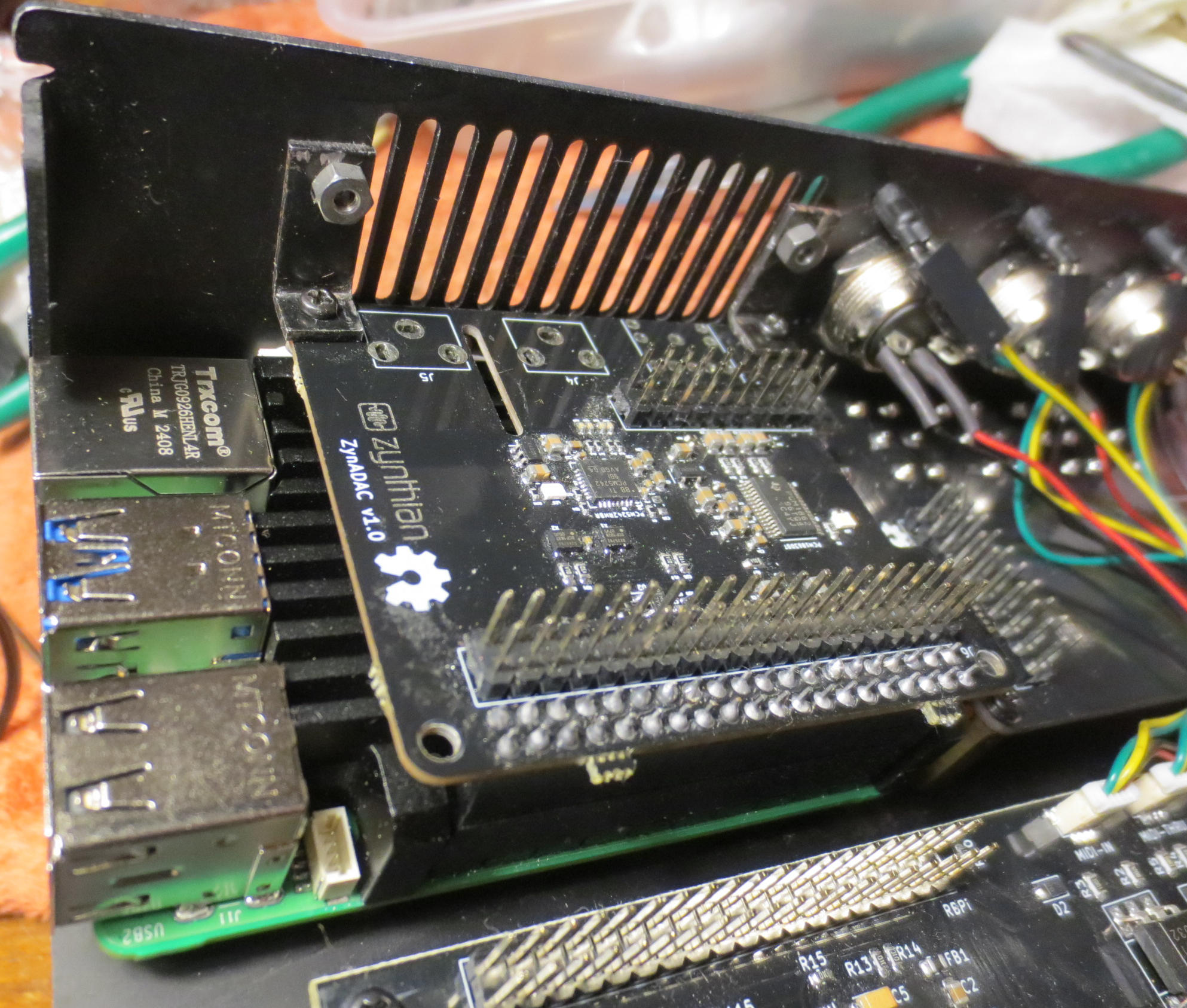
So I finally took the plunge and upgraded my V4 with an RPi5. I used the upper part of the passive cooler pictured further up in this thread, and put heat pads along the side facing the rear of the V4 case to help transfer heat to the case, much as the Zynductor does in the original V4. The RPi is mounted to the bottom of the case using the original standoffs. An extender on the 40 pin connector is used to raise the ADAC board above the cooler. Instead of letting the ADAC board float free, I attached it to the back of the case using two angle brackets I happened to have on hand. (You can just see part of the white thermal pad below the left angle bracket in the picture).
The only thing on the outside of the case that belies the new internals are two extra screws on the back, together with the missing RPi headphone outlet :
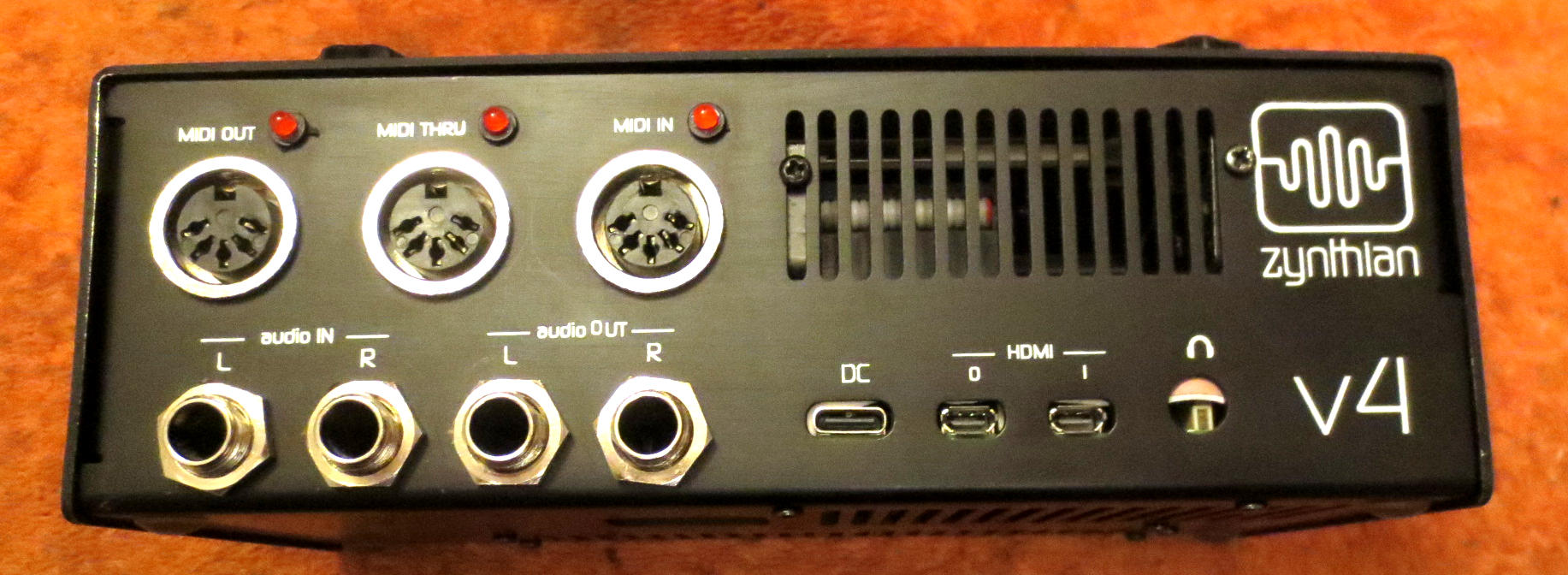
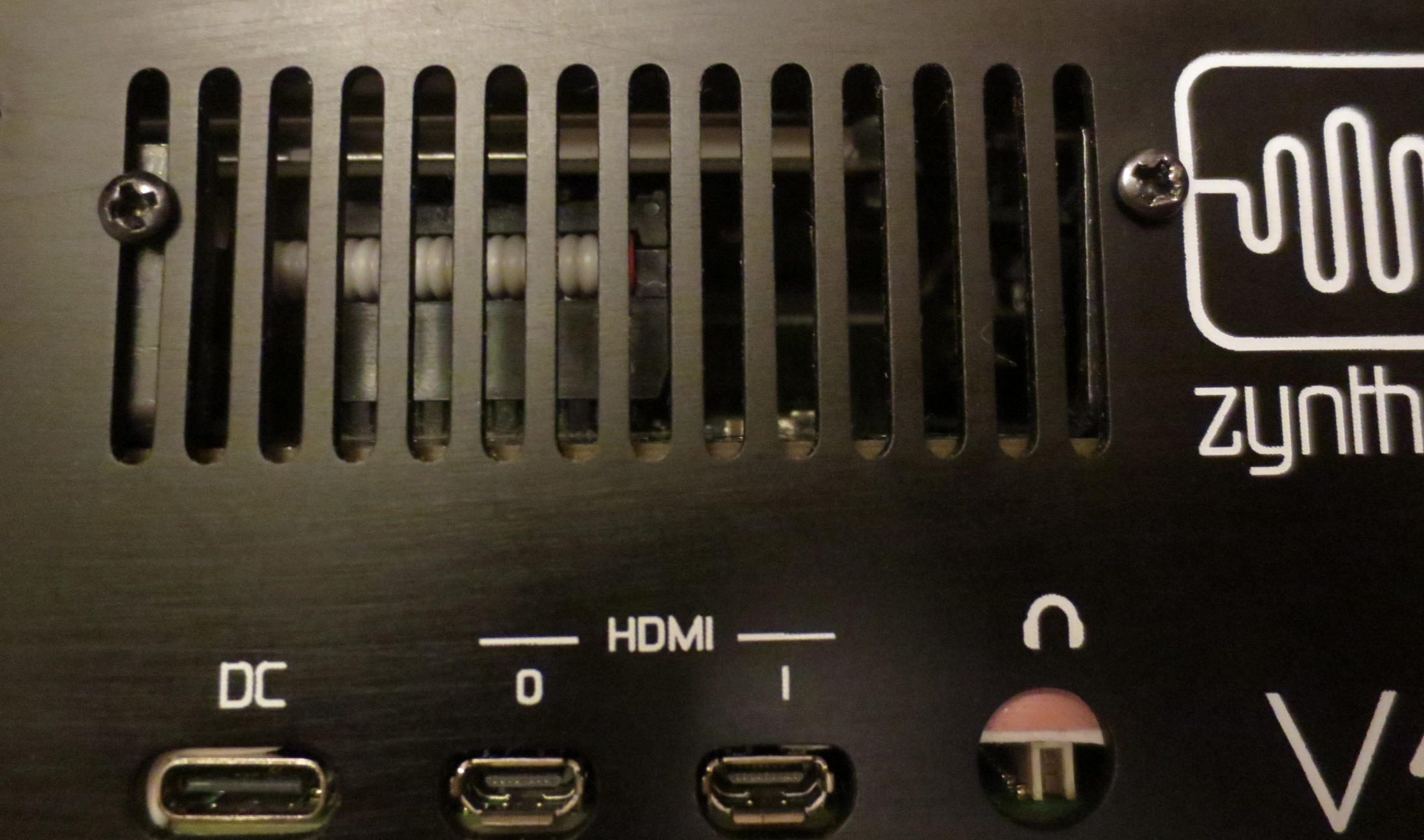
and the slighly offset network and USB connectors on the left hand side:
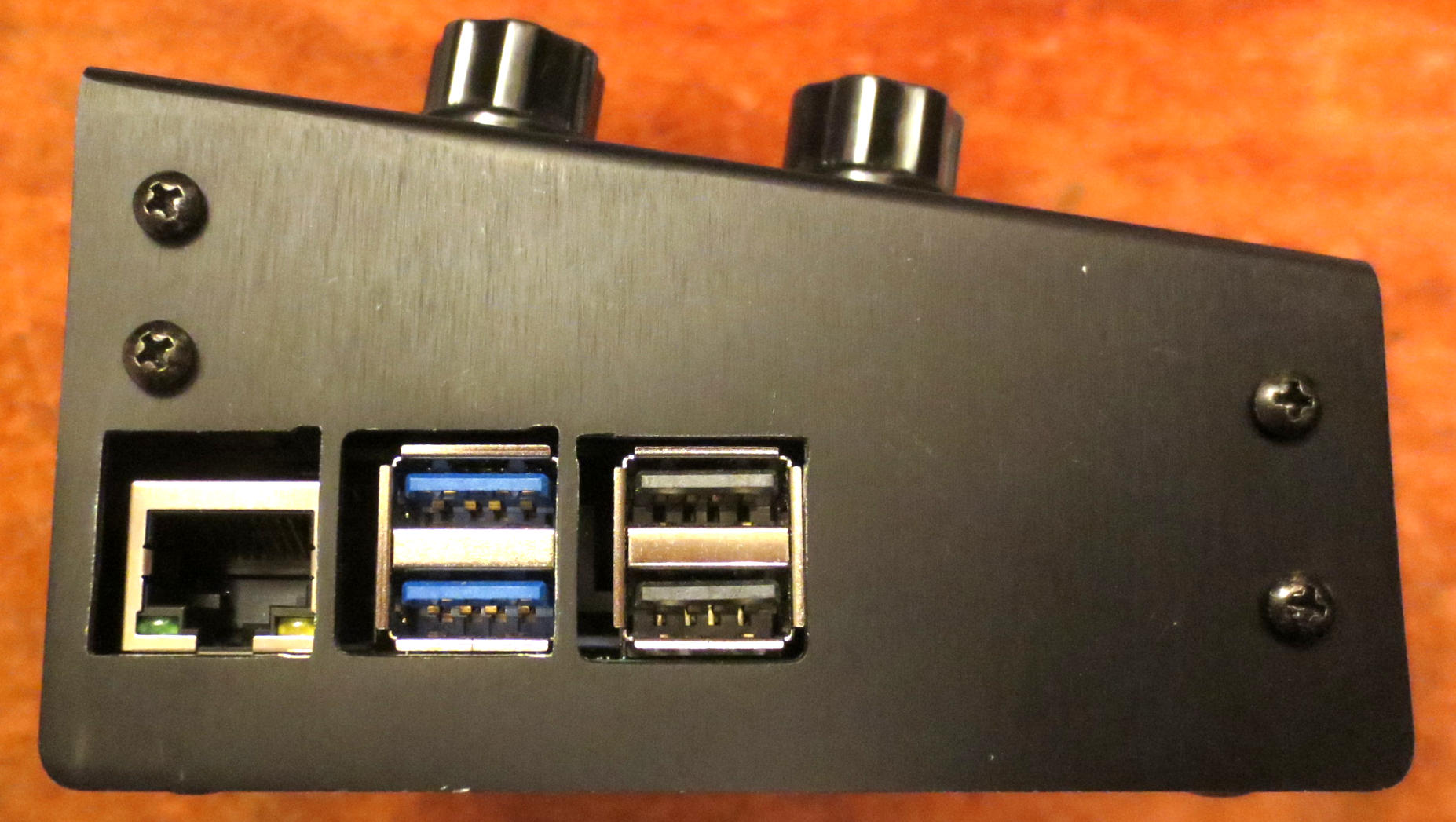
I had to increase the size of the openings due to the different connector arrangement. Initially I was only going to increase the height of the to-be-USB connector on the right, but it turns out the connectors are not in the exact same place either (and the thermal pad adds another half a mm or so of shift as well), so I had to file away some of the bars on the case separating the connectors too. I opted to leave the bars rather than file them away completely, as I thought it looked better than just making a big hole. In the picture the holes look worse than they do in reality; I didn’t notice the uneven sides of the holes until I looked at the picture.
It all works fine, although the RPi5 does get hotter than the RPi4, but the case does not become uncomfortably warm in any way.
Two initial hickups: I managed dislodge one of the jumpers on the v3.5 display board, with the result that the two right hand encoders didn’t work. I didn’t even realize there were jumpers on the board, until one of them fell out of the case and I wondered where it came from.
The other issue was that I took my RPi4 SD card and booted the RPi5 with it. It all worked well except for one thing: Zynthian couldn’t connect via the (wired) Ethernet connection. The LEDs were flashing on the connector, and ip addr showed the interface was up and running, but it would not communicate. Burning a new RPi5 image cured this. I’m guessing something happens at first boot that configures the network card in such a way that it can’t be changed without manual intervention.
One difference I’ve noted between the RPi4 and RPi5 is that with the RPi5, the display briefly shows the console when starting up and shutting down. I don’t know if this is due to some difference between the RPi4 and RPi5 configurations, or because I’ve previously had the RPi5 configured differently, having tested it in a 5" touchscreen only configuration.
I’m now in the slightly bizarre situation that I have a V4 with an RPi5, together with V5 with an RPi4 which turned up second hand recently. So why upgrade the V4 rather than the V5? Well, one reason is that I really like the V4 form factor, and I’d already done some investigations and preparations for the upgrade. The other reason is probably ‘because I can and it’s a bit adventurous’.
7 Likes
So, a couple of observations after this rebuild. (Being the most familiar with MiMi-d, I’ve used it as a yardstick when it comes to CPU performance. By turning off ‘Economy mode’ in the plugin, it consumes CPU whether or not the voices are playing, so just setting the voice count varies the CPU load without having to play anything.)
I’ve noted that by default, the configuration for RPi5 has half the buffer size (128 samples) of the one for the RPi4 (256 samples), so this would tend to load the RPi5 more to start with. I’ve not considered this below, just running with the default settings for the respective platform.
- Setting overclock to Medium works fine, but setting overclock to Maximum results in Zynthian not booting at all. And I mean not at all. I connected a screen to HDMI output 0, where normally the console shows up before the system switches to the internal screen, but with overclock at maximum, there is nothing. I don’t know if this is to be expected, i.e. if there is something additional on V5.1 that facilitates overclocking. I’m using the recommended 27W power supply for Zynthian in this case.
- With overclocking set to medium, everything works fine. Idle temperature is about 45°C.
- Loading Zynthian to the max, with 8 chains of MiMi-d with 32 voices each, I get an orange heart in the display, and the temperature eventually goes up to over 76°C and the system begins to throttle. But this is with a total of 256 voices! As a comparison, a V5 RPi4 Zynthian with overclocking at max can handle 4 chains of 21 voices each (with some intermittent glitching when the mixer screen is shown), so 84 voices total.
- With 4 chains of MiMi-d with 32 voices each, so half of full load, the temperature goes up to 60°C or so.
- Even when loading Zynthian maximally, and having an USB-powered master keyboard (Korg Keystage 61), I can use the 15W power supply intended for the RPi4 without issues. No throttling, instability or other problems.
I’m assuming that a V5.1 (RPi5) can run with overclocking at Maximum without overheating?
1 Like
The problem with overclocking arises from the internal power supply circuits. If the core (or anything else inside the RPi5) consumes too much power, a brownout happens and the RPi5 crashes, if the clock governor does not manage to catch that early enough and thottle the clocks to mitigate the overcurrent problem.
There are also overclocking issues on the SDIO bus (Wi-Fi and microSD) and with DRAM timings, set aside timing issues in general (UART Midi, bus contention,…). Depending on the CPU load, overall a negative performance gain is to be expected (with the DSP56300 emulation, for example).
I’d be very interested to read the results of your test without overclocking.
Please, if you can afford the time, try once without overclocking and tell us how it works then.
Here is a small script that displays all relevant information about frequencies and currents.
The 27W power supply of RPi is usually already on the verge of overload with the RPi5 alone, so it seems very unlikelyl to run the RPi5 on a lower spec supply without encountering problems, especially when overclocked.
Please try the script, or, if that is too much, please try to issue the following command in Webconf Terminal and post the result here.
vcgencmd get_throttled
I’m very curious. Thank you.
power_report.sh (1.2 KB)
1 Like
To be clear, first, the only overclocking modes I’ve tried are the ones selectable from the Webconf: None, Medium and Maximum.
Of these, None (2400 MHz I assume) and Medium (2700 MHz according to /boot/config.txt) work fine with either the 15W or 27W power supply, with no throttling (as reported by vcgencmd get_throttled), not even when running with more or less maximum load.
Maximum (3000 MHz according to /boot/config.txt) is the one that causes problems, even with the 27W power supply, and since the system refuses to boot I can’t log in and report any throttling.
I’ll run your script in the None and Medium modes and report back the results.
Ok, so I ran the power_report.sh script under a combination of circumstances:
- 15W (RPi4 original) vs 27W (RPi5 original) power supply
- Overclock None vs Medium (as set in webconf)
- Idle (no voices playing) vs max (or at least reasonably high) load (yellow/orange heart)
I should note that my Korg Keystage master keyboard was plugged into an USB connector and was thus powered by Zynthian.
v4-rpi5-psu27-none-max (576 Bytes)
v4-rpi5-psu27-none-idle (576 Bytes)
v4-rpi5-psu27-medium-max (576 Bytes)
v4-rpi5-psu27-medium-idle (576 Bytes)
v4-rpi5-psu15-none-max (576 Bytes)
v4-rpi5-psu15-none-idle (576 Bytes)
v4-rpi5-psu15-medium-max (576 Bytes)
v4-rpi5-psu15-medium-idle (576 Bytes)
1 Like
Thank you.
The VDD_CORE_A current(7) is over 6.5A under load when overclocked. It will work some time, but will make problems soon when the regulator ages over time.
The 15W PSU seems to be of superior quality with lots of overcurrent capacity. Lucky you!
Maybe check the voltage on the +5V line with the 15W PSU under max load when overclocked, you may see it goes down. Wonder how long that PSU will last under such stress.
Still can not believe everything, and Wi-Fi, works with the 15W PSU…
1 Like
I should mention that I don’t have Wi-Fi enabled on my Zynthian, at least with the RPi4 I found the connection unreliable, so I use wired Ethernet all the time.
Yes, I can understand all that, but from what I understand, the V5.1 Zynthian (with RPi5) uses maximum overclocking, so what does the V5.1 have that my “V4+” doesn’t? I understand the cooling is very probably not as good, but that wouldn’t affect initial startup. Is there some hardware in the V4 that misbehaves when the RPi is overclocked?
1 Like
Hi @ricard!
First, we disabled overclocking on Pi5 because it causes a lot of headaches. Now you have to enable it by hand. Not all Pi5 boards support overcloking. It’s quite random, so your board could support medium, maximum or none. You can’t assume your Pi5 board supports overclocking at all.
The best,
Maybe a more stable power supply 
Ok, jokes aside, I run all my RPi5 at stock speed now with a 40W 5.1V supply circuit each, connect power via GPIO and USB-C via power splitter, so I can have the gadget mode feature and pump 8Amps into the RPi5 if needed. The 3.3V rail on GPIO supplies absolutely nothing, so the onboard regulator has to feed only the RPi5. For soundcard and other electronics, a separate 3.3V regulator takes its input from the 5.1V supply that also supplies the screen.
The same with NVMe, these have their own power supply, deducting 3.3V and 1.8V power rails from the 12V 55W base supply that feeds the 5.1V regulator, again, no power is taken from RPi5 and not from the 5.1V, that only feeds Pi and screen.
The same is for the SD card on 16cm long FPC extender, own power supply close to the card socket.
And gues what, overclock is not possible beyond 3.14GHz, some RPI5 do not go over 2.7GHz. Wi-Fi shows white flag much earlier. I’ve actually burnt two onboard Wi-Fi modules with overclocking experiments! These do not work any more, even at stock speed.
With such a supply, the EEPROM config has to have a line added via sudo -E rpi-eeprom-config --edit
PSU_MAX_CURRENT=5000
A higher number than 5000 makes no sense, 5000 is maximum allowed. Without that, any external power supply has no benefit and RPi5 will only run in safe low power mode.
Do not define this setting, if you use USB-C supply, as RPI5 will not ask USB-PD to rampup current to 5V 5A and supply will be only about 5V 2A, or not work at all.
With the 27W Raspberry Pi supply, overclock was not possile higher than 2.7GHz, even with the RPi5 that later with the good supply hit the Pi number in GHz.
Maybe this gives a hint. YMMV.
If you wand to check how your power supply behaves under load, try on SSH:
watch vcgencmd pmic_read_adc
And watch what comes on the 5V rail, and core amps… 
You may check on a separate SSH the Wi-Fi
watch iwconfig
and suddenly you see excessive TX counting up faster and faster, screen update stuttering, and then Wi-fi disappears. If you are lucky, the SDIO is not burnt if you pull the power ASAP and boot a non-overclocked config. You have been warned: Do not overclock!
BTW, if it gets really sick, you burn the SDIO controller and the RPi5 will never boot from microSD again and have no Wi-Fi, and no GPIO SPI. That happened to a colleague’s RPi5.
Thanks for the replies! I can certainly understand that overclocking may or may not work depending on the individual Broadcom chip or other components on the RPi board. In a general sense, certain systems are better at overclocking than others; indeed, my RPi4 V5 seems to have overclocking set to Medium by default, so perhaps the RPi4 generally behaves better with overclocking, up to a point.
I had in my mind that I’d read somewhere that because of the hefty cooling block in the V5.1 that it supported Maximum overclocking without the risk of overheating, but I must be mistaken then. Or did that concern the RPi4 (given the seemingly default Medium setting for the V5)?
It’s not really that I need the speed; indeed, the stock speed is fast enough on the RPi5, although it’s pretty cool to run eight 32-voice instances of MiMi-d with all voices playing which requires overclock to be set to Medium (not that my music ever requires that amount of notes).
I did seem to notice occasional glitches with Osirus when running at stock speed, which I didn’t when I’d set overclock to Medium, but I haven’t tested that extensively.
Hi @ricard 
Same here, very occasionally, either with Osirus or Ostirus. Nevertheless, I have never been able to ascertain whether my two Pi5s (and which of them) behave efficiently with overclocking.
Being quite random the answer, and possibly causing negative performance gain doing otherwise, I have set both to zero overclock, and raise them to medium only when DSP563 emus are loaded (with VNC disabled, of course).
My take on overclocking is this: It makes the system faster, which is easily visible by looking at the CPU load: I think for 32 voices of MiMi-d it drops from very roughly just short of 50% to 40%, which is in line with the 12.5% increase in clock frequency (from 2.4 GHz at to 2.7 GHz), but that does not mean that one needs to utilize that CPU capacity continuously; indeed, fully loaded, with overclock set to Medium, my RPi5 eventually runs too hot and throttles down. But it does mean that there is more headroom for short term spikes, such as what seems to happen with Osirus, or if you need a couple of extra voices in a particular section of a song. So as long as the system behaves in a stable manner, overclocking gives a bit of extra breathing room, and having a large cooling block means that it can handle those spikes without the temperature rising too quickly.
1 Like
Now if we made it MIDI controllable. . . . .
You mean having the overclocking MIDI controllable?
Well it would make for some interesting possibilities for CPU control . . . .
Don’t take it too seriously. . .
No, I won’t, anyway, it would seem like quite a risky prospect, if it even works; I don’t know if the clock frequency can be set in runtime, the way the OS is set up, it can only be set at boot time, so possibly the frequency change needs to be done in a very controlled manner and not while the system is up and running. On the other hand, for desktop and laptop computers, the CPU frequency and scheduling strategy can be set runtime.
But more importantly, there’s really not much need, in the sense that most synth plugins only use the CPU when they are actually playing something, thus, even if oversampling is enabled, but few voices are playing, the actual active CPU time will be small. (When I’ve been doing performance testing with MiMi-d, if turned off the ‘Economy mode’ parameter (same parameter as in OB-Xd), which causes the DSP code for all voices to run at all times whether or not they are playing something).
There is the cpufrequtils packet, which allows to set the clock governor and frequency at runtime, on terminal: cpufreq-set --help and cpufreq-info --help give info how to use.
That would be really interesting, providing it actually works without freezing the system while reading Midi data, and, afaik, an absolute first in audio applications of any CPU I know (I don’t remember having ever heard of dynamic processor clock for real-time synthesis…).