Hello all,
I just finished building my v5.1 and I was interested to know if it would be possible to run traktion waveform on the same pi5 (and control it via VNC or such). I also just installed it and its currently running on a separate pi5.
So my question is as such:
is it possible to have oram run wayland on a secondary (virtual) display (since it’s the standard pi5 window manager it seems)
and would it be possible to have that “secondary” display accessible via VNC instead of the zynthian screen.
-in the future I’ll be happy to add an hdmi cable and have a real screen for the daw.
I looked on the forum a bit but couldn’t see many people actually having a “desktop” running on top or on the side of oram.
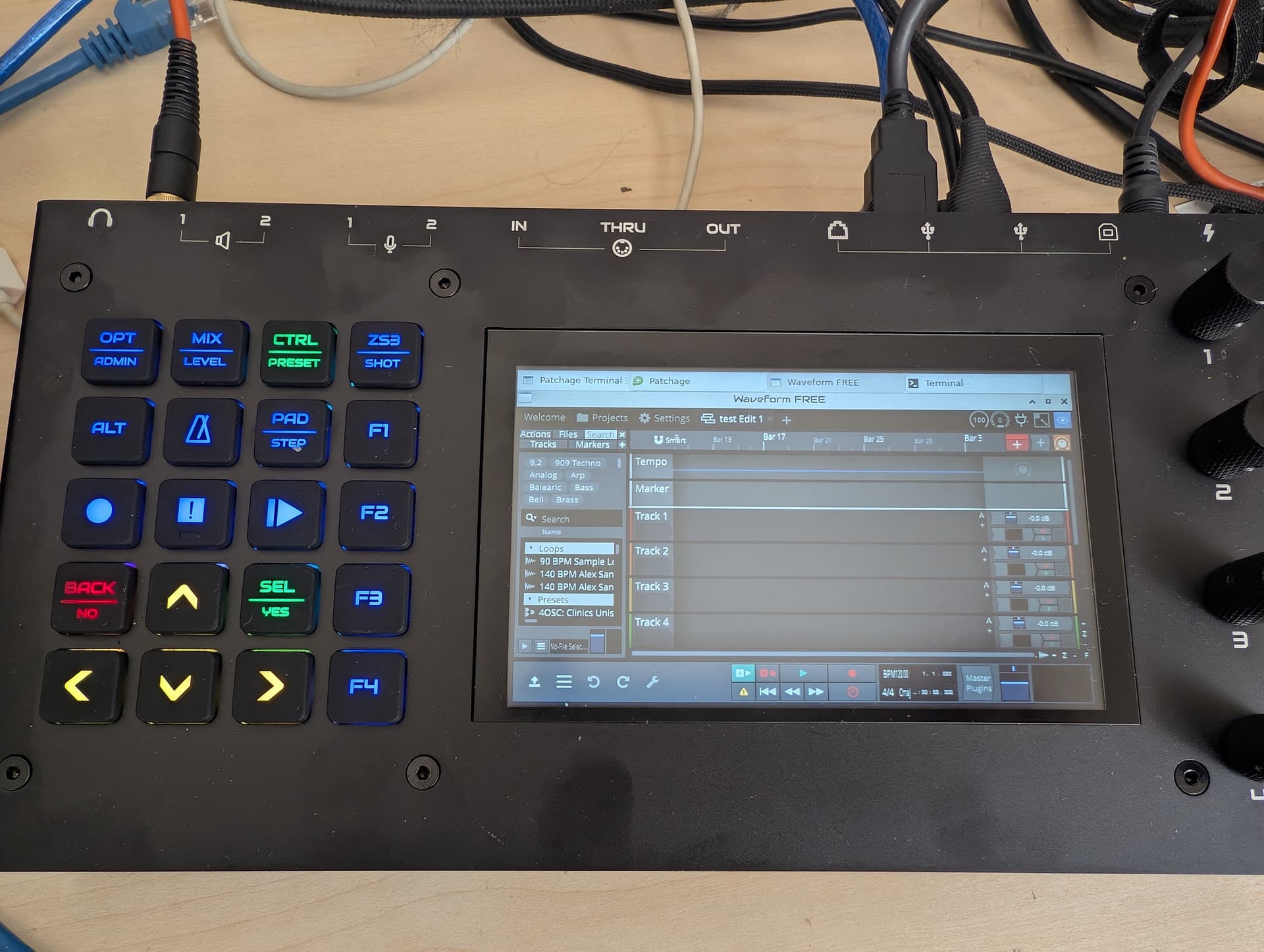
update: just discovered got “startx” to run. It does display apps running such as “pachage” and such but the touch screen seems kind of “reversed”.
Well so I guess it kind of works.
it installed easily after connecting a mouse and keyboard.
But that rises a few questions from me:
having it running in X11 doesn’t really make much sense since there isn’t even a window manager there and presumably it would lack integration with the zynthian app
What would be a good small windows manager, and how to install it without breaking the rest of zynthian…
Could it be running on a webpage kind of like the vnc_zynthian mirror?
Actually we don’t use matchbox. We have no window manager on the main display and we use xfce4 for the VNC desktop (aka engines) display. We are not going to support running a wm on the main display. That is likely to break lots of stuff. You could run your DAW on the VNC desktop. We don’t support sick nonsense but we do encourage experimentation and such silliness!
that’s what I figured so far, yes “experimentation” is the word…
I obviously understand about not running a DAW on the main display.
But from preliminary tests (just today), it seems I can have have the DAW running and a few synth engines running without colisions, or getting down in flames.
I’ ve been using waveform for a few concerts recording (using flow8 from behringer) as a multitrack recorder) and it was really straight forward to use plusI have a few projects with it already…
but NON seems pretty nice I have to try it.
I haven’t used it yet myself since I’ve been committed to Reaper since 2013 but I’ve had my eye on it for a couple years, but later this year I’m probably going to see if I can build a Pi-based digital mixer/multitrack recorder for the band I’m in and I’ll probably use it for that (unless PieJam adds pi5 support in the mean time and works better)
Yeah, they’re currently only officially supporting up to pi4 and I gave my only 4 a few months ago because I hadn’t even needed to turn it on in over a year. I might try getting it to run on the 5 at some point but if I’m building something to use live stability is the most important thing so I’d rather wait for official support.
NON had some drama a few years back that I don’t know much about, but it seems like the fork that came out of all that is the only active version now from what I can tell.
Making a touchscreen-only Zynthian is an option too, but I’d rather use something simpler.
Anyway, this is all a derail from the original thread topic now, I brought up NON originally because (on paper, at least) it’s very lightweight and already uses Jack so it might be easier to integrate with Zynthian on the same machine and more CPU efficient.
Now I’m thinking that a way to handle use cases like this (using software outside of the Zynthian ecosystem simultaneously on the same hardware) could be some kind of “run/show-hide/close application” function that could be bound to one of the user buttons and linked to any executable.
So using the OP’s case as an example, let’s assume Waveform is installed and bound to a short press of F1 (with “close” bound to long-press). it would work like this:
First short press runs Waveform and maximizes it on the Zynthian display.
Wish Waveform visible, a second short prss minimizes Waveform and maximies the Zynthian UI.
Further short presses toggle between displaying Zynthian UI and the bound application (Waveform here)
Long press closes Waveform (maximizing it first if there are any user prompts that need to be dealt with, i.e. being prompted to save before closing)
Just brainstorming but it could be a simple way to let advanced users access any arbitrary software they wanted to use on their Zynthian, while keeping it safely hidden from new users (since you would have to set it up per-application in webconf) so it could be a “use at own risk” sort of thing.