Zynthian JFK (Just For Keys)

A full zynthian has audio and MIDI record and playback features, including support for mulitrack. This gives a substantial set of options for recording, including field recording, rehearsal, show, etc. I don’t think this is a requirement for JFK which is specifically a keyboard expander. I would expect JFK to offer the ability to play instrument chains (MIDI->MIDI FX->Instrument->Audio FX) with fast selection of presets and chains/instruments. It may not have most of the functionality of zynthian exposed (sequencer, mixer, recorder, player, etc.) These features may still exist in the base code and be accessible from API (e.g. CUIA) and hardware controller device drivers so that a user could configure a snapshot, use it to play from keyboard with simple UI and trigger these other features from external hardware devices but without GUI integration. (Hardware controller would be expected to have full control and indication integration, e.g. a launch pad that can launch sequences and indicate their play status.)

So, JFK should be just for keys.

3 Likes

For me, not.
Only audio and MIDI play.
It could be useful for my live.
For my live, further request maybe too much and non appropriate in this topic, would be show PDF or jpg via HDMI.

1 Like

I’m mostly interested in full Zynthian, so I’m not going to argue strongly for any features of the simplified product.

However, consider that even the most minimalist portable pianos tend to have a “user song” a.k.a. recording function of some sort. Clearly there is some sort of demand for this even by people who buy devices “just to play”.

There is likely some truth to the assumption that, say, 80% of people only need 20% of all features. But the set of 20% features will still differ from person to person. Some may ask for simple recording and playback. Some may ask for a separate metronome output. Some may ask for velocity curves or even per-key velocity adjustments to deal with the hardware they have. Some may expect being able to mix in Bluetooth audio for practicing. Some will probably need advanced settings for their MIDI pedal setup to control the performance. Some need to show lyrics and chords changes on screen, perhaps controlled via pedals.

If you simply define your target user persona as a musician with virtually no needs other than playing presets, you may end up with a lot of people that are interested in the rough idea but ultimately abandon this mode for not catering to a slightly specific need that’s a dealbreaker for them. When the next step up is a mode that offers the functionality, but is not fit for live use in the same way, that’s a recipe for disappointment.

I’m not advocating for the inclusion of every single feature, but pick your target audience wisely and make sure you thoroughly understand all the stuff they’ll need. And consider the fact that many manufacturers are putting out devices with a beginner-friendly efficient UX that are still somehow packed with features, because their users are asking for them.

Yes, and I know that making flexible devices appear simple is hard work with difficult trade-offs to consider. Thank you for spending your time on this. I’m not sure if I come across as an overly generic whiner, but I’m actually quite happy about what ZynthianOS is right now already, and excited about what you’ve got in store for Vangelis.

I have come to learn that both of you carefully consider all these factors, which may not always align with my own ideas but are well-considered either way. Perhaps one day I’ll find enough time to contribute something of value and bridge that gap.

2 Likes

You already did it :wink:

Why not, for the future, to define a set of CUIA that a user can load to have on a V4 all buttons existing on V5? I mean a kind of keys extention that you can have simply connecting an USB PC keyboard,

This would allow to have a compact unit (V4) for live and an extending interface for production (V4 + keyboard)

1 Like

That is already (kinda) implemented. There is a keybinding profile for numeric pad which maps the buttons from a USB (or Bluetooth) attached numerical keypad to CUIA functions. It was written before V5 so a dedicated V5 emulation profile may be beneficial. At the time we did consider producing a dedicated hardware keypad but it didn’t seem to be a viable product.

3 Likes

Another thought!

What if JFK were architected as an “app”, but I can also install other specialized interfaces, in the same way that I can add a device driver?

For example: At some point in the indefinite future, I may be interested in making a Zynthian version of the Bastl Midilooper, except backed by Zynthian chains and other common infrastructure. This may not fit with the vision for Zynseq, probably not with this JFK concept either, or if it does then it needs to be discussed and changed/downsized so that it does.

But it would be super nice if one could take over all of the buttons [1] and screen, reuse all the ZynthianOS infrastructure, and put a custom specialized interface on it. I could prototype the Midilooper and if something works out, figure out which parts are useful to port to Zynseq. Someone could port of the Dirtywave M8 interface and back it by Zynthian engines. Obviously some kind of tightly scripted workflow interfaces. Probably lots of things I’m not considering right now.

[1] Obviously there still needs to be a standardized way to switch back out of the “app” into a different mode, and presumably other global settings should be available as well.

3 Likes

That sounds similar to the long-held aspiration to separate the UI from the back-end (model / view) which we started with CUIA and continue with state manager but have not completed the separation. There is a thread on this forum discussing API which works benefit this approach. My high-level preference is to have a completely standalone, headless module and the UI as another standalone module that communicates entirely via API but it attempts to move that way have be influenced by the need to optimise for the available resources.

A pure MVP approach is attainable but likely to reduce capability due to increased overhead. I works still want to move closer to this though, but probably retaining some direct UI API elements (which we planned to do by retaining CUIA and implementation a separate API).

5 Likes

Not Just for Keys…
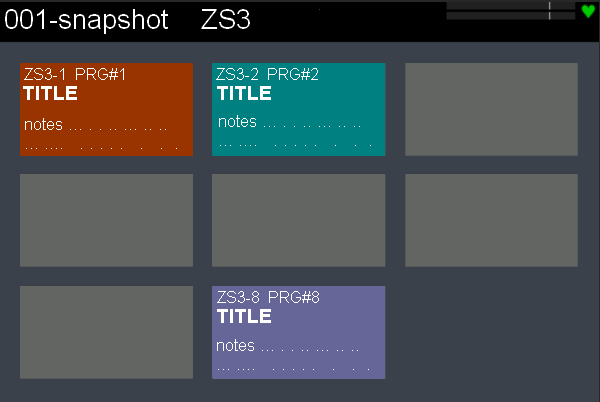
to make ZS3 even more effective what about to have ZS3 screen like this

after saving ZS3, in a week I forgot the aim of what I saved :slight_smile: and in this wat it would be easier to recall zs3
TITLE is today ZS3 name
notes could be a short description
rectangle could have also its colour background

6 Likes

Afternoon all, first time here, so please bear with me!

I know this is a bit of an old thread, but I may just be the kind of person this JFK version may be for. I built a V4 several years ago, mucked around with it for a bit, liked it, but found it way too much of a faff for my needs. It’s been gathering dust ever since.

I came back here because I saw rumours that a JV plugin might be in the works, and would like to retire my 3080 from gigging, it’s getting a bit old and fragile, and if I could get rid of some of my other bulky/old stuff at the same time it would be great.

So, what would I like to see? I think, two basic setups, one for programming, and one for live. In the programming setting, access to engines, patches, patch editing, and maybe a couple of effects to chain on, ( but only if the engine doesn’t have it’s own built in). Don’t need complex effect chains, sequencer, looping, midi/audio recording or any of that stuff.

Then for performance, all this would be set up per song, session or gig, with clickable buttons like in Piattica’s post above. Each button would recall one engine/patch/effects chain, and they would be toggleable, so I might have a 303 bass, minidexed bass, and two pad patches on the same engine that I can switch between. Maybe even limit it to two or three engines in use at any one time, that way you can have “presets” one side of the screen, page/ patch navigation controlled by one encoder, and the other three encoders controlling output levels for each preset with visible levels. Maybe press and rotate for effects mix, and plain rotate for outputs, then the four buttons, (on the V4!), could just enable and disable patches.

I can think of many more things that would make gigging operation simpler, but I’ll leave it there for now, as I don’t even know if this is a live subject any more!

Feel free to pick this apart, I don’t offend easily.:wink:

2 Likes

It would be very interesting to have something “live” for keyboard oriented. that was actually my goal with my little web interface ( A live-session proposal )
having this directly into Zynthian via a dedicated string is really appealing !

Hi @Pinkmouse :slight_smile:,

You got back to this forum quite at the right time. It’s been a while now since VirtualJV by Giulio Zausa was officially available on Zynthian, as an added synth engine to enable in webconf.

Please, be aware that sourcing legally, as a legitimate hardware owner, the required firmware for the emulator (a low-level digital circuitry replica) is the sole responsibility of the user, and that any advice or instructions whatsoever on the related procedures have not been and will not be given on this forum.

You will find a specific section of the webconf app, with dedicated facilities for uploading the ROMs to the relevant emulators folders.

Good luck, and have fun! :rainbow:

1 Like

Ta!

1 Like

Right, well after much reading, I’ve come to a conclusion. Zynthian is not the way forward for me. It just does too much in too limited a format.

Don’t get me wrong, I think Zynthian is great, and the Devs have worked really hard and done a great job packing so much in to the Pi, it’s just not for me. I like making music. I also like building complex things, but the two don’t go together in my workflow. So, for instance, I have two Pi 1’s running MiniDexed, rackmounted, with just encoders and 16x2 displays. I’ll build a Fluidsynth based Pi, again rackmounted, with multisamples from my Proteus. I think I’m going to make another rackmount with the baremetal JV , again, dead simple, 24x2 display and encoder. All have/ will have 5 pin midi and individual outputs and I can select/control banks and presets from my Hapax sequencer. I’m keeping things simple. Yes, more stuff, but also more redundancy and a much simpler setup, plug in and play.

Once again, this is a “Me Thing” and is by no means a slight on the project, and I wish Zynthian well for the future. So long, and thanks for all the fish!

Have fun everyone!

2 Likes

Thanks for the feedback. A stable release of zynthian should be a tool for the musician, not a development platform. We also make our bleeding edge development version available for those that want to share the pain. JFK is a new development that is aimed at the keyboard extender user but it’s not a reality yet.

Vangelis had more features but also better defined workflows and documentation which aims to alleviate some of the issues you experienced. I home we get it right, or at least better.

3 Likes

Thanks for the reply. I honestly think a lot of my issues could be solved by some sort of modular setup process, say the ability to just turn stuff off on initial configuration that I don’t want, and gets in the way of using what do want.

My ideal workflow would be something like, on initial set up choose, say a dozen synth engines. Then, when I turn the unit on, I would just see those engines, I could pick either setup or gig mode, then set the midi channel, CCs if required, pick a preset and assign it to a “Pad” that I could scroll through and recall in gig mode. If during setup, I wanted to create a new patch or tweak an existing one, I could just plug in a monitor and mouse, (or use the webUI) and see the full interface for that synth, tweak, and save. Then, just some sort of library editor to group presets into pages and that’s it.

Mixer and FX would be nice in gig mode, but not essential, just scrolling pages of preset buttons/pads would be perfect.

edit: Even more useful would be if I could just get the Hapax to send a midi programme change to the Zynthian that would automatically set up everything for that song without me even touching it.

In summary, if I can’t operate it quickly and easily on a blacked out stage with as few button presses as possible, it’s not for me, and if it needs too many levels of menu diving to set up, it’ll just get put back on the shelf to gather more dust.

I know I may not be a typical user of Zynthian, but I hope my feedback may be of use to you in some way! :wink:

3 Likes