Hi, I had to format the SD card and installed ORAM stable. When I tried to transfer everything to the NVMe with @riban’s script, it wouldn’t work… So I extracted the NVMe, formatted it, and checked it with CrystalDisk, which said the NVMe is 100% good. I redid everything, but now a very quick message appears that says (I think) “Error cuja,” but it’s so fast that I might have misread it, then everything shuts down… Has this happened to anyone? Thanks.
Hi @lanfranco
Maybe you can take a video to pause the message?
Thanks @jawn
I thought about it late but I did it… the message is: ERROR CUIA zynswitch(6, “L”)
If I boot from SD I see this… If I boot from nvme the shutdown window appears for a moment and then turns off…
1 Like
What is your hardware and do you know the wiring config? Switch 6 Long is an unusual configuration. Maybe one of your hardware switches (6th or 7th one) is pressed or short circuit.
Sounds like something related to the kit or wiring configuration.
Can you access webconf?
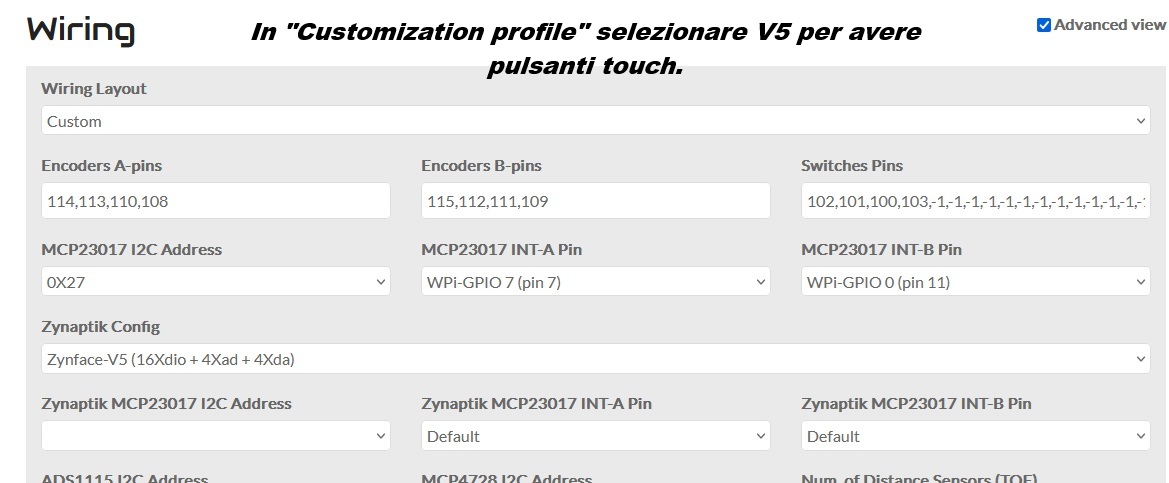
I unplugged the MCP and it gives the same error and when it boots it does so on the shutdown screen…
Show us more wiring config, specifically around swithes 6 & 7.
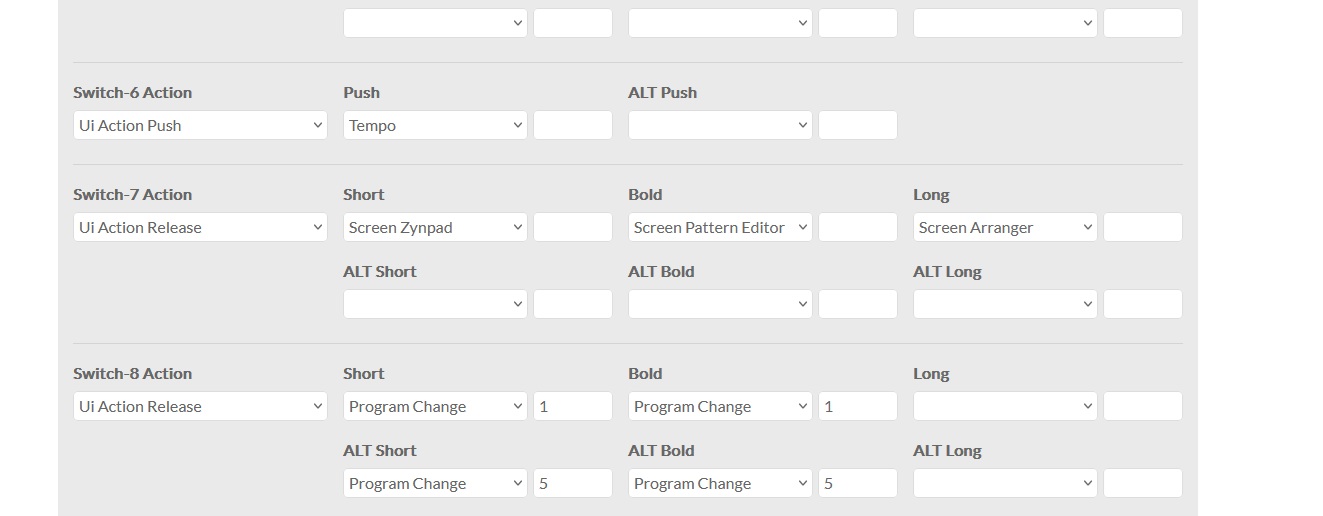
It boots to the shutdown screen even with the buttons disconnected and then shuts down…
Now thanks to the arrival of the Starlink kit (even though I hate Musk) I downloaded the latest Oram image in a few minutes and am writing a new SD.
It sounds quite like a hardware issue, that some buttons are being detected as pressed or flapping. What is your hardware? Are there any loose wires or dodgy soldering?
I was just checking… I don’t see any problems, and with the MCP disconnected, the buttons and encoders aren’t visible because they’re completely disconnected. I’m using a Raspberry P5. Now I’ll try reflashing the SD card because the Oram image I had was outdated due to the slowness of my old connection. I’ll keep you updated. Thanks as always.
I’ve now reflashed the SD card with the latest Oram I downloaded today. Everything seems to work. BUT, if I load a sound or snapshot, the Zynthian shuts down. I have no undervoltage signs.
Correction!!! Only when I load Pianoteq or a snapshot with Pianoteq does it crash… I tried loading Amsynth and it works… I installed Pianoteq 9 and registered the license.
1 Like
Now it also turned off when I ran @riban’s script to clone the SD to the nvme…
After several attempts, I’ve now cloned the NVMe. However, every time I turn on the Zynthian, I’m never sure if it will boot. If it fails, I have to reboot…
Are you sure the PSU is sufficient to power the RPi with the NVMe and attached peripherals / devices?
After several reboots, everything seems to be working fine now. Yes, @riban, I have a 12V 6A power supply that came from a camping refrigerator with a 12V to 5V voltage regulator. This was the second thing I checked. Now everything seems to be working fine. I had errors with the sound card and other things, but after several reboots, everything seems fine. Your script also worked. Thanks.
P.S.
Could it have been this setting that I hadn’t made and that I found in the configuration?
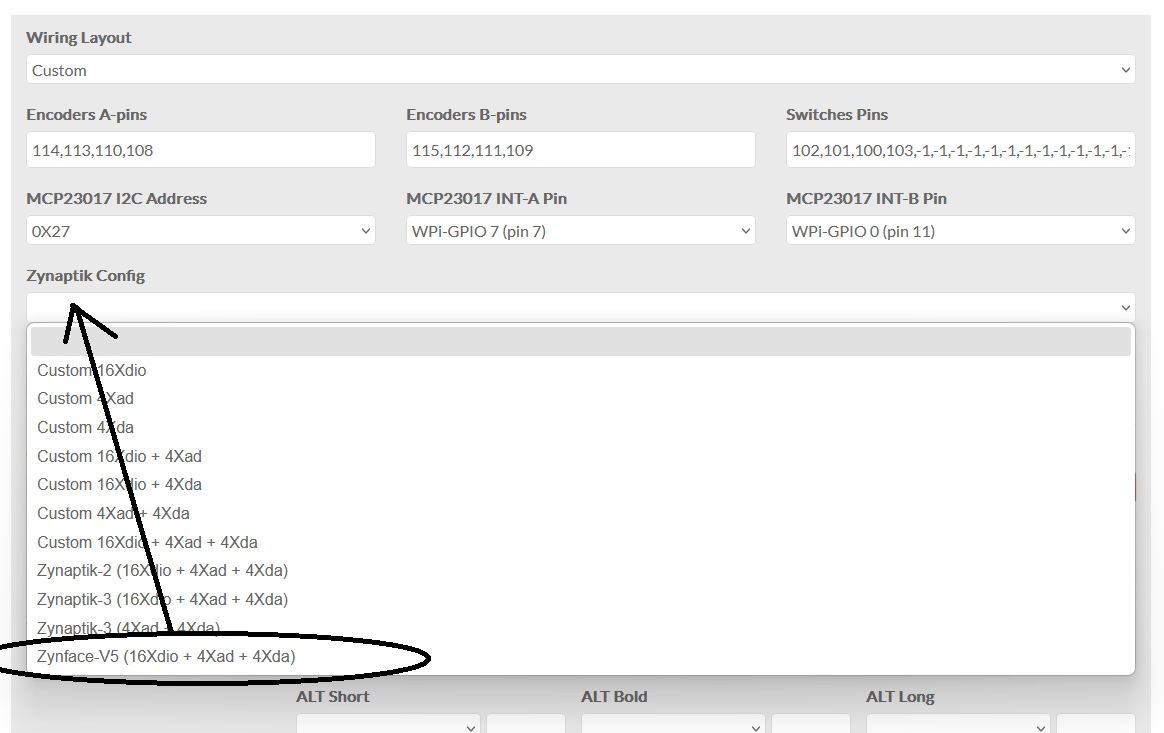
@riban, it would be interesting to create a script that allows you to clone the NVMe to an SD card (it’s probably very easy for you, but not for me). I think everyone experiments with SD cards, so being able to quickly restore it to its original, working state without reinstalling everything would be great, in my opinion.
1 Like
I am not sure this is a path I want to take. Figuring out what needs to transfer to an invariably smaller target may be irksome. I would recommend flashing a clean image to the uSD and to use zynthian backup and restore for user data… which is being reviewed and improved in a separate dev branch.
Thinking about it… you’re right. Did you happen to look at the setting that mistakenly appeared on webconf? Could that have been the cause of my problems? Thanks @riban