Hi @zynthianers!
I’m proud of introducing “collections”. I already told a little bit about them some days ago, when i started implementation:
These days, i’ve been quite busy on “home tasks”, but finally i had some time to advance with the implementation, and now all the important bits are in its place. Of course, it’s not finished, but it’s functional enough and it’s time to make a deeper introduction.
Collections are “Assets Packages” for zynthian. An asset is (should be) any type of data file managed by zynthian: samples, mid files, soundfonts, presets, etc.
You can manage collections by accessing webconf->library->collections:
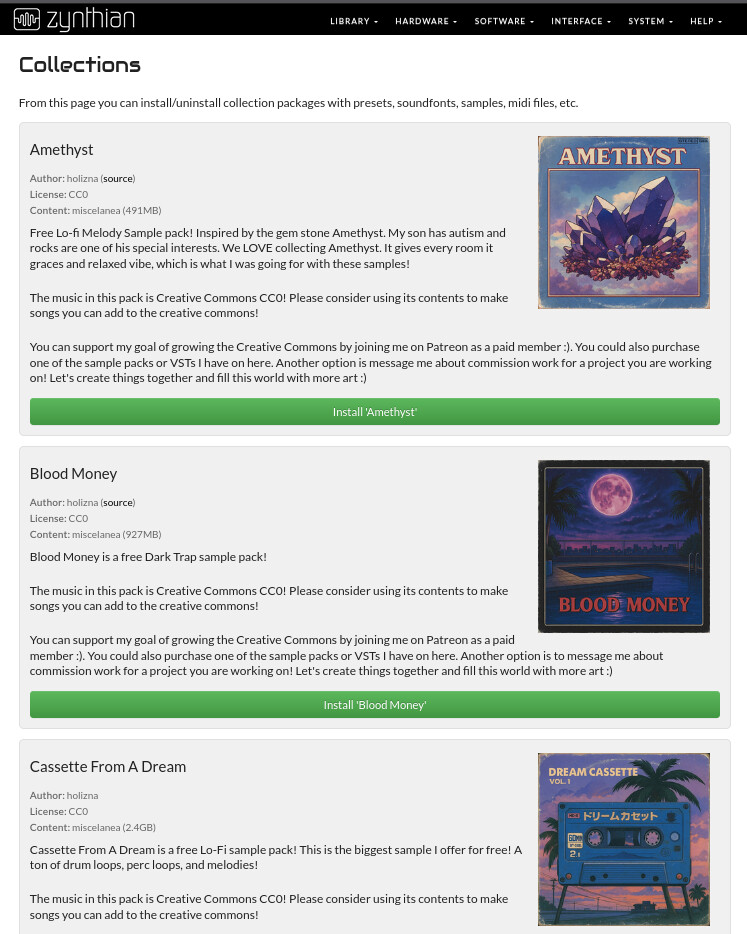
The current interface is quite basic, but it has all the needed bits. Basically it’s a list of available “collections”, with the related info and options:
- title
- image
- author
- license
- content type
- size
- description
- Install / Uninstall button
TODO:
- Some search/filtering functionality will be needed very soon. I expect the list to grow quickly.
- Install progress indication. Currently only an animation is shown.
- Improve the style.
- Implement a package cache so it doesn’t query the server to show the list after each operation. It’s sloooow!
Well this is more or less all you need to know from a basic user point of view.
What about creating collections? Well, of course it’s super easy!!! 
The first you need to know is that there are 2 types of collections:
Package Collections:
They are stored as a tar.xz file that internally replicates the directory structure of the “files” directory from your zynthian-my-data folder. Something like:
- info.yml => a yaml config file with the associated info for the collection
- Art => a directory with images used by the file browser to show fancy icons.
- Audio
- IRs
- Midi
- Neural Models
- Patterns
- Samples
Note it’s not needed to have all the directories. Only those with some data inside.
Scripted collections:
They are managed by a bash script, that implements 3 commands:
- install => install the package
- uninstall => uninstall the package
- installed => return “installed” or “uninstalled”
Currently, collections are served from the os.zynthian.org server:
You will find a few collections to learn the details. As you can see, each collection is a folder containing the related files & subdirs:
- Art => a subdirectory with the associated images
- collection_name.tar.xz or collection_name.sh => depending of the type of collection
- info.yml => A yaml file with the associated info for the collection.
Regarding the info.yml files, they are super simple. An example:
title: "Amethyst"
icon: "Art/8554b33a-befd-4bcc-89c7-774f9dae2957.jpg"
author: "holizna"
license: "CC0"
source_url: "https://www.patreon.com/posts/amethyst-lo-fi-155377277?collection=2096448"
description: "Free Lo-fi Melody Sample pack! Inspired by the gem stone Amethyst. My son has autism and rocks are one of his special interests. We LOVE collecting Amethyst. It gives every room it graces and relaxed vibe, which is what I was going for with these samples!

The music in this pack is Creative Commons CC0! Please consider using its contents to make songs you can add to the creative commons!

You can support my goal of growing the Creative Commons by joining me on Patreon as a paid member :). You could also purchase one of the sample packs or VSTs I have on here. Another option is message me about commission work for a project you are working on! Let's create things together and fill this world with more art :)"
Or:
title: "VCSL Keys"
icon: "Art/VCSL.png"
author: "Versilian Studios LLC.; Patches by Peter Eastman"
license: "CC0"
source_url: "https://versilian-studios.com/vcsl-keys/"
size: "682MB"
contains: "soundfonts"
description: "Successor to VS Upright No. 1, this collection contains all of the keyboard instruments from the Versilian Community Sample Library in one convenient package! Explore 3 grands, 2 uprights, and 5 harpsichords, all derived from Versilian Studios commercial libraries."
Please, note info.yml for “scripted collections” MUST contain a “size” field that is not needed for “package file collections”.
A full example of package collection:
and a full example of scripted collection:
Regarding publishing:
-
“Scripted collections” will be managed via git repository. I mean, we will have a public repository where everybody can PR their scripted collections. And this will be ASAP!
-
“Package collections” are currently stored in the os.zynthian.org server. I’m thinking about how to improve/manage this, but until then, if you have package collections to contribute, just tell me.
BTW, in the next days, i will start moving to collections the pre-installed soundfonts. The idea is putting the bricks to allow going forward with this:
and other similar initiatives:
All the best!