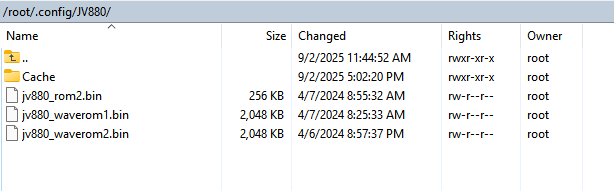
I believe I have the .bin file in the right location (screenshot attached). I have tried versions jv880_rom2_1.0.1.bin and jv880_rom2_1.0.0.bin renamed to jv880rom2.bin. I can see and select presets in the zynthian view (e.g. 78:GamelanP2). But in VNC Engines I see “Error Cannot load ROMs…” And as expected no sound. Anything obvious I’ve forgotten?
The rom names are case sensitive. The extensions may need to be changed from “.bin” to “.BIN” or vice versa. This is assuming you have the roms themselves of course
run ./generate_lv2_presets_VirtualJV.py >/zynthian/config/jalv/presets_VirtualJV.json
After that, add VirtualJV to a chain and you should see banks with presets instead of a long preset list.
What could be improved: Generate the list of banks based on the installed ROMs (currently ALL banks/presets are shown, nevertheless they are installed or not).
I used your script, with some mods, to generate the TTLs for banks and presets, so they are now included with the plugin. Users don’t need to run your script. Instead, simply update (Vangelis branch, of course!)
I think it should, because the names are stored in a JSON object and the calls are addressed to URIs with names like “…preset546” at the end (it seems that all available sounds have a fixed preset number inside VirtualJV).
Out of curiosity, and for the sake of experimentation, I have tried to install manually the JV880 emu on the latest Oram Stable.
This has been my process:
Downloaded the most recent JV880.lv2 from the official ZynthianOS repository;
Copied it via SFTP to: usr/local/lib/lv2;
Placed the (legally sourced) ROMs both in the plugin folder (by redundancy) and in: root/.config/jv880 (four .wav files, 2 .bin roms, 2 .bin waveroms);
Rebooted > searched for engines in Webconf > enabled VirtualJV > searched for presets > rebooted;
I can confirm that also nvram.bin needs to be added to the ROM files, for the plugin to work. Otherwise, on VNC it will claim that no ROM files are available, thus producing no sound at all.
This is the functional outcome which I can report on Oram Stable:
VirtualJV appears as expected, in the list of available instruments for new chains;
On arming a new chain with VirtualJV, presets are shown tidily ordered in categories, as per the latest plugin update;
Presets selected on the Zynth cannot be auditioned or played;
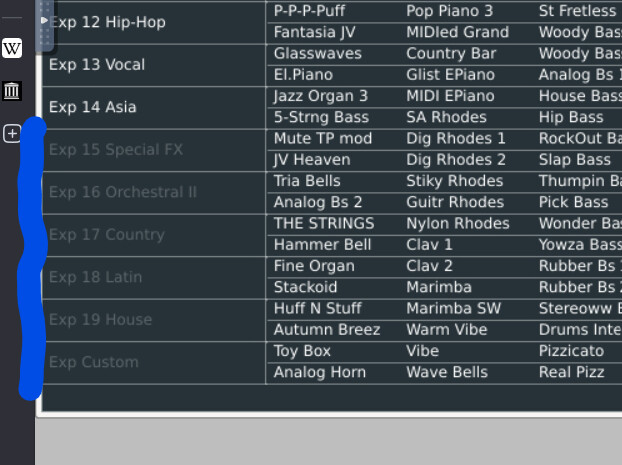
Presets can be effectively selected and played through VNC on the plugin’s interface, but only the factory library is available. All further banks and expansions are greyed-out, and contain no preset data.
Any ideas about something possibly missing or done wrong? (apart, obviously, from simply switching that specific Zynthian to Vangelis ).
EDIT: I think that I may have understood what is going on, with presets shown on the Z interface but actually unavailable from the ROMs.
Let’s see if I end up being able to effectively select all the patches from the Zynthian interface.
EDIT 2: Now I can see (and play) all expansion banks on VNC, and also select presets on the Zynthian. Nevertheless, the order of presets on the Z in Oram stable does not match the patches shown in VNC, as if there was some kind of fixed increment, that displaces the correct correspondence between name and patch number on the instrument’s GUI. Arguably, this is something that Vangelis takes care of, while regenerating presets on installation.
Best regards
(PS Not very keen to switch to Vangelis on all of my Zynthians, for the time being: doing so today on my V5.1 + nvme broke the system, and had me reinstalling everything from scratch. Probably, some wrong operation on my part anyway).
Sorry for answering so late. I think the ROMs were defective…
The list of presets is staticly created - regardless of whether ROMs are available and which ones.
@jofemodo My bank creation script should be called when “Searching for presets” and it should look for which ROMs are installed and if the checksum is ok. Only if the ROM is ok it should be shown in the bank. What do you think?
Thanks. If I read your words correctly, when using VirtualJV on Oram stable I should run your python presets script, after installing the ROMs, regardless of the patch list already embedded in the Jofemodo’s package available in the Zynthian repo. Right?