I am overwhelmed at all the sounds (patches ) available in the Zynthian V5. Music is my hobby not my main job. I use only about 25 instrument sounds (patches) in my music performances. These include conventional acoustic instruments. I have found realistic Piano, Bass, Drums, Strings. But I can’t find realistic Rhythm Guitar, Solo lead Guitar, Solo violin, Oboe, Alto saxophone, Hammond Organ, Flute, Harmonica, Bassoon, Clarinet, realistic sampled Oohs & Aahhs & Pizzicato strings (plucked strings). Can anyone tell me where in the default sounds I can find those that I need? I would appreciate any help. I need to know where to find these in the factory supplied sounds. Thanks. Dr. Chelliah
1 Like
Have you found the linuxsampler or fluidsynth? When you add instrument chain synths are the first page. There’s more pages one being samplers which could to some extent answer your needs. Theres also Zynthian Sound Manager which you could use to scroll through the sounds, but i guess its early development still.
1 Like
For drawbar organ, try set free which is in the Organ group of instruments. Also there is Aeolus which is a great pipe organ emulator.
As described by @mankiis , there are soundfont and sample players in the Sampler group and zynthian (full OS image) includes many GB of samples.
For piano there is the Piano group with a demo version of Pianoteq. If you want a great piano (acoustic, electric, etc.) I would single recommend paying for a licence for this product. You can test all the sounds in the demo version before deciding where to purchase.
Ensure you read the documentation and search the forum. Many of you questions are already answered.
2 Likes
It is possible you misunderstand the function of the zynthian.
It is not in itself a sound producing device. Outside of specific developments of engines like Midi D, the zynthian is simply a highly optomised linux/pi audio device for presenting jack (linux’s professional audio interface) devices in a standard way with easy access to the parameters those engines present.
So it has no default sounds. Indeed when opened from scratch the only audio component on offer is the metronome.
There are specific engines that you load up, but once again these are not zynthian written components. They are predominately Linux lv2 plugins.
Start with the wiki…
https://wiki.zynthian.org/index.php/Zynthian_UI_User’s_Guide\_-\_Oram
And that should explain what has been achieved and how the community views sound generation.
2 Likes
As @mankiis and @riban have already suggested, what you really need is to set up your Zynthian with instrument chains that expose the system’s excellent built‑in plugins and let you browse their presets. You may add a few of these chains - e.g. MDA piano, setBfree, and multiple instances of FluidSynth - and they will appear in the mixer view, and can be quickly selected by just touching the corresponding strip. Then you can save them as a snapshot, and that snapshot becomes your quick way to return to your preferred default setup whenever you want.
That’s just the starting point. The possibilities for fine‑tuning your system are extensive, and as you become more familiar with everything Zynthian offers, you’ll be able to shape and refine it to match your workflow. It does take some time to learn and master all the features, but the flexibility is well worth it.
There are ongoing ideas about making this whole process easier for anyone exploring the Keyboard-Expander use case on Zynthian, for example, the discussion here: https://discourse.zynthian.org/t/zynthian-jfk-just-for-keys/. For now, though, this approach is probably still the most practical one.
3 Likes
As stated above and elsewhere @DrChelliah, Zynthian is not a General Midi (GM) expander, if this is what you are expecting from it. It is instead a music embedded system (a computer with a customised operating system, nested inside e physical device) employable in a wide range of applications, mainly comprising - apart from other and more esoteric usages - a sequencer with some DAW functions, a drum machine, an FX unit, a multitimbral expander, a stage piano (or keyboard) generator, an audio FX unit and a multitrack audio recorder.
If you aim at a sort-of GM box behaviour, I suggest you possibly refer to the official protocol of the standard:
-
Channel 10 (Percussion): Exclusively assigned to drum sounds, where each note triggers a different percussion instrument.
-
Channels 1-9, 11-16 (Melodic): Used for melodic, harmonic, or bass parts, assigned using MIDI Program Change messages.
Typical GM Configuration
-
Channel 1: Often used for the main melody or primary instrument.
-
Channel 10: Percussion/Drum Kit.
-
Channels 2-9, 11-16: Supporting instruments (bass, pads, leads).
Zynthian could be able, depending on the complexity of the musical arrangement, of playing all 16 GM Midi channels together (if you drive it from an external computer), but I would not recommend pushing a single machine to this limit, even if the soundfont romplers (which I will comment upon in a while) are relatively CPU-light plugins.
With this in mind, the practical workaround for your use case might be to create from the Main Menu (Add Instrument Chain) a layout of 16 subsequent chains (Midi tracks), associated with all 16 Midi channels.
I suggest that you select with the second rotary encoder bottom-right the Sampler category and the Sfizz SFZ instrument. You are then presented with the choice of the Midi Channel (first encoder bottom-right, rotate and push to select), then with a list of instrumental categories (rotate and push) and finally with a list of presets (again, first encoder bottom-right, rotate and push to select).
After setting each channel/chain you must press the second rubber button of the first upper row (Mix) to return to the mixer view. If you want to change your timbral selections at a later stage, you just need to select the relevant channel/chain with the same lower right encoder, and press twice (Preset function) the third rubber button in the first row. Don’t forget to configure the Midi In mode of at least one channel as Multitimbral, if you think about driving the device from an external computer or sequencer. Otherwise, the default Active Mode will do just fine, for playing the Zynthian from a Midi controller keyboard, with a different timbre on each selected chain.
This should be a solid starting point for your possible goals. Of course, it is a very basic application scenario, among the many more conceivable, and you will have to learn anyway how to add and set the audio FX in each chain, for the appropriate kind of sonic ambience.
Do not overlook the abundantly informative online documentation, for making up your mind to the ways of this ingenious little monster.
Regards
3 Likes
Your message was incredibly useful. I am finally getting the hang of it. I know that this is NOT meant to be a MIDI sound module but based my reading, I am confident, it can be used as a Multitimbral MIDI output device with some limitations of course. But now I need some help with another question. Is there any way to listen to any of the sounds without using a computer or any MIDI triggering device? I need to listen to each of these sounds and figure out the 30 sounds I use most of the time. Since there are so many sounds available, I need to listen to each one to figure out which one I want to use in my music. Can any one help me? Is there any way to trigger the sound from the sound pad? I thought I saw someone doing it on a youtube video. Thanks
1 Like
You could add a note to a sequencer pattern and start it looping then change presets.
The Engine selection dialog, when constructing a chain, allows previewing of snapshots as the names are highlighted.
This can be performed with nothing more than an hdmi monitor, a USB sound device and a Pi with zynthian SSD in it.
I can’t find Linux Sampler. Where is it hidden?
Change the category from instrument/synth to instrument/sampler.
Use the knob if you have an official Zynthian device, otherwise you can drag up down or left right with the mouse if I recall correctly.
Thanks for the tip. Yes, I have the Zynthian… but which knob? I tried all the knobs!!
The knob next to the categories? By the way, which Zynthian do you have?
V5.1
There is no knob for categories Is it knob 1, 2, 3 or 4 on the right side?
Hi, it is the second knob on the right side from the bottom. It is the same pot that I directed you to for finding the sampler category. Indeed, Linux Sampler belongs in the same category as Sfizz, and can be then selected with the lowest knob + push.
Regards
1 Like
I am pretty sure this is all in the user documentation but for those who can’t be arsed to read…
When you add a new instrument on a V5, the bottom knob moves through the list of instruments in the current group. The knob above it switches between instrument groups. There is similar behaviour when selecting an audio effect.
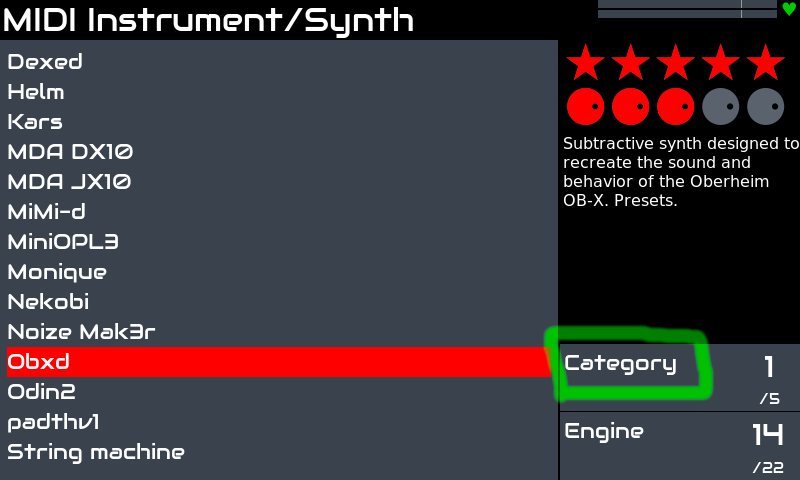
I am familiar with this screen but I can’t find Linux Sampler or Set B Free
So when you scroll through the categories to the Sampler category - you see some samplers, but not LinuxSampler?
I’ve captured a little video with basic workflows for creating instruments and selecting presets:
I added this to the wiki. This is the zynthian-live-mockup link:
I hope this help to clarify your ideas, @DrChelliah .
Regards,
8 Likes